

Google Maps Review Classifier — complaints, no login · $0.5/1k
Pricing
from $0.43 / 1,000 review classifications
Google Maps Review Classifier — complaints, no login · $0.5/1k
Google Maps reviews toolkit by LeoWorks — review analysis: complaints, praise, sentiment, reply queue. For leads use leoworks/google-maps-lead-qualifier. places = Maps URLs/IDs or names + location; datasetId = reviews. ~25 s/place, ~$1.10/1,000 (compass billed to you).
Pricing
from $0.43 / 1,000 review classifications
Rating
5.0
(3)
Developer

Leoworks
Maintained by CommunityActor stats
2
Bookmarked
3
Total users
1
Monthly active users
15 days ago
Last modified
Categories
Security
Limited permissionsShare
Part of LeoWorks Google Maps tools: reviews → health, free (Google Maps Review Health Check) · reviews → replies (Google Maps Review Classifier) · places → leads (Google Maps Lead Qualifier).
Analyze Google Maps reviews — paste a Google Maps URL, or type a business name and its city. This Actor collects the newest reviews of each place — Google Maps reviews sentiment analysis without a prompt — and classifies every one with complaint types, sentiment, what customers praise and serious-issue alerts, and flags the unanswered reviews that need an owner reply — as a table, a reply-queue CSV and a per-place summary; run it weekly for Google review monitoring. Already have reviews? Pick a Google Maps reviews scraper's dataset or paste review texts instead. About 8 reviews take 2 seconds, classifying costs $0.50 per 1,000 reviews — when the Actor collects the reviews for you, compass' scraper adds about $0.60, so about $1.10 per 1,000 reviews all-in — and the free $5 monthly Apify credit covers about 10,000 classified reviews. No prompts, no LLM key.
Who collects the reviews: when you enter Places, the reviews are collected by a separate Actor, Google Maps Scraper by compass — not by this Actor. Apify bills that Actor to your account at its own price (about $0.006 per place + $0.0005 per review; compass can change it). This Actor adds $0.0005 per classified review. All-in that is about $1.10 per 1,000 reviews (this Actor $0.50 + collection about $0.60); 50 reviews of one place cost about $0.06 in total. The Store price card shows only this Actor's part. Reviewer names and profiles are never collected.
Why use it
- Business owner or branch manager — start with the unanswered 1–2 star reviews: the reply queue is sorted lowest stars first.
- Agency — send each client a monthly per-location report (complaint mix, star distribution, owner reply rate, last 90 days vs before).
- Multi-branch or franchise operator — see which location loses stars and why (wait times, billing, cleanliness) by comparing complaint mix across places.
- Safety, legal or compliance — catch food-safety, injury, discrimination, theft and legal-threat reviews the same day, whatever the star rating.
- Competitor research — enter nearby competitors and compare what their customers complain about and praise.
- Developer or AI agent — structured labels with probabilities through the API or MCP; no prompts, no LLM key.
Performance at a glance
| Result | |
|---|---|
| Complaint types | 89% of reviews labelled right (100 held-out English reviews of Chicago businesses, 2026-10-10) |
| Sentiment | 98% (same set) |
| Serious-issue alerts | found 10 of 10, 1 false alarm in 93 (same set) |
| Speed | 8 reviews in about 2 seconds; about 25 seconds per place when collecting |
| Cost | $0.50 per 1,000 reviews for this Actor; about $1.10 per 1,000 all-in when it collects for you (the collector is billed separately) |
Details and limits are under Accuracy and limits below.
Compliance and privacy
- Public data, no login. The reviews are the publicly visible Google Maps reviews of the place; nothing needs your Google account, cookies or a login.
- No personal profiles. Reviewer names and profiles are never collected or output. Only the review text, its stars, the business category and your custom labels are sent for classification.
- Nothing is kept unless you ask. If you set Monitor key, the Actor saves only summary figures (average rating, review count, newest review date, unanswered count) in a key-value store named
monitor-google-maps-reviewsin your own Apify account, to compare with the next run. No review text, names or IDs are stored. - You stay responsible for the use. Collection of Places is done by compass' Google Maps Scraper, and Google's terms apply to collecting the data. This is not legal advice.
See it work
Real-data figures: 377 Google reviews of 10 Chicago dentists, Oct 2026 (4.45 average rating).
What can the Google Maps Review Classifier do?
- Collects the reviews for you — paste a place's Google Maps URL or place ID, or enter a business name + Location (collection by compass' Google Maps Scraper, billed to you separately) or classify a dataset you already have
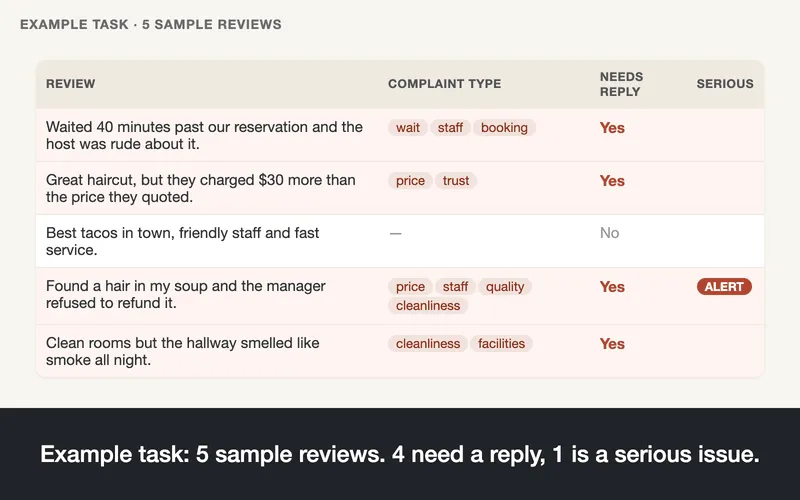
- Complaint types — staff, wait, quality, cleanliness, price, booking, facilities, trust (multi-label, each with a probability)
- What customers praise — the same 8 aspects, so strengths and weaknesses line up per place
- Serious-issue alert — health and safety, discrimination or harassment, theft, fraud accusations and legal threats, whatever the star rating
- Sentiment — positive / neutral / negative
- Reply queue — reviews that need an owner reply and are still unanswered, as a CSV sorted lowest stars first
- Summary by place — complaint and praise mix, star distribution, owner reply rate, monthly trend and last 90 days vs before, as JSON and CSV
- Your own labels — up to 10 yes/no criteria in plain language (e.g. "mentions parking", "complains about a specific employee")
Use it to: answer unanswered 1–2 star reviews first · catch food-safety, injury or discrimination reviews the same day · see why a location loses stars (wait times? billing? cleanliness?) and what it should keep doing · compare branches or competitors · report monthly to agency clients · feed labelled reviews to a dashboard or an AI agent.
Tested on real data: 377 Google reviews of 10 Chicago dentists (run ywG0jLf9BI5aJUs8Z, 2026-10-12) — 15.9% with a complaint (staff, booking, price, upselling), 19 serious-issue alerts, and 34 reviews that needed a reply and had none. Cost of the classification: about $0.19.
Works from Claude, Cursor or Claude Code — add it as a tool through the Apify MCP server and ask in plain language (setup in Use with Claude, Cursor or Claude Code below).
How to analyze Google Maps reviews
Option A — enter the places (the Actor collects the reviews):
Open the Actor (Try for free on the Store page) to get the input form. The Console remembers what you typed last time in this browser: if you see old values, click Cancel changes, or switch to the JSON tab and keep only what you need, for example { "places": ["Joe's Pizza"], "location": "New York, USA", "maxReviewsPerPlace": 50 }.
- In Places, paste the place's Google Maps URL or place ID (best: it names the exact branch), or write a business name (for example
Joe's Pizza) and fill Location with its city and country (New York, USA). You can add up to 20 places. The two sample texts in Review texts are ignored when Places is filled. The run log lists the places that were actually found, with their addresses — check it when you used a business name. - Set Max reviews per place — the newest reviews are collected first (default 50).
- Optional: add Custom labels, or a filter such as Only reviews with at most 3 stars. Skipped reviews are not charged by this Actor.
- Click Start. The run log shows the estimated cost before anything is collected; one place takes about 20–30 seconds. If you set a maximum cost per run, the Actor lowers the reviews per place to stay within it, or stops before collecting when even one review per place does not fit.
- In Output, open Classified reviews, Needs a reply or Labels with probabilities, or download
REPLY_QUEUE.csvandREPORT_PLACES.csv. Export the table as CSV, Excel or JSON.
Compare the branches of a chain: every place gets its own row in REPORT_PLACES.csv (complaint rate, star average, top complaint, unanswered count), next to an overall row. Enter the branches you care about in Places — a URL or place ID names the exact branch — or collect all branches of one brand with Google Maps Scraper (its exact-match setting keeps only places whose name matches the search term, e.g. every Burger King in a city) and classify that dataset here. The branch with the worst complaint rate, and what those complaints are about, is one sorted column away.
Option B — you already have reviews:
- Run a Google Maps reviews scraper for the places you care about — for example Google Maps Reviews Scraper with Sort by: newest (see Works with).
- Open this Actor, pick that run's dataset in Reviews dataset (or paste review texts to try it).
- Optional: add Custom labels, or a filter such as Only reviews newer than: 90 days or Only reviews with at most 3 stars. Skipped reviews are not charged.
- Click Start and open the same outputs as above.
Run it automatically after every scrape
In your Google Maps scraper (or its saved task), open Integrations → Add integration → Apify Actor, choose this Actor and set its input to:
Every finished scrape is then classified with no extra step. Add an Apify Schedule to the scraper (for example every Monday with Only reviews newer than: 7 days here) to get a weekly reply queue.
Pricing
Pay only for classified reviews — no subscription.
| Event | Price | When |
|---|---|---|
review-judged | $0.0005 | One review classified (complaint types, sentiment, owner-reply flag and any custom labels). |
How much does it cost to analyze Google Maps reviews?
That is $0.50 per 1,000 reviews for classification. When you enter Places, the collection by compass' Google Maps Scraper is billed to you on top (about $0.006 per place + $0.0005 per review, its price): about $1.10 per 1,000 reviews all-in, or about $0.06 for one place with 50 reviews. The run log shows the estimate before anything is collected, and the final status message shows what the collection actually cost.
Cost examples
| Reviews | Cost |
|---|---|
| 100 | $0.05 |
| 1,000 | $0.50 |
| 10,000 | $5.00 |
| 100,000 | $50.00 |
With the free $5 monthly Apify credit you can classify about 10,000 reviews.
Reviews without text (star-only ratings) are skipped and not charged. Reviews that fail after retries are reported with an error field and not charged. If you set a maximum cost per run, the Actor stops cleanly when it is reached.
How much does it cost when I enter places and let the Actor collect the reviews?
Two Actors run, and Apify bills both to your account: the collection by compass' Google Maps Scraper (about $0.006 per place plus $0.0005 per review — its price, which compass can change; the run log shows the live estimate) and the classification here ($0.0005 per review).
| Run | Collection (compass) | Classification (this Actor) | Total |
|---|---|---|---|
| 1 place, 50 reviews | about $0.031 | $0.025 | about $0.056 |
| 1 place, 100 reviews | about $0.056 | $0.050 | about $0.106 |
| 5 places × 20 reviews | about $0.080 | $0.050 | about $0.130 |
| 10 places × 50 reviews | about $0.310 | $0.250 | about $0.560 |
Many Google reviews are star-only (no text — about half in our tests): compass collects and bills them, but this Actor skips them and does not charge for them, so the number of classified reviews can be lower than the number collected. The free $5 monthly Apify credit covers about 89 places with 50 reviews each. Places without a match are not charged by this Actor, and compass bills only a start fee of about $0.0002 for them.
Is it free to try?
Yes. The form defaults collect and classify the 20 newest reviews of two New York places for about $0.05 all-in (collection about $0.03 billed by Apify + classification $0.02), and the free $5 monthly Apify credit covers about 10,000 reviews of classification (see the cost examples above). Try the example tasks on this page, or paste your own reviews as text for about $0.001.
Input and output examples
Output sample
Real rows from run hAEA5DKm0KnBajX4E (2026-10-11, build 0.2.2): Chicago businesses' Google Maps reviews from the Google Maps Reviews Scraper, with one custom label ("mentions parking").
| review | place | stars | complaints | praise | sentiment | unanswered | your label |
|---|---|---|---|---|---|---|---|
| Couldn't get past the rudeness of the front desk staff. After two poor encounters, I cancelled the appointment. | Dentist | 1 | staff | — | negative | yes | — |
| Over priced. Bathroom is gross. The furniture is cool but the walls and doors are nasty. | Restaurant | 1 | cleanliness, price, facilities | facilities | negative | yes | — |
| Got food with so much delay! | Restaurant | 1 | wait | — | negative | yes | — |
| Terrible parking. The self parking is $18 just to drive in. … They add a 20% service fee to everything. | Hotel | 1 | price, facilities | — | negative | no | mentions parking |
| Booked a new patient appointment online a few weeks in advance … only to discover after arriving that I'm not in their system somehow? | Dental clinic | 1 | booking | — | negative | no | — |
| Had a great experience. They made the repairs and returned it a day early. They were very responsive to any concerns I had. | Auto repair | 5 | none | wait, staff, booking, quality | positive | no | — |
Serious-issue alert — run ujZOpOzdJw7YdMr8b (2026-10-11) on three public reviews: all three were flagged.
| review (shortened) | stars | complaints | alert (probability) |
|---|---|---|---|
| "…the next morning, we found an extremely large cockroach on the table…" | 1 | cleanliness | yes (0.97) |
| "…that warmness completely disappeared the moment I walked up — a person of color wearing a hoodie…" | 1 | staff | yes (0.91) |
| "great atmosphere + food but the front door slammed on my hand last night & i've been icing it all day…" | 3 | facilities | yes (0.91) |
The third one is a 3-star, mostly positive review: a star filter alone would never have shown it.
Input example
The form default — two New York places by their Google Maps URL, 20 newest reviews each, collected by compass' scraper and classified in the same run (about $0.05 all-in: collection about $0.03 billed to you by Apify + classification $0.02; 20–40 seconds):
A business name works too when you add its city and country (collection billed separately — about $0.06 for 50 reviews):
Reviews you already have can be pasted as text, no collection and no dataset needed (about $0.001 for two reviews, 3 seconds):
To classify a Google Maps scraper's output, pass its dataset instead — the text, stars, date, business category, owner reply and IDs are detected automatically:
Which Google Maps URL or place ID can I use?
Each line of Places is one place. A URL or place ID is the reliable way — it names the exact branch. Tested forms (2026-10-15):
| What you enter | Example | Result |
|---|---|---|
The place's page URL, copied from the browser address bar after you open the place on Google Maps (the long one that contains data=!…) | https://www.google.com/maps/place/Joe's+Pizza/@40.71,-74.00,17z/data=!4m6!3m5!1s0x89c2… | works |
cid URL | https://www.google.com/maps?cid=10332424901773702701 | works |
place_id URL | https://www.google.com/maps/place/?q=place_id:ChIJqdNaaBVbwokRLTafYrQlZI8 | works |
Place ID (starts with ChIJ) — find it with Google's Place ID Finder | ChIJqdNaaBVbwokRLTafYrQlZI8 | works |
Short link from Share → Copy link (maps.app.goo.gl/…) | accepted, not tested — prefer the address-bar URL | |
| A URL with only coordinates, or a Google Maps search-results page | https://www.google.com/maps/search/dentists+chicago | search pages are refused (they list many places); coordinates-only URLs may find no place. To cover many places at once, collect them with Google Maps Scraper by search terms or categories — a pasted search URL is capped at about 300 places by the Google Maps site itself — and classify its dataset here (Reviews dataset) |
| Business name + Location | Joe's Pizza with Location New York, USA | works — the first Google Maps result for that name in that area is taken, so for a chain name the branch (Starbucks Gangnam Station) |
| Business name without Location | Seoul Starbucks | refused before anything is collected — the lookup would run from a US data center and could return a Starbucks in New York (measured 2026-10-15) |
If no place is found, this Actor charges nothing and compass bills only its start fee (about $0.0002); the run message tells you what to change.
Output files and columns
| Where | What |
|---|---|
| Dataset — view Classified reviews | One row per review with flat, spreadsheet-friendly columns |
| Dataset — view Needs a reply | Place, stars, date, complaints, review text and link — filter unanswered = true |
| Dataset — view Labels with probabilities | Every label with its probability, for your own thresholds |
REPLY_QUEUE.csv | Unanswered reviews that need a reply, lowest stars first, then newest (when the dataset has the owner-reply field) |
REPORT_PLACES.csv | One row per place: headline, reviews, average stars, complaint rate, negative share, top complaints, top praise, alerts, unanswered, owner reply rate, last 90 days vs before, star counts |
REPORT (JSON) | The same per place plus (with monitorKey) the change since the last run: previousRunAt, ratingDelta, newReviews, newCriticalIssues, unrepliedDelta; a one-sentence headline (top complaint and its share, serious issues, unanswered reviews, 90-day trend; rule-based, no extra charge), monthly trend, sentiment shares, custom label shares, example complaints and alert examples |
SUMMARY (JSON) | Run statistics: detected fields, filters, counts, skipped reviews |
All files are in the run's Storage → Key-value store and linked from the Output tab. Nothing extra is charged for them.
One row
When no complaint type passes the threshold, complaintTypes is none. ownerReplied and unanswered appear only when the dataset has an owner-reply field; publishedAt only when it has a review date. Minimal mode returns IDs and label keys only.
Summary by place (REPORT)
API, MCP and integrations
Works with
Run one of these, then pass its dataset to this Actor. Field detection was checked against real output of both (2026-10-10).
| Scraper on Apify Store | Dataset shape | Text | Stars | Category | Owner reply | IDs kept |
|---|---|---|---|---|---|---|
| Google Maps Reviews Scraper (compass) | one row per review | text | stars | categoryName | responseFromOwnerText | reviewId, placeId |
| Google Maps Scraper (compass) with Max reviews set | one row per place, reviews in reviews[] | flattened automatically — each review is classified with its place's ID, name and category |
Also: the Apify API and JavaScript/Python clients · Apify Schedules (e.g. new reviews every week) · Claude, Cursor and Claude Code through the Apify MCP server (next section).
Call it from code
Run and get the labelled rows in one request (replace the token and dataset ID):
JavaScript (npm install apify-client):
Python (pip install apify-client):
The dataset also connects to Google Sheets, Make, Zapier, Slack and webhooks from the run's Integrations tab.
Use with Claude, Cursor or Claude Code (MCP)
Ask your AI agent. Add the Apify MCP server with this Actor as a tool, then say, for example:
- "Analyze the Google Maps reviews of Joe's Pizza Broadway in New York (place ID ChIJifIePKtZwokRVZ-UdRGkZzs): classify the newest 20 reviews, tell me the top complaint types and which reviews have no owner reply yet."
- "Compare Joe's Pizza Broadway (ChIJifIePKtZwokRVZ-UdRGkZzs) and Katz's Delicatessen (ChIJCar0f49ZwokR6ozLV-dHNTE) using 20 newest reviews each — which one has more serious-issue alerts, and what do customers praise at each?"
- "Classify these Google reviews and tell me which ones need an owner reply: “Waited 50 minutes and nobody apologised.” / “Best slice in town, will be back.” / “They charged my card twice and ignored my emails.”"
The agent calls the tool leoworks--google-maps-review-classifier (use the place's Google Maps URL, or a business name plus a city and country in location) and then reads the labels with get-dataset-items. When the tool collects the reviews for you, compass' scraper is billed to your Apify account on top (about $0.05 for 2 places with 20 reviews each), so keep the number of places and reviews small in a first agent session.
Claude Desktop or Cursor (mcp.json):
Claude Code: claude mcp add --transport http apify "https://mcp.apify.com?tools=leoworks/google-maps-review-classifier" --header "Authorization: Bearer YOUR_APIFY_TOKEN". Leave out the header to sign in with OAuth in the browser instead. Your Apify token is in Console → Settings → API & Integrations. We verified this setup with the Apify MCP server (v0.17.4) on 2026-10-10: the agent classified a pasted review in 8 seconds end to end (run rmvOm5YjbAAmcwfz7).
Accuracy and limits
Accuracy
Measured on 197 hand-labelled English Google Maps reviews of 24 Chicago businesses (restaurants, hotels, dentists, salons, gyms, auto repair; 2026-10-10), first 520 characters of each review. The questions were adjusted on one part, then checked once on a separate part that was not used for adjusting.
| Set | Reviews | Complaint types | Sentiment | Praise | Serious-issue alert |
|---|---|---|---|---|---|
| Check set — not used for adjusting | 100 (55 with a complaint) | 89% | 98% | 95% | found 10 of 10, 1 false alarm in 93 |
| Adjusting set | 97 (54) | 92% | 98% | — | — |
Praise and alerts were added in version 0.2 (2026-10-11) and labelled by hand on the check set before the first run; only the praise definition of "quality" was tightened once afterwards. Seven reviews whose seriousness is debatable (e.g. "I feel scammed" about an x-ray bill) were left out of the alert score.
"Complaint types" counts a review as correct when the labels found include a true complaint type and add none that is wrong (reviews without complaints must get none). On the check set the eight main complaint types were each found in at least 83% of the reviews that had them (the catch-all "other", 2 reviews, was missed). Probabilities are calibrated — raise Complaint threshold for fewer, surer labels. Automated labels can be wrong; check samples before making big decisions.
Limits
| Item | Limit |
|---|---|
| Review length | First 4,000 characters are used |
| Custom labels | Up to 10, each up to 200 characters |
| Places | Up to 20 per run: a place's Google Maps URL or place ID, or a business name + Location (one location per run). Google Maps search-result URLs are refused (they list many places) |
| Reviews per place | When you enter places: the newest 50 by default, set with Max reviews per place; reviewer names and profiles are never collected |
| Dataset size | Any — datasets are read in pages of 1,000 |
| Language | English (measured). Other languages are accepted and usually work, but accuracy has not been measured — treat them as beta |
| Speed | 8 reviews in about 2 seconds; larger datasets run 10 reviews in parallel (up to 40) |
| Data | Only the review text, its stars, the business category and your custom labels are sent for classification; reviewer names and profiles are not used or output |
| Filters | Reviews without a star rating or date are kept by the star and date filters |
| Credit left when collecting for you | With Places, starting the scraper may need roughly $0.50 of remaining Apify credit this billing cycle, even when the run costs a few cents (observed, not documented by Apify). The run then stops before anything is collected and this Actor charges nothing |
Run it on a schedule
Weekly is the usual rhythm: schedule the Actor (or your Google Maps reviews scraper) every Monday with Only reviews newer than 7 days and a Monitor key to get a weekly reply queue and what changed since the last run. Create an Apify Schedule for a saved task with your places; to classify after each scrape instead, see Run it automatically after every scrape. To start it from other tools, use the Apify n8n or Make integration, or the Apify API.
Related Actors
Scrapers that collect the input (Apify Store, other publishers — this Actor reads their datasets):
| Scraper | Collects |
|---|---|
| Google Maps Reviews Scraper (compass) | reviews of the places you choose |
| Google Maps Scraper (compass) | places and their reviews by search term |
More from Leoworks:
This Actor is built for local-business reviews (restaurants, hotels, clinics, salons, gyms, repair shops): its labels are about service, waiting, premises, booking and billing, and it uses the business category, review date and the owner's reply from Google Maps data. For other review sources use our other Actors:
| Need | Actor |
|---|---|
| Product reviews on Amazon | Amazon Review Classifier |
| Product reviews on AliExpress (collects and labels in one run) | AliExpress Reviews Scraper |
| Korean reviews (Coupang, Olive Young, Naver) | Korean Review Classifier |
| Japanese reviews (Rakuten and others) | Japanese Review Classifier |
| Spanish reviews (MercadoLibre and others, beta) | Spanish Review Classifier |
| Social media comments (Instagram, TikTok, Facebook, YouTube) | Social Comment Classifier |
| Google Maps places as sales leads | Google Maps Lead Qualifier |
FAQ and support
Why not use the official Google Places API?
Place Details in the Places API returns at most 5 reviews per place, chosen by relevance. The Business Profile API returns all reviews, but only for locations you manage. Neither labels complaints or tells you which reviews still need a reply. This Actor works on all the reviews a Google Maps reviews scraper collects, for your places or anyone's.
What are the alternatives to Google Maps Review Classifier?
Reading reviews by hand, pasting them into a chatbot (no fixed labels or probabilities, see Which AI makes the judgments?), or a reputation-management subscription priced per location. This Actor costs $0.50 per 1,000 reviews classified, plus the separate scraper if it collects for you.
How do I download or export Google reviews with complaints flagged?
Run it with Places (or pick a Google Maps reviews scraper's dataset), then open Output and export the dataset as CSV, Excel or JSON: every review row carries its complaint types, sentiment and serious-issue alert. REPORT_PLACES.csv adds one row per place and REPLY_QUEUE.csv the reviews still waiting for an owner reply.
How do I analyze Google Maps reviews?
Paste the place's Google Maps URL in Places (or type the business name and fill Location) and click Start — the Actor collects the newest reviews and classifies them. Or run a Google Maps reviews scraper yourself (see Works with) and pick its dataset in Reviews dataset. Each review gets complaint types, praise, sentiment and a needs-a-reply flag; open Needs a reply or download REPLY_QUEUE.csv and REPORT_PLACES.csv. Step by step: How to analyze Google Maps reviews above.
Why did it analyze the wrong place?
A business name is looked up with a Google Maps search in the area given by Location; the first result is taken. Without a location the search runs from a US data center, which is why it is required for names. For a chain, name the branch (Starbucks Gangnam Station) or, best, paste the branch's own Google Maps URL or place ID — those identify one exact place. The run log lists the places found with their addresses, and every output row carries placeName and placeAddress.
How is this different from a Google Maps reviews scraper?
A scraper only collects reviews. This Actor classifies them — and when you enter Places it also collects the reviews for you by calling compass' Google Maps Scraper, a separate Actor billed to your account, so you go from a business name to a reply queue in one run. This Actor does not scrape Google Maps itself. Already have reviews? Use Reviews dataset or Review texts.
Who is billed for collecting the reviews?
With Places, Apify bills two runs to your account: compass' Google Maps Scraper for the collection (about $0.006 per place + $0.0005 per review — its price) and this Actor for the classification ($0.0005 per review). Both appear on your Apify bill; open the collection run from this run's log or SUMMARY (collection.runId). If the collection cannot start (for example, not enough Apify credit), this Actor charges nothing and the run's message says what happened.
Does it collect reviewer names or profiles?
No. The collection is fixed to leave reviewer names and profiles out, and the classification uses only the review text, its stars, the business category and your custom labels.
Is it legal to analyze Google reviews?
This Actor does not scrape Google Maps itself: with Places it calls compass' Google Maps Scraper, and otherwise it only classifies reviews you give it. You are responsible for having the right to use the data — Google's terms apply to collecting it. This is not legal advice.
Which AI makes the judgments?
Jev, TypeSafe's decision model (version jev-1.13.0, pinned). Jev answers each label with a calibrated probability instead of generated text, so a 0.9 means the same thing for every item. Answers are stable but not fixed: re-running the same input can change a few borderline answers (under 1% of answers in our repeat tests) — filter on probability when an item must never flip.
Does it write the owner replies?
No. It tells you which reviews need a reply and why, so you can answer the right ones first.
Can I classify only new reviews every week?
Yes. Schedule the scraper (sorted by newest), connect this Actor through Integrations (see How to analyze Google Maps reviews) and set Only reviews newer than: 7 days. Older reviews are skipped and not charged.
To see what changed since the last run, set Monitor key (any name, e.g. my-cafes) and run again with the same key: each place row then shows ratingDelta, newReviews, newCriticalIssues (new serious-issue alerts) and unrepliedDelta, with previousRunAt. The first run with a key only saves the baseline.
What if my dataset has places with nested reviews?
That works: datasets from the Google Maps Scraper with Max reviews set are flattened to one row per review, each with its place's ID, name and category.
What if some fields were not detected?
The run log and SUMMARY show which field was used for text, stars, date, owner reply and place name. Set the right one under Field mapping.
What counts as a serious issue?
Health and safety (food poisoning, injury, pests, unsafe rooms), discrimination, harassment or abuse by staff, theft, fraud or scam accusations, and threats of legal action or chargebacks. Rude staff, long waits, high prices or poor quality alone are not.
Are reviews in other languages supported?
They are accepted and usually labelled well, but only English is measured. If your scraper adds an English translation (textTranslated), set Text field to it for the most reliable results.
Disclaimer
Independent tool — not affiliated with, endorsed by or sponsored by Google, or by the authors of the scrapers listed above. Names are used only to describe compatible data sources. The reviews shown are public reviews used as examples.
Reviews and support
If this Actor saved you time, a short review on Apify Store helps others find it. Questions or a dataset whose fields are not detected? Open an issue in the Issues tab — we answer within a day.
Need a custom label set, a different dataset format or a feature? Say so in the issue — we are open to custom solutions.
Changelog
See the Changelog tab.


