

Korean Review Classifier — sentiment, no login · $0.5/1k
Pricing
from $0.43 / 1,000 review classifications
Korean Review Classifier — sentiment, no login · $0.5/1k
Classify Korean reviews (Coupang review analysis 쿠팡 리뷰, Naver): complaint types, sentiment, purchase motive. Korean review sentiment analysis. Use for Korean; for Japanese use leoworks/japanese-review-classifier. datasetId (text auto-detected) or texts. ~100 reviews/5 s, pay per review.
Pricing
from $0.43 / 1,000 review classifications
Rating
0.0
(0)
Developer

Leoworks
Maintained by CommunityActor stats
0
Bookmarked
2
Total users
2
Monthly active users
2 hours ago
Last modified
Categories
Share
Part of LeoWorks review analysis tools (same labels, any language): Korean (for Naver Place reviews and blog posts: Naver Place Review Classifier) · Japanese · Spanish · Amazon · AliExpress · Google Maps · social comments.
Korean review sentiment analysis for Coupang, Olive Young and Naver reviews. Classify Korean reviews: feed it a Korean review scraper's dataset (Coupang review analysis and more) or paste texts, and every review is labelled with complaint type, sentiment and purchase motive, each with a probability — English keys and Korean names, no prompts, no LLM key. About 100 reviews take 5 seconds, it costs $0.50 per 1,000 reviews, and the free $5 monthly Apify credit covers about 10,000 reviews.
Why use it
- Cross-border seller or brand manager — read what Korean Coupang and Naver buyers complain about, without reading Korean.
- Product team before a launch — compare the complaint mix of your product with competitors (delivery, defect, size/fit, price, packaging, customer service).
- Customer-service lead — find why 1-star reviews happen and which complaint types dominate.
- Marketing — separate purchase motives (discount, reputation, brand, gift, repurchase) in positive reviews.
- Data team — tag reviews from any Apify dataset for a dashboard or BI tool; English keys and Korean names.
- Developer or AI agent — labels with probabilities through the API or MCP; no prompts, no LLM key.
Performance at a glance
| Result | |
|---|---|
| Complaint type | 88% of reviews labelled right (100 hand-labelled Korean reviews from Coupang, Naver Shopping and Naver Place) |
| Sentiment | 96% (same set) |
| Speed | About 100 reviews in 5 seconds |
| Cost | $0.50 per 1,000 reviews; the Actor classifies reviews you give it, so no collection cost is added |
Details and limits are under Accuracy and limits below.
Compliance and privacy
- No login, no scraping. This Actor does not visit any website: it classifies the dataset or the texts you give it.
- No personal data in the output. Only the review text, its rating and the ID fields you choose are sent for classification; reviewer names are not output.
- You stay responsible for the source data. Follow the terms of the site the reviews came from. This is not legal advice.
See it work
Accuracy figures: 100 hand-labelled Korean reviews (Coupang, Naver Shopping, Naver Place) — complaint type 88%, sentiment 96%.
What can the Korean Review Classifier do?
- Complaint types — delivery, quality/defect, size/fit, price/value, customer service, packaging, no effect, skin trouble, other (multi-label, each with a probability)
- Sentiment — positive / neutral / negative
- Purchase motive — price/discount, reviews & reputation, brand, gift, repurchase, unknown
- Your own labels — up to 10 yes/no criteria in plain English or Korean (e.g. "mentions the smell", "배송 기사 불친절")
Labels come with English keys and Korean names (e.g. quality_defect / 품질·불량), so the output works for global and Korean teams.
Use it to: analyze Korean reviews for a product launch · find why Coupang buyers leave 1-star reviews (쿠팡 리뷰 분석) · compare complaint mix against competitors · monitor sentiment of Naver Place reviews for a store · tag reviews for a dashboard or BI tool · Korean sentiment analysis (리뷰 분석) at scale.
Works from Claude, Cursor or Claude Code — add it as a tool through the Apify MCP server and ask in plain language (setup in Use with Claude, Cursor or Claude Code below).
How to analyze Korean reviews
- Run a review scraper (for example a Coupang or Naver review scraper on Apify Store).
- Open this Actor, pick that run's dataset in Reviews dataset — or paste texts in Review texts.
- Run. The review text field is detected automatically (
content,text,review,reviewText,reviewContent,blogContents, …). Set Text field if your data uses another name, and Extra text fields (e.g.title) to include a review headline.
Pricing
Pay only for classified reviews — no subscription.
| Event | Price | When |
|---|---|---|
review-judged | $0.0005 | One review classified (complaint types, sentiment, purchase motive and any custom labels). |
How much does it cost to analyze Korean reviews?
That is $0.50 per 1,000 reviews.
Cost examples
| Reviews | Cost |
|---|---|
| 100 | $0.05 |
| 1,000 | $0.50 |
| 10,000 | $5.00 |
| 100,000 | $50.00 |
With the free $5 monthly Apify credit you can classify about 10,000 reviews.
Items without review text are skipped and not charged. Reviews that fail after retries are reported with an error field and not charged. If you set a maximum cost per run, the Actor stops cleanly when it is reached.
Is it free to try?
Yes. The form defaults classify two pasted reviews for about $0.001 (2 seconds), and the free $5 monthly Apify credit covers about 10,000 reviews (see the cost examples above). Try the example task on this page, or paste your own reviews.
Input and output examples
Output sample
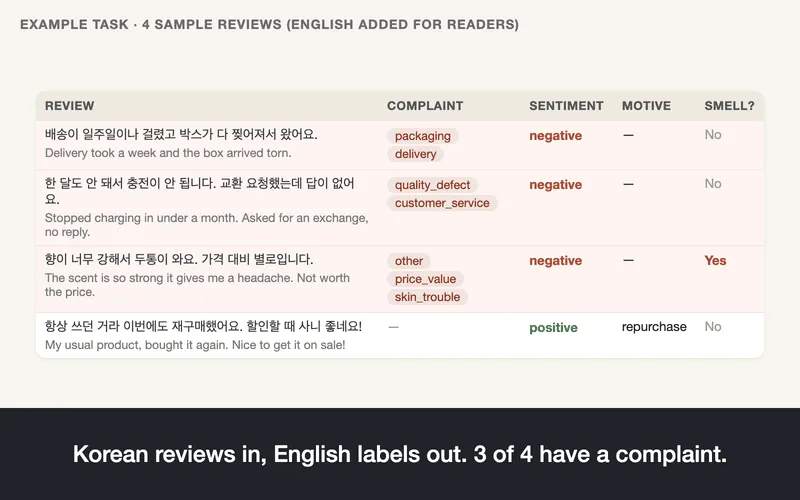
Real rows from the public example task run jeTbgdu8HSUVroE75 (2026-10-04), with one custom label ("mentions the smell"). English translations are added here for readers; the Actor returns the original text.
| text (Korean) | English (added) | complaint (probability) | sentiment | motive | custom: mentions the smell |
|---|---|---|---|---|---|
| 한 달도 안 돼서 충전이 안 됩니다. 교환 요청했는데 답이 없어요. | Stopped charging in under a month. Asked for an exchange, no reply. | quality_defect (0.95), customer_service (0.92) | negative (1.00) | unknown | false |
| 배송이 일주일이나 걸렸고 박스가 다 찢어져서 왔어요. | Delivery took a week and the box arrived torn. | packaging (0.97), delivery (0.96) | negative (1.00) | unknown | false |
| 향이 너무 강해서 두통이 와요. 가격 대비 별로입니다. | The scent is so strong it gives me a headache. Not worth the price. | other (0.76), price_value (0.74), skin_trouble (0.70) | negative (1.00) | unknown | true |
| 항상 쓰던 거라 이번에도 재구매했어요. 할인할 때 사니 좋네요! | My usual product, bought it again. Nice to get it on sale! | none (0.98) | positive (1.00) | repurchase | false |
Each row also keeps the ID fields you choose (reviewId, productId, …), the rating, and in full mode complaintScores for every complaint type.
Input example
The form default — two pasted reviews, no dataset needed (about $0.001, 2 seconds):
To classify a scraper's output, pass its dataset instead — the text, rating and ID fields are detected automatically:
Output files and columns
When no complaint type passes the threshold, complaint is [{ "label": "none", "labelKo": "불만 없음" }]. Full mode also includes complaintScores (the probability of every complaint type). Minimal mode returns label keys only.
Summary by product (REPORT)
Each run also saves a REPORT record (Output tab → Summary by product) at no extra charge: for every product, a one-sentence verdict (headline in English, headlineKo in Korean — built by rules from the figures below, no extra charge), the complaint rate and complaint mix, sentiment shares, purchase motives, average rating and the 3 strongest complaint reviews — plus the same for all reviews together. Products are grouped by summaryGroupField (detected automatically from fields such as productId, productName or placeId when empty).
API, MCP and integrations
Works with
Review scrapers on Apify Store — run one, then pass its dataset to this Actor. Field detection was checked against real output of each scraper below.
| Source | Scraper on Apify Store | Text field | Rating | IDs kept |
|---|---|---|---|---|
| Coupang reviews | Coupang Review Scraper (zen-studio) | content (+ title via Extra text fields) | rating | reviewId, productId |
| Coupang reviews | Coupang Reviews Scraper (delicious_zebu) | content (+ title) | rating | review_id, product_id |
| Olive Young reviews (Korea) | Olive Young Review Scraper (cocomoon) | text | rating | reviewId, productNo |
| Olive Young reviews (Global) | Olive Young Review Scraper (solidcode) | reviewText | rating | reviewId, productId |
| Naver Shopping / Smartstore reviews | Naver Shopping Reviews Scraper (delicious_zebu) | reviewContent | rating | reviewId, productId |
| Naver Place reviews | Naver Place Reviews Scraper (huggable_quote) | reviewText (visitor) and blogContents (blog) | reviewRating | reviewId, blogUrl, placeId |
Summary rows that scrapers add (product totals, rating distributions) have no review text, so they are skipped and not charged. Olive Young Global reviews can be in English or Japanese; the labels are built and tested for Korean, and English also works.
Also: the Apify API and JavaScript/Python clients · Apify Schedules (classify a scraper's new reviews every day) · Claude, Cursor and Claude Code through the Apify MCP server (next section, verified 2026-10-06) · our Naver Blog Brand Monitor, OliveYoung Global & Amore Mall and AliExpress Reviews Scraper, which use the same labels.
Use with Claude, Cursor or Claude Code (MCP)
Ask your AI agent. Add the Apify MCP server with this Actor as a tool, then say, for example:
- "Classify these Korean reviews and tell me the top complaint types: “배송이 일주일이나 걸렸고 박스가 다 찢어져서 왔어요.” / “냄새가 너무 독해서 두통이 와요.” / “가격 대비 만족, 재구매 의사 있습니다.”"
- "Which of these Coupang reviews mention skin trouble, and what made each buyer purchase? “바르자마자 얼굴이 빨개지고 따가웠어요. 환불하고 싶어요.” / “선물용으로 샀는데 포장이 예뻐서 좋아요.”"
- "Run a Korean review sentiment analysis on dataset YOUR_DATASET_ID from my Coupang scraper run and summarize the complaints by product."
The agent calls the tool leoworks--korean-review-classifier and reads the labels with get-dataset-items. Replace YOUR_DATASET_ID with the ID of your own dataset.
Claude Desktop or Cursor (mcp.json):
Claude Code: claude mcp add --transport http apify "https://mcp.apify.com?tools=leoworks/korean-review-classifier" --header "Authorization: Bearer YOUR_APIFY_TOKEN". Leave out the header to sign in with OAuth in the browser instead. Your Apify token is in Console → Settings → API & Integrations. We verified this setup with the Apify MCP server (v0.17.2) on 2026-10-06: the agent classified a pasted review in 3 seconds (run 5nDBIy3beD7oRbJ8B).
Accuracy and limits
Accuracy
Measured on 100 hand-labelled Korean reviews (Coupang, Naver Shopping, Naver Place; 47 with 1–4 stars): complaint type 88%, sentiment 96%. Probabilities are calibrated — raise Complaint threshold for fewer, surer labels. Automated labels can be wrong; check samples before making big decisions.
Limits
| Item | Limit |
|---|---|
| Review length | First 4,000 characters are used |
| Custom labels | Up to 10, each up to 200 characters |
| Dataset size | Any — datasets are read in pages of 1,000 |
| Languages | Built and tested for Korean; English reviews also work |
| Speed | About 100 reviews in 5 seconds |
| Data | Only the text, rating and the ID fields you choose are sent for classification; reviewer names are not output |
Run it on a schedule
Daily or weekly, following your scraper: schedule your Korean review scraper with an Apify Schedule and connect this Actor to it with an Actor-to-Actor integration so every finished scrape is classified. This Actor has no date filter, so set the scraper to collect recent reviews only. To start it from other tools, use the Apify n8n or Make integration, or the Apify API.
Related Actors
Scrapers that collect the input (Apify Store, other publishers — this Actor reads their datasets):
| Scraper | Collects |
|---|---|
| Coupang Reviews Scraper (delicious_zebu) | Coupang product reviews |
| Olive Young Review Scraper (solidcode) | Olive Young reviews |
| Naver Shopping Reviews Scraper (delicious_zebu) | Naver Shopping reviews |
More from Leoworks:
| Need | Actor |
|---|---|
| Google Maps reviews | Google Maps Review Classifier |
| Amazon reviews | Amazon Review Classifier |
| AliExpress reviews (collects and labels in one run) | AliExpress Reviews Scraper |
| Japanese reviews (Rakuten and others) — same labels and price | Japanese Review Classifier |
| Spanish reviews (MercadoLibre and others) — same labels and price, beta | Spanish Review Classifier |
| Social media comments | Social Comment Classifier |
| Korean Naver blog posts about your brand | Naver Blog Brand Monitor |
FAQ and support
Why not use an LLM API like ChatGPT directly?
You can, for a handful. For thousands you would write and test prompts, handle rate limits, parse free text and keep the labels consistent between runs. This Actor uses fixed labels with a probability for each, measured accuracy on hand-labelled data, and needs no LLM key: $0.50 per 1,000 reviews.
What are the alternatives to Korean Review Classifier?
A general sentiment API (usually positive / negative only, often weaker on Korean), an LLM with your own prompts, or reading reviews by hand. This Actor adds complaint type and purchase motive, with Korean label names next to the English keys.
How do I do sentiment analysis on Korean text?
Paste the texts into Texts (or pick a dataset) and click Start. Every review gets positive / neutral / negative with a probability, plus complaint type and purchase motive. On 100 hand-labelled Korean reviews, sentiment matched 96% and complaint type 88% (see Accuracy); raise Complaint threshold for fewer, surer labels.
How do I analyze Coupang reviews?
Run a Coupang reviews scraper (see Works with), open this Actor, pick that run's dataset in Reviews dataset and click Start — the Korean text, stars and IDs are detected automatically. Add Custom labels for anything specific, such as "mentions the smell". 100 reviews take about 5 seconds and cost $0.05. Step by step: How to analyze Korean reviews above.
쿠팡 API 없이 쿠팡 리뷰를 분석할 수 있나요?
네. 쿠팡 API 키 없이, Apify의 쿠팡 리뷰 스크래퍼(Works with 참고)로 모은 리뷰 데이터셋을 이 Actor에서 고르면 됩니다. AI가 리뷰마다 불만 유형·감성·구매 동기를 확률과 함께 붙이고, 비용은 1,000건당 $0.50입니다.
Which AI makes the judgments?
Jev, TypeSafe's decision model (version jev-1.13.0, pinned). Jev answers each label with a calibrated probability instead of generated text, so a 0.9 means the same thing for every item. Answers are stable but not fixed: re-running the same input can change a few borderline answers (under 1% of answers in our repeat tests) — filter on probability when an item must never flip. We re-measure accuracy on our labelled test set before we change the model version. Only the review text, its rating and your custom labels are sent to Jev; reviewer names and other fields are not.
Which Korean review scrapers does it work with?
Any Apify dataset with a review text field — see Works with above. Field detection was checked against real output of the Coupang, Olive Young and Naver Place scrapers listed there.
Does it generate text or summaries?
No. It only assigns labels with probabilities — fast, cheap and consistent.
Does it work for English or Japanese reviews?
English reviews work, but this Actor is tuned and measured on Korean. For Japanese use the Japanese Review Classifier and for Spanish the Spanish Review Classifier (same labels and price); for AliExpress reviews in any language use the AliExpress Reviews Scraper, which collects and labels in one run.
Disclaimer
Independent tool — not affiliated with, endorsed by or sponsored by Coupang, CJ Olive Young or NAVER Corp., or by the authors of the scrapers listed above. Names are used only to describe compatible data sources.
Reviews and support
If this Actor saved you time, a short review on Apify Store helps others find it. Questions or a dataset whose fields are not detected? Open an issue in the Issues tab — we answer within a day.
Need a custom label set, a different dataset format or a feature? Say so in the issue — we are open to custom solutions.
Changelog
See the Changelog tab.


