

Airbnb Availability Calendar — Occupancy & Minimum Stay
Pricing
from $1.75 / 1,000 listing calendars
Airbnb Availability Calendar — Occupancy & Minimum Stay
Airbnb availability calendar for any listing or destination: free and booked nights, the host's minimum stay, the first free date and occupancy per month, up to 12 months ahead. Paste listing URLs or a place. Export, schedule or call it via API. No browser, no login.
Pricing
from $1.75 / 1,000 listing calendars
Rating
5.0
(2)
Developer

Matvey
Maintained by CommunityActor stats
0
Bookmarked
40
Total users
14
Monthly active users
4 days ago
Last modified
Categories
Security
Limited permissionsShare
Airbnb Availability Calendar reads the booking calendar of any Airbnb listing: which nights are free, which are taken, the host's minimum stay for each date, the first bookable date, and occupancy per month — up to twelve months ahead. Paste listing URLs, or give a destination and let the Actor read the calendars of everything Airbnb shows there. It calls the same request the listing page itself makes, so one property is one small JSON request: no browser, no login, and twelve months cost exactly what one month costs.
Need prices, details or guest reviews as well? Airbnb Scraper does everything this Actor does (
"mode": "calendar", same rows and fields) plus listings with nightly prices, listing details and one row per guest review. This Actor stays the narrow, calendar-only door.
Tested head-to-head — 24 September 2026
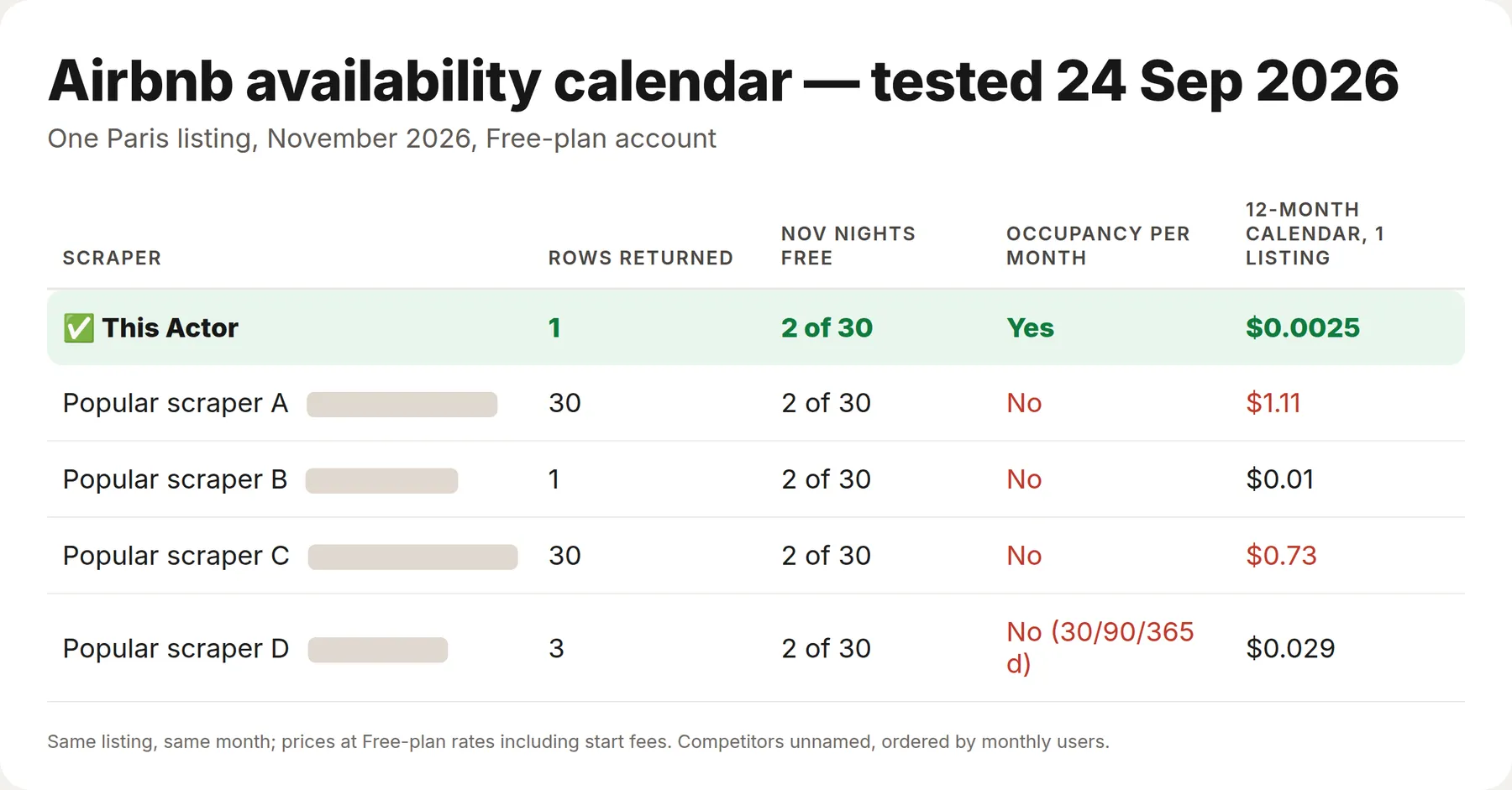
We ran this Actor and four of the most-used Airbnb availability-calendar Actors on the Apify Store on the same request: the calendar of one Paris listing (a studio in Gennevilliers) for November 2026, on a Free-plan account. All five read the same answer — 2 of 30 November nights free, the 5th and the 15th. The differences are in what you pay and what you get on top.
| This Actor | The 4 others | |
|---|---|---|
| Price of a 12-month calendar for one listing, incl. start fees | $0.0025 | $0.01 – $1.11 |
| Occupancy for each calendar month | Yes | No (per-day rows, one total, or 30/90/365-day windows) |
What you get
| Field | Example |
|---|---|
minNights / maxNights | 3 / 28 |
occupancyPercent | 61.4 — share of scanned nights already taken |
availableDays / bookedDays | 71 / 113 |
firstAvailableDate | 2026-11-04 |
availabilityByMonth | per month: nights, free, booked, occupancy % |
calendar | every date with available, bookable, checkIn, checkOut, minNights |
listingId / url / name | identifier, link, title (the title comes with destination searches; pasted URLs leave it empty) |
How much it costs
$0.0025 per listing calendar, whatever the number of months. Reading a year for one property costs a quarter of a cent; a hundred properties cost $0.25. Error rows are never charged. The Actor runs without a browser, so platform usage stays near zero.
Input
Give it listing URLs:
…or a destination, to measure a market rather than named properties:
A pasted Airbnb search URL works the same way as a destination.
Output
One row per listing:
Switch off Include the day-by-day array for one compact row per listing with monthly occupancy only. Pages that fail after the retries arrive as type: "error" rows carrying the URL and the reason, and are not billed.
What people use it for
- Occupancy tracking — how full a building, a street or a whole destination is, month by month.
- Revenue estimates — booked nights over a window are the input every rental-income model needs.
- Competitive pricing — see which minimum-stay rules the hosts around you actually enforce.
- Availability alerts — re-run daily and watch
firstAvailableDatemove. - Feeding a channel manager or a spreadsheet — the day-by-day array maps straight onto a booking grid.
Integrations
Results land in a standard Apify dataset: export to JSON, CSV, Excel or XML, or pull them over the API. Connect the run to Make, Zapier, n8n, Google Sheets, Slack or a webhook, or schedule it and compare snapshots day over day.
Use via API
Run this Actor from your own code or pipeline. Get your token in Apify Console → Settings → API & Integrations. Every input field below has the same name as in the JSON tab of the input form.
Python
JavaScript
cURL (runs the Actor and returns the results in one call)
🤖 For AI Agents & LLM Apps
Compact reference for agents calling this Actor through the Apify MCP server or the Apify API (lergassy/airbnb-availability-calendar).
Purpose: Day-by-day availability for any Airbnb listing: which nights are free, which are booked, the host's minimum stay, the first bookable date and occupancy per month. Paste listing URLs or a destination; up to 12 months ahead, no browser.
Timing: the input below usually finishes in about 10 seconds, so run-sync-get-dataset-items works. Bigger lists take proportionally longer — past a few minutes start an asynchronous run and read the dataset when it finishes (the sync endpoint stops at 5 minutes).
Minimal input:
Output: one dataset row per listing (with its day-by-day calendar). Main fields: name, minNights, maxNights, occupancyPercent, availableDays, bookedDays, firstAvailableDate, monthsScanned, listingId, url, availabilityByMonth, calendar, scrapedAt.
FAQ
Is this an Airbnb price calendar?
It is an availability calendar. Airbnb no longer sends nightly prices in its calendar, so no tool that reads the calendar can return a price per date honestly. For the price of a stay on your dates run Airbnb Scraper with checkIn and checkOut — several date ranges give you a price curve.
Is scraping Airbnb legal? This Actor reads only what Airbnb serves to any visitor without logging in — public listing information. It collects no personal data about guests or hosts beyond the listing title Airbnb itself publishes. Check your own jurisdiction and Airbnb's terms before large-scale use.
Why does a listing come back with an empty calendar? Airbnb removes the calendar for listings that are unlisted, paused or deleted. Those arrive as an error row rather than as a silently empty result.
Do I need a proxy? Apify Proxy is on by default because Airbnb rate-limits repeat callers by IP. If it starts refusing pages, the run moves itself to residential addresses and carries on.
You might also like
- Airbnb Scraper — Listings, Prices, Reviews & Calendar — prices, ratings, amenities, hosts and guest reviews for a whole destination, and this calendar too.
- Booking Hotels Scraper — the same market from Booking.com.
- Agoda Reviews Scraper — guest reviews for hotels across Agoda and Booking.


