

Airbnb Scraper — Listings, Prices, Reviews & Calendar
Pricing
from $0.84 / 1,000 listings
Airbnb Scraper — Listings, Prices, Reviews & Calendar
Scrape Airbnb listings for any place and dates: price per night and per stay, rating, coordinates, beds, photos, host and amenities. Add guest reviews with host replies and the availability calendar with minimum nights and occupancy, or get one row per review or per calendar. No browser, no login.
Pricing
from $0.84 / 1,000 listings
Rating
5.0
(7)
Developer

Matvey
Maintained by CommunityActor stats
0
Bookmarked
45
Total users
19
Monthly active users
14 hours ago
Last modified
Categories
Share
Airbnb Scraper is one Actor for everything Airbnb shows about a stay. Give it a place and dates and it extracts Airbnb listings with the price for the stay and per night in your currency, rating and review count, property type, coordinates, bedrooms and beds, Guest favorite badges and photos. Switch on details for the description, amenities, host, capacity, sub-scores, cancellation policy and house rules; switch on the calendar for minimum nights, day-by-day availability and occupancy per month; switch on reviews for the guest reviews with the host's replies — all on the same listing row. Or pick a mode and get one row per guest review (up to 2,000 per listing) or one availability-calendar row per listing. It reads the data Airbnb renders into its own pages and its own JSON API, so there is no browser and no login: sixty listings take a few seconds. Airbnb stops a search after about 270 results; this Actor keeps going through price bands, so 400 listings for Seminyak came back from one run in 36 seconds.
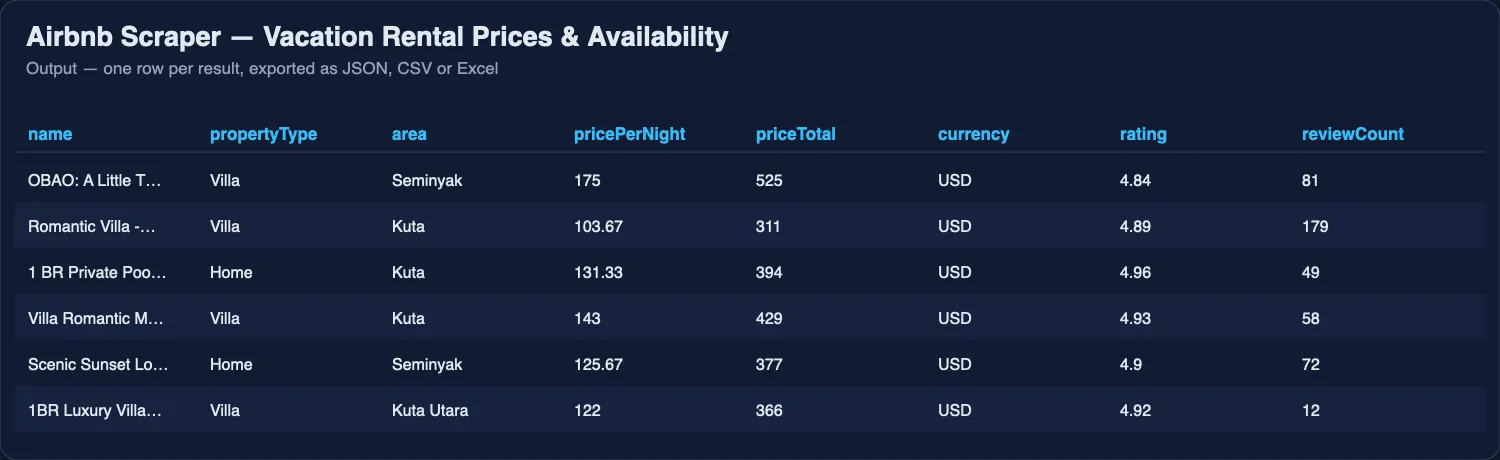
Give it a place the way you would type it into Airbnb, a check-in and check-out date and the party size, or paste Airbnb search URLs with your own filters, or listing URLs to open in full. Export as JSON, CSV or Excel, run it on a schedule, or call it from the API and AI agents.
🧭 Three modes in one Actor
Mode (mode) | One row per | Use it for | Price |
|---|---|---|---|
| Listings (default) | listing | prices for your dates, market scans, details, amenities, host; calendar and reviews inside the row | from $0.40 per 1,000 listings, $0.80 with details (Business plan, from 14 Nov 2026) |
Reviews ("reviews") | guest review | review monitoring, sentiment, complaints research, up to 2,000 reviews per listing | $2.00 per 1,000 on the Free plan, $1.40 on Business (from 14 Nov 2026) |
Availability calendar ("calendar") | listing | free and booked nights, minimum stay, first free date, occupancy per month, up to 12 months ahead | $2.40 per 1,000 on the Free plan, $1.68 on Business (from 14 Nov 2026) |
Listings come from a place (locationQueries), an Airbnb search URL with your own filters, or listing URLs and ids (startUrls) — in every mode.
Moving from Airbnb Listings Scraper, Airbnb Reviews Scraper or Airbnb Availability Calendar
Those three Actors are merged into this one. Change the Actor and keep your input — the old field names work as they are:
| You used | Your input keeps working here because… | Same rows |
|---|---|---|
| Airbnb Listings Scraper | it had the same fields as Listings mode | type: "listing", identical fields |
| Airbnb Reviews Scraper | maxReviewsPerListing, sortBy and includeListingInfo switch the run to Reviews mode by themselves | type: "review", identical fields |
| Airbnb Availability Calendar | includeDays and onlyAvailableListings switch the run to Calendar mode by themselves (or set "mode": "calendar") | type: "listing-calendar", identical fields |
Setting mode explicitly is the clearest. The Availability Calendar Actor stays available as a narrow, calendar-only door; the other two are deprecated and point here.
Tested head-to-head — 30 October 2026
Same search for both (Seminyak, Bali, 10–13 Dec 2026, 2 adults, 20 listings), run from an ordinary Free-plan account against the most-used Airbnb scraper in the Store:
| This Actor, search rows | This Actor, with details | Most-used Airbnb Actor | |
|---|---|---|---|
| Listings returned | 20 of 20 | 20 of 20 | 20 of 20 |
| Run time | 5 s | 28 s | 10 s |
| Fields per row | 31 | 63 | 37 (several nested) |
| Fields filled | 98 % | 98 % | 96 % |
| Paid for 20 rows, Free plan | $0.024 | $0.064 from 14 Nov ($0.113 today) | $0.080 |
| Guest reviews, availability calendar, minimum nights in the same Actor | yes | yes | no — reviews are a separate Actor, no calendar |
Prices come as numbers — total, per night, original and discount — so they sort and sum in a spreadsheet without cleanup. An earlier test on 23 September 2026 against four popular Airbnb scrapers gave the same picture: all listings returned, 97 % of fields filled, 0 % failed runs.
What is Airbnb Scraper?
It is an Airbnb data scraper for people who need listing prices and availability as a table rather than a screen: hosts and property managers comparing their rates with the street, analysts sizing a short-term rental market, travel apps, and anyone building a price watch for a destination. It answers "what does a two-bedroom in Canggu cost that week", "which villas in Ubud are Guest favorites under $80 a night" and "what amenities does this listing actually have".
What data can Airbnb Scraper extract?
| Field | Example |
|---|---|
name, propertyType, area | Hidden Point Villa "WOODEN HOUSE" · Villa · Ubud |
priceTotal, pricePerNight, currency, nights | 159 · 53 · USD · 3 |
priceOriginal | 210 — the struck-through price when a discount is shown |
rating, reviewCount | 4.97 · 346 |
badges, isGuestFavorite | ["Guest favorite"] · true |
bedInfo | ["1 bedroom", "1 queen bed", "1 bath"] |
highlights | ["Free cancellation", "Book early to save"] |
latitude, longitude | -8.5069 · 115.2625 (approximate, as Airbnb shows before booking) |
images | photo URLs |
checkIn, checkOut, adults | the dates and party the price was quoted for |
url, listingId, position, page, place | link, id, order collected, page, how Airbnb understood the place |
With Open every listing page switched on:
| Field | Example |
|---|---|
description | Full text, HTML removed |
amenities, amenityGroups | 45 items, grouped as Bathroom, Bedroom and laundry, Entertainment… |
hostName, isSuperhost, hostingSince | I Wayan · true · 8 months hosting |
personCapacity, bedrooms, beds, bathrooms | 2 · 1 · 1 · 1 |
roomType, propertyTypeDetail, overviewTitle | Entire home/apt · Entire villa · Entire villa in Ubud, Indonesia |
ratingAverage, ratingCount, reviewTags | 4.97 · 346 · Pool 133, Hospitality 300, Breakfast 149 |
sleepingArrangements, highlightsDetail | ["1 queen bed"] · ["Outdoor entertainment"] |
locationText, isExactLocation | Ubud, Bali, Indonesia · false |
hostResponseRate, hostResponseTime, hostIsAirbnbManaged | 98 · within an hour · false |
ratingDistribution | {stars5: 91.7, stars4: 8.3, stars3: 0, …} — share of reviews per star |
categoryRatings | {cleanliness: 4.8, accuracy: 4.9, check_in: 5, communication: 4.7, location: 4.8, value: 4.9} |
discountPercent | 19 — how far the nightly price sits below the struck-through original |
cancellationPolicy | Free cancellation for 24 hours. Cancel before October 8 for a partial refund. |
houseRules, checkInTime, checkOutTime, checkInWindow, safetyItems | ["Up to 4 overnight guests", "No pets", "Quiet hours: 10:00 PM - 9:00 AM", "No parties or events"] · 15:00 · 11:00 · Check in after 3:00 PM · ["Smoke alarm", "Must climb stairs"] |
With Availability calendar and minimum nights switched on:
| Field | Example |
|---|---|
minNights, maxNights, availableOnCheckIn | 2 · 1125 · true |
availabilityByMonth | [{month: 2026-10, days: 31, available: 10, occupancyPercent: 68}, …] |
availableDaysAhead, calendar | 21 · one entry per day with available, bookable, check-in/out allowed, min and max nights |
With Guest reviews switched on:
| Field | Example |
|---|---|
reviews | [{rating: 5, date: "3 weeks ago", text: "Great stay, fantastic location…", reviewerName: "Jenny", reviewerLocation: "Sydney, Australia", hostResponse: null}, …] |
💬 Reviews mode — one row per guest review
| Field | Example |
|---|---|
listingId, listingUrl, listingName | 1369235628901673242 · https://www.airbnb.com/rooms/1369235628901673242 · Tiny home in Kuta Utara |
listingRating, listingReviewCount, listingCity, hostName | 4.96 · 435 · Kuta Utara, Bali, Indonesia · Putu Adi |
reviewId, rating, date, createdAt | 1659269953021095271 · 3 · April 2026 · 2026-04-08T08:33:12Z |
text, language | "The location and pool suited our needs very well…" · en |
reviewerName, reviewerLocation, reviewerPhoto, reviewerId, reviewerProfileUrl, reviewerIsSuperhost | Jenny · Sydney, Australia · photo URL · id · profile link · false |
hostResponse, hostRespondedAt | the host's reply and when it was written |
photos, highlight, highlightType, roomTypeTitle | photos the guest attached, Airbnb's card label ("Stayed a few nights") |
Order with sortBy: MOST_RECENT (default), LOWEST_RATED (complaints first) or HIGHEST_RATED.
📅 Availability calendar mode — one row per listing
| Field | Example |
|---|---|
listingId, name, url | 1779422892946998331 · Private 1BR Villa Ubud Rice Field · link |
minNights, maxNights | 1 · 365 — the shortest and longest stay the host sells |
monthsScanned, daysScanned, availableDays, bookedDays, occupancyPercent | 2 · 61 · 20 · 41 · 67.2 |
firstAvailableDate | 2026-10-30 — first night a stay can start |
availabilityByMonth | [{month: "2026-11", days: 30, available: 7, booked: 23, occupancyPercent: 76.7}, …] |
calendar | one entry per day: available, bookable, check-in / check-out allowed, min and max nights (includeDays: false drops it) |
propertyType, area, rating, reviewCount, pricePerNight, latitude, longitude | on listings found by a place search: what the listing is and what it costs for the searched stay |
Airbnb's calendar carries no nightly prices — Airbnb removed them from it. The price for your dates comes from the search: use Listings mode with checkIn/checkOut, or read pricePerNight on calendar rows found by a place search.
What other Airbnb scrapers get wrong — and what this one does instead
The issue trackers and reviews of the most-used Airbnb scrapers on Apify repeat the same complaints. Each one is a design decision here.
| Complaint on other actors | Airbnb Scraper |
|---|---|
| "Only 41 results returned when Airbnb shows 478", "requested 2,000 items, received 243" | Plain paging is the first pass, then the same search runs again in nine price bands and every listing is kept once — 400 for Seminyak in one run, measured |
| "checkIn date not being read from startUrls" | Dates and guests in a pasted search URL win over the form, per URL |
| "Add minimum nights to output" — open on the leading actor for weeks | minNights and maxNights on the check-in date, plus the day-by-day calendar and occupancy per month |
| Reviews only through a second, separate actor | reviews on the listing row, up to 200, with the host's replies |
| "not scraping descriptions", "half the titles missing", "bed and bath not available" | Every field is read from the JSON Airbnb ships in its own page, not from the layout — description, title, beds, baths, amenities on every detailed row |
| "Charged me despite the limits", "no data returned but charged" | Billing is per listing row and per opened page; error rows and empty searches cost nothing, and maxListings is a hard cap |
| "Can't export data if it's too much" | Rows are flat, one per listing; arrays are short lists, not nested blobs |
| "Wrong price" | Total for the stay, average per night, the struck-through original and the discount in percent — and the dates and party the quote was for on the same row |
How much does it cost to scrape Airbnb?
Pricing is pay per row — you pay for what lands in your table: no start fee, nothing per page, nothing for proxies. Error rows, the free run-summary row and empty searches are never charged, and "Max cost per run" is respected to the cent.
From 14 November 2026 (per 1,000 rows; your Apify plan sets the column):
| Row | Free plan | Starter (Bronze) | Scale (Silver) | Business (Gold) and up |
|---|---|---|---|---|
| Listing from a search (Listings mode) | $1.20 | $0.80 | $0.60 | $0.40 |
| + Listing page opened (details, amenities, host, rules; calendar or reviews inside the row) | +$2.00 | +$0.80 | +$0.60 | +$0.40 |
| = full listing with details | $3.20 | $1.60 | $1.20 | $0.80 |
| Guest review (Reviews mode) | $2.00 | $1.80 | $1.60 | $1.40 |
| Listing calendar (Availability calendar mode) | $2.40 | $2.16 | $1.92 | $1.68 |
For comparison, the most-used Airbnb Actor in the Store charges $4.00 / $2.00 / $1.50 / $1.00 per 1,000 full listings on the same four plans plus a start fee, and $5.00 / $4.10 / $3.20 / $2.30 per 1,000 reviews (prices read from the Store on 30 October 2026). A typical run of 100 full listings costs $0.32 here against $0.40 on the Free plan and $0.08 against $0.10 on Business.
Until 13 November 2026 the current prices apply: $1.20 per 1,000 listings (Bronze $1.08, Silver $0.96, Gold $0.84) plus $4.44 per 1,000 opened listing pages ($4.00 / $3.56 / $3.11); review rows and calendar rows are billed as listings during this period. The Pricing tab always shows the price in force today.
Bulk export: what 50,000 listings actually cost
This Actor is built for bulk jobs — put hundreds of inputs into one run, or call it from the API on a schedule. There is no fee per run, no fee per page and no proxy charge: you pay for the rows you keep, and error rows are free. That is what decides the bill once you pull a whole market rather than a single search.
| Job | This Actor | Most-used Actor in this category |
|---|---|---|
| 50,000 full listings with details across 100 runs, Free plan, from 14 Nov 2026 | $160 | $200.01 |
| 50,000 full listings with details, Business plan, from 14 Nov 2026 | $40 | $50.01 |
Prices checked on the Apify Store on 30 October 2026 against the Actor with the most monthly users in this category; its per-run fee is counted in, as ours would be if we charged one. Some Actors here ask less per row — this table compares against the one buyers actually use most.
How to scrape Airbnb listings
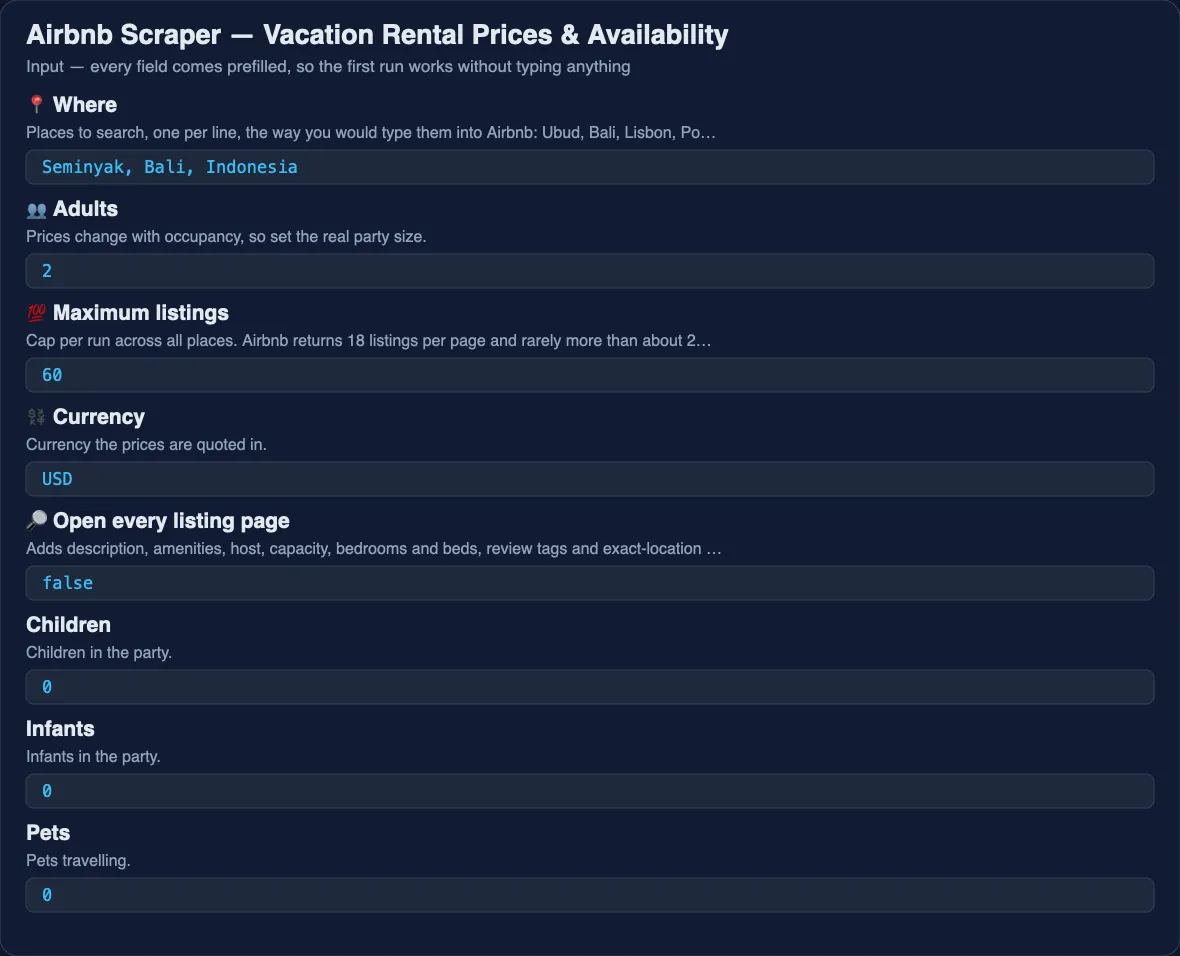
- Type the place into 📍 Where —
Ubud, Bali,Lisbon, Portugal,Brooklyn, NY. Several places, one per line, run in one go. - Set 📅 Check-in and 📅 Check-out. Airbnb quotes a price only for a date range; without dates the Actor searches a stay one month out and says so in the log.
- Set 👥 Adults to the real party size — prices change with occupancy.
- Choose 💯 Maximum listings and 💱 Currency.
- Switch on 🔎 Open every listing page if you need amenities, description and host.
- Click Start, then export from the Output tab or read the dataset through the API.
To use Airbnb's own filters, run the search on airbnb.com, copy the URL from the address bar and paste it into 🔗 Airbnb URLs — every filter in that URL is honoured. Listing URLs pasted there are always opened in full: name, description, amenities, sleeping arrangements, house rules, host, rating and coordinates. Prices are the one thing a listing URL cannot give you — Airbnb quotes a stay inside a search, so run a place or a search URL when you need nightly and total price.
⬇️ Input
Filtered search from an Airbnb URL
One listing in full
Occupancy and minimum stay for a market
Every listing comes back with minNights, availableOnCheckIn and availabilityByMonth — a hundred properties' occupancy for the next quarter in one table.
Reviews for a shortlist
💬 Reviews mode: every review of a listing
One row per review, worst first. A place works too — "locationQueries": ["Ubud, Bali"], "maxListings": 20 reads the reviews of the first twenty listings Airbnb shows. The input of the former Airbnb Reviews Scraper (startUrls + maxReviewsPerListing) runs here unchanged.
📅 Availability calendar mode: occupancy of a market
One compact row per listing with free and booked nights, the minimum stay, the first free date and occupancy per month for the next six months. Paste listing URLs instead of a place to track named properties.
⬆️ Output
With details on, the same row also carries description, amenities, amenityGroups, hostName, isSuperhost, hostingSince, personCapacity, bedrooms, beds, bathrooms, roomType, ratingAverage, ratingCount, reviewTags, sleepingArrangements, locationText and isExactLocation. A page that could not be read arrives as a type: "error" row with the URL and the reason, never as a silently missing listing.
A review row (Reviews mode):
A calendar row (Calendar mode):
The table views follow the modes: Listings, Details, Reviews (reviews mode), Availability calendar (calendar mode), plus the reviews and months unwound from listing rows.
🔁 Get only new listings — schedule it
A one-off export is useful once; a feed is useful every day. Fill Only new rows — memory name (for example my-listings-watch) and the Actor remembers every listing row — or, in Reviews mode, every review — it has delivered under that name. Known listings are skipped before their pages are opened, so they cost nothing at all. (A calendar changes every day, so Calendar mode always returns every listing.) Every later run with the same name writes — and charges — only rows you have not received before; rows delivered earlier are skipped for free.
- Run once with the memory name to load the history.
- Open the run → Actions → Schedule (or Schedules) and set daily or hourly.
- Read the new rows from the run's dataset, or connect a webhook, n8n, Make or Zapier to the run.
Each memory name is separate, so one schedule per hotel list, keyword set or market never mixes with another. To start over, use a new name.
Use cases for Airbnb data
Pricing your own place
Pull every comparable listing in your area for the same dates and see where your nightly rate sits, which badges the competition carries, and what they offer that you do not.
Sizing a short-term rental market
Count listings, property types, ratings and prices for a town before buying or managing there. Run it monthly and keep the history.
Watching prices for a trip
Schedule the same search weekly and watch pricePerNight move for the dates you want.
Travel and property products
Feed listings, coordinates and prices into a map, a comparison page or a recommendation model without maintaining a scraper of your own.
AI agents
An agent asked "find me a villa in Ubud with a pool under $80" can call this Actor with the place, dates and a price cap, and filter on amenities.
Integrations and Airbnb API
Run it from the Apify API, the JavaScript and Python clients, a schedule, or a webhook, and push the dataset to Google Sheets, Slack or a database through n8n, Make or Zapier. Airbnb has no public API for this data; the Actor is the practical substitute.
🤖 For AI Agents & LLM Apps
Compact reference for agents calling this Actor through the Apify MCP server or the Apify API (lergassy/airbnb-scraper).
Modes: mode = listings (default), reviews (one row per review) or calendar (one row per listing with availability). Purpose: returns Airbnb listings for a place and a date range, priced for that stay, with rating, location, beds and badges — and, on request, the description, amenities, host and capacity of each listing. Use it to answer "what does a stay in X cost on these dates", "which listings in X have a pool and a 4.9+ rating" and "what does this listing offer".
Minimal input:
Output: one row per listing — listingId, url, name, propertyType, area, latitude, longitude, priceTotal, pricePerNight, priceOriginal, currency, nights, rating, reviewCount, badges, isGuestFavorite, bedInfo, highlights, images, place, checkIn, checkOut, adults, position, page, scrapedAt. With includeDetails: true also description, amenities, amenityGroups, hostName, isSuperhost, personCapacity, bedrooms, beds, bathrooms, roomType, ratingAverage, ratingCount, reviewTags, locationText, isExactLocation. Unreadable pages come back as type: "error".
Behaviors an agent should know:
- Prices exist only for a date range. Pass
checkInandcheckOut; without them the Actor picks a stay one month out and logs it.priceTotalis for the whole stay,pricePerNightis derived from it. adultschanges the price. Pass the real party size.maxListings(default 60) caps the run; Airbnb serves 18 per page and rarely more than about 270 per search, so ask for a narrower place rather than a bigger number.includeDetailscosts one request per listing and is the only way to get amenities, description and host. Leave it off for price comparisons.- Airbnb's own filters (
price_max,min_bedrooms,room_types[]…) work throughstartUrls: paste a filtered search URL.priceMin,priceMax,minBedrooms,minBeds,minBathroomsandroomTypescover the common ones directly. - Reviews mode:
startUrlswith listing URLs or ids,maxReviews(up to 2,000) andsortBy(MOST_RECENT,LOWEST_RATED,HIGHEST_RATED). Calendar mode:startUrlsorlocationQueries,calendarMonths1–12 counted from today,onlyAvailableListings. - Coordinates are approximate until booking;
isExactLocationsays whether Airbnb shows the exact spot. ratingandreviewCountare empty for new listings without reviews — not zero.- Apify Proxy is on by default, because Airbnb rate-limits repeat callers by IP address. If Airbnb starts refusing pages mid-run, the Actor moves itself onto residential addresses and carries on; if it is refused there too, the run fails with the reason instead of handing you an empty table that says "succeeded".
Short-term rental data: nightly rates, availability and occupancy
Every listing comes back with the nightly rate and the total price for the dates you asked about, so the same run answers what a place costs and whether it is free. Run a city on a schedule and the results stack into an availability history — the raw material for occupancy and pricing research on a market, without paying for a short-term rental analytics subscription.
Rental prices by city, in one table
Give it several places at once and every row carries its own location, dates, currency, property type and bed count. That is a like-for-like comparison of holiday rental prices across cities, which is the question most people are actually asking when they open Airbnb with a spreadsheet next to them.
❓ FAQ
Is it legal to scrape Airbnb?
The Actor reads public listing pages and returns the information any visitor sees: prices, ratings, descriptions and amenities. It does not log in, does not collect guest data and does not bypass any access control. How you use the data is subject to your local law and Airbnb's terms — consult a lawyer for commercial use at scale.
Why does a listing show a different price on Airbnb?
Prices depend on dates, party size and currency. The Actor quotes the price for exactly the checkIn, checkOut, adults and currency you set; change any of them and the number changes on Airbnb too. Taxes and fees are as Airbnb displays them in the total.
Can I get more than 270 listings for a place?
Yes. Airbnb caps a search at roughly fifteen pages, so the Actor runs the same search again in price bands (Airbnb filters those server-side) and keeps each listing once. Set maxListings to what you need; 400 for Seminyak took 27 pages and 36 seconds. For a very large city, neighbourhoods or several date ranges still add coverage on top.
Do I need a proxy?
No setup needed. Apify Proxy is on by default because Airbnb rate-limits repeat callers by IP address; the moment Airbnb pushes back the run moves itself onto residential addresses, and you pay nothing extra for it. Calendar and review requests go to Airbnb's own API, which answers plain requests, so those modes are fast.
Can I use it with the Apify API or an MCP server?
Yes. It runs from the API and the official clients, and AI agents reach it through the Apify MCP server without extra setup.
Does it return guest reviews?
Yes, two ways. Switch on Guest reviews and each listing row carries its latest reviews (up to 200). Or set "mode": "reviews" for one row per review, up to 2,000 per listing, newest, lowest or highest rated first: rating, date, text, language, reviewer name, location and photo, the photos the guest attached and the host's reply.
Does it return minimum nights and the availability calendar?
Yes — switch on Availability calendar and minimum nights. Each listing gets the host's minimum and maximum stay on your check-in date, whether that date is open, a day-by-day calendar for the months you choose, and occupancy per month (the share of days booked or blocked). The most-used Airbnb scraper has an open request for minimum nights that has gone unanswered. For one compact row per listing — free and booked nights, first free date, occupancy per month, up to 12 months from today — set "mode": "calendar".
Does the calendar include nightly prices?
No. Airbnb no longer sends prices in its availability calendar, so no scraper that reads the calendar can return them honestly. The price for your stay comes from the search: run Listings mode with checkIn and checkOut, several date ranges if you need a price curve.
I used Airbnb Reviews Scraper or Airbnb Listings Scraper — what changes?
Only the Actor name. Paste the same input into this Actor: the old fields switch the right mode on by themselves and the rows have the same fields. Both Actors are deprecated and keep running for existing integrations, but new features land here.
Your feedback
Found a place it mis-reads or a field that is empty when it should not be? Open an issue on the Issues tab — every one gets answered.
You might also like
| Actor | What it does |
|---|---|
| Airbnb Availability Calendar | Calendar-only door: free and booked nights, minimum stay, occupancy per month |
| Trip.com Scraper | Hotel prices and availability for a city and dates |
| Agoda Reviews Scraper | Hotel reviews, including the Booking.com reviews shown on Agoda |
| Google Flights Scraper | Live flight prices, layovers and booking options |
| Email Verifier & Phone Number Validator | Checks e-mails and phone numbers in bulk |
Also known as
People look for this Actor as an Airbnb scraper, an Airbnb listings API, an Airbnb reviews scraper, an Airbnb availability calendar and occupancy scraper, an Airbnb price scraper, a vacation rental data source, a short-term rental scraper, a holiday rental scraper, an STR analytics feed, and a way to get nightly rates and availability by city.
Use via API
Run this Actor from your own code or pipeline. Get your token in Apify Console → Settings → API & Integrations. Every input field below has the same name as in the JSON tab of the input form.
Python
JavaScript
cURL (runs the Actor and returns the results in one call)


