

Flight Price Calendar — cheapest dates for any route
Pricing
from $0.10 / 1,000 rows
Flight Price Calendar — cheapest dates for any route
[$0.20/1K rows] The cheapest departure date for any route: lowest fare per day for up to a year, five cheapest days flagged, departure x return grid for round trips. Sweep many routes in one run. No run fee, no search fee.
Pricing
from $0.10 / 1,000 rows
Rating
5.0
(1)
Developer

Matvey
Maintained by CommunityActor stats
0
Bookmarked
18
Total users
8
Monthly active users
2 hours ago
Last modified
Categories
Share
Flight Price Calendar
Flight Price Calendar answers one question: when is this route cheapest? It returns the lowest fare for every departure date over the next weeks or the whole year — Google's own date grid, as data — and flags the cheapest days. For round trips it returns the departure × return grid, so you also see whether leaving a day earlier or staying a night longer is cheaper.
$0.20 per 1,000 rows. No run fee, no search fee, no proxy fee. A full year of dates for one route is 365 rows — 7 cents.
Tested head-to-head — 9 October 2026
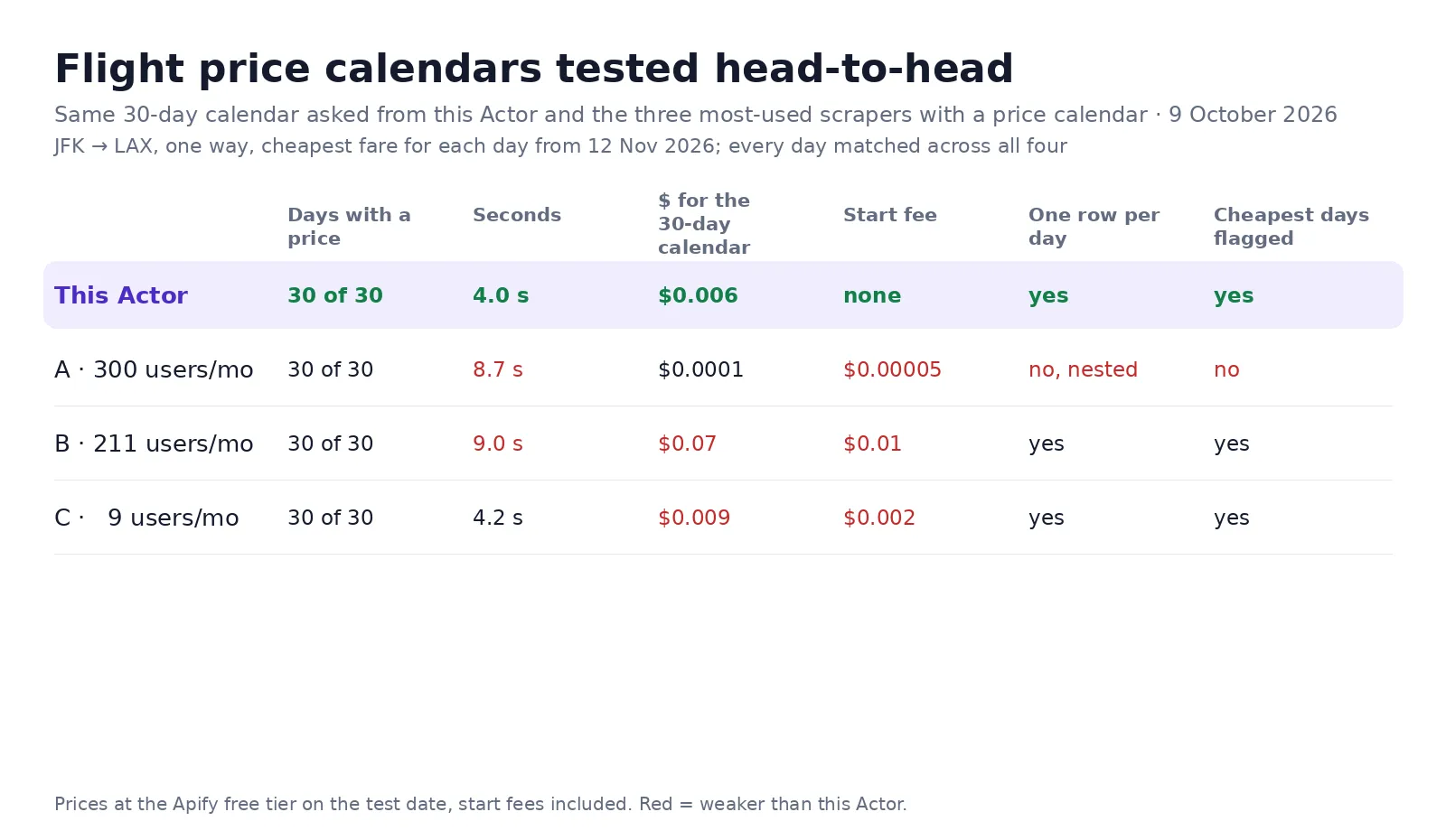
The same 30-day calendar — JFK → LAX, one way, the cheapest fare for each day from 12 November 2026 — was asked from this Actor and from the three most-used scrapers with a price calendar on Apify Store:
| Days with a price | Seconds | $ for the 30-day calendar | Start fee | One row per day | Cheapest days flagged | |
|---|---|---|---|---|---|---|
| This Actor | 30 of 30 | 4.0 | $0.006 | none | yes | yes |
| A · 300 users a month | 30 of 30 | 8.7 | $0.0001 | $0.00005 | no, nested in one flight row | no |
| B · 211 users a month | 30 of 30 | 9.0 | $0.07 | $0.01 | yes | yes |
| C · 9 users a month | 30 of 30 | 4.2 | $0.009 | $0.002 | yes | yes |
All four returned the same price for every one of the 30 days. A is cheaper because it bills one row for the whole calendar; its days come nested inside a flight row instead of as rows you can sort and chart.
What a run returns
One row per date:
| Field | Example |
|---|---|
date | 2027-03-15 |
price / currency | 92 / USD |
isCheapest | true for the five cheapest days in the window |
googleFlightsUrl | Opens that exact date on Google Flights |
tripLengthDays (round trips) | Nights of stay for this departure × return pair |
Plus a free summary row whose calendar object holds cheapestDates — the five best days with their
prices — and the lowest and highest fare of the window. Turn off calendarOnly to also get the itinerary
list with Google's priceLevel and the typical price band.
How to use it
- Enter origin, destination and a departure date to anchor the window.
- Set calendarDays:
60for the next two months,365for the year. - Click Start. You get one row per date, cheapest days flagged.
Round trip: add a return date. Google keeps your trip length flexible around it and returns the grid, so you get "leave Tuesday, come back Sunday — $80 less" as rows you can sort.
A whole route map at once
A route without a departureDate starts its calendar tomorrow. Three routes × 180 days = 540 rows = 11 cents. Because nothing is charged per search, sweeping
fifty routes costs exactly fifty times the rows and not a cent more.
What it is good for
- Flexible travellers and fare-deal sites: publish "cheapest week to fly Bali–Singapore" from data instead of guesswork.
- Travel agencies: answer "when should I book" with the actual grid in front of the client.
- Pricing and revenue teams: a year of daily lows per route is a demand curve — school holidays, Eid, Christmas and the quiet weeks all show up.
- Trip planners and AI agents: the calendar is the fastest way to turn "sometime in March" into a concrete date.
Fields you can set
| Input | What it does |
|---|---|
calendarDays | Size of the window: 30, 60, 180, 365 |
returnDate | Switches to the departure × return grid |
adults / children / infants | Up to 9 passengers, infants in seat or on lap |
cabinClass | economy, premium economy, business, first |
maxStops | Nonstop only, or up to one or two stops |
currency / market | Price in any currency, from any country's point of sale |
routes | A list of routes swept in one run |
What it costs
One event, $0.0002 per row — $0.20 per 1,000, down to $0.10 on higher Store tiers. Searches, retries, residential proxy and run start are free; rows that fail are never charged. A year for one route: 7 cents. Ten routes, 60 days, every week for a month: 2,400 rows — 48 cents.
Notes and limits
Calendar prices are the lowest fare Google shows for that date at the moment of the run — they move
during the day, so a daily schedule is worth more than one big sweep. A stay longer than about a month
returns a thinner grid, because most airlines cap round-trip stays. If Google does not answer the
calendar request, an error row says so instead of a silent gap, and it is not charged.
The Actor reads publicly displayed prices without logging in or collecting personal data. Google's terms restrict automated access, and the legality of scraping public data depends on your jurisdiction and use.
Need something else?
Want the grid in a different shape, or a sweep across a hundred routes? Open an issue on this Actor's page — answered the same day.
Need the full itinerary list, layovers, aircraft, CO₂ and booking options with seller prices? Use Google Flights Scraper. Watching a single route for a price drop? Flight Price Tracker.
Use via API
Run this Actor from your own code or pipeline. Get your token in Apify Console → Settings → API & Integrations. Every input field below has the same name as in the JSON tab of the input form.
Python
JavaScript
cURL (runs the Actor and returns the results in one call)


