

YouTube Comments Scraper — $0.50/1K comments & replies
Pricing
from $0.35 / 1,000 comments
YouTube Comments Scraper — $0.50/1K comments & replies
Scrape YouTube comments and replies from videos, whole channels, playlists or a YouTube search: text, likes, creator hearts, pinned flag, reply count, commenter channel and video stats. Sort newest or top, filter by keyword, likes and date. Export, run via API, schedule, or use with AI agents.
Pricing
from $0.35 / 1,000 comments
Rating
5.0
(4)
Developer

Matvey
Maintained by CommunityActor stats
0
Bookmarked
54
Total users
31
Monthly active users
4 days ago
Last modified
Categories
Share
Tested head-to-head — 24 September 2026
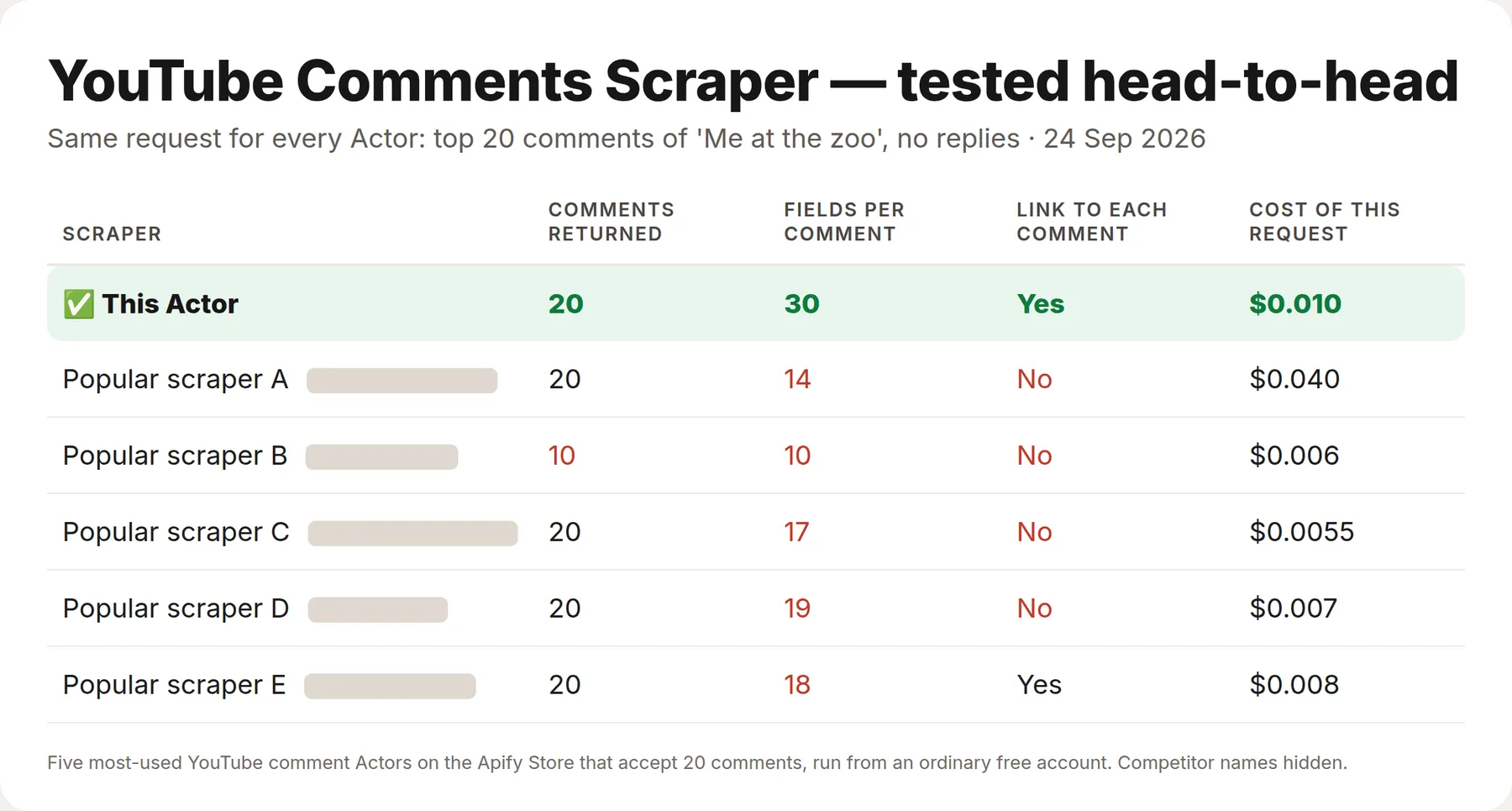
The same request went to this Actor and to the five most-used YouTube comment Actors on the Apify Store on the same afternoon, from a fresh free account: the top 20 comments of "Me at the zoo", without replies. The comments matched; what came with each one did not.
| This Actor | The 5 others | |
|---|---|---|
| Fields per comment | 30 | 10 – 19 |
| Video title, video channel and a direct link to the comment on every row | Yes | None of the five has all three |
What is YouTube Comments Scraper?
YouTube Comments Scraper collects the comments and replies of YouTube videos — one video, a list of videos, a whole channel, a playlist, or the top results of a YouTube search — and gives you every comment as one clean row: text, likes, reply count, whether the creator hearted or pinned it, and the commenter's channel. No YouTube API key, no daily quota, no login, no browser.
It reads YouTube data the same way the YouTube web player does, so it is fast (about 20 comments per request, hundreds per second) and cheap: a run costs compute seconds, nothing else.
What data can YouTube Comments Scraper extract?
| Field | Example |
|---|---|
text | "can confirm: he never gave us up" |
likes, replyCount | 313000, 1000 |
publishedAgo / publishedAt | "1 year ago" / 2025-09-11 |
isPinned, isCreatorHearted, isEdited | true, true, false |
isReply, parentCommentId | true, UgzuC3zzpRZkjc5Qzsd4AaABAg |
authorName, authorChannelId, authorChannelUrl, authorAvatarUrl | @SanDiegoZoo, UCC5NfQ6…, link, image |
authorIsVerified, authorIsCreator, authorIsArtist | true, false, false |
commentId, commentUrl | YouTube's stable ID and a link that opens the video at this comment |
videoId, videoTitle, channelName, channelId, source | which video, and whether it came from a channel, playlist or search |
One video row per video (rowType = video) adds videoViews, videoLikes, videoCommentCount, videoPublishedAt, videoDurationSeconds, videoDescription, videoKeywords and commentsCollected. Anything that could not be read becomes an error row with a plain-words errorMessage; error rows and video rows are free.
How much does it cost to scrape YouTube comments?
$0.50 per 1,000 comments, pay per event, nothing up front. Comments removed by your filters, video rows and error rows cost nothing. Apify's free plan gives $5 of platform credit a month — about 10,000 comments. Bronze, Silver and Gold plans get 10 %, 20 % and 30 % off.
Example: the 20 latest videos of a channel × 200 comments = 4,000 comments = $2.00.
Bulk export: what 50,000 comments actually cost
This Actor is built for bulk jobs — put hundreds of inputs into one run, or call it from the API on a schedule. There is no fee per run, no fee per page and no proxy charge: you pay for the rows you keep, and error rows are free. That is what decides the bill once you pull a whole market rather than a single video.
| Job | This Actor | Most-used Actor in this category |
|---|---|---|
| 50,000 comments across 100 runs | $25 | $100 |
Checked on the Apify Store on 24 September 2026 against the Actor with the most monthly users in this category; its per-run fee is counted in, as ours would be if we charged one. Some Actors here ask less per row — this table compares against the one buyers actually use most.
Switching from another YouTube Comments Actor
Measured on 9 October 2026 from Apify's own public Store data. The comparison is with the most-used YouTube comments Actor on the Store (most users in the last 30 days); it is not named here on purpose — the numbers are public and checkable, the name adds nothing.
| The most-used YouTube comments Actor | This Actor | |
|---|---|---|
| Price per 1,000 comments, free plan | $2.00 | $0.50 |
| Bronze / Silver plan | $1.50 / $1.20 | $0.45 / $0.40 |
| Gold / Platinum plan | $0.90 / $0.60 | $0.35 / $0.35 |
| Diamond plan | $0.30 | $0.35 |
| Start fee | none | none |
| Runs in the last 30 days that ended SUCCEEDED | 98.9% of 95,453 (695 failed) | 93.4% of 106 (0 failed, 6 stopped by the user, 1 timed out) |
Where it goes the other way: on the Diamond plan the other Actor is cheaper, and its success rate is higher on a sample about 900 times larger. None of our runs in that window ended FAILED; the gap is runs stopped by the user and one that hit its timeout. Two defaults differ, so set them explicitly when you move a saved input: the other Actor sorts newest first and its comment limit defaults to 1; ours sorts by top comments and takes 100 per video.
Input mapping
| Their input | This Actor | Note |
|---|---|---|
startUrls [{"url": "…"}] | videoUrls | a plain list of links or 11-character video IDs; also channelUrls, playlistUrls, searchQueries |
maxComments | maxCommentsPerVideo | replies count too when included; 0 = all |
sortCommentsBy: TOP_COMMENTS / NEWEST_FIRST | sort: top / newest | |
oldestCommentDate | commentsSince | a date or a period such as 7 days |
Output mapping
| Their field | This Actor |
|---|---|
comment | text |
cid | commentId (plus a direct commentUrl) |
author | authorName |
voteCount | likes |
replyCount | replyCount |
type (comment / reply) | isReply |
replyToCid | parentCommentId |
authorIsChannelOwner | authorIsCreator |
hasCreatorHeart | isCreatorHearted |
publishedTimeText | publishedAgo (plus an approximate publishedAt date) |
videoId | videoId |
pageUrl | videoUrl |
title | videoTitle |
commentsCount | videoCommentCount — on the video summary row, turn on includeVideoDetails |
Their field names are taken from their published dataset schema (build 0.0.249, 9 October 2026), not from a run of theirs.
How to scrape YouTube comments
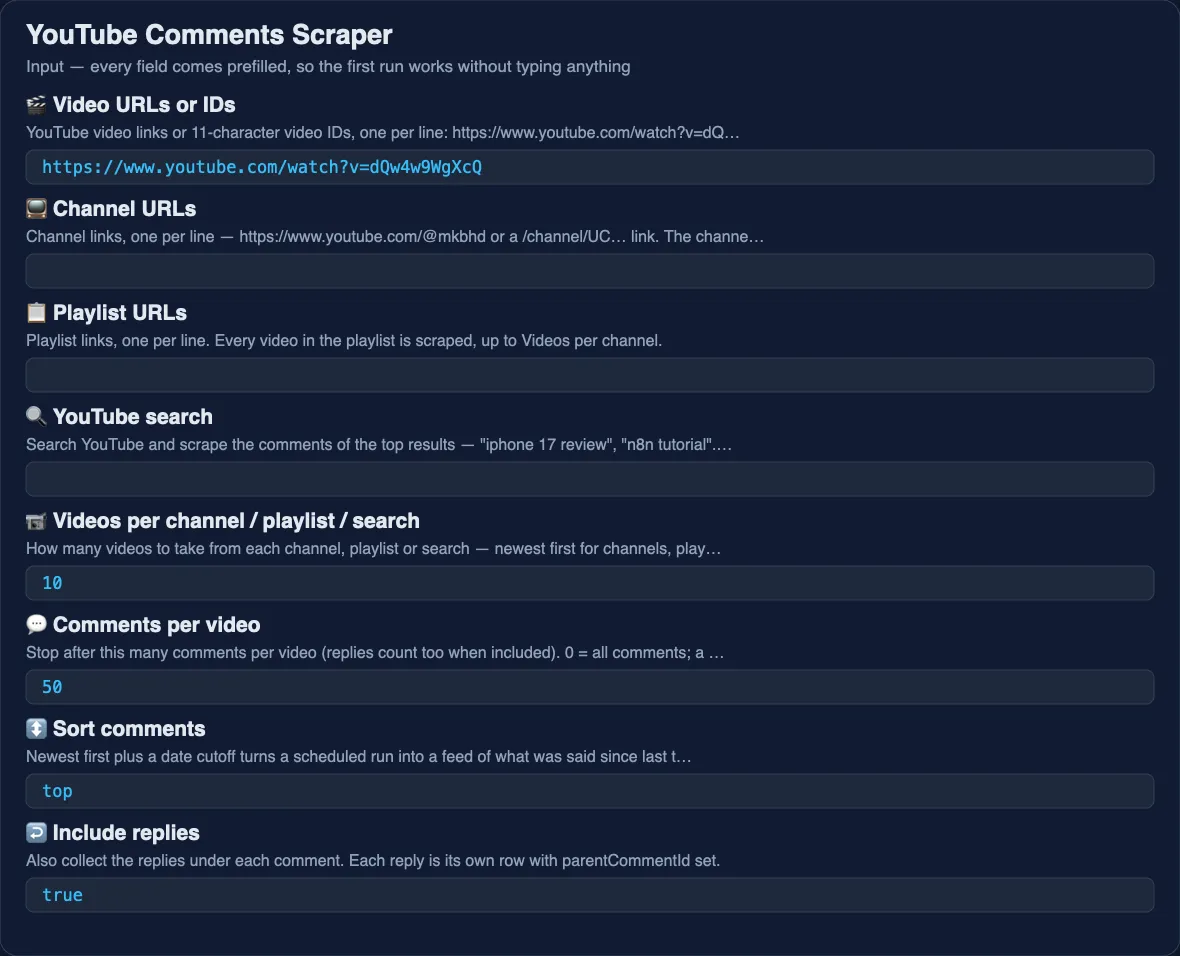
- Paste into 🎬 Video URLs or IDs —
watch?v=,youtu.be, Shorts links or bare IDs — or give a 📺 Channel URL, a 📋 Playlist URL, or type a 🔍 YouTube search. - Set 💬 Comments per video (0 = all) and, for channels, playlists and searches, 📹 Videos per source.
- Choose Top comments or Newest first; switch ↩️ Include replies on or off.
- Optional filters: 🔎 Keyword in comment (
battery|chargingfor alternatives), 👍 Minimum likes, ❤️ Only comments hearted by the creator, 📅 Only comments since. - Click Start. Export from the Output tab as CSV, Excel or JSON, or connect it to a sheet or a workflow.
⬇️ Input
Whole channel, playlist or search
Channels give their newest videos first, playlists keep playlist order, searches follow YouTube's ranking. Every comment row says in source which channel, playlist or query it came from.
Filters
- Only comments since —
2026-06-01or7 days,3 months. YouTube shows ages, not dates, so the cutoff is applied to the age shown; with Newest first collection stops at the first older comment, which keeps scheduled runs short. - Keyword in comment — case-insensitive;
|separates alternatives. - Minimum likes, Only comments hearted by the creator — applied before a comment is saved; skipped comments are not charged.
⬆️ Output
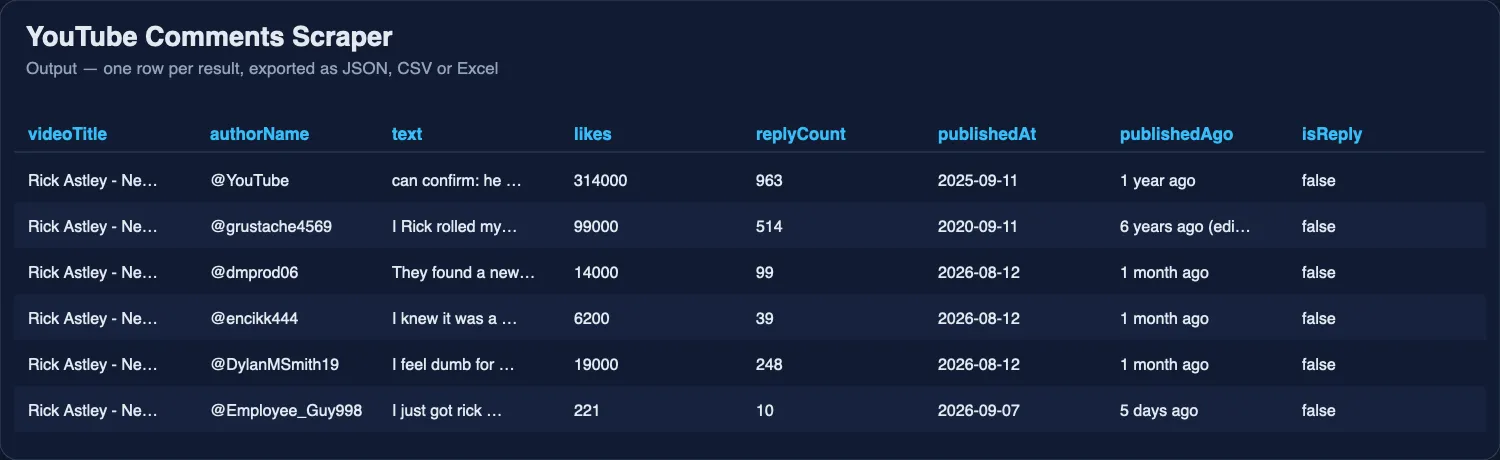
Dates
YouTube shows comment ages ("3 weeks ago"), not dates. publishedAt is that age subtracted from the run date — accurate to the unit YouTube shows. publishedAgo keeps YouTube's wording. Video publish dates are exact.
Use cases for YouTube comments
Audience research and sentiment
Pull the comments of a competitor's last 20 videos, run them through a sentiment model or an LLM, and read what their audience praises and complains about.
Creator feedback loops
Run daily with Newest first and Only comments since: 1 day on your own channel; new questions land in a sheet or Slack every morning, with ❤️ hearted and pinned flags so you can see what was already answered.
Lead generation and outreach
Comments under "best CRM for small business" style videos are people stating a need in their own words. Filter by keyword and Minimum likes, and the commenter's channel link is right there.
AI, RAG and datasets
Stable IDs, clean text and thread structure (parentCommentId) drop straight into an embedding pipeline. The MCP server lets an AI agent search YouTube and read the comments in one step.
Integrations
- API — start runs and fetch results from any language; the API tab has snippets for Python, Node.js and cURL.
- n8n, Make, Zapier — run on a schedule, push new comments to Google Sheets, Slack, Notion or a CRM.
- Google Sheets — the built-in integration appends each run's rows to a sheet.
- MCP server — add
https://mcp.apify.comto Claude, Cursor or any MCP client; the scraper becomes a tool the agent can call with a video link or a search query. - Webhooks — a POST when a run finishes, with links to the dataset.
❓ FAQ
Is it legal to scrape YouTube comments?
The scraper reads only public comments, visible to any visitor without logging in. Comments carry personal data (names, channel links), so storing and using them is subject to GDPR and similar laws; consult a lawyer if in doubt.
Do I need a YouTube API key?
No. The official Data API caps you at 10,000 units a day; this scraper has no quota and no key.
Can I get all comments of a video?
Yes — set Comments per video to 0. A video with a million comments takes a while; the scraper pages through YouTube's list until it ends.
Are replies included?
Yes by default, each as its own row with parentCommentId, up to Replies per comment (0 = all).
Can I use YouTube Comments Scraper with the Apify API?
Yes. Every run can be started, monitored and downloaded through the API in JSON, CSV or Excel.
Can I use it through an MCP server?
Yes. Connect the Apify MCP server and the scraper appears as a tool; an agent can search "iphone 17 review" and reason over the comments in one step.
Can I integrate it with other apps?
Yes — n8n, Make, Zapier, Google Sheets, Slack and webhooks.
Does one row equal one comment?
Yes. Each comment or reply is one row; each video adds one summary row (rowType = video), which Video summary rows switches off.
Your feedback
A video that does not scrape, an empty field, a filter you miss — open an issue in the Issues tab; every issue gets an answer. A review in the Reviews tab helps other buyers find the scraper.
You might also like
| Actor | What it does |
|---|---|
| YouTube Transcript Scraper | Subtitles and transcripts of YouTube videos |
| Threads Scraper | Posts, profiles and search on Meta Threads |
| Telegram Channel Analytics | Subscribers, reach and stats of Telegram channels |
| Speech to Text | Transcripts from audio and video files and YouTube links |
| Trustpilot Reviews API | Company reviews from Trustpilot |
Use via API
Run this Actor from your own code or pipeline. Get your token in Apify Console → Settings → API & Integrations. Every input field below has the same name as in the JSON tab of the input form.
Python
JavaScript
cURL (runs the Actor and returns the results in one call)


