

Agoda Reviews Scraper 💰$3/1K — Hotel Guest Reviews & Ratings
Pricing
from $2.10 / 1,000 reviews
Agoda Reviews Scraper 💰$3/1K — Hotel Guest Reviews & Ratings
Scrape hotel guest reviews and ratings from Agoda, including the Booking.com review pool on the same page: rating, text, traveler type, room booked, length of stay, reviewer country and date, plus live room prices. Hotel review data for any property.
Pricing
from $2.10 / 1,000 reviews
Rating
5.0
(9)
Developer

Matvey
Maintained by CommunityActor stats
0
Bookmarked
66
Total users
31
Monthly active users
13 hours ago
Last modified
Categories
Share
Agoda Reviews Scraper extracts hotel reviews and property data from Agoda.com — the leading hotel booking platform in Asia — without the official Agoda API, login, or cookies. Paste a hotel URL and get every review as structured Agoda data: rating, text, traveler type, room type, reviewer country, and dates. It also extracts the Booking.com reviews that Agoda displays for most hotels, so a default run gives you two review sources at once, de-duplicated into one list.
Runs use Agoda's own JSON endpoints instead of rendering pages in a browser, so a hotel with hundreds of reviews finishes in seconds. Export scraped data, run the scraper via API, schedule and monitor runs, or integrate with other tools.
Tested head-to-head — 24 September 2026
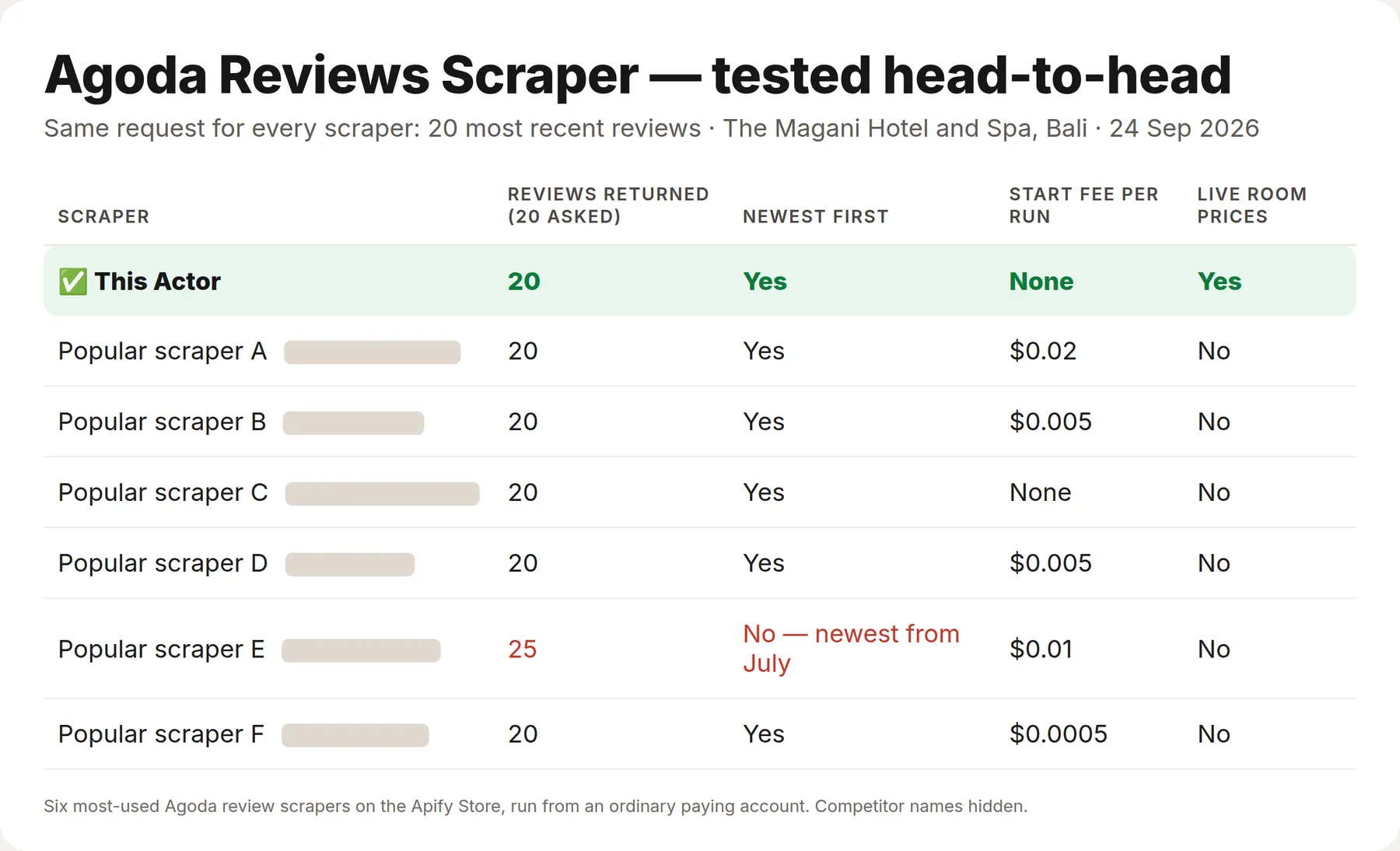
Same request for every Actor — the 20 most recent reviews of The Magani Hotel and Spa, Bali — run against the six most-used Agoda review scrapers on the Apify Store, from an ordinary paying account.
| This Actor | The six others | |
|---|---|---|
| Returned exactly 20, newest first | Yes | 5 of 6 (one returned 25 reviews, the newest from July) |
| Start fee per run | None | 5 of 6 charge one ($0.0005–0.02) |
| Price per 1,000 reviews vs the most-used one | $3 | $6 + $0.02 per run |
| Live room prices in the same Actor | Yes | 0 of 6 |
Re-checked on 30 October 2026 with the same request against the most-used one: the 20 newest reviews here in 7–38 seconds over seven runs for $0.06, there 20 reviews (ten of them Booking.com reviews from November 2025 to June 2026) in 29 seconds for $0.14 (its $0.02 start fee plus $0.006 a review on the Free plan).
What is Agoda Reviews Scraper?
Agoda Reviews Scraper is a no-code tool to scrape Agoda reviews at scale. Give it one or more hotel page URLs and choose a review source (Agoda, Booking.com, or both), a sort order, and a limit. The Actor returns clean JSON you can download as CSV or Excel, push into a spreadsheet or CRM, or feed into an AI pipeline.
- Two review sources in one run: Agoda's own guest reviews plus the Booking.com reviews shown on the same hotel page.
- Rich review fields: rating, title, full text, traveler type (couple, family, business, solo), room type, length of stay, reviewer country, check-in month, helpful votes.
- Hotel record with Agoda and Booking.com review counts.
- Fast and cheap: no browser, no proxies needed for small runs.
What data can Agoda Reviews Scraper extract?
| Field | Example |
|---|---|
rating | 10.0 |
title | Great location, clean and friendly |
text | We stayed 7 nights in the Magani Suite… |
travelerType | Couple |
roomType | Magani Suite |
reviewerCountry | Australia |
checkInDate | August 2026 |
lengthOfStay | 7 nights |
source | agoda / booking.com |
hotelName, hotelId, hotelUrl | The Magani Hotel And Spa, 335650 |
starRating, accommodationType | 5, Hotel |
address, area, city, country | Jalan Melasti, Legian, Bali, Indonesia |
The hotel record adds the score the hotel page shows — reviewScore (9.1), reviewScoreText (Exceptional), reviewsTotal (3,968) and scores by topic: cleanliness, location, service (staffPerformance), room comfort, facilities, value for money, food — plus Agoda guests' own agodaScore / agodaScores, and agodaReviewCount / bookingReviewCount so you can size a property before scraping everything.
| Hotel field | Example |
|---|---|
reviewScore / reviewScoreText / reviewsTotal | 9.1 / Exceptional / 3968 |
scores | { "staffPerformance": 9.5, "cleanliness": 9.3, "location": 9.3, "roomComfort": 9.2, "facilities": 9.0, "valueForMoney": 8.9, "foodDining": 8.2 } |
agodaScore / agodaScores | 9.0 / the same topics, Agoda guests only |
🛏️ Room rates and availability
Switch on Room rates and availability and give a check-in date, and every rate on sale for that stay comes back as its own row: room name, floor area, bedding, how many guests it takes, whether breakfast is included, the cancellation terms, the nightly price in the currency you pick, and Agoda's own scarcity note when it shows one.
One property with a three-night stay typically returns 40-90 rate rows, because Agoda sells the same room several ways: with and without breakfast, refundable and not, pay now and pay later. That is what makes the data useful for rate shopping — you see the whole ladder, not just the headline price.
Leave the dates empty and the Actor prices a stay 30 days out, which is the usual default for a rate check. Prices are per night before taxes and fees, exactly as Agoda shows them.
Room rate rows cost $0.004 each — $4 per 1,000.
How much does it cost to scrape Agoda reviews?
The Actor uses Apify's pay-per-event pricing: you pay only for the review, hotel and room rate records saved to your dataset — nothing per run, per page or per proxy gigabyte. Error rows are never charged.
| Event | Price | Per 1,000 |
|---|---|---|
| Review (Agoda or Booking.com) | $0.003 | $3 |
| Hotel record (address, rating, review counts) | $0.004 | $4 |
| Room rate (one rate on one room type) | $0.004 | $4 |
Because the Actor talks to Agoda's JSON endpoints directly, platform compute is tiny — a two-hotel run of 160 reviews used well under a cent of compute in our tests. The Apify Free plan ($5 monthly credit) covers roughly 1,600 reviews a month. Bronze, Silver and Gold Store tiers get a discount on top.
Bulk export: what 50,000 reviews actually cost
This Actor is built for bulk jobs. Paste hundreds of hotel URLs into one run, or call it from the API on a schedule — there is no fee per run, no fee per page and no proxy charge. You pay for the rows you keep, and error rows are free. That is what decides the bill once you scrape a whole market rather than one property.
| Job | This Actor | Most-used Agoda reviews Actor on the Store |
|---|---|---|
| 50,000 reviews across 100 runs | $150 | $302 |
Checked on Apify Store, 21 September 2026, against the Agoda reviews Actor with the most monthly users; its per-run fee is included, as ours would be if we had one. Some Actors in this category charge less per row — this table compares against the one buyers actually use most.
On top of price, a bulk run here returns two review sources at once: Agoda's own reviews and the Booking.com reviews shown on the same hotel page, de-duplicated into one list, each review labelled with the pool it really came from. Pick a single source and you get only that source — reviews from the other pool are skipped and never billed.
How to scrape Agoda reviews
- Open any hotel on Agoda.com and copy its URL, for example
https://www.agoda.com/the-magani-hotel-and-spa/hotel/bali-id.html. - Paste it into Agoda hotel URLs. Add as many hotels as you need.
- Choose Review source (Agoda, Booking.com, or both), Sort reviews by, and Max reviews per hotel.
- Click Start. When the run finishes, open the Storage tab and export as JSON, CSV, or Excel.
⬇️ Input
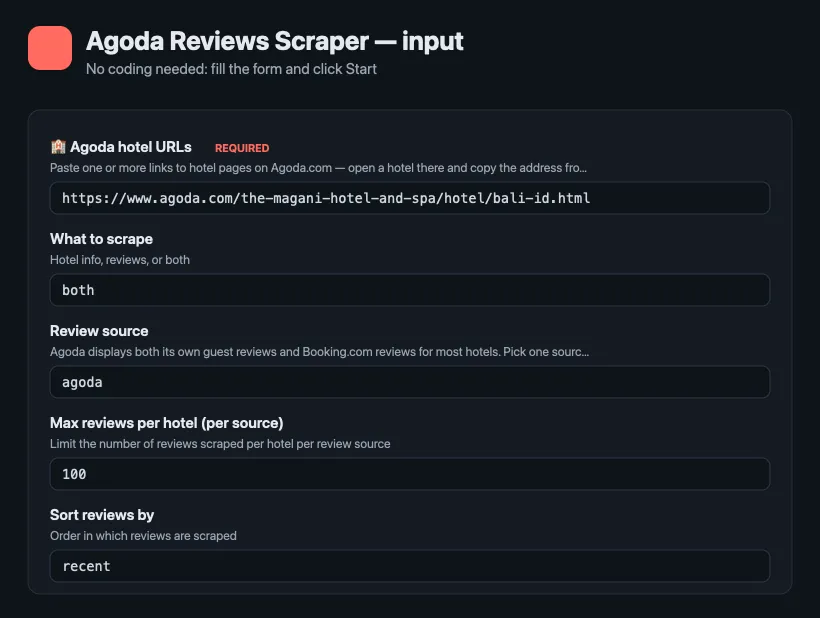
The only required field is the list of Agoda hotel URLs. Everything else has sensible defaults.
| Field | Required | Description |
|---|---|---|
startUrls | yes | Agoda hotel page URLs |
mode | no | reviews, hotel, or both (default both) |
reviewsProvider | no | agoda, booking, or all (default all) |
maxReviewsPerHotel | no | Reviews per hotel, counted across both sources together (default 100) |
maxResults | no | Ceiling on rows for the whole run, across every hotel in the list |
reviewLanguages | no | Which language editions of Agoda to walk; reviews always come back in the language they were written in |
reviewsSort | no | recent, ratingDesc, ratingAsc, helpful |
minRating | no | Keep only reviews scored at least this (1–10) |
cutoffDate | no | YYYY-MM-DD — skip older reviews; with recent sort the run stops paging there, so daily incremental runs cost only the new reviews |
maxReviewsPerHotel is one budget shared by both review sources, and the same review is
never written twice, so asking for both sources widens the pool you draw from without
doubling what you pay. With the default settings a hotel returns 50 Agoda reviews and 50
Booking.com reviews rather than 100 of one kind.
Scrape reviews from Booking.com via Agoda
Set reviewsProvider to booking or all. Agoda shows Booking.com guest reviews on most hotel pages; the Actor pulls them through the same endpoint and tags each record with source: "booking.com".
⬆️ Output
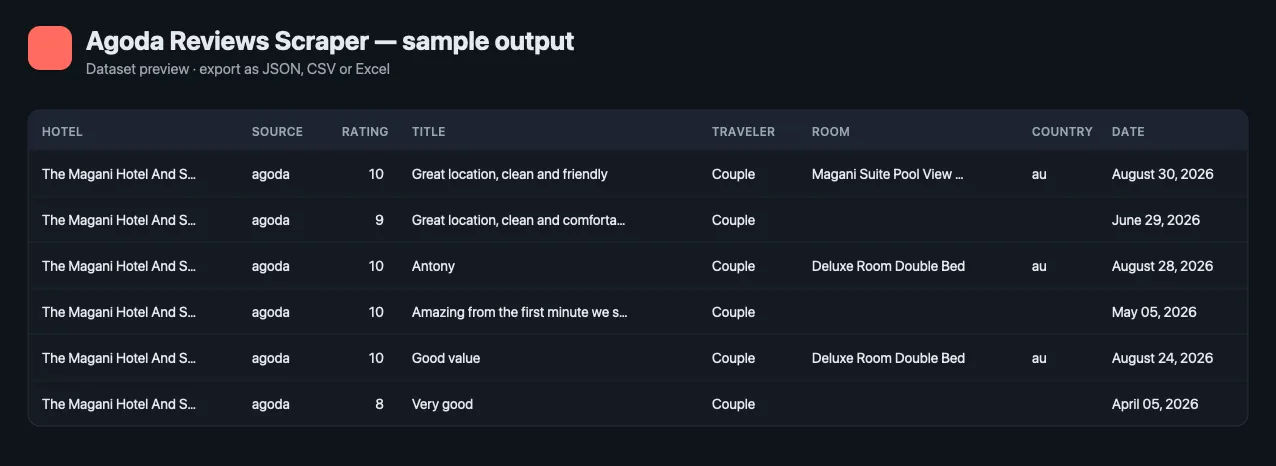
Each review is one dataset item. A hotel record (type: "hotel") is added per URL when mode is hotel or both.
Use the Reviews and Hotels table views in the dataset to browse results, or download everything as CSV/Excel.
🔁 Get only new reviews — schedule it
A one-off export is useful once; a feed is useful every day. Fill Only new rows — memory name (for example my-reviews-watch) and the Actor remembers every review row it has delivered under that name. Every later run with the same name writes — and charges — only rows you have not received before; rows delivered earlier are skipped for free.
- Run once with the memory name to load the history.
- Open the run → Actions → Schedule (or Schedules) and set daily or hourly.
- Read the new rows from the run's dataset, or connect a webhook, n8n, Make or Zapier to the run.
Each memory name is separate, so one schedule per hotel list, keyword set or market never mixes with another. To start over, use a new name.
Use cases for Agoda review data
Hotel reputation monitoring
Track new reviews for your own property from Agoda and Booking.com in one feed; schedule the Actor daily and alert your team on low ratings.
Competitor benchmarking
Compare guest sentiment across competing hotels in Bali, Bangkok, Tokyo, or any market Agoda covers.
Sentiment analysis and AI
Feed clean, structured review text into sentiment models, dashboards, or RAG applications.
Travel content and recommendations
Build hotel guides and comparison pages backed by real guest feedback.
Integrations and Agoda reviews API
Run Agoda Reviews Scraper from your own code with the Apify API and the JavaScript or Python client, or connect it without code to Google Sheets, Slack, n8n, Make, Zapier, and webhooks. It also works with LangChain, LlamaIndex, and the Apify MCP server, so AI agents can request Agoda reviews on demand.
🤖 For AI Agents & LLM Apps
Compact reference for agents calling this Actor through the Apify MCP server or the Apify API (lergassy/agoda-reviews-scraper).
Purpose: returns guest reviews for any Agoda property, including the Booking.com reviews Agoda republishes on the same page, plus a summary row per hotel. Use it to answer "what do guests say about this hotel", "how did sentiment change this season" and "how does this property compare with the one next door".
Minimal input:
Output: one row per review — type, hotelId, hotelName, hotelUrl,
source, reviewId, rating, title, text, positives, negatives,
ratingText, reviewDate (ISO), checkInDate, checkOutDate, stayMonth,
language, reviewerName, reviewerCountry, reviewerCountryCode,
reviewerReviewCount, isExpertReviewer, travelerType, roomType,
lengthOfStay (nights), images, ownerResponse, ownerResponseDate,
responderName, reviewProvider, helpfulVotes. Use minRating and
cutoffDate in the input to fetch only low scores or only new reviews. With mode set to
hotel or both the dataset also carries one row per property with name,
englishName, starRating, accommodationType, address, area, city, country,
postalCode, hotelId, reviewScore, reviewScoreText, reviewsTotal, scores (by topic),
agodaScore, agodaScores, agodaReviewCount, bookingReviewCount and url.
Behaviors an agent should know:
- Input is Agoda property URLs, not search queries. Any Agoda hotel URL works; the Actor resolves the property id from it.
reviewsProviderpicks the pool:all(default) for both,agodaorbookingfor one. Thesourcefield on every row says which pool it came from, so mixed runs stay traceable.maxReviewsPerHotelis per property and is shared by both sources, default 100. Ten hotels therefore return at most 1,000 review rows whateverreviewsProvideris set to. UsemaxResultsto cap the run as a whole.- A row with
type: "error"and anerrorstring startingIncomplete:means Agoda stopped serving pages part-way through that hotel. The rows already returned are valid; the set is not complete. Treat the presence of that row as "re-run before trusting counts", not as a failed run. - Ratings use each source's own scale: Agoda scores out of 10, Booking.com out of
10 as well, but the two populations are not directly comparable — compare within
a
source, not across it. positivesandnegativesare only filled where the source splits the review into liked and disliked; Agoda's own reviews usually put everything intext.- Dates are ISO 8601.
checkInDateis the month of the stay, not a full date, because that is all the source publishes. - No login, no API key and no browser: the Actor reads Agoda's own review endpoint, so runs are fast and cheap.
Hotel guest reviews with the fields that make them analysable
Rating and text are the easy part. Every review here also carries the traveler type, the room actually booked, the length of stay, the reviewer's country and the month of the stay — so hotel review data can be segmented instead of averaged. A property at 8.4 overall can be a 9.1 for couples and a 6.8 for families, and only the segments show it.
Two review pools on one page
Agoda publishes its own guest reviews and the Booking.com review pool for most properties. Both are pulled in the same run, and the hotel row reports how many each pool holds before any review is fetched, so coverage is visible before a large job starts.
❓ FAQ
Is it legal to scrape Agoda reviews?
The Actor extracts only publicly available data that anyone can see without logging in and does not collect private account data. Always review the target website's terms of service and consult a lawyer for your specific use case.
Can I use Agoda Reviews Scraper with the Apify API?
Yes. Every Actor on Apify is available via REST API and the official JavaScript and Python clients — see the API tab for ready-made snippets.
Can I use it through an MCP server?
Yes. Connect the Apify MCP server to your AI agent and it can call this Actor as a tool.
Can I integrate it with other apps?
Yes — Google Sheets, Slack, n8n, Make, Zapier, webhooks, and any tool that speaks HTTP.
How do I get one review per row?
Reviews are already one item per row. Filter the Reviews view or export with type=review to drop hotel records.
Do I need proxies?
Small runs work without them. For large volumes keep Apify Proxy enabled in the input (on by default). Datacenter proxies are enough for normal runs; residential addresses mainly help when you are scraping a property's entire review history in one go, because Agoda throttles deep paging.
Will I get every review a hotel has?
Up to your limit, usually — but Agoda throttles deep paging and sometimes stops serving pages
before its pool is exhausted. When that happens the Actor writes a row with type: "error" whose
message starts Incomplete:, naming how many rows it managed. Runs that end without that row
went to the end of what Agoda served. Measured on a Bali property with about 1,900 reviews,
consecutive full-history runs landed within a few percent of each other and every short one said
so. Do not treat a review count from a single deep run as the property's true total; the count
Agoda itself prints on the page disagrees with its own API as well.
Which hotels work?
Any hotel page on agoda.com worldwide; Agoda's deepest coverage is Asia — Bali, Thailand, Japan, Vietnam, Singapore, Malaysia.
Does it scrape hotel prices?
Yes. Set Mode to rooms (or switch on Also fetch room prices) and give check-in and
check-out dates: the Actor returns one row per bookable room with its price, bedding, occupancy,
breakfast and cancellation terms. Reviews and room prices can be collected in the same run.
Run health
When a run ends with many error rows, the Actor sends its developer the counts (rows delivered, error types, run ID) so the cause gets fixed fast; your input and results are never sent.
Your feedback
Found a bug or need a field we don't return? Open an issue in the Issues tab — feature requests are welcome and usually shipped fast. If the Actor helped you, a review helps others find it.
You might also like
| Actor | What it does |
|---|---|
| Airbnb Scraper | Airbnb listings for any place and dates: nightly price, rating, beds, amenities, host |
| Tokopedia Reviews Scraper | Product reviews from any shop on Indonesia's largest marketplace |
| Google Flights Scraper | Flight prices, airlines, stops and times by route and dates |
| New Business Leads Monitor | Daily feed of newly registered US businesses and funded startups, with phone, email and lead score |
| Email Verifier & Phone Number Validator | Checks e-mails and phone numbers in bulk: deliverability, throwaway and role flags, numbering plan, US state and time zone |
Also known as
People look for this Actor as an Agoda scraper, an Agoda reviews scraper, a hotel reviews scraper, a hotel guest reviews API, hotel review data, hotel ratings data, a traveler reviews source, and a Booking.com reviews scraper.


