

LinkedIn Company Scraper
Pricing
from $2.24 / 1,000 companies
LinkedIn Company Scraper
[$2/1K companies] LinkedIn company data without login: website, industry, size, employees on LinkedIn, followers, HQ and full address, type, founded, specialties, office locations, similar companies, latest posts. No cookies, no account, no run fee.
Pricing
from $2.24 / 1,000 companies
Rating
5.0
(2)
Developer

Matvey
Maintained by CommunityActor stats
0
Bookmarked
26
Total users
18
Monthly active users
7 days ago
Last modified
Categories
Share
LinkedIn Company Scraper turns a list of LinkedIn company pages into a firmographics table: website, industry, company size, employees on LinkedIn, followers, headquarters with full street address, company type, year founded, specialties, every office location, LinkedIn company ID, cover image, jobs link, affiliated pages, similar companies with industry and location, and the latest posts with comments and media — one row per company.
$0.002 per company ($0.0032 from 15 October 2026). No login, no cookies, no LinkedIn account at risk, no start fee. Pages that do not exist or refuse are free.
Tested head-to-head — 26 September 2026
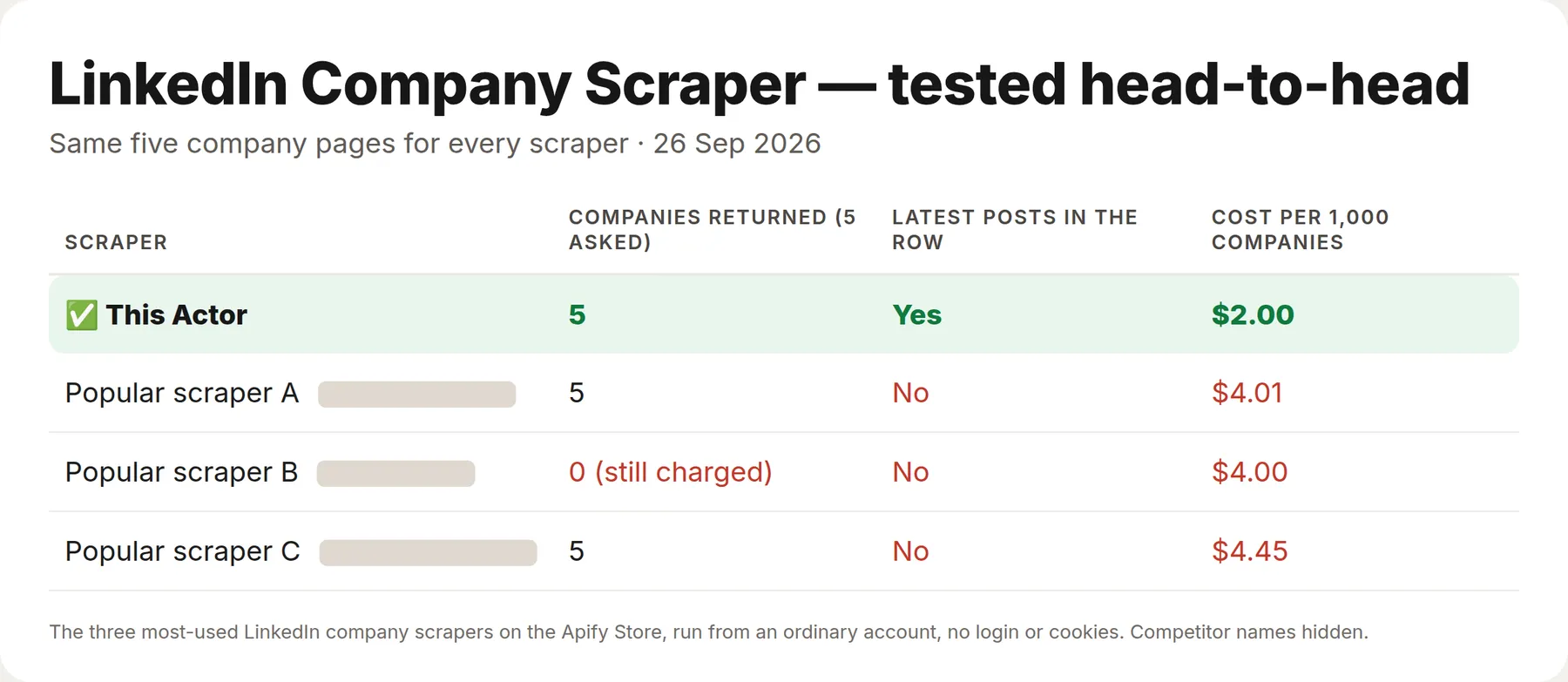
Same five company pages for every Actor, run through the three most-used LinkedIn company Actors on the Apify Store from an ordinary account.
| This Actor | The three others | |
|---|---|---|
| Companies returned (5 asked) | 5 | 5, 5 and 0 (an empty result that was still charged) |
| Price per 1,000 companies | $2 | $4.00–$4.45 |
| Latest posts in the same row | Yes | No |
Tested head-to-head — 5 October 2026
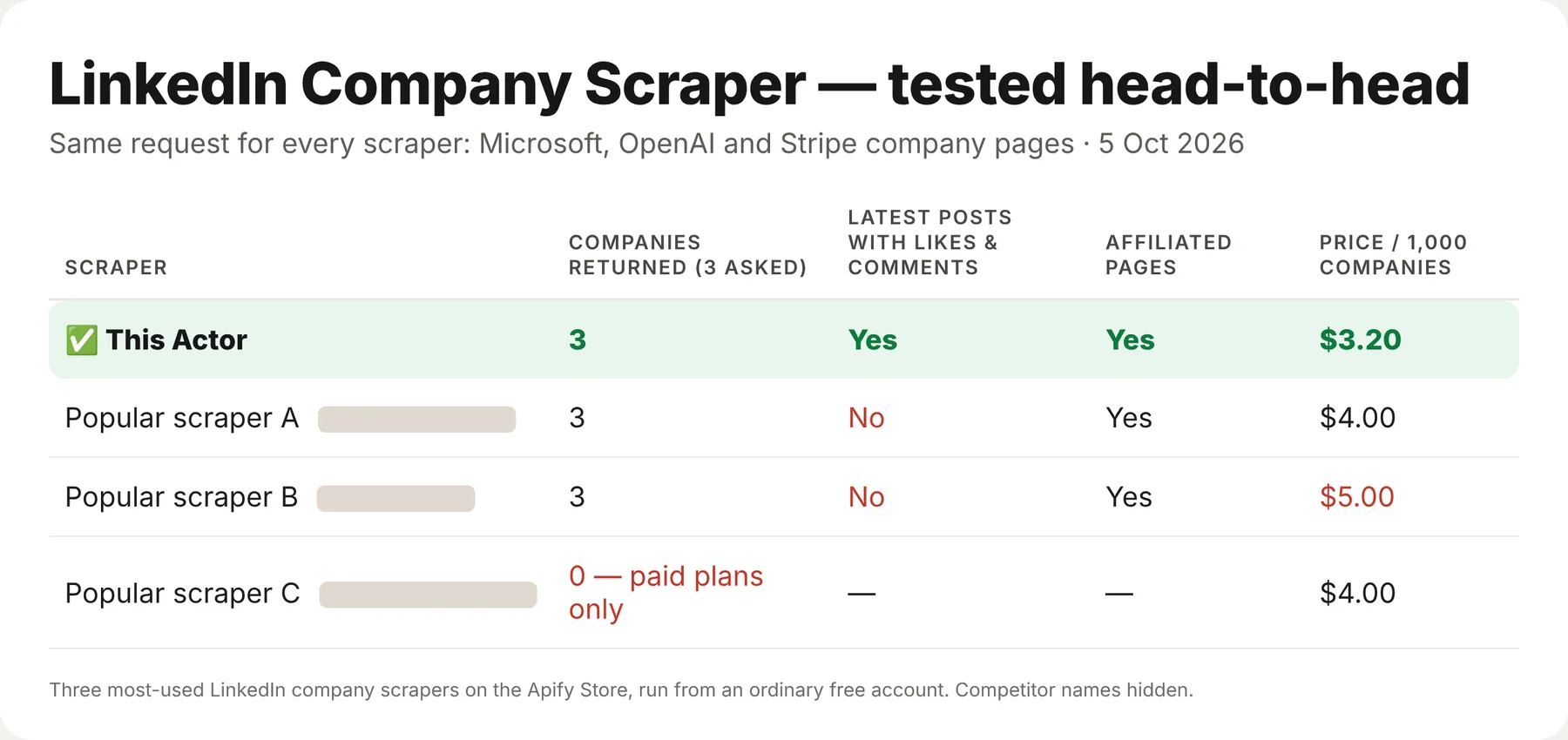
Microsoft, OpenAI and Stripe went to this Actor and to the three most-used LinkedIn company scrapers on the Apify Store, from an ordinary free account.
| This Actor | The others | |
|---|---|---|
| Price per 1,000 companies | $3.20 | $4 – $5 |
| Latest posts with likes & comments in the row | Yes | none |
| Affiliated (showcase) pages | Yes | 2 of 3 |
What is LinkedIn Company Scraper?
A company-enrichment tool for sales, recruiting and market research. It reads the public company page — the one LinkedIn shows search engines — and returns it as clean data you can sort, filter and load into a CRM. Paste one URL or a hundred thousand; call it from the Apify console, the API, a spreadsheet, n8n, Make, Zapier or an AI agent.
Typical uses: enriching a lead list with size and industry, building an account list for ABM, mapping a market segment by headcount and headquarters, tracking competitors' follower growth and posting activity, and finding lookalike companies through the similar-companies list.
What is in every row
| Field | Meaning |
|---|---|
name, website, tagline, description | Identity and the company's own description |
industry, companySize, companySizeMin, companySizeMax | Industry and the size band as numbers you can filter on |
employeesOnLinkedIn, followers | Members who list the company as employer, and page followers |
headquarters, streetAddress, city, region, postalCode, country | Headquarters with the full postal address |
companyType, founded, specialties | Privately held / public / non-profit…, year founded, specialties as a list |
locations | Every office address listed on the page |
companyId, coverImageUrl, jobsUrl | LinkedIn's numeric company ID, the cover banner, and the "See jobs" link (job search filtered to this company) |
similarCompanies | LinkedIn's "similar pages" — name, URL, industry, location and logo, ready to feed back in |
affiliatedPages | Subsidiaries and showcase pages the company lists — name, URL, industry, location, logo |
latestPosts, latestPostAt | The company's own newest posts (usually up to 10) with text, date, likes, comment count, reactions, images, video, document, link card, hashtags, mentions and link |
Company, school and showcase pages all work. Only what a logged-out visitor can see is returned: LinkedIn does not show follower counts of similar pages, a "verified" badge or the number of open jobs to logged-out visitors, so those are not included. Posts the company only reposted from other people are left out of latestPosts (the LinkedIn Posts Scraper returns them).
How much does it cost?
$0.002 per company — one row, one charge. From 15 October 2026 the price is $0.0032 per company (lower on Apify's higher discount tiers).
- Pages that do not exist: $0.
- Pages LinkedIn refuses after retries: $0 (delivered as an error row with the reason).
- Latest posts, locations, similar companies: included.
Bulk export: what 50,000 rows actually cost
This Actor is built for bulk jobs — paste a whole account list into one run, or refresh your CRM on a schedule. There is no fee per run, no fee per page and no proxy charge: you pay for the company rows you keep, and error rows are free.
| Job | This Actor | Most-used Actor in this category |
|---|---|---|
| 50,000 companies across 100 runs | $100 ($160 from 15 October 2026) | $200 |
Checked on the Apify Store on 23 September 2026 against the Actor with the most monthly users in this category ($0.004 per company). Some Actors here ask less per row — this table compares against the one buyers actually use most.
How to use it in three steps
- Paste LinkedIn company URLs or slugs into 🏢 Companies —
https://www.linkedin.com/company/stripeor juststripe— or link a Google Sheet under 🔗 Companies from a file or sheet. - Leave 📰 Add the latest posts on if you want posting activity in the same row.
- Press Start, then download JSON, CSV or Excel — or call the run from the API, n8n, Make, Zapier or an AI agent.
⬇️ Input
⬆️ Output
Run health
When a run ends with many error rows, the Actor sends its developer the counts (rows delivered, error types, run ID) so the cause gets fixed fast. Your input and your results are never sent.
Use cases
Lead and account enrichment
A column of company URLs from Sales Navigator or a CRM export in; size, industry, HQ and website out — filter to 51–200 employees in SaaS in one line.
Market maps
Scan a segment and chart it by headcount band, country and founding year. similarCompanies expands the list for you.
Competitor monitoring
Schedule weekly: followers, employees on LinkedIn and the newest posts show who is hiring and who is shipping.
AI agents
Connect through the Apify MCP server and ask "how big is Canva and where are its offices?" — the agent gets a row, not a screenshot.
Integrations
Every run is available through the Apify API, and the Actor works out of the box with n8n, Make, Zapier, Google Sheets, LangChain and the Apify MCP server. Schedule it, webhook it, or export straight to CSV.
FAQ
Do I need a LinkedIn account or cookies? No. The Actor reads public company pages only — nothing is logged in, so no account can be restricted.
Does it list employees? No. LinkedIn shows the employee list only to logged-in members. You get employeesOnLinkedIn (the count) and the size band.
Why did a company come back as an error? Either the slug does not exist (404) or LinkedIn refused the request after retries. Both are free; run the error rows again later.
Is this legal? The Actor reads publicly available company pages — business information a company publishes about itself. Use it in line with LinkedIn's terms and your local law.


![LinkedIn Company Data & Insights Scraper [NO COOKIE] avatar](https://images.apifyusercontent.com/svCwvsi6KESGk1EEmLtQUVYJwwmvIVkJlvWV5h9Jp7M/rs:fill:76:76/cb:1/aHR0cHM6Ly9hcGlmeS1pbWFnZS11cGxvYWRzLXByb2QuczMudXMtZWFzdC0xLmFtYXpvbmF3cy5jb20vNVRrZ2MySEM2a3ZnZWhmNmMtYWN0b3Itcmw1RVVJWVl3TjhNaDNqVWotclRoMmR2Z2NTeS1saW5rZWRpbl9jb21wYW55X2RhdGFfaW5zaWdodHNfbG9nby5wbmc.webp)


