

LinkedIn Posts Scraper — Latest Posts
Pricing
from $1.12 / 1,000 posts
LinkedIn Posts Scraper — Latest Posts
[$1/1K posts] Latest public LinkedIn posts of any company or person, no login: text, date, likes, URL, activity id, image, author, follower count — plus people's articles. Built for scheduled monitoring; filtered posts are free. No cookies, no run fee.
Pricing
from $1.12 / 1,000 posts
Rating
5.0
(2)
Developer

Matvey
Maintained by CommunityActor stats
0
Bookmarked
28
Total users
19
Monthly active users
7 days ago
Last modified
Categories
Share
LinkedIn Posts Scraper returns the latest public posts of any LinkedIn company or person: post text, publish date, likes and reactions, comment count, images, video, document and link card, mentions and hashtags, quoted and reposted posts, post URL, activity id, author and the source's follower count — one row per post. For people it also returns their LinkedIn articles. Give it single post URLs and each post comes back with its top comments (author, text, date, likes).
$0.001 per post ($0.0016 from 15 October 2026). No login, no cookies, no LinkedIn account at risk, no start fee. Posts removed by your filters and pages that refuse are free.
Tested head-to-head — 5 October 2026
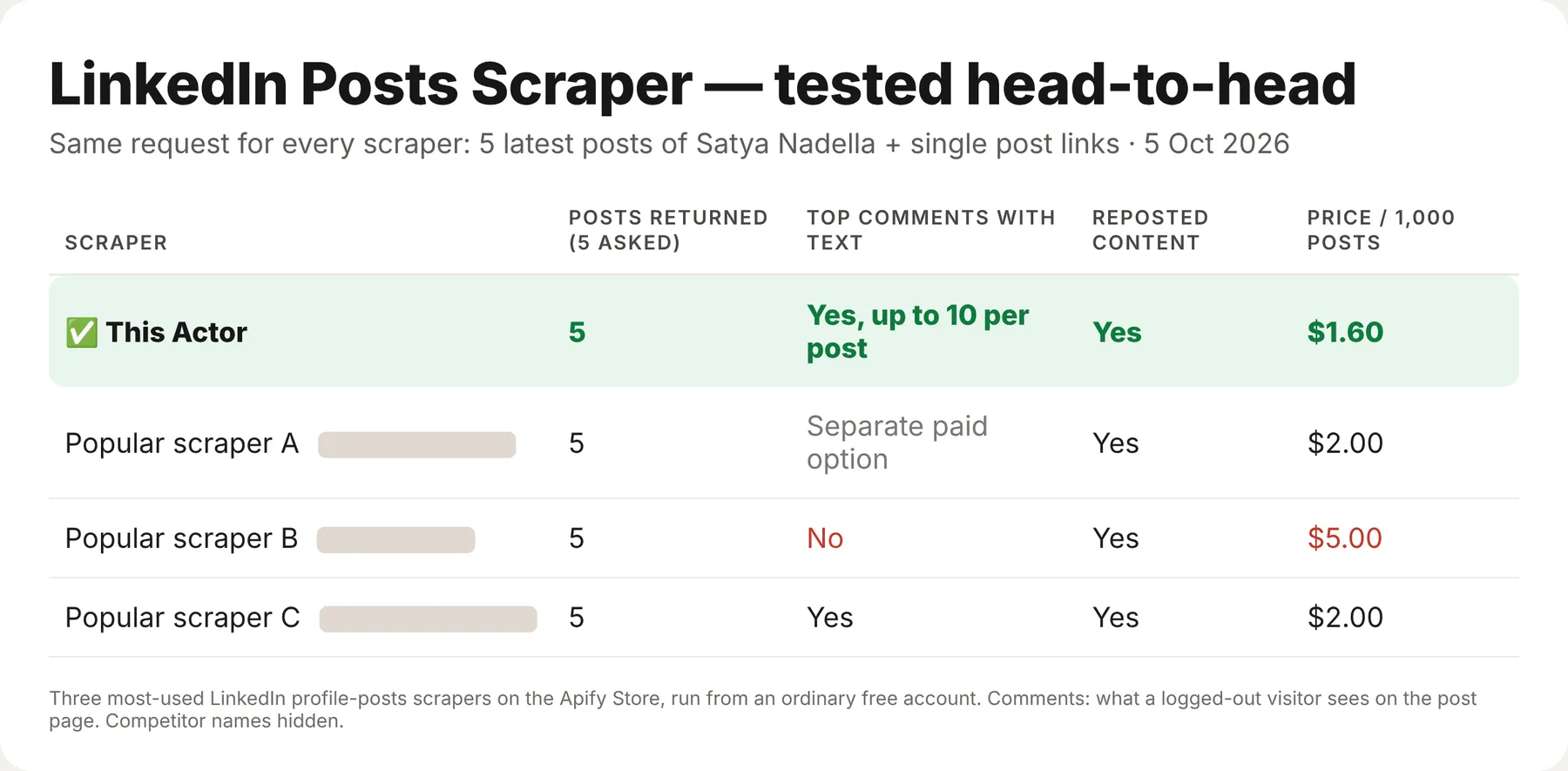
The 5 latest posts of Satya Nadella and single post links went to this Actor and to the three most-used LinkedIn profile-posts scrapers on the Apify Store, from an ordinary free account. Comments are what a logged-out visitor sees on the post page (up to about 10).
| This Actor | The others | |
|---|---|---|
| Price per 1,000 posts | $1.60 | $2 – $5 |
| Top comments with text | Yes, up to 10 per post | 1 of 3; 1 more as a paid option |
| Reposted content | Yes | 3 of 3 |
What is LinkedIn Posts Scraper?
A monitoring tool: point it at the companies and people you follow — competitors, prospects, thought leaders, your own brand — and schedule it. Every run returns what they published recently, with engagement. Deduplicate on activityId and you have a feed of every new post as it appears, in a spreadsheet, a Slack channel or your CRM.
What "latest" means. Without login, LinkedIn shows the posts in a company's "Updates" feed (about 7–10) and the posts, quote-shares and reposts of a person's "Activity" tab (usually 5–10) plus up to 10 articles. This Actor returns exactly that — it is built for regular monitoring, not for downloading someone's entire history. Run it daily or weekly and nothing is missed. When a page shows fewer posts than your Maximum posts per page, you get one free notice row saying how many LinkedIn showed.
Single posts and their comments. Paste post links (https://www.linkedin.com/posts/…, https://www.linkedin.com/feed/update/urn:li:activity:…) into 💬 Single post URLs (or the main list). Each gives one post row with every field above, plus topComments. A logged-out visitor sees only the top ~8–10 comments of a post — not all of them (Satya Nadella's post with 129 comments shows 8), and no replies; commentsCount still gives the full count. To get the same top comments for the posts found on company and profile pages, switch on 💬 Add top comments to posts from pages — that opens each post's own page, one extra request per post, so the run takes longer (no extra charge).
Freshness. Posts are read from the visible feed cards as well as the page's search-engine data, so quote-shares and reposts are included and the newest item matches what a logged-out visitor sees. Posts a company targets to a specific country or language (for example Microsoft's French-language posts) are not shown to logged-out visitors and cannot be read without login.
What is in every row
| Field | Meaning |
|---|---|
postType | post or article |
text, headline | Post text; headline is the title of a long-form LinkedIn article (null for ordinary posts) |
publishedAt, likes, reactionsCount | ISO timestamp; total reactions of all types (likes and reactionsCount are the same number) |
commentsCount, topReactionTypes | Comment count; the most frequent reaction types, e.g. LIKE, PRAISE |
postUrl, activityId, shareUrn, imageUrl | Link, stable id for deduplication, LinkedIn URN, cover image |
images, videoUrl, videoThumbnail | All attached images; the post video (MP4) and its cover |
documentTitle, documentUrl, documentPageCount | An attached document / carousel |
articleTitle, articleUrl, articleSubtitle | The shared link card (or the article itself for article rows) |
hashtags, mentions, links | Hashtags; tagged people and companies (name, URL, type); other links in the text |
authorName, authorUrl, authorType, authorHeadline, authorImageUrl | Who posted — company or person, with headline and photo when shown |
isRepost, repostedAt, repostedBy, repostedByUrl, originalActivityId | For reposts: when and by whom it was reposted; author fields are the original author |
quotedPost | The post a quote-share comments on: author, text, link, date when shown |
topComments | The top ~8–10 comments shown to logged-out visitors: author name, URL, photo, text, images, date, likes, comment link (single post URLs always; posts from pages with Add top comments; otherwise null) |
sourceUrl, sourceName, sourceType, sourceFollowers | The page you asked for and its follower count (sourceType: post for a single post URL) |
Every post row has every field (null or [] when the page does not show it). Repost counts are not shown to logged-out visitors, so there is no such field.
notice rows (free) carry sourceUrl, message, postsOnPage, postsDelivered, postsFilteredOut and maxPostsPerSource.
How much does it cost?
$0.001 per post — one row, one charge. From 15 October 2026 the price is $0.0016 per post (lower on Apify's higher discount tiers).
- Posts older than Only posts published after or below Minimum likes, and reposts or articles you switched off: $0.
noticerows: $0.- A single post URL is one post. Its
topComments, and the comments added by Add top comments to posts from pages, cost nothing extra. - Pages that do not exist or refuse after retries: $0.
How pages are read
Company pages are read directly. Profile pages go through a residential address, a new one for every
profile, because LinkedIn starts refusing direct and datacenter requests to profiles after a few
dozen. About one profile in four or five is hidden from logged-out visitors on that route (LinkedIn
answers HTTP 999 or shows a login wall). Hidden profiles are opened through a second route: a web
unblocker first, and a heavier unblocking service for the ones it cannot open — together they open
most of them. That second route is paid from the run's own margin, so on a list where most profiles
return few or no posts (strict date or likes filters, maxPostsPerSource of 1) some refused profiles
may not get it. Both routes are included in the price; a profile that still refuses is an error row
and costs nothing. If you put your own proxy URLs in the proxy field, they are used for every page
and the second route is off.
Very long lists
When most of the last 30 profiles in a run are refused by rate limits (hidden profiles do not count), the rest of the profiles go straight to the
second route (with your own proxies: the run pauses for 90 seconds, and after two pauses stops trying
profiles). A run that gets within 30 seconds of its timeout stops taking new pages the same way.
Pages that were not tried are not charged; their URLs are saved in the NOT_ATTEMPTED record of the
run's key-value store and named in the status message, so you can run them again later.
Run health
When a run ends with many error rows, the Actor sends its developer the counts (rows delivered, error types, run ID) so the cause gets fixed fast. Your input and your results are never sent.
Bulk export: what 50,000 rows actually cost
This Actor is built for bulk jobs — hundreds of companies and people in one run, on a schedule. There is no fee per run, no fee per page and no proxy charge: you pay for the post rows you keep.
| Job | This Actor | Most-used Actor in this category |
|---|---|---|
| 50,000 posts across 100 runs | $50 ($80 from 15 October 2026) | $100 |
Checked on the Apify Store on 23 September 2026 against the Actor with the most monthly users in this category ($0.002 per post). Some Actors here ask less per row — this table compares against the one buyers actually use most.
How to use it in three steps
- Paste LinkedIn company and profile URLs into 🔗 Companies and people —
https://www.linkedin.com/company/hubspot,https://www.linkedin.com/in/justinwelsh. - Set 📅 Only posts published after to yesterday and schedule the task daily; add 👍 Minimum likes to keep only posts that landed.
- Press Start, then download JSON, CSV or Excel — or send new rows to Slack, Sheets or a CRM through n8n, Make or Zapier.
⬇️ Input
Monitor pages:
Single posts with their top comments, plus a page whose posts get comments too:
⬆️ Output
A single post URL gives the same row with sourceType: "post" and topComments filled (shortened):
A page with fewer posts than asked adds one free row:
Use cases
Competitor content monitoring
Twenty competitors, daily, into a sheet: what they announce, how it lands, how often they post.
Sales triggers
Prospects' company posts about funding, launches and hiring — the reason to write today.
Creator and thought-leader tracking
Posts and articles of the voices in your niche with likes, to see which topics win.
AI agents
Through the Apify MCP server: "what did Stripe post on LinkedIn this week?" returns rows with links.
Integrations
Every run is available through the Apify API, and the Actor works out of the box with n8n, Make, Zapier, Google Sheets, LangChain and the Apify MCP server.
FAQ
Can I get a company's full post history? No — only what LinkedIn shows logged-out visitors: the latest ~7–10 posts. That is why the Actor is priced and built for scheduled monitoring.
Comments and reposts? Comment counts, reaction totals and the top reaction types are included, and reposts come as rows with isRepost: true (switch them off with Include reposts). Comment texts: the top ~8–10 comments a logged-out visitor sees on a post's own page, in topComments — always for single post URLs, and for posts from pages with Add top comments to posts from pages. The rest of the comments, replies, per-type reaction counts and repost counts are shown only to logged-in members, so they are not included. A commenter's headline is usually not shown to logged-out visitors (authorHeadline is then null).
Do I need a LinkedIn account? No. Nothing is logged in.
Is this legal? The Actor reads public posts. Posts by people are personal data — process them with a lawful basis under GDPR/CCPA and follow LinkedIn's terms.


