

Skyscanner Scraper — $0.80/1K flights, agents & calendar
Pricing
from $0.56 / 1,000 flights
Skyscanner Scraper — $0.80/1K flights, agents & calendar
Scrape Skyscanner flight prices by route and date: price, airlines, flight numbers, stops, layovers, times, duration, and every travel agent with its price, rating and booking link. One-way, round trip, multi-city and a 12-month price calendar. Export, schedule, or call via API and MCP.
Pricing
from $0.56 / 1,000 flights
Rating
0.0
(0)
Developer

Matvey
Maintained by CommunityActor stats
0
Bookmarked
2
Total users
1
Monthly active users
16 hours ago
Last modified
Categories
Share
Skyscanner Scraper pulls live flight prices from Skyscanner for any route and date and returns them as clean rows: total price, the travel agent or airline selling it, every other agent with its own price, rating and booking link, airlines, flight numbers, stops, layovers, departure and arrival times, duration and CO₂. One-way, round trip, multi-city, and a 12-month price calendar (cheapest fare per day). No Skyscanner API key, no partner account, no browser.
It is a Skyscanner API alternative for fare tracking, price comparison, travel content and AI agents: you give a route and a date (or paste a Skyscanner search link), you get a table you can export to Excel, CSV or JSON, call from Python or JavaScript, or plug into n8n, Make, Zapier and MCP.
Tested head-to-head — 30 Oct 2026
Four searches run on every Actor with the same input, 20 results each, US market, USD: JFK → LHR and LAX → NRT one-way, DPS ⇄ SIN round trip, CGK → SIN → BKK multi-city.
| This Actor | Other Skyscanner Actors in the Store | |
|---|---|---|
| Rows returned (20 asked) | 20 on every search | 18–20 (Skyscanner-based), 6–16 (cache-based) |
| Cheapest fare found | same or lower (LAX → NRT: $276.95 vs $279) | — |
| Cost of a 20-row run, Free plan | $0.020 one-way, $0.024 round trip | $0.027–$0.040 |
| Every agent with its own price, rating and booking link | yes | no |
| Data from Skyscanner itself | yes | not always (one returns cached fares from another source, with a wrong date) |
| Price calendar in the same Actor | yes, $0.0008 per day | separate Actor, $0.003 per day |
| Run time | 30–50 s | 2–31 s |
What is Skyscanner Scraper?
Skyscanner compares hundreds of airlines and online travel agencies for every search. This Actor runs that same search the way the Skyscanner website does and hands you the result as data:
- Flights mode — one row per itinerary. Each row carries the lowest price, the agent behind it, a direct Skyscanner booking link, and the full list of agents (Expedia, Kiwi.com, Trip.com, Gotogate, the airline itself…) with each agent's price and customer rating.
- Price calendar mode — one row per departure day for the next ~12 months with the cheapest one-way price Skyscanner has seen and its price level (low / medium / high). One fast request per route.
Typical searches return 100 to 2,000 itineraries; you keep as many as you need with Max flights per search.
What data can Skyscanner Scraper extract?
| Field | Example | What it is |
|---|---|---|
price | 290.4 | Lowest total price for all passengers |
currency / priceFormatted | USD / $291 | Currency you asked for |
cheapestAgent | British Airways | Who sells the lowest price |
bookingUrl | https://www.skyscanner.net/transport_deeplink/… | Skyscanner redirect to book with that agent |
agents[] | {name, price, rating, ratingCount, isAirline, bookingUrl} | Every agent with a price, cheapest first |
unpricedAgents[] | ["Lufthansa"] | Agents listed without a price ("see their site") |
airlines / airlineCodes | ["British Airways"] / ["BA"] | Marketing carriers |
flightNumbers | ["BA114"] | All flight numbers of the trip |
stops / totalStops | 0 / 0 | Most stops on one leg / all legs together |
departAt / arriveAt | 2026-12-03T21:15:00 | Local times, outbound |
returnDepartAt / returnArriveAt | 2026-12-10T08:05:00 | Local times, return (round trip) |
durationMinutes | 420 | Flying + layover time |
legs[] | segments, operating airline, airports, layovers | Full itinerary, leg by leg |
tags | ["cheapest","shortest"] | Skyscanner's own labels |
score | 0.999 | Skyscanner "Best" score |
isSelfTransfer | false | Separate tickets, re-check bags |
changeAllowed / refundable | false | Fare policy flags |
emissionsKg / emissionsVsTypicalPercent | 310 / -28 | CO₂ per passenger and vs a typical flight |
searchUrl | https://www.skyscanner.net/transport/flights/jfk/lhr/261203/… | The same search on Skyscanner |
totalFound / resultsComplete | 301 / true | How many itineraries Skyscanner had |
Price calendar rows (type: "price-day"): date, price, currency, priceLevel, isCheapestDay, searchUrl.
💰 How much does it cost to scrape Skyscanner?
Pay-per-event, no monthly rent, error rows are always free:
| Event | Free plan | Bronze | Silver | Gold+ |
|---|---|---|---|---|
| Flight search, per leg (one-way = 1, round trip = 2) | $0.004 | $0.0036 | $0.0032 | $0.0028 |
| Flight row (one itinerary) | $0.0008 | $0.00072 | $0.00064 | $0.00056 |
| Price-calendar day | $0.0008 | $0.00072 | $0.00064 | $0.00056 |
Examples (Free plan prices):
- One-way search, 20 flights: $0.004 + 20 × $0.0008 = $0.020
- One-way search, 50 flights: $0.044 (Gold: $0.031)
- Round trip, 50 flights: $0.008 + $0.040 = $0.048
- 12-month price calendar for one route (~360 days): ≈ $0.29
Rows cost $0.80 per 1,000 on the Free plan and $0.56 per 1,000 on Gold, plus the search fee. A search that finds nothing, a bad date or an unknown airport is a free error row. The last row of each run is a free summary of what was delivered and charged (switch it off with Add a free summary row).
How to scrape Skyscanner with Skyscanner Scraper
- Open the Actor and type From and To — airport codes (
JFK,LHR), city codes that cover every airport of a city (NYC,LON), or plain city names (Bali,Tokyo). - Set Departure date as
2026-12-03, or as+30for "30 days from today" — handy for schedules, the date never goes stale. - Add a Return date for a round trip, or leave it empty for one-way.
- Optionally pick cabin, passengers, stops, airlines, max price, currency and market.
- Press Start. A one-way search takes 15–35 seconds, a round trip 30–60 seconds.
- Download the table as Excel, CSV, JSON or HTML, or read it through the API.
⬇️ Input
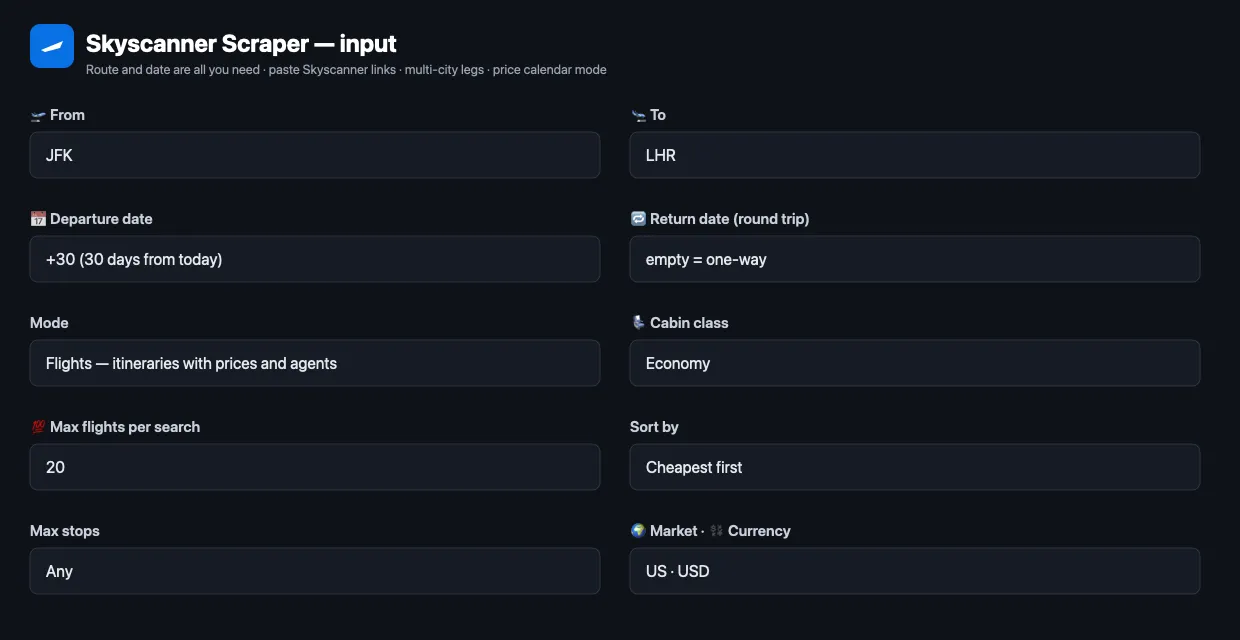
One-way or round trip
Several origins, destinations or dates, comma-separated ("origin": "JFK,EWR", "departureDate": "+30,+31,+32"), become one search per combination, up to 200 searches per run.
Paste Skyscanner links
Route, dates, adults, children and cabin are read from the link.
Multi-city / open-jaw
Price calendar
Add departureDate and calendarEndDate ("+10", "+90") to cut the window.
Filters
| Input | Effect |
|---|---|
maxStops | 0 direct only, 1, 2, or any |
airlines | keep itineraries flown by these IATA codes (["BA","AA"]) |
maxPrice | drop anything above this total price |
excludeSelfTransfer | drop separate-ticket itineraries |
sortBy | best (Skyscanner score), cheapest, fastest |
maxAgentsPerFlight | how many agents to list per row (0–100) |
market / currency / locale | point of sale, price currency, language |
Filters are applied to the full Skyscanner result, then the first Max flights per search rows are kept, so maxStops: "0" with 20 rows gives 20 direct flights when Skyscanner has them.
⬆️ Output
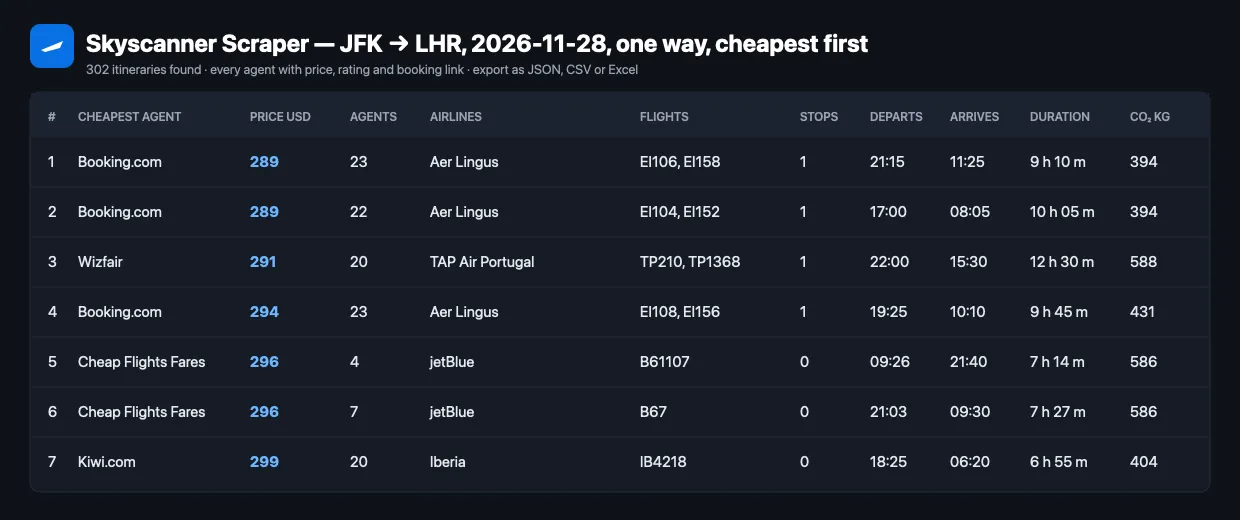
One real row (JFK → LHR, one-way, cheapest first; booking links shortened):
The dataset has three views: Flights, Price calendar, and Errors and notices.
Error rows
A search that cannot run returns one free row with type: "error", a kind (bad-input, no-results, error) and a sentence saying what to change: a date in the past, an unknown airport, a return before the departure, or a filter that left nothing. These rows are never charged, so an empty answer is a documented result, not a broken run.
Use cases for Skyscanner data
Fare tracking and price alerts
Schedule the same route daily with "departureDate": "+30" and compare price over time, or run the price calendar weekly to catch the cheapest days.
Agent and OTA price comparison
agents[] shows how far apart Expedia, Kiwi.com, Trip.com and the airline are on the same itinerary — the spread Skyscanner shows in its booking panel, as data.
Travel agencies and travel content
Build "cheapest month to fly to Bali" pages from the calendar, or quote clients several options with direct booking links.
Airline and route research
Who flies a route, how many connections, typical durations, CO₂ versus typical, self-transfer share.
AI agents and RAG
Flat, literal field names and a deterministic input make it easy for an LLM agent to call through the Apify MCP server and answer "what is the cheapest way from Jakarta to Tokyo next month?".
Integrations
- Apify API — run and read results from any language. Python:
- JavaScript —
await client.actor('lergassy/skyscanner-flights-scraper').call({...})withapify-client. - n8n, Make, Zapier, Google Sheets, Slack, webhooks — through Apify integrations.
- MCP server — AI agents (Claude, ChatGPT, Cursor) can find and run this Actor through the Apify MCP server (
mcp.apify.com).
❓ FAQ
Is it legal to scrape Skyscanner?
The Actor reads publicly visible flight prices — the same data any visitor sees on skyscanner.net — and no personal data. Whether and how you may reuse the data depends on your country and your use; for commercial redistribution check Skyscanner's terms and consult a lawyer.
Do I need a Skyscanner API key?
No. The official Skyscanner API is open only to approved partners. This Actor needs only an Apify account.
Can I use Skyscanner Scraper with the Apify API?
Yes — every run can be started and read through the Apify API, with ready clients for Python and JavaScript.
Can I use it through an MCP server?
Yes. Add the Apify MCP server to your agent and it can call this Actor as a tool with the same input fields.
Can I integrate it with other apps?
Yes: n8n, Make, Zapier, Google Sheets, Airtable, Slack, webhooks and anything that speaks HTTP.
How many results do I get per search?
As many as Skyscanner has for the route and date — usually 100 to 2,000 itineraries — capped by Max flights per search (default 50). One row = one itinerary, with every agent's price inside it.
Why can a price differ from what I see on Skyscanner?
Prices change by the minute and differ by market and currency. Use the same market and currency as your Skyscanner site, and open searchUrl to see the same search.
How long does a run take?
15–35 seconds per one-way search, 30–60 seconds per round trip, about 5–10 seconds per price calendar. Searches in one run go three at a time.
What does "+30" mean in a date?
"30 days from today". Saved tasks and schedules with relative dates never search a past date.
What is a "search, per leg" event?
Skyscanner prices every leg of a trip, so a round trip costs twice the search fee of a one-way search and a 3-leg multi-city three times. Rows are billed separately.
Your feedback
Found a bug, need a field, or want a different output? Open an issue on the Actor's Issues tab — we read every one and usually reply within a day. If the Actor did its job, a short review helps the next traveller find it.
You might also like
| Actor | What it does |
|---|---|
| Google Flights Scraper | Google Flights fares, calendar and booking options |
| Kayak Flights Scraper | KAYAK prices per booking provider |
| Momondo Flights Scraper | Momondo fares and sellers |
| Ryanair Flights Scraper | Ryanair fares and fare calendar |
| Flight Price Comparison | Several flight sources in one run |
| Booking.com Scraper | Hotel prices, rooms and reviews |


