

Kayak Flights Scraper — $1/1K rows + $0.003 per run start
Pricing
from $0.70 / 1,000 rows
Kayak Flights Scraper — $1/1K rows + $0.003 per run start
Scrape KAYAK flight prices by route and dates: fare per booking provider, airline, flight numbers, times, stops, layovers, aircraft, booking link. One-way, round trip, all cabins. $1.00 per 1,000 rows + $0.003 per run start, down to $0.70 per 1,000 on higher Store tiers.

Kayak Flights Scraper
Kayak Flights Scraper turns a KAYAK flight search into clean rows: the price, who is selling the ticket — airline or agency — the airline and flight numbers, times, duration, stops and layover airports, aircraft type, cabin, and a direct booking link. One-way and round trip, any cabin, many routes in one run.
From 31 October 2026: $1.00 per 1,000 rows on the Free plan, $0.70 on Gold, plus $0.003 per GB of run memory at start ($0.006 at the default 2 GB). No page fee, no proxy fee. Error rows are always free.
KAYAK is a metasearch engine, so a row here answers a question Google Flights cannot: which seller is cheapest for this exact itinerary right now, with the link that takes you to that price.
Tested head-to-head — 30 October 2026
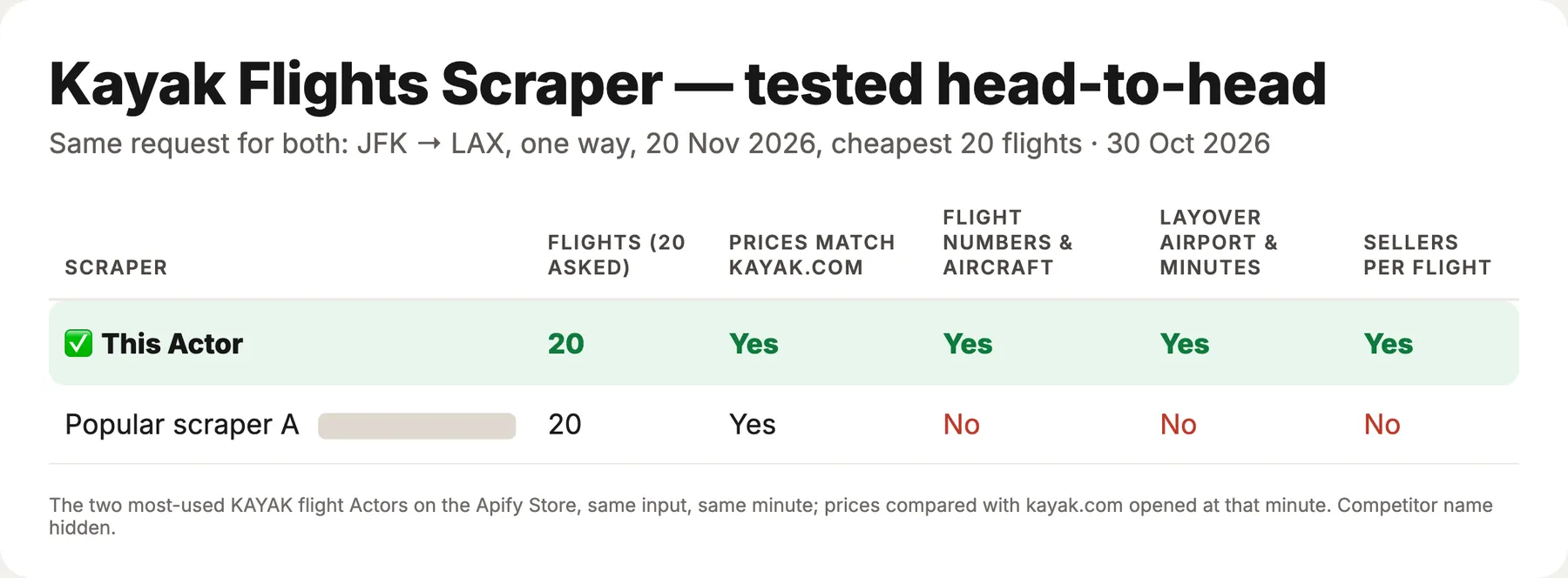
We ran this Actor and the second most-used KAYAK flights Actor on the Apify Store on the same request: New York JFK to Los Angeles, one way, 20 November 2026, sorted by price, 20 flights. Both returned the same 20 flights at the same prices, and those prices matched kayak.com opened at the same minute ($194, $213, $213, $215…). This is where they differed:
| This Actor | The other one | |
|---|---|---|
| Flight numbers for every segment | Yes (B61301, DL738…) | No |
| Aircraft, layover airport and minutes | Yes | No |
| How many sellers quote each flight | Yes | No |
| Paste a KAYAK link instead of filling the form | Yes | Yes |
What you get
| Field | Example |
|---|---|
price / currency / priceLabel | 78 / USD / $78 — per person, as KAYAK shows it; round trips are the total for both directions |
totalPrice / adults / children / travelers | 234 / 2 / 1 / 3 — the price for everyone in the search |
provider / providerCode | Booking.com / BDCFlight — the seller behind that price |
providersForThisFlight | 5 — how many sellers offer this same itinerary |
airline / airlines / flightNumbers | Jetstar / ["Jetstar"] / ["JQ86"] |
stops / layovers[] | 1 / [{ "airport": "KUL", "minutes": 95 }] — on a round trip stops is the most stops on either leg; layovers lists both legs |
departAt / arriveAt / durationMinutes | 2027-03-15T14:55 / 2027-03-15T18:00 / 185 |
legs[] → segments[] | Per flight: airline, flight number, airports, times, duration, aircraft (Airbus A321neo), layover |
cabinClass / tripType | economy / round_trip |
bookingUrl | Deep link straight to that seller's checkout; for trips KAYAK sells as separate tickets it opens the itinerary on KAYAK |
splitTickets[] | Only when KAYAK sells the trip as separate tickets: seller, price, route and checkout link of each ticket |
kayakUrl | The itinerary's page on KAYAK |
Switch on One row per booking provider and every seller of an itinerary becomes its own row — that is the comparison table behind "who sells this flight cheapest".
How to run it
- Enter origin and destination as IATA codes (
DPS,JFK,LHR) and a departure date. - Add a return date for a round trip, set passengers and cabin.
- Click Start. Rows appear in the Flights table.
Many routes in one run
There is no fee per search, so the number of routes only affects the rows you keep.
Bulk export: what it costs
From 31 October 2026 there are two events: a row, and a start fee of $0.003 per GB of run memory (the default 2 GB makes it $0.006 per run). Nothing is charged for searches, retries, pages or proxy traffic, and rows that fail are never charged.
| Per 1,000 rows | Free | Bronze | Silver | Gold |
|---|---|---|---|---|
| Row price | $1.00 | $0.85 | $0.78 | $0.70 |
| Job | Rows | Runs | Free plan | Gold |
|---|---|---|---|---|
| One route, one date | 50 | 1 | $0.056 | $0.041 |
| 100 routes in one run | 5,000 | 1 | $5.01 | $3.51 |
| 20 routes tracked daily for a month | 30,000 | 30 | $30.18 | $21.18 |
| Big export | 50,000 | 1 | $50.01 | $35.01 |
Put many routes into one run (routes or several links): the start fee is paid once per run, not per route.
What it is good for
- Fare comparison and metasearch: the same itinerary from five sellers, with each price and link.
- Price monitoring: schedule the routes you care about and store one row per run;
providertells you who moved. - Travel agencies: check whether an agency undercuts the airline before you quote a client.
- Market research: which carriers and sellers hold which routes, at what price and stop count.
Inputs
| Input | Notes |
|---|---|
origin / destination / departureDate / returnDate | IATA codes and ISO dates; a return date prices the round trip as one total |
searchUrls | Paste kayak.com or momondo.com search links instead — route, dates, cabin, passengers, sort and airline filter are read from the link |
adults / children | Up to 9 passengers; price stays per person, totalPrice covers everyone |
cabinClass | economy, premium economy, business, first |
sortBy | best (KAYAK ranking), cheapest, shortest |
maxStops | Nonstop only, or up to one or two stops |
airlines | Only itineraries flown by these airlines (AA, DL), filtered by KAYAK itself |
maxResults | Rows per search; KAYAK serves 50 per page and more pages are loaded as needed |
allProviders | One row per seller instead of one row per itinerary |
currency | Three-letter code |
routes[] | Many routes in one run |
proxyConfiguration | Default works; switch to residential if a route gets a bot check |
Notes and limits
Times are local to each airport, as KAYAK displays them. Round-trip prices are the total for both directions. Prices move during the day and between sellers — for monitoring, schedule the run rather than caching a result. A route KAYAK cannot search — a date in the past or more than about 11 months ahead, a city name instead of a code, the same origin and destination — gets a free error row that names the problem, at once and without retries. If KAYAK serves a bot check for the IP, the run writes an error row that says so and suggests switching the proxy to residential; that row is free.
The Actor reads publicly displayed prices and schedules without logging in, bypassing access controls or collecting personal data. KAYAK's terms restrict automated access, and the legality of scraping public data depends on your jurisdiction and use; review the terms and consult a lawyer for commercial use.
Need a field that isn't here?
Open an issue on this Actor's page — answered the same day, most requests shipped within a week.
Related: Google Flights Scraper for Google's own fare list and price calendar, Flight Price Tracker for fare alerts.
🤖 For AI Agents & LLM Apps
Compact reference for agents calling this Actor through the Apify MCP server or the Apify API (lergassy/kayak-flights-scraper).
Purpose: Scrape flight prices from KAYAK by route and dates: price per booking provider, airline, flight numbers, times, duration, stops and layovers, aircraft, cabin and a direct booking link. One-way and round trip, batch routes, all cabins.
Timing: the input below usually finishes in about 35 seconds, so run-sync-get-dataset-items works. Bigger lists take proportionally longer — past a few minutes start an asynchronous run and read the dataset when it finishes (the sync endpoint stops at 5 minutes).
Minimal input:
Output: one dataset row per flight offer. Main fields: price, currency, provider, airline, flightNumbers, stops, departAt, arriveAt, durationMinutes, bookingUrl.


