

Substack Scraper
Pricing
from $0.45 / 1,000 posts
Substack Scraper
[$0.60/1K posts] Posts of any Substack publication: title, subtitle, date, free or paid, likes, comments, restacks, word count, podcast length, cover, URL — plus full text of free posts and a publication row with author, subscriber tier and plans. Custom domains work. No run fee, no login.
Pricing
from $0.45 / 1,000 posts
Rating
5.0
(1)
Developer

Matvey
Maintained by CommunityActor stats
0
Bookmarked
19
Total users
9
Monthly active users
5 hours ago
Last modified
Categories
Share
Substack Scraper turns any Substack publication into a table of its posts: title, subtitle, date, free or paid, likes, comments, restacks, word count, post type, podcast length, cover image and URL — newest first, as deep into the archive as you want. Add the full text of free posts with one switch, and get a publication row with the author, description, subscriber tier, launch date, paid plans and benefits.
$0.0006 per post — a thousand posts for sixty cents. No start fee, no login, no browser. Custom domains work; publications that do not exist are free.
Tested head-to-head — 9 October 2026
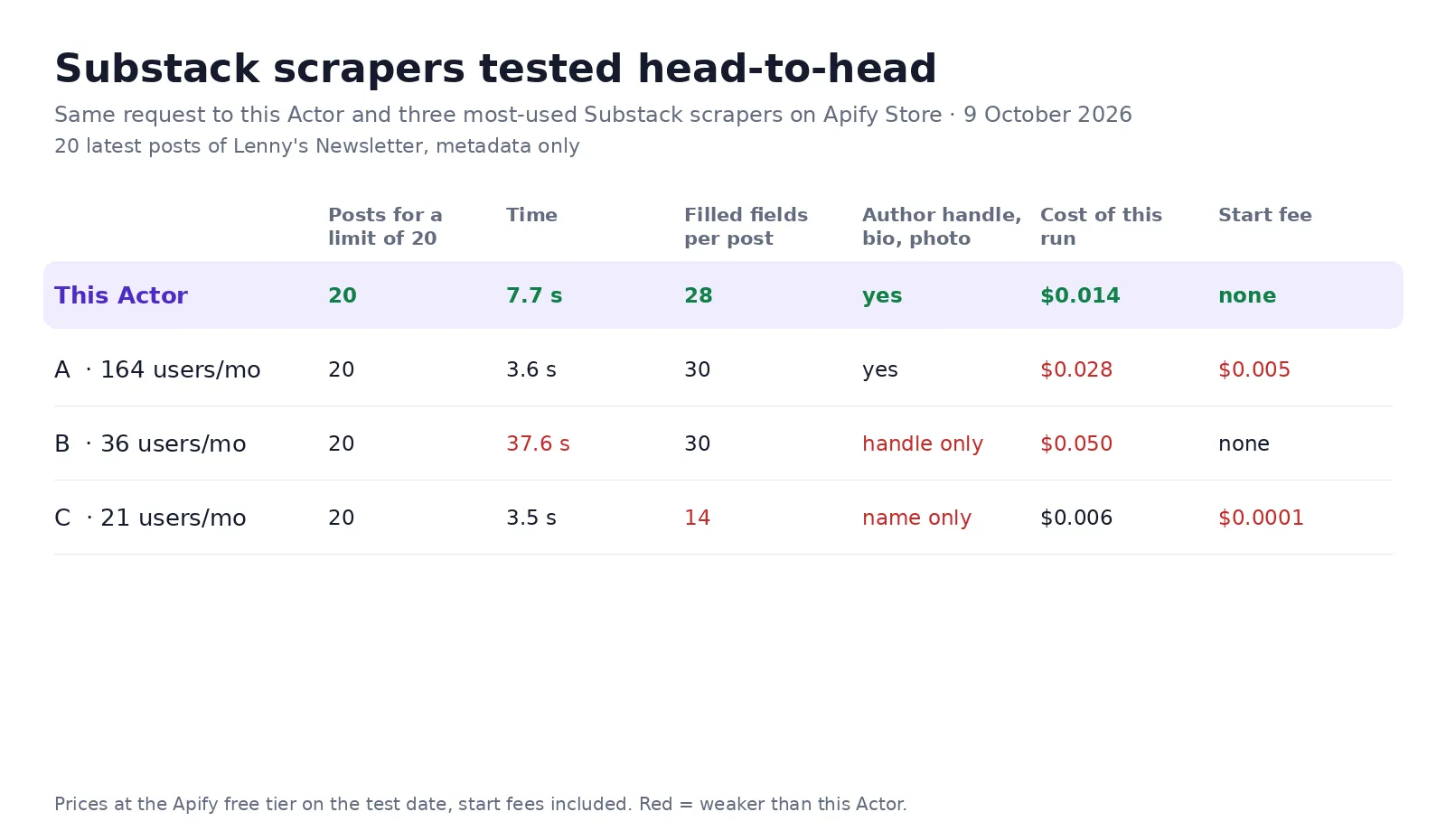
The same request went to this Actor and to the three most-used Substack scrapers on the Apify Store (A–C by users in the last 30 days): the 20 latest posts of Lenny's Newsletter, metadata only.
| This Actor | The three others | |
|---|---|---|
| Posts delivered for a limit of 20 | 20, plus one newsletter row with subscriber tier, plans and benefits | 20 each |
| Author handle, bio and photo on every post | yes | 1 of 3 |
| Filled fields per post | 28 | 14–30 |
| Time | 7.7 s | 3.5–37.6 s |
| Cost of this run | $0.014 — $0.0006 per post, $0.002 per newsletter | $0.006–0.050 |
| Start fee | none | 2 of 3 charge one |
What is Substack Scraper?
A research tool for anyone who studies newsletters: content teams tracking competitors, analysts sizing a niche, writers picking topics by what gets likes, and AI agents that need a publication's archive as data. Substack serves its archive as JSON to its own pages; this Actor reads that directly, so a 500-post archive takes seconds and costs 30 cents.
What is in every row
| Field | Meaning |
|---|---|
title, subtitle, url, publishedAt, authors, section | The post |
audience, isPaid | everyone, only_paid or founding |
likes, comments, restacks | Engagement as Substack counts it |
wordCount, postType, podcastDurationSec, hasVideo, hasPodcast | Format and length |
description, truncatedBody, coverImageUrl | Preview text and image |
contentHtml, contentText, contentIsPreview | Full text when Add the full text is on; a paid post gives its free preview, flagged and not charged |
The publication row adds authorName, authorHandle, authorBio, description, subscriberTier ("Hundreds of thousands of subscribers"), paidSubscriberTier, subscribersOrderOfMagnitude, createdAt, language, twitter, hasPaidPlan, plans (price, currency, interval) and the free and paid benefits.
How much does it cost?
| Event | Price |
|---|---|
| Post row | $0.0006 |
| Full text of a free post (optional) | $0.0006 |
| Publication row (optional) | $0.002 |
- Posts skipped by the date filter or the type filter: $0.
- Paid posts when full text is on: the preview is delivered free.
- Publications that do not exist or are not on Substack: $0.
Bulk export: what 50,000 rows actually cost
This Actor is built for bulk jobs — hundreds of publications in one run, whole archives, or a schedule that reads every new post daily. There is no fee per run, no fee per page and no proxy charge: you pay for the rows you keep.
| Job | This Actor | Most-used Actor in this category |
|---|---|---|
| 50,000 post rows across 100 runs | $30 | $57.50 + start fees |
Checked on the Apify Store on 23 September 2026 against the Actor with the most monthly users in this category ($0.00115 per post plus a fee per run). Some Actors here ask less per row — this table compares against the one buyers actually use most.
How to use it in three steps
- Paste publication URLs or subdomains into 📰 Publications —
https://www.lennysnewsletter.com,noahpinion.substack.com, or justlenny. - Set Posts per publication (newest first) and, if you like, Only posts published after and Post type. Turn on Add the full text of free posts for the body.
- Press Start, then download JSON, CSV or Excel — or call the run from the API, n8n, Make, Zapier or an AI agent.
⬇️ Input
⬆️ Output
Use cases
Competitive content research
Fifty publications in your niche, the last 100 posts each — sort by likes per word and see what actually lands.
Newsletter monitoring
Schedule daily with Only posts published after yesterday; new posts flow into Sheets or Slack.
Sizing a market
The publication row gives subscriber tiers, launch dates and paid plans for hundreds of newsletters in one run.
AI agents and RAG
Full text of free posts, clean contentText, through the Apify MCP server — "summarize what Platformer wrote about AI this month" returns sourced rows.
Integrations
Every run is available through the Apify API, and the Actor works out of the box with n8n, Make, Zapier, Google Sheets, LangChain and the Apify MCP server. Schedule it, webhook it, or export straight to CSV.
FAQ
Does it read paid posts? No. Paid posts come back with all their metadata and engagement, and with the free preview when full text is on — never the paywalled body.
Are subscriber counts exact? Substack publishes tiers, not numbers ("Tens of thousands of paid subscribers"); the row carries the tier text and its order of magnitude.
Custom domains? Yes — paste the domain; the Actor follows Substack's own redirects and reads the same JSON.
Comments and notes? Not in this Actor; it is posts and publications.
Is this legal? The Actor reads public pages and the JSON behind them, the same thing a browser loads without logging in. Use the content in line with each publication's terms and copyright.


