

Website Screenshot & Visual Regression Diff
Pricing
from $3.20 / 1,000 screenshot captureds
Website Screenshot & Visual Regression Diff
Visual regression testing for public web pages: capture screenshots and compare them with another page or a PNG/JPEG baseline. Get pixel-level diff images and change percentages for QA, monitoring, CI, and AI agents.
Pricing
from $3.20 / 1,000 screenshot captureds
Rating
0.0
(0)
Developer

lintlab
Maintained by CommunityActor stats
0
Bookmarked
2
Total users
1
Monthly active users
a month ago
Last modified
Categories
Share
Compare public website screenshots for visual regression testing. Give the Actor a page URL and, optionally, a second page or a PNG/JPEG baseline: it returns the captured screenshots, a pixel-level diff image and the percentage of the page that changed. Use it to check releases, or schedule it to watch a page for visual changes.
Highlights
- Full-page, viewport, or CSS-selector captures in PNG or JPEG
- Fixed-height and offset captures (
captureHeight,topOffset) for above-the-fold shots or one band of a long page - Lazy-load scrolling (
scrollToLoad) and sticky/fixed-header handling (hideFixedElements) for clean full-page shots - Desktop, laptop, tablet, and mobile device presets
- Optional page or image baselines with configurable diff thresholds
- Structured dataset rows plus direct screenshot and diff-image URLs
- $0.004 per successful capture; $0.002 per computed diff
Quick start
Try a ready-made example: Full-page website screenshot. Open it, click Start, then copy it and swap in your own URLs.
What a diff looks like
A real run (zTkTt3VRHJyClQ4gT, 2026-09-28) on two small demo pages: the changed page raises the price, drops one feature bullet and restyles the button. Changed pixels are red; unchanged content is faded.
| Baseline | Changed page | Diff (1.24% of pixels changed) |
|---|---|---|
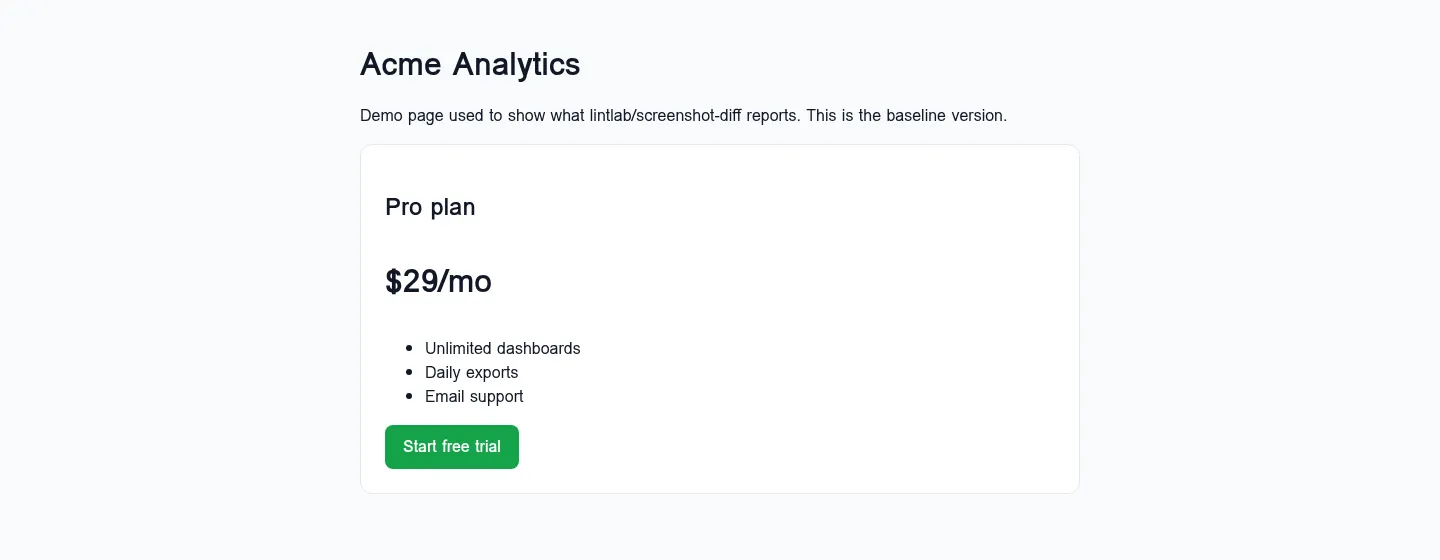 | 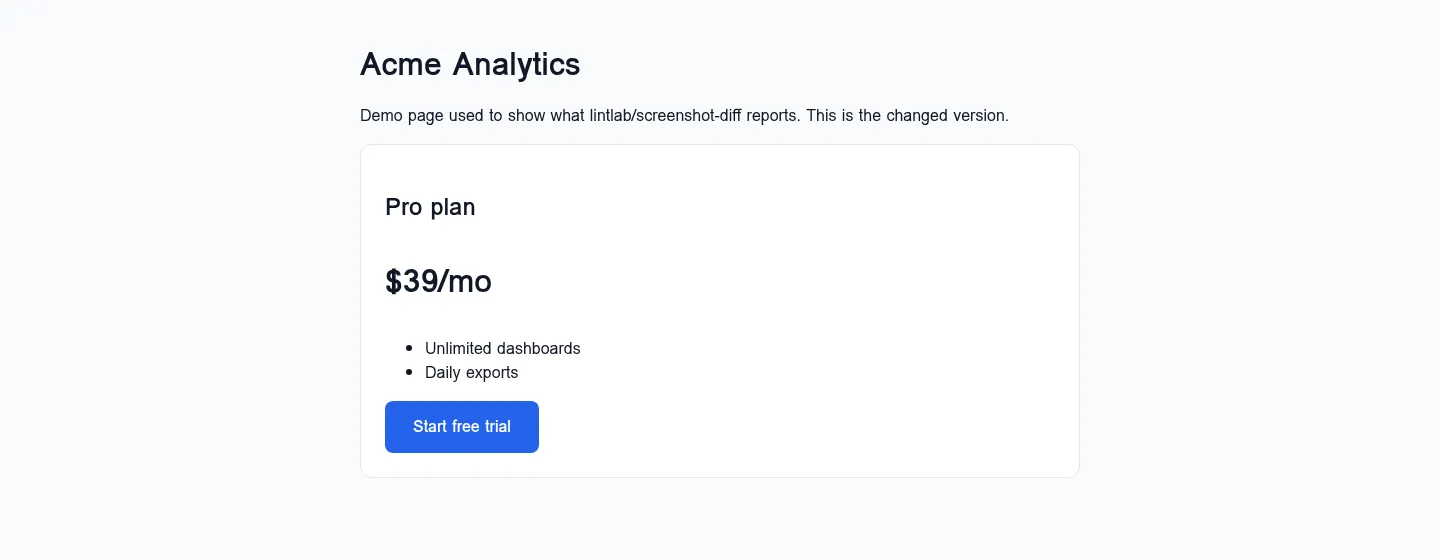 | 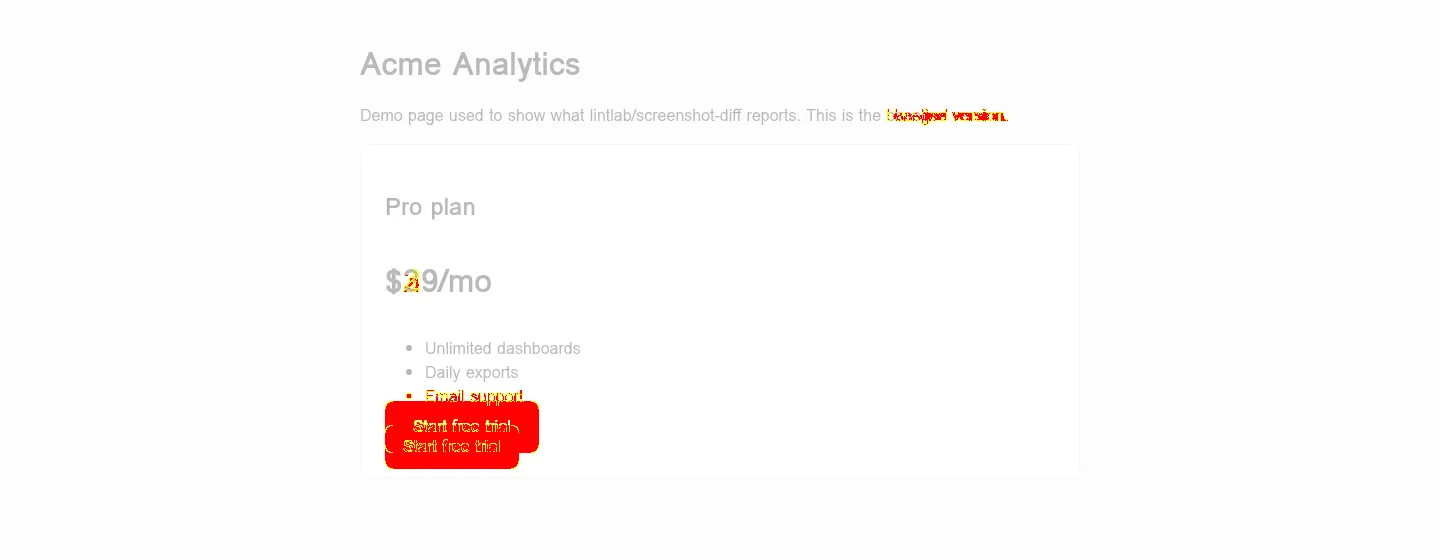 |
Input: the changed page in urls, the original page in baselineUrls, with "mode":"viewport", "device":"laptop" and "captureHeight":560. The row reports "diffPixels": 9963, "diffPercent": 1.235491, "changed": true, and it cost $0.006 in events ($0.004 capture + $0.002 diff).
Use in CI
Call the Actor from any CI job through the Apify API: pass your preview URL in urls and the production URL in baselineUrls, then fail the job when diff.diffPercent is above your threshold. No browser on the runner and no baseline images in git.
Use with AI agents / MCP
Call lintlab/screenshot-diff through the Apify API or Apify MCP server. Read the default dataset, then pass screenshotUrl or diff.diffImageUrl to the next vision-capable agent step.
Overview
screenshot-diff is a lintlab Apify Actor that captures screenshots of public web pages. It can compare each capture with another public page or a public PNG/JPEG baseline and store a pixel-level diff image.
The Actor uses Playwright Chromium, honors robots.txt for the lintlab-screenshot user agent (an unreachable or 5xx robots.txt counts as "disallow", per RFC 9309), re-checks every main-frame redirect hop before capture or charge, and routes Chromium through a local validating forward proxy. The proxy pins each outbound socket to a validated public IP and rejects non-HTTP URLs and private, loopback, or link-local network destinations.
Input
urls is required and accepts at most 200 entries. Baselines are optional. Use either baselineUrls (pages captured with the same settings) or baselineImageUrls (public PNG/JPEG files), with one baseline per input URL in the same order.
Capture modes:
fullPagecaptures the full document.viewportcaptures the configured viewport.selectorcaptures the first element matchingselector.
Fixed-height and offset captures (full page and viewport modes):
captureHeightcrops the capture to a fixed height in CSS pixels.{"mode":"fullPage","captureHeight":768}gives a consistent above-the-fold shot, even on pages whose height keeps changing.topOffsetstarts the capture that many CSS pixels from the top of the page, e.g. to skip a header or capture a band further down ({"topOffset":1200,"captureHeight":800}).- The capture is clamped to the rendered page height. A
topOffsetpast the end of the page returns an error row, and no capture is charged. scrollToLoadscrolls through the page (bounded: up to 50 viewport steps, 20,000 px, ortimeoutSecs), returns to the top, and waits briefly for images, so lazy-loaded images and sections render in full-page shots.hideFixedElements(full-page mode) turns fixed elements into absolute and sticky elements into static, so a sticky header or cookie bar appears once instead of repeating or covering content.- Both default to
false. Web fonts are always awaited (up to 3 s) before capture.
Device presets are desktop (1366×768), laptop (1440×900), tablet (768×1024), and mobile (390×844 at 3× device scale with a mobile user agent). networkidle is the default readiness setting and falls back to load if the page does not become idle before the timeout.
Output
The default dataset contains one item for each requested URL. Screenshots and diff images are records in the run's default key-value store.
Failed or policy-blocked URLs still receive a dataset item with an error field and null capture fields. A path blocked by the site's robots policy reports "error": "disallowed by robots.txt".
Pricing
| Event | Price |
|---|---|
| Screenshot captured and stored | $0.004 |
| Visual diff computed and stored | $0.002 |
| Start fee from us | $0.00 |
A failed capture is not charged. A diff is charged only after it is computed and its image is stored. Apify platform usage for the run is included in these event prices. The Actor respects a run's maximum charge limit and stops scheduling work when that limit is reached.
Use cases
- Visual regression checks in CI
- Monitoring your own public pages for visual changes
- Giving AI agents eyes on public web interfaces
Limits and behavior
- Public HTTP(S) pages only. DNS answers resolving to private, loopback, link-local, reserved, or other non-public IP ranges are blocked.
robots.txtis fetched once per origin per run and honored for main-frame target and baseline navigations, baseline images, and main-frame redirects. Each redirect hop is checked before Chromium requests it. A disallowed hop on the target URL yields an error row with no capture or charge. A disallowed hop on a baseline URL is never requested either: the row keeps the target screenshot (charged as a capture) and reportsdiff failed: disallowed by robots.txt, with no diff charge. Subframes are not checked against robots.txt.- No login, cookies input, CAPTCHA handling, user-supplied proxy, or stealth/anti-detection behavior is provided. The Actor uses its own local security proxy.
- The Actor does not bypass access controls. Use it only on pages you are allowed to access and capture.
- PNG and JPEG baselines are supported. Differently sized images are aligned at the top-left and padded with white to the larger canvas before comparison.
- Dynamic pages can vary between runs. Use
waitForSelector,delayMs,hideSelectors,scrollToLoad, andhideFixedElementsto reduce expected noise. screenshotUrlanddiffImageUrlare signed Apify key-value-store links, so they open without an API token even if your account's storage access is restricted. They follow your run storage's retention settings.
Local development
Node.js 20 or later is required.
The end-to-end script writes only to ./storage, captures https://example.com, and prints elapsed time plus a 2 GB memory × seconds compute estimate.
More lintlab tools
- Broken Link Checker & Technical SEO Audit: page-level SEO findings and broken internal links
- XML Sitemap Checker, Validator & URL Extractor: validate sitemaps and export every URL
- PDF to Markdown & Text Extractor: page-aware Markdown for RAG and AI agents
Built by lintlab — small, reliable data tools. Tested before release. Support: open an issue on this Actor's Issues tab here on Apify.


