

PDF to Markdown & Text Extractor
Pricing
from $2.40 / 1,000 pdf processeds
PDF to Markdown & Text Extractor
PDF to Markdown converter and PDF text extractor for RAG and AI agents, including scanned PDFs via OCR (7 Latin-script languages). Convert a public PDF to text or page-aware Markdown with metadata, links and simple tables; OCR reads image-only pages instead of only flagging them.
Pricing
from $2.40 / 1,000 pdf processeds
Rating
0.0
(0)
Developer

lintlab
Maintained by CommunityActor stats
0
Bookmarked
3
Total users
2
Monthly active users
a month ago
Last modified
Categories
Share
Convert a public PDF URL into page-aware Markdown or plain text for search indexing, RAG and AI-agent workflows. The Actor extracts text, links, metadata and tables, and can OCR scanned pages. One dataset item is written per input URL.
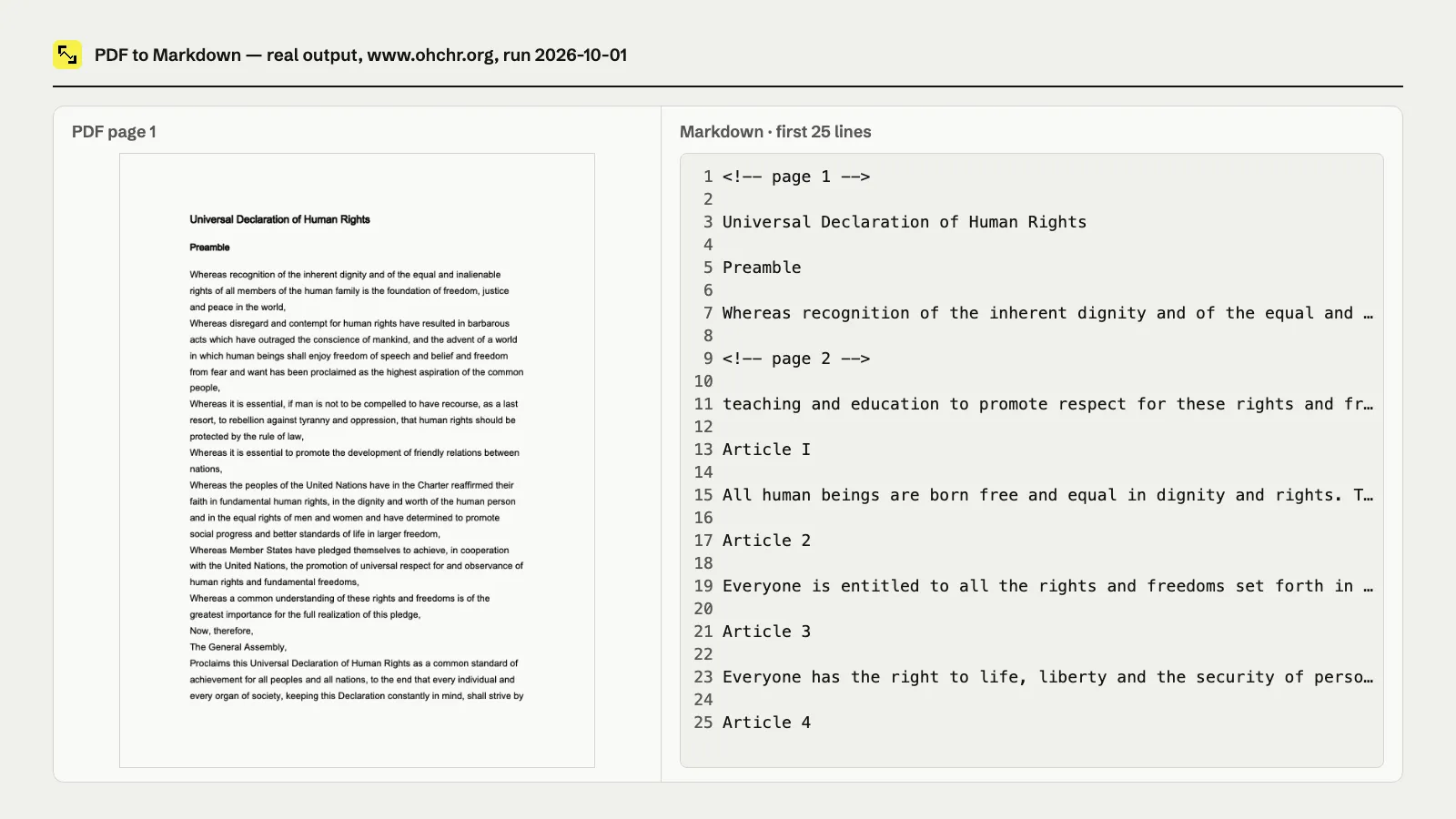
Real output from a run on the English UN Universal Declaration of Human Rights PDF (2026-10-01): the first page beside the beginning of the extracted Markdown.
What you get
- Markdown page markers, inferred headings, obvious lists, and preserved links
- Tables extracted as Markdown: read from the PDF's own table tags where present, otherwise rebuilt from column alignment, each with a confidence score and its source
- PDF metadata, page counts, hashes, and structured link records
- Image-only page detection and optional OCR with per-page confidence
- $0.003 per successfully processed PDF
- $0.006 per OCR page with at least 20 recognized characters
OCR defaults to auto, which reads image-only pages. Use off for text-layer extraction only, or all to OCR every page when a PDF's text layer is unusable.
Quick start
Try a ready-made example: PDF to text for RAG, extract tables from a PDF or OCR a scanned PDF to text. Open one, click Start, then copy it and swap in your own PDF URLs.
Example: a table extracted from a PDF
Real output from a run on the W3C WCAG example table PDF (2026-10-02). The table came from the PDF's own tags, so tableConfidence reports {"rows": 5, "columns": 6, "confidence": 1, "source": "tags"}:
Untagged PDFs are rebuilt from column alignment instead, scored by how well the columns line up (tables with missing cells are capped at 0.6), so you can route uncertain tables to a manual check.
Which tables to trust
Every table gets a review flag, and every document gets a tableReport summary, so your pipeline can send clean tables straight to the index and hold the doubtful ones for a person:
needsReviewis true when confidence is below 0.8, a row has missing cells, or the table has only one column.raggedRowscounts rows with fewer filled cells than the table's column count.headerDetectedis true when the PDF tags a header row, or the first row is text-only above a numeric column.
Real tableReport from the W3C table run above (2026-10-02):
Confidence measures how well the extraction is supported, not whether the numbers are right, so check values that matter against the PDF even when needsReview is false.
Use with AI agents / MCP
Call lintlab/pdf-to-markdown through the Apify API or Apify MCP server, then read markdown, perPage, metadata, and imageOnlyPages from the default dataset before sending text to an LLM or indexer.
Overview
Convert public PDF URLs into page-aware Markdown or plain text with an Apify Actor. It downloads each document safely, respects robots.txt, verifies that the response is a PDF, and writes one dataset item per URL.
What it does
- Extracts text without a browser and runs OCR locally in the container.
- Marks every Markdown page with
<!-- page N -->. - Infers headings from relative font sizes and preserves obvious lists.
- Extracts tables as Markdown: tagged PDFs from their Table/row/cell structure, untagged ones from consistent column alignment (rows with missing cells kept, cells left empty), with a per-table confidence score.
- Converts link annotations into Markdown links and returns a structured link list.
- Returns document title, author, creator, producer, creation date, and modification date when embedded in the PDF.
- Reports pages with little or no extractable text as image-only and OCRs them in
automode. - Uses SSRF-safe downloads with DNS pinning, public-unicast-only addresses, redirect checks, byte limits, timeouts, and fail-closed robots handling.
PDFs are processed two at a time in off mode and one at a time in auto or all mode. Password-protected or encrypted PDFs are reported as encrypted; the Actor never attempts to bypass encryption, DRM, paywalls, or logins.
Input
outputFormat accepts markdown, text, or both. Duplicate URLs are removed. maxPdfs limits unique input URLs, and the run's maximum charge setting can lower the number attempted.
ocrMode accepts auto (image-only pages), off (no OCR), or all (OCR every page and use recognized text when available). ocrLanguages accepts eng, deu, fra, spa, por, ita, and nld; join codes with + for multilingual pages. maxOcrPages defaults to 20 and cannot exceed 200 per PDF.
Output
Each input produces one dataset item, including failures:
The default key-value store also contains SUMMARY, a JSON run summary with processed, failed, charged, page, byte, and error counts.
Pricing
The Actor costs $0.003 per successfully processed PDF, or $3 per 1,000 PDFs, plus $0.006 per OCR page when OCR returns at least 20 characters. Failed or skipped OCR pages are free. The dataset item is saved before charging. Failed downloads, robots-blocked URLs, non-PDF responses, oversized responses, parse failures, and encrypted PDFs are free. A clean image-only report is successful and chargeable because it identifies affected pages without failing.
Limits and responsible use
OCR uses bundled language data without run-time network access. It renders pages at up to 300 DPI with a 9-million-pixel limit and a 30-second timeout per page. Handwriting and low-quality scans may produce poor or empty text. OCR output is paragraphs; it does not infer tables. Heading, paragraph, list, link-label, and table reconstruction for text-layer pages are geometry-based heuristics; complex layouts, multi-column prose, forms, and nested tables may not reproduce perfectly. Tagged tables use PDF structure tree Table/TR/TH/TD nodes where available. In Markdown, spanned or missing cell positions are left empty; nested tables are not reconstructed. Untagged tables use row and column alignment, up to 10 columns. The tableConfidence source is tags or layout. Tagged confidence is below 1 when a tagged cell cannot be mapped to text. Layout confidence is below 1 when cell starts drift enough to lower the rounded alignment score; it is capped at 0.6 when a kept row has empty cells or nearby short text may have been omitted. Confidence measures extraction evidence, not semantic correctness. Right-to-left text-layer pages (Arabic, Hebrew) come out in logical reading order with searchable letters, but paired brackets and punctuation next to embedded left-to-right text can still land on the wrong side, for example )word( or (word,).
Only process documents you own or are authorized to access and transform. The Actor honors robots.txt, accepts only public HTTP(S) destinations, and does not authenticate or bypass access controls.
More lintlab tools
- Website Screenshot & Visual Regression Diff: full-page screenshots with pixel diffs
- Broken Link Checker & Technical SEO Audit: page-level SEO findings and broken internal links
- XML Sitemap Checker & URL Extractor: validate sitemaps and export every URL
Built by lintlab — small, reliable data tools. Tested before release. Support: open an issue on this Actor's Issues tab here on Apify.


