

Google Sheets Sync (Reliable)
Pricing
from $1.00 / 1,000 row writtens
Google Sheets Sync (Reliable)
Sync Apify datasets with Google Sheets: append, upsert, replace or export. Batched writes, automatic retries, deduplication and clear error messages.
Pricing
from $1.00 / 1,000 row writtens
Rating
0.0
(0)
Developer

Loris Barce
Maintained by CommunityActor stats
0
Bookmarked
2
Total users
1
Monthly active users
4 hours ago
Last modified
Categories
Security
Limited permissionsShare
Send any Apify dataset to a Google Sheet, or pull a Google Sheet into a dataset. Pick append, upsert, replace or export.
It's built to finish: writes go in batches, transient Google errors are retried automatically, duplicates are skipped, and when something is wrong the error tells you how to fix it.
- Append new rows at the bottom of a tab
- Upsert: update rows whose key matches (e.g.
urlorid) and append the rest - Replace the whole tab with fresh data
- Export a tab to an Apify dataset (header row → JSON keys)
- Deduplication on by default: running the same sync twice writes nothing the second time
- Nested JSON flattened into columns (
address.city), arrays joined with; - Dry run to check access, columns and limits without writing anything
- Pay only for rows actually written, never for retries or failed rows
Quick start
- Set up a Google service account (5 steps, below). You only do this once.
- Share your sheet with the service account email as Editor.
- Paste the sheet URL and the service account JSON into the input, select your dataset, and click Start.
No credentials yet? Run the Actor with the example input anyway. It starts in demo mode: it shows you, in the
OUTPUTrecord, exactly which header and rows it would write. Nothing is written and no rows are charged (only the tiny $0.00005 start fee, see Pricing).
Set up a Google service account (5 steps)
A service account is a "robot" Google user that the Actor signs in as. It can only open sheets you explicitly share with it.
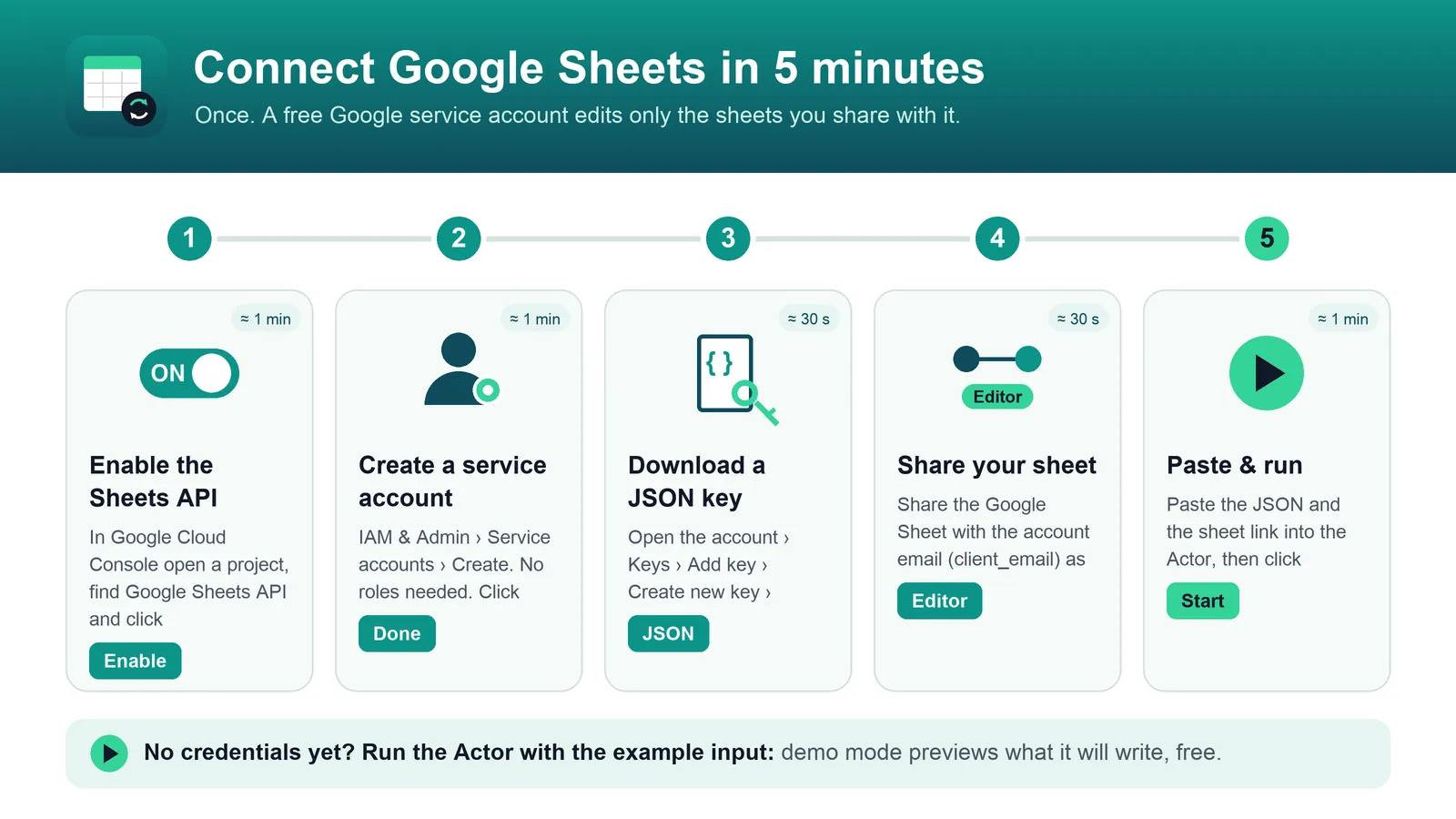
- Create a project and enable the API. In Google Cloud Console, create a project (or pick one), then open Google Sheets API and click Enable.
- Create the service account. Go to IAM & Admin → Service Accounts → Create service account. Any name works. You can skip the optional roles.
- Download a JSON key. Open the service account, then Keys → Add key → Create new key → JSON. A
.jsonfile downloads. Keep it private. - Share your sheet. Open the Google Sheet, click Share, paste the service account email (the
client_emailvalue in the JSON, likename@project.iam.gserviceaccount.com), choose Editor, and click Send. - Paste the key into the Actor. Copy the whole content of the JSON file into Google service account JSON. The field is stored encrypted and never appears in logs.
For export only, the sheet can be shared as Viewer.
Input examples
Append a dataset to a sheet
Upsert by key (update existing rows, add new ones)
Rows whose url is already in the sheet are updated in place. Only the columns present in your data are changed, so formulas and notes in other columns stay as they are. New URLs are appended.
Replace the content of a tab
columns is optional. It keeps only these columns, in this order.
Export a sheet to a dataset
Each row becomes one dataset item, with the header row as keys.
Write rows pasted as JSON (no dataset)
This writes the columns id | name | address.city | tags and the row 1 | Alice | Rome | vip; newsletter.
Input reference
| Field | Default | Description |
|---|---|---|
spreadsheetId | required | Sheet ID or full URL |
sheetName | first tab | Tab to use. Created if missing (except for export) |
mode | append | append, upsert, replace, export |
datasetId | Dataset to write. Takes precedence over rawRows | |
rawRows | JSON array of objects, used when no dataset is selected | |
keyColumns | Required for upsert. With dedup, a row is a duplicate when its key already exists | |
deduplicate | true | Skip rows already present in the sheet (and repeated rows in the input) |
columns | all | Whitelist and order of columns |
flattenNested | true | a.b.c columns and ; -joined arrays. When off, nested values are written as JSON text |
serviceAccountJson | Service account key (secret). Empty = demo mode | |
dryRun | false | Validate and report, without writing |
Output
Each run stores a summary in the OUTPUT record of its key-value store:
- In export mode,
rowsWrittenis the number of rows exported. - If some rows could not be written,
failedRowsDatasetIdpoints to afailed-rowsdataset. Each item there holds the original row and the reason (see FAQ). - If the run stops on a configuration error,
errorcontains the message.
Pricing
This Actor uses pay per event. You pay only for rows that Google confirmed as written:
| Event | When it is charged | Price |
|---|---|---|
row-written | A row appended or updated in the sheet | $0.001 per row ($1 per 1,000 rows) |
row-exported | A row exported from the sheet to the dataset | $0.0005 per row ($0.50 per 1,000 rows) |
apify-actor-start | Once per run | $0.00005 per run (5 cents per 1,000 runs) |
Platform usage (compute) is included: you pay nothing else. Besides the start fee, you don't pay for skipped duplicates, failed rows, retries, dry runs or demo mode. If you set a maximum cost per run, the Actor writes as many rows as fit in it, then stops cleanly with status SUCCEEDED and spendLimitReached: true. The run is never cut off in the middle of a batch.
FAQ: common errors
"The service account cannot access this spreadsheet. Share the spreadsheet with … as Editor" The sheet is not shared with the service account. Click Share in the sheet and add the email shown in the message as Editor.
"The service account can open the spreadsheet but is not allowed to edit it" The sheet is shared as Viewer. Change the service account's access to Editor. Nothing was written.
"The Google Sheets API is not enabled for the Google Cloud project…" Open the link in the message, click Enable, wait a minute or two and run again.
"Invalid service account JSON: …"
Paste the entire downloaded .json file, including the curly braces. OAuth client IDs and API keys won't work: it has to be a service account key ("type": "service_account"). If Google rejects the key, it may have been deleted. Create a new one.
"Spreadsheet … was not found" Check the URL or ID. Copy it straight from the browser's address bar.
"This file is not a native Google Sheet" The file is an uploaded Excel or CSV. In Google Sheets choose File → Save as Google Sheets and use the new URL.
"This write would grow the spreadsheet to about … cells"
Google allows at most 10,000,000 cells per spreadsheet, counting all tabs. Limit the columns with columns, write fewer rows, or use a new spreadsheet. This check runs before anything is written.
"Key column(s) … were not found in the data"
keyColumns must match column names in your data. Nested fields use dot notation, e.g. address.city.
Some rows are in failed-rows. What happened?
Google rejected that batch even after retries; the most common cause is a cell over Google's 50,000 character limit. The rest of the data was still written. Each item in failed-rows shows the original row and the reason. Fix the data and run again: with deduplication on, rows already in the sheet are skipped. Rows marked "possiblyWritten": true hit a network error where Google's answer was lost. Check the sheet for them. They were not charged.
I ran it without credentials and nothing was written That's demo mode. Add the service account JSON to write for real.
Why this instead of other Sheets actors
- Built to finish the job. Writes go in batches of up to 500 rows, requests are paced to stay under Google's per-minute quota, and rate-limit or server errors are retried with exponential backoff (up to 6 attempts). Retries of an append can never duplicate rows.
- One bad batch doesn't sink the run. Rows Google rejects go to a
failed-rowsdataset with the reason. Everything else is still written, and the run ends with a clear summary. - Real upsert. Matching rows are updated in place by key and new ones appended, without touching your formulas or other columns.
- Dedup by default. Scheduled runs don't pile up duplicate rows.
- Errors you can act on. Each error says what is wrong and how to fix it, with the exact email to share the sheet with. Everything is checked before the first write.
- Fair billing. You're charged only for rows Google confirmed, and your spending limit is respected to the row.
- Minimal access. The Actor only gets read access to the dataset you select, and it reaches only the sheets you share with your service account.
In italiano (breve)
Google Sheets Sync (Reliable) copia un dataset Apify in un Google Sheet (modalità append, upsert, replace) oppure esporta un foglio in un dataset (export). Scrive a blocchi, ritenta da solo gli errori temporanei di Google e salta i duplicati. Se qualcosa non va, l'errore dice cosa fare.
Configurazione in 5 passi: (1) in Google Cloud Console abilita la Google Sheets API; (2) crea un service account; (3) scarica una chiave JSON; (4) condividi il foglio con l'email del service account (client_email) come Editor; (5) incolla il JSON nel campo Google service account JSON.
Prezzo: paghi solo le righe scritte davvero (row-written, $0,001 a riga) o esportate (row-exported, $0,0005 a riga), più $0,00005 per ogni avvio. L'uso della piattaforma è incluso. Duplicati saltati, righe fallite, dry run e modalità demo non costano nulla oltre all'avvio. Se imposti un limite di spesa, l'Actor si ferma in modo pulito quando lo raggiunge.
Senza credenziali l'Actor gira in modalità demo: nel record OUTPUT mostra un'anteprima di cosa scriverebbe, senza scrivere nulla e senza addebitare righe.


