

Booking.com Reviews Scraper
Pricing
from $0.60 / 1,000 delivered reviews
Booking.com Reviews Scraper
Export flat, deduplicated Booking.com reviews with positive and negative text, scores, stay context, property replies when exposed, filters, coverage, and optional changes-only monitoring.

Use this Booking.com reviews scraper to convert property URLs into flat, deduplicated review rows with scores, stay details, traveler context, property replies, stable identity, and explicit coverage. Use the default recent export for a quick dataset or changes-only output for recurring reputation monitoring.
This hotel reviews scraper is built for review analysis, property-response tracking, guest-experience research, and scheduled changefeeds. It preserves positive and negative review text separately, provides a normalized combined text field, and distinguishes source exhaustion from a bounded, capped, or failed collection window.
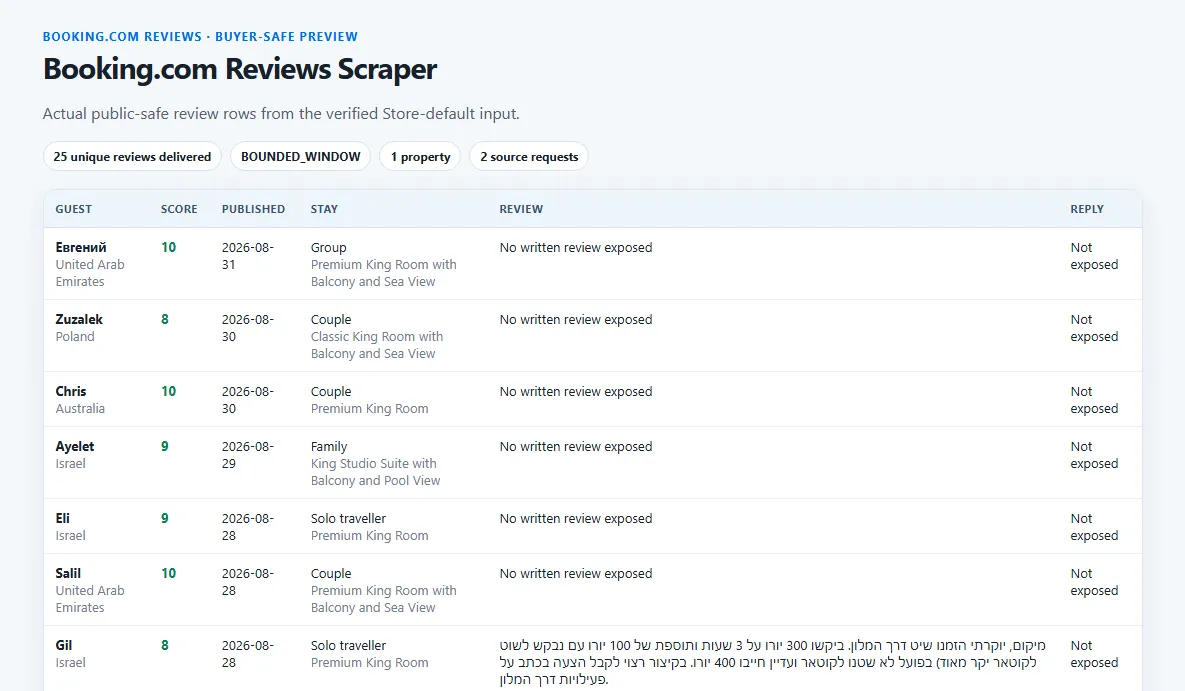
🚀 Start in 60 seconds
Paste one public property URL and keep the 25-review prefill:
After the run finishes, open:
- Review overview for text, score, stay, traveler, reply, state, and coverage fields.
- Full export for every schema-backed review field.
OUTPUTin the default key-value store for matched, emitted, suppressed, coverage, and PPE counts.
Start with one property before increasing concurrency or review limits. The run report exposes total source requests, transferred bytes, runtime, limits, coverage, and billing without disclosing the extraction implementation.
🎯 Choose the right workflow
Recent review export
Keep mode: "recent" for a low-work newest-first window. Recent mode is intentionally reported as BOUNDED_WINDOW unless the source positively ends within the requested limit.
This is recommended for daily or weekly monitoring, recent sentiment analysis, and quick review samples.
Full pagination
Use mode: "full" when you need older reviews. The Actor continues until positive source exhaustion, maxReviewsPerProperty, or a hard request, runtime, cost, or charge ceiling.
Full mode can claim complete coverage only after positive source exhaustion. Receiving the requested review count proves the delivery cap was met; it does not prove there were no more source reviews.
All rows or changes-only monitoring
Keep outputMode: "all" to write every unique matching review. For a changefeed, use:
The first state-less run establishes the baseline and writes every matched review as NEW. Compatible repeats write only NEW or UPDATED reviews; UNCHANGED rows are observed and suppressed for free. A newly exposed property reply counts as UPDATED.
Changes-only mode requires incrementalState: true and accepts at most three unique properties per run. Partial or capped snapshots never infer that a missing review was deleted.
📦 What you get
Each paid dataset item is one unique Booking.com review. Core fields include:
- stable review, property, and delivery identity so interrupted runs can resume without duplicate paid rows;
- positive, negative, and normalized combined review text;
- overall score, review subratings, and property score breakdown when exposed;
- publication and stay dates, stay length, and room type;
- traveler type, stay tags, reviewer name, and reviewer country;
- property response text and date when included;
- helpful votes, source language, and photo URLs when exposed;
NEW,UPDATED, orUNCHANGEDchange status;- canonical coverage status and buyer-safe warnings.
A representative row shape:
Missing source values remain null; the Actor does not invent review text, scores, stay details, replies, or reviewer attributes. Duplicate targets and stable review identities are not delivered or charged twice.
🎛️ Input guide
Review selection
| Input | Use it when | Work and result impact |
|---|---|---|
propertyUrls | You have public Booking.com property URLs or compact cc/slug IDs | Each unique property adds source work; all-mode accepts up to 100 targets |
mode | You need a recent window or deeper history | Full pagination can require many more pages |
maxReviewsPerProperty | You need a bounded number of rows per property | Higher values can increase requests, runtime, and transfer |
language | You need one source language | Blank keeps every language |
sortBy | You need newest, relevance, oldest, or score order | Newest is recommended for monitoring and lower-date early stopping |
dateFrom, dateTo | You need a publication-date window | Deterministic filters; newest-first can stop after crossing the lower bound |
minScore, maxScore | You need an inclusive 0–10 score range | Applied to extracted rows |
travelerTypes, reviewerCountries | You need audience segments | Empty keeps every exposed traveler type or country |
Replies and monitoring
Turn on repliesOnly to keep only reviews with an official property response. includePropertyResponse controls whether response text and date are included; disabling it reduces output depth but does not reduce source requests.
Keep incrementalState on for stable change classification. Choose changes_only only when you want the dataset to contain NEW and UPDATED rows instead of all observed rows.
Limits and coverage
maxConcurrencyparallelizes properties, not pages inside one property.maxRequestsis the hard total across metadata lookup, pages, retries, and automatic routing.maxRuntimeSecsstops new source work before the wall-clock ceiling.
The defaults are safer than maximizing every limit. Raise one dimension at a time and inspect coverage after each larger run.
💰 Pricing
This Actor uses pay per event. The prices below are the active Store prices for all six Apify plans.
| Apify plan | Actor start per verified run | Price per delivered review | Price per 1,000 delivered reviews |
|---|---|---|---|
| Free | $0.0018 | $0.00075 | $0.75 |
| Bronze | $0.0018 | $0.00070 | $0.70 |
| Silver | $0.0018 | $0.00065 | $0.65 |
| Gold | $0.0018 | $0.00060 | $0.60 |
| Platinum | $0.0018 | $0.00034 | $0.34 |
| Diamond | $0.0018 | $0.00020 | $0.20 |
- Free example: 25 delivered reviews cost
$0.0018 + (25 × $0.00075) = $0.02055. - Gold example: the same 25 reviews cost
$0.0018 + (25 × $0.00060) = $0.01680.
Gold reduces the review event by 20% compared with Free. At 25 delivered reviews, the flat start makes the complete-run saving 18.25% ($0.00375).
The start is charged only after at least one target returns usable verified review observations or positively confirmed empty coverage. Blocked, failed, and unverified source attempts are free. On a compatible changes-only repeat with zero NEW or UPDATED rows, a successful verified scan costs only the $0.0018 start. Suppressed unchanged rows, duplicates, and run-report evidence are free. The first changes-only baseline writes every matching review as NEW, so those delivered rows are charged normally.
✅ Coverage you can trust
Each review row includes coverage context, and the machine-readable run report explains the whole run.
COMPLETErequires positive source exhaustion for the requested extraction shape.BOUNDED_WINDOWmeans recent mode or the delivery limit produced a useful window without a full-history claim.CAPPEDmeans a review, request, runtime, cost, or buyer-charge ceiling stopped additional work.PARTIALmeans some requested work succeeded but at least one part could not be verified.BLOCKEDorFAILEDremains explicit and is never converted to empty success.EMPTY_CONFIRMEDrequires positive source evidence that no matching reviews exist.
Coverage warnings explain limits and filters. The run report separates matched, emitted, suppressed, intended, charged, and free counts. Monitoring state advances only from a safe compatible observation; missing rows in partial snapshots do not become deletion events.
🔌 API and automation
Use the same input through the Apify API. Keep the Actor ID and token in environment variables:
After completion, read defaultDatasetId from the run and fetch:
For scheduled changefeeds, reuse the same property targets, filters, sort order, mode, and review cap so state comparisons remain compatible. The Actor does not create schedules itself.
❓ FAQ and support
Why are all reviews NEW on the first changes-only run?
There is no earlier compatible snapshot yet. The first run establishes the baseline; later runs can identify unchanged and updated rows.
Why is recent mode not COMPLETE when it returned the requested rows?
Because a delivery cap is not source exhaustion. Recent mode is a useful newest-first window and is labeled accordingly unless the source positively ends.
Does a missing review mean it was deleted?
No. V1 does not infer deletion from partial, capped, or otherwise incomplete observations.
What should I include in a support report?
Include the Apify run ID, input with tokens or secrets removed, the affected property, expected and observed behavior, and the relevant coverage warnings or OUTPUT report. Never send an API token in a support message.


