

eBay Product Scraper & Price Change Monitor
Pricing
from $1.25 / 1,000 listing delivereds
eBay Product Scraper & Price Change Monitor
Search eBay listings, filter prices and condition, read item details, and track newly observed listings and price changes across repeated runs.
Pricing
from $1.25 / 1,000 listing delivereds
Rating
0.0
(0)
Developer

Luka
Maintained by CommunityActor stats
0
Bookmarked
2
Total users
1
Monthly active users
20 hours ago
Last modified
Categories
Share
Turn public eBay listings into a sourcing shortlist or a repeatable price watchlist.
- Compare asking prices, current auction bids, condition and seller information.
- Export stable listing IDs and URLs for spreadsheets and AI agent workflows.
- Keep a baseline and receive newly observed listings and changed values on later checks.
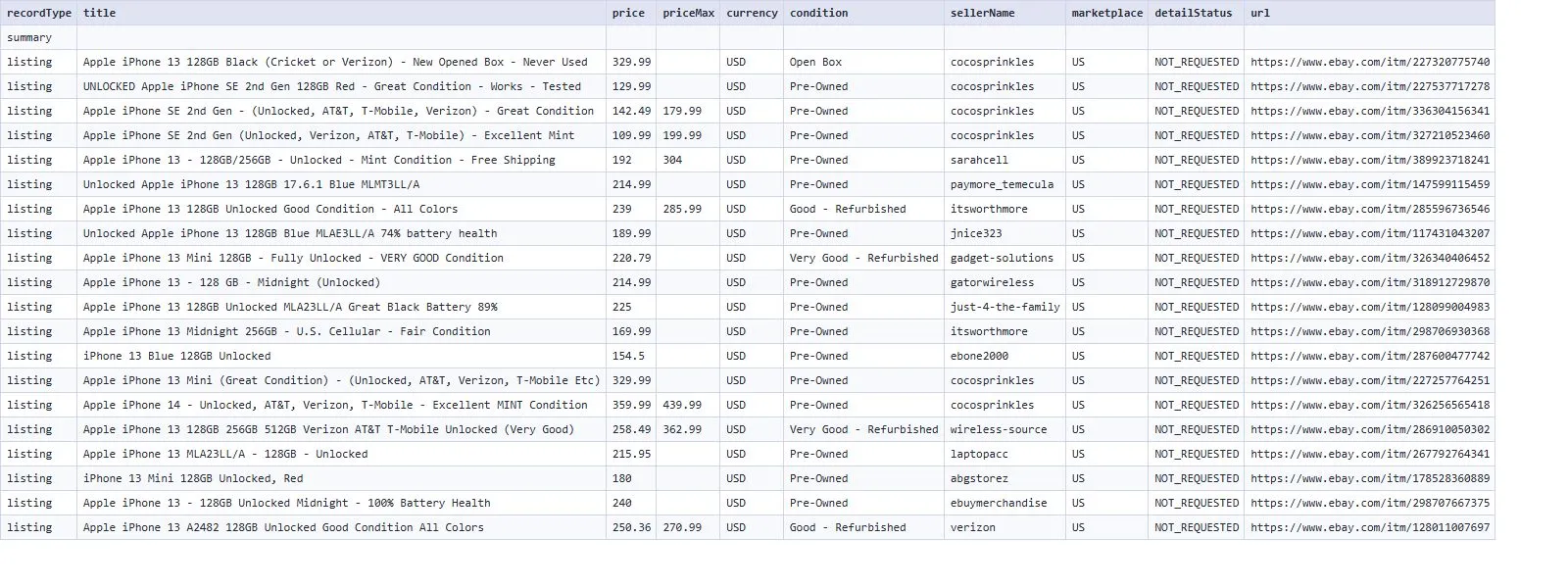
An observed listing includes listingId, title, price, currency, condition, sellerName, marketplace and url. Missing secondary source fields are null; prices are never invented.
🚀 Start in 60 seconds
Keep United States, enter a search term, and run with 20 listings / 1 page. Open the Listings Dataset view. The default does not open every item detail and is the least expensive way to explore a search.
🎯 Choose the right workflow
| Workflow | Result |
|---|---|
| Current listings | A deduplicated snapshot of the requested listings. |
| Monitor changes — first run | A baseline of current listings saved under your watchlist name. |
| Monitor changes — later runs | NEW and UPDATED observations with before/after values. Unchanged listings do not create paid change rows. |
Reuse identical targets, filters, limits and watchlist name for comparisons. Changing the scope starts a separate baseline. Search rankings can change; NEW means absent from the previous observed window, not a newly created eBay listing. A missing result never proves that an item sold or ended.
📦 What you get
The Dataset contains listing, change and a free summary row. Keep recordType when processing mixed rows. CSV, Excel and JSON exports are available through Apify.
Listing fields include stable ID and URL, title, displayed price/range, currency, condition, buying format when exposed, current bid count, shipping information and seller feedback. Optional details add published brand, description, image URLs and availability when present. Shipping is destination-dependent; an unknown destination is left empty.
Change rows include changeType, changeId, before, after and changedFields. Observation time alone does not create a change.
🎛️ Input guide
Use Search terms for keyword searches. Search URLs retain supported filters from a public eBay search. Item URLs read exact listings; clear Search terms when you want only a watchlist.
Search-term filters cover condition, buying format, minimum/maximum item price, free shipping, category, seller and sort order. Saved URLs keep their own filters and marketplace. Results are processed in input order up to the global listing limit.
Increase both Maximum pages per search and Maximum listings to read additional pages. Include item details adds one separately checked page per successfully read detail. An unavailable optional detail keeps the basic listing and marks detailStatus=UNAVAILABLE; it does not advance a monitor baseline as complete.
💰 Pricing
One successfully verified search page or item detail costs $0.02. Failed pages are not charged. Each delivered listing or actionable change adds the rate below. Summaries and unchanged observations are free. Platform usage is included.
| Apify plan | Per 1,000 listings or changes |
|---|---|
| Free | $2.60 |
| Bronze | $2.25 |
| Silver | $1.70 |
| Gold | $1.25 |
| Platinum | $1.25 |
| Diamond | $1.25 |
For example, 20 listings from one search page cost $0.072 on Free, without details. A later one-page monitor check with no changes costs $0.02. Opening 20 additional detail pages adds $0.40 if all 20 succeed. Set both the input charge ceiling and the platform charge limit to cover the full requested maximum; an insufficient ceiling stops work before source access.
✅ Coverage you can trust
COMPLETE means the requested source traversal finished. CAPPED identifies a requested page or listing limit. PARTIAL identifies an unavailable requested detail. A verified empty search is EMPTY_CONFIRMED; blocked or unverified source data is never called empty.
Inspect the run summary for each target's reached pages, delivered rows and stop reason. The maximum listing count is a ceiling, not a guarantee. Large requests may need a longer Apify timeout; time limits stop work honestly and do not manufacture completeness.
🔌 API and automation
Apify runs the scraping; no eBay developer credentials are required. AI agents can use the structured input, stable IDs, change IDs and run summary through Apify's Actor tools or API. Save a Task to reuse an input, then send Dataset rows to a spreadsheet or downstream workflow. Scheduling is optional and is configured by the account owner.
⚠️ Not yet supported
Login-only data, private seller information, completed-sale verification, tax-inclusive checkout totals and inferred removal/sold events are outside this Actor's scope. Listing descriptions, variant ranges and delivery estimates are observations, not purchase guarantees. Do not run simultaneous updates of the same watchlist; a concurrent update is rejected.
❓ FAQ and support
Why did no change rows appear? A successful repeat check can find the same values. Read the free summary to distinguish no changes from a failed or capped source.
Why is an item more expensive than the minimum search price? A search card can show a variant range or current auction bid. The Actor labels ranges and bids; it does not promise that every variant is available at the minimum.
What should an agent do after failure? Inspect the run summary. Correct invalid input or budget first. If a monitor requires review, keep its watchlist unchanged and send the run URL through the Actor's Issues tab; do not repeatedly restart an ambiguous paid delivery.


