
CMA CGM Cargo Tracking — Containers, B/L and ETA
Pricing
from $4.00 / 1,000 tracked numbers
CMA CGM Cargo Tracking — Containers, B/L and ETA
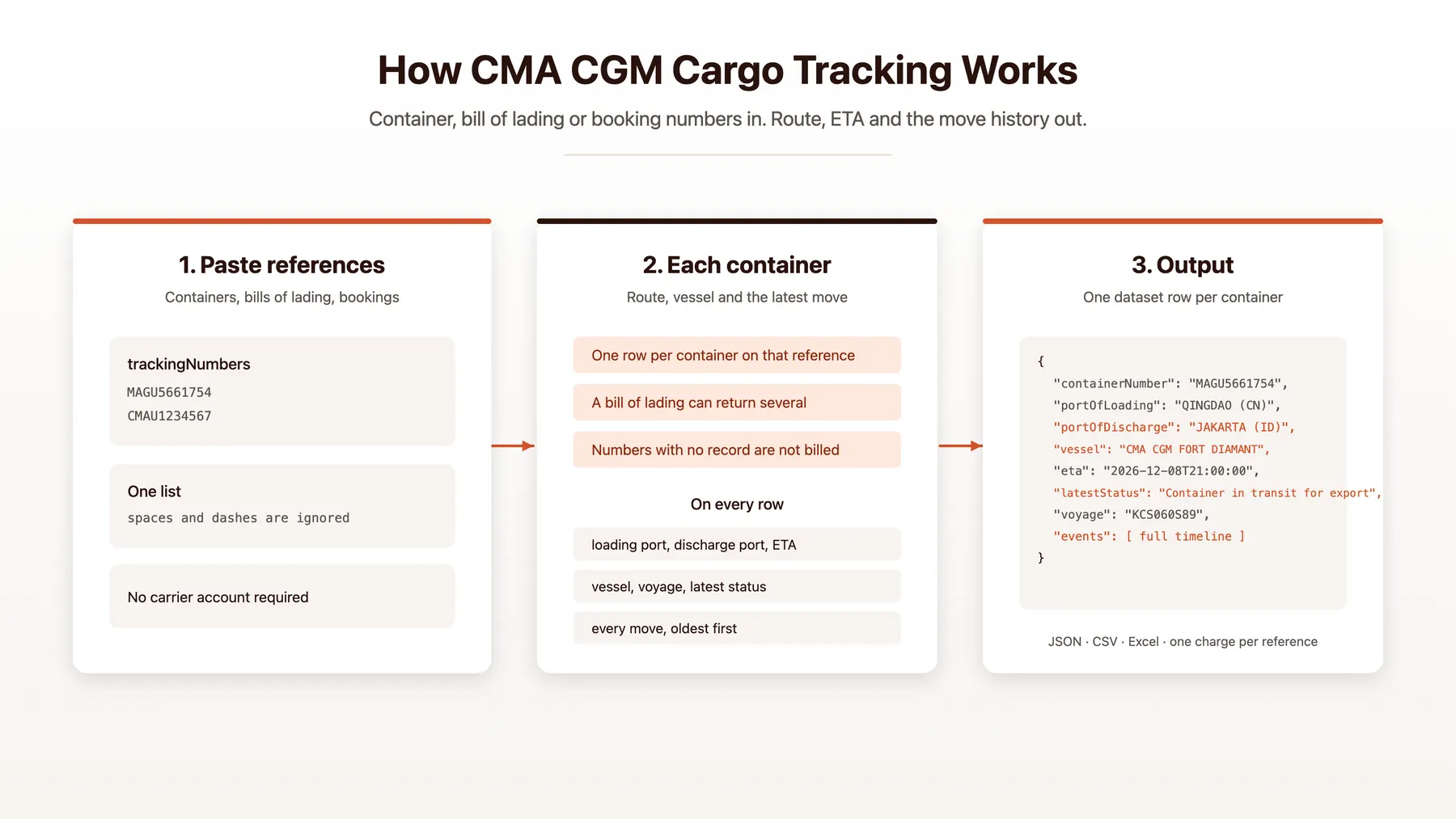
Track CMA CGM containers, bills of lading and booking references in bulk. Each result is one container: loading port, discharge port, transshipments, vessel, voyage, ETA, latest status and the full move history. Export as JSON, CSV or Excel. No carrier account or login is required.
Pricing
from $4.00 / 1,000 tracked numbers
Rating
0.0
(0)
Developer

Muhamed Didovic
Maintained by CommunityActor stats
0
Bookmarked
2
Total users
1
Monthly active users
a day ago
Last modified
Categories
Features
Share
CMA CGM Cargo Tracking
Track CMA CGM containers, bills of lading and booking references in one run. Each dataset row is one container: where it loaded, where it discharges, the vessel and voyage, the ETA, and every move from empty pickup to the latest event.
Paste a list, start the run, and download JSON, CSV or Excel. No CMA CGM account.
Why use this scraper?
- One row per container, with the route filled in, instead of a flat list of events you have to reassemble
- Container numbers, bills of lading and booking references in the same list
- A bill of lading or booking returns every container on that reference
- Loading port, discharge port, transshipment ports, vessel, voyage and ETA on the row itself
- The full move history, oldest first, with estimated moves marked
- Numbers that match nothing are not billed
- Schedule it. The same list, checked every morning, is a working exception report
Overview
This actor is for freight forwarders, importers, NVOCCs and anyone who already has CMA CGM references and wants them as rows. It covers the public tracking record: the commercial move history a visitor sees for a container, bill of lading or booking. It does not log in, so it does not include documents, invoices or inland moves that CMA CGM shows only to a booking party.
A reference with several containers produces several rows, one per container. A reference with no record produces none.
Supported inputs
| Input | Example | Result |
|---|---|---|
| Container number | MAGU5661754 | That container |
| Bill of lading | the B/L printed on the shipment | Every container on that bill |
| Booking reference | the booking number | Every container on that booking |
Spaces and dashes are ignored, so MAGU 5661754 and magu-5661754 are the same number.
Not accepted: vessel names, port schedules, and anything behind a CMA CGM login.
Use cases
| Who | What they do with the rows |
|---|---|
| Freight forwarders | Refresh a customer portal from the latest status and ETA |
| Importers | See which boxes are still on the water and which are at the terminal |
| Operations | Catch a missed transshipment or a vessel change from the move list |
| Platforms | Store one snapshot per run and alert when latestStatus changes |
How it works
- Paste container numbers, bills of lading or booking references under Tracking numbers.
- Start the run. Each number usually returns in a few seconds.
- Open the dataset. One row per container.
- Download JSON, CSV or Excel, or call the Apify API.
- Numbers with no tracking record are listed in the run summary and are not billed.
Input configuration
| Field | Type | Required | Default | What it does |
|---|---|---|---|---|
| Tracking numbers | list of text | yes | MAGU5661754 | Container, bill of lading or booking references, one per line |
| Include the full carrier record | yes/no | no | off | Adds the carrier's full record under raw |
On the free plan, only the first 10 numbers are tracked.
One container
A list
Output overview
Each row is one container. The top fields are the shipment as a whole: origin, destination, the two ocean ports, any transshipment ports, the vessel and voyage from the latest move that names one, and the ETA at the discharge port. events is the move list, oldest first. isActual is false on a move that has not happened yet. delivered is true when the latest actual move is the container reaching the consignee, or the empty box back in a depot.
A container that has been back in the depot for more than about 15 days no longer appears. That reference comes back as not found, not as an error.
Output sample
Container MAGU5661754, looked up on 24 November 2026. The run returned 6 events. Two are included here.
Key output fields
The reference
trackingNumberis what you submitted.numberTypesays whether it matched a container, a bill of lading or a booking.containerNumber,containerType,billOfLading,bookingNumbercome from the shipment. A bill of lading lookup fillsbillOfLadingand still has one row per container.
The route
origin,destination,portOfLoading,portOfDischarge,transshipmentsvessel,voyage,etalatestStatus,latestLocation,latestDate,delivered
The moves
events[]withdate,location,locationCode,description,facility,vessel,voyage,isActualeventCount,trackingUrl,scrapedAtraw, only when the full carrier record is turned on
FAQ
Does a bill of lading cost more than a container number? No. One charge covers every container on that reference. A bill of lading with four containers is four rows and a single charge. A number that matches nothing is not charged.
Why was my container not found? The number may be wrong, it may belong to another line, or the empty box was returned more than about 15 days ago. Those show in the run summary under not found. A run where the carrier does not answer at all fails, so you can retry it.
Can I track Maersk or MSC here? No. This actor is CMA CGM only. For several lines in one list, use Container Tracking.
Do I need a CMA CGM API key or login? No.
What is not included? No bills of lading PDF, no freight invoices, no release status, and no rail or barge moves that the carrier shows only to the booking party.
Support
- Open an issue on the Issues tab of this actor
- Email: muhamed.didovic@gmail.com
- Website: https://muhamed-didovic.github.io/
Additional services
- A private build that posts each status change to your own webhook or sheet: muhamed.didovic@gmail.com
- The same row shape for other ocean carriers, in one actor: Container Tracking
Explore more scrapers
- Container Tracking for Maersk, CMA CGM, MSC, COSCO, ONE, HMM and Wan Hai in one list
- More actors: memo23 on Apify
🤖 For AI Agents & LLM Apps
Compact reference for AI agents calling this actor via the Apify MCP server or the Apify API (actor: memo23/cma-cgm-cargo-tracking).
Purpose: CMA CGM public tracking. One dataset row per container, with route, vessel, ETA and the move list.
Minimal input:
Output: one row per container. Fields: trackingNumber, numberType, containerNumber, containerType, billOfLading, bookingNumber, origin, destination, portOfLoading, portOfDischarge, transshipments[], vessel, voyage, eta, latestStatus, latestLocation, latestDate, delivered, events[] {date, location, locationCode, description, facility, vessel, voyage, isActual}, eventCount, trackingUrl, scrapedAt.
Behaviors an agent should know:
- Always pass
trackingNumbers. There is no search by port or vessel name. - A bill of lading or booking can return several rows and is still one charge.
- Free plan: first 10 numbers only. Missing numbers are not charged and are listed in the key-value record
SUMMARY. - Billed once per reference that returns a container, plus a small start fee.
delivered: nullmeans the latest move is not a delivery or an empty return. - No login fields. Moves the carrier shows only to the booking party are absent. A container back in the depot for more than about 15 days is not found.
⚠️ Disclaimer
This Actor is an independent tool and is not affiliated with, endorsed by, or sponsored by CMA CGM S.A. or any of its subsidiaries. All trademarks mentioned are the property of their respective owners.
The scraper accesses only publicly available shipment tracking pages. No authenticated endpoints, paid features, or content behind the cma-cgm.com login wall. Users are responsible for ensuring their use complies with cma-cgm.com's Terms of Service, applicable data-protection law (GDPR, CCPA, etc.), and any contractual obligations of their own organization.
SEO Keywords
CMA CGM container tracking, CMA CGM cargo tracking, CMA CGM bill of lading tracking, CMA CGM booking tracking, CMA CGM shipment status, CMA CGM ETA, CMA CGM vessel tracking, CMA CGM container number search, track CMA CGM container, CMA CGM tracking API, ocean freight tracking, container tracking data, bill of lading status, shipping container ETA, freight forwarder tracking, import container status, NVOCC shipment tracking, transshipment tracking, container move history, supply chain visibility, logistics tracking export, port of discharge ETA, container arrival date, CMA CGM ANL APL CNC tracking


