

Discord Server Scraper - Members, Online & Invites
Pricing
from $0.50 / 1,000 server scrapeds
Discord Server Scraper - Members, Online & Invites
Discord Server Scraper — no token, no login. Paste any invite link, code, or vanity name and get full public server data: member count, who's online now, boosts, verification, features, vanity URL and icon — plus live online members and voice channels when the widget is on. Bulk, JSON or CSV.
Pricing
from $0.50 / 1,000 server scrapeds
Rating
0.0
(0)
Developer

Muhamed Didovic
Maintained by CommunityActor stats
0
Bookmarked
2
Total users
1
Monthly active users
11 hours ago
Last modified
Categories
Share
Discord Server Scraper
Look up any public Discord server from just an invite — no token, no login, no bot. Paste invite links, invite codes, or vanity names and get each server's full public metadata: member count, who's online right now, boosts, verification level, features, icons/banner, and — when the server has its widget enabled — the live online members and voice channels. Built for bulk: drop in a whole list and get one clean row per server.
Why Use This Scraper?
- No Discord token, account, or self-bot — most Discord scrapers ask for a user token (a self-bot, which risks a ban). This one uses only Discord's own public invite and widget endpoints, so there is nothing to log in to and nothing to get banned.
- Any invite form works — a full invite link (
https://discord.gg/pythonorhttps://discord.com/invite/python), a bare invite code (npXE8Vky), or a vanity name (python). Mix them freely in one run. - Real community size, not guesses — every row carries live
memberCountandonlineCount, plusboostCount,verificationLevel,nsfwLevel, and the server's fullfeatureslist. - Live widget data — for servers that enabled their public widget, you also get
onlineMembers(up to 100, each with username, status, avatar), thevoiceChannels, the livewidgetPresenceCount, and a freshinstantInvite. - Bulk by design — paste hundreds of invites and the actor looks them up in parallel (with built-in rate-limit handling), emitting one dataset row per server.
- Pure API — fast, cheap, stable — no headless browser, no captcha solving. Discord's endpoints have no anti-bot, so runs are quick, reliable, and need no proxy by default.
- Clean, export-ready output — one flat row per server, ready as JSON, CSV, or Excel, or pulled from the Apify API into your dashboard, CRM, or spreadsheet.
Overview
Discord servers are invite-only from the outside, but every public invite exposes a surprising amount of metadata — the server's name, description, member and online counts, boost level, feature flags, and branding. Servers that turn on the public widget expose even more: who's online right now and the live voice channels.
This actor turns that public surface into structured data. Give it invites in any form and it calls Discord's public invite API for the metadata and — when enabled — the public widget API for the live online members and voice channels, emitting one consistent row per server whether you looked up one invite or ten thousand. It is built for community discovery, vetting, and monitoring — sizing a server before a partnership or ad buy, building a directory of communities in a niche, or tracking growth over time — and deliberately does not touch private data: no messages, no full member rosters, no token-gated endpoints.
Supported Inputs
Give the actor one or more Discord invites via startUrls. Each entry is one server, and the invite code is taken from the last path segment of a URL (or used verbatim for a bare code). All these forms work and can be mixed in one run:
1. Full invite links
https://discord.gg/pythonhttps://discord.com/invite/pythonhttps://discord.gg/npXE8Vky
2. Bare invite codes
npXE8Vkyreactiflux
3. Vanity names
pythonminecraft
Copy-pasteable startUrls:
Not supported (by design):
- Messages, channels' contents, or full member lists — these require a Discord user token (a self-bot). This actor deliberately uses no token and does not scrape them.
- Keyword/server discovery — the
searchQueryfield is reserved for an upcoming discovery mode. It is accepted today but ignored; the actor scrapes the invites you list. - Dead, expired, or invalid invites — if Discord no longer resolves an invite, there is no public data to return for that code, so it is skipped.
Use Cases
| Who | What they use it for |
|---|---|
| Community & marketing teams | Vet a Discord community by its real member/online counts, boosts, and features before a partnership, sponsorship, or ad buy. |
| Growth, BD & lead generation | Build a list of servers in a niche, size each one, grab its invite link and the inviter handle, and prioritise outreach. |
| Investors & analysts | Track a community's memberCount and onlineCount over time by scheduling the actor — a live proxy for project momentum. |
| Competitive & market research | Monitor rival or adjacent communities: size, online activity, boost level, feature flags, and live voice-channel usage. |
| Developers & data teams | Feed live server metadata into a Discord directory, a dashboard, or an internal tool via JSON/CSV or the Apify API. |
How It Works
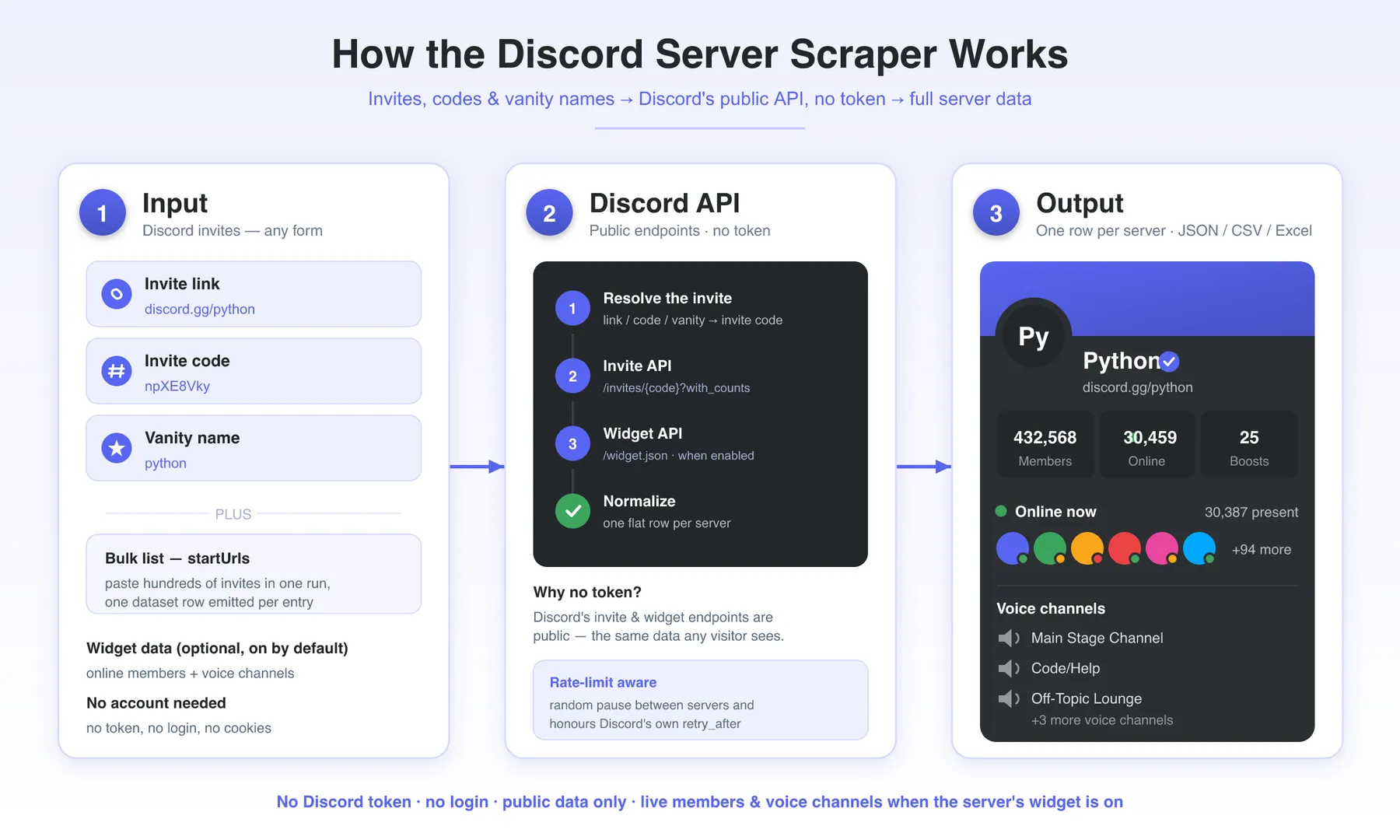
- Input — give the actor Discord invites in any form (links, bare codes, or vanity names) via
startUrls. LeaveincludeWidgeton (default) to also capture live online members and voice channels. - Resolve the invite — each entry is reduced to its invite code (the last path segment of a URL, or the bare code/vanity verbatim).
- Invite API — the actor calls Discord's public
/invites/{code}?with_countsendpoint for the server's metadata: name, description, member and online counts, boosts, verification, features, and branding. No token, no login. - Widget API — when
includeWidgetis on and the server enabled its widget, the actor also reads/guilds/{id}/widget.jsonfor the live online members, voice channels, and presence count. Servers without a widget simply skip these fields — it is not an error. - Emit — each server becomes one flat row, streamed to the dataset for download as JSON, CSV, or Excel, or via the API. The actor paces requests (a random pause between servers) and honours Discord's rate limits automatically.
Input Configuration
| Field | Type | Default | Description |
|---|---|---|---|
startUrls | array | (required) | Discord invites to look up — full invite links, bare invite codes, or vanity names. One dataset row is emitted per entry. |
includeWidget | boolean | true | Also fetch the server's public widget.json for online members (up to 100), their status and avatar, the voice channels, and the live presence count. Servers that disabled their widget simply omit these fields. |
searchQuery | string | (empty) | Reserved for an upcoming keyword-discovery mode. Accepted today but ignored — the actor scrapes the invites in startUrls. |
maxItems | integer | 1000 | Hard cap on the number of servers looked up (and billed). Entries beyond the cap are skipped. |
minDelay | integer | 250 | Lower bound, in milliseconds, of the random pause after each server (per-IP rate-limit protection). |
maxDelay | integer | 750 | Upper bound, in milliseconds, of that per-server pause. |
maxConcurrency | integer | 10 | Maximum number of invites looked up in parallel. |
minConcurrency | integer | 1 | Advisory floor for concurrency (kept for parity). |
maxRequestRetries | integer | 5 | How many times a Discord request is retried (transport errors and 429s) before the server is marked failed. |
proxy | object | (none) | Optional. Discord's invite and widget endpoints have no anti-bot, so the actor runs directly with no proxy by default. Set this only to route traffic through your own proxies or Apify Proxy. |
Example — bulk lookup with widget data (default):
Example — metadata only, no widget, faster:
Output Overview
Every server is emitted as one flat JSON object. The base fields are always present (member/online counts, boosts, verification, features, branding, invite metadata). The widget fields — widgetPresenceCount, onlineMembers, voiceChannels, instantInvite — appear only when includeWidget is on and the server enabled its public widget; otherwise they are simply absent (not an error). Fields a server does not publish (no banner, no description) come back as null. Download as JSON, CSV, or Excel, or pull via the Apify API.
Output Sample
A real row for the Python server (https://discord.gg/python). The features, onlineMembers, and voiceChannels arrays are trimmed and the long avatar URLs shortened for readability:
The Python server has its widget on, so
widgetPresenceCount,onlineMembers,voiceChannels, andinstantInviteare present. Servers with the widget disabled (e.g. many communities) return the base fields only.
Key Output Fields
Invite & identity
inviteCode— the resolved invite code or vanity used for the lookupinviteUrl— the canonicalhttps://discord.gg/{code}linkserverId— Discord's numeric guild (server) id; stable, the field to deduplicate and join onname,description— server name and public description (descriptionisnullif none)vanityUrlCode— the server's vanity (e.g.python), ornull
Size & status
memberCount— total membersonlineCount— members online at scrape time (from the invite API's approximate presence count)boostCount— number of Nitro boostsverificationLevel— Discord's verification tier,0–4(None → Highest)nsfwLevel— Discord's NSFW classification,0–3features[]— server feature flags (e.g.COMMUNITY,VERIFIED,DISCOVERABLE,PARTNERED,ANIMATED_ICON,VANITY_URL)
Branding
iconUrl,bannerUrl,splashUrl— full CDN URLs for the server's icon, banner, and invite splash (any may benull)
Invite context
channelName— the channel the invite points toinviterUsername— the user who created the invite, when exposed (oftennullfor vanity invites)expiresAt— the invite's expiry timestamp, ornullfor a permanent/vanity invitescrapedAt— ISO timestamp of extraction
Live widget data (only when includeWidget is on and the server enabled its widget)
widgetPresenceCount— live count of present members reported by the widgetonlineMembers[]— up to 100 members online now, each{ username, status, avatarUrl }(statusisonline,idle, ordnd)voiceChannels[]— the server's voice channels, each{ id, name, position }instantInvite— a fresh invite URL from the widget, ornull
FAQ
Do I need a Discord account, token, or bot to use this? No — this is the core difference from most Discord scrapers. The actor uses only Discord's public invite and widget endpoints, the same data any visitor sees from an invite link. No login, no OAuth, no user token, no self-bot, so there's no account to get rate-limited or banned.
What invite forms can I paste in?
Any of them: a full invite link (https://discord.gg/python or https://discord.com/invite/python), a bare invite code (npXE8Vky), or a vanity name (python). The code is taken from the last path segment of a URL, or used as-is for a bare code. You can mix all three in a single startUrls list.
Can you scrape messages, channels, or the full member list? No — and this is deliberate. Message history, channel contents, and complete member rosters are gated behind a Discord user token (a self-bot), which carries a real ban risk and ToS exposure. This actor intentionally uses no token, so it returns public server metadata only: counts, features, branding, and — via the public widget — who's online right now and the voice channels.
Why are onlineMembers and voiceChannels missing on some servers?
Those come from a server's public widget, which each server owner turns on or off. When a server has its widget enabled (and includeWidget is on), you get widgetPresenceCount, onlineMembers, voiceChannels, and instantInvite. When the widget is off, those fields are simply absent — the base metadata (members, online count, boosts, features, branding) still comes back normally. It is not an error or a failed scrape.
What happens with a dead, expired, or invalid invite? If Discord no longer resolves the invite, there is no public data to return for that code, so the entry is skipped rather than producing a row. Double-check the invite works in a browser if you expected a result.
How fresh are the member and online counts?
They are live at the moment of the scrape — memberCount and onlineCount come straight from Discord's invite API, and widgetPresenceCount / onlineMembers reflect who is online right then. Schedule the actor to track a community's size and activity over time.
Do I need a proxy?
No. Discord's invite and widget endpoints have no anti-bot, so the actor runs directly by default and paces itself under Discord's rate limits (a random pause between servers, plus automatic handling of retry_after). You can still plug in your own proxies or Apify Proxy via the proxy field.
What export formats are supported, and can I run it in bulk?
Yes to bulk — paste hundreds of invites and they are looked up in parallel, one row each, capped by maxItems. Every run writes to an Apify dataset you can download as JSON, CSV, Excel, XML, or JSONL, or fetch via the Apify API. It plugs into scheduling, webhooks, and integrations (Google Sheets, Zapier, Make, etc.) like any Apify actor.
Support
- Found a bug or need a new field? Open a ticket on the Issues tab of this actor — it's the fastest way to reach me and I actively maintain this scraper.
- Email: muhamed.didovic@gmail.com
- Website: muhamed-didovic.github.io
Additional Services
Need something beyond the standard output? I build and maintain custom scrapers and data pipelines — custom fields or export formats, scheduled community-tracking feeds wired into your dashboard or CRM, enrichment on top of server metadata, and private or dedicated actors for high-volume or compliance-sensitive use. Reach out via the Issues tab or email and describe what you need.
Explore More Scrapers
Browse my other Apify actors — social platforms, business directories, job boards, review sites, and more — on my profile: memo23 on Apify.
⚠️ Disclaimer
Discord is a trademark of Discord Inc. This actor is an independent tool and is not affiliated with, authorized by, endorsed by, or in any way officially connected to Discord Inc.
This scraper accesses only publicly available data — the server metadata any visitor can see from a public invite link, plus data from a server's own public widget where the owner has enabled it. It does not use a Discord token, does not log in, does not bypass authentication, and does not access messages, private channels, or full member lists.
You are responsible for how you use the data you collect. Use it in compliance with Discord's Terms of Service and Developer/Community guidelines, and with applicable laws (including the GDPR, CCPA, and other data-protection regulations). Do not use scraped data to spam, harass, or violate anyone's privacy.
SEO Keywords
discord scraper, discord server scraper, discord server data, discord member count, discord online count, discord invite scraper, discord community scraper, discord widget scraper, discord server lookup, no-token discord scraper, discord server analytics, discord server stats, discord community discovery, discord lead generation, discord server metadata, discord boosts scraper, discord voice channels scraper, discord vanity url lookup, discord invite api, discord guild scraper, discord server monitoring, scrape discord without token, discord community research


