

Instagram Audio Scraper · Sounds, Music & Trending Reels
Pricing
from $2.80 / 1,000 sounds
Instagram Audio Scraper · Sounds, Music & Trending Reels
Search Instagram sounds, look up any audio page id (catalogue or creator original), or name the track on a reel or profile. Artist, duration, cover, lyrics and trending flags, Instagram's reel count, a download URL, and optional permanent audio save. No login, no cookies.
Pricing
from $2.80 / 1,000 sounds
Rating
0.0
(0)
Developer

Muhamed Didovic
Maintained by CommunityActor stats
0
Bookmarked
192
Total users
133
Monthly active users
3 days ago
Last modified
Categories
Share

Name the sound behind any Instagram reel — or search the catalogue by song, artist, track id, or profile. Catalogue ids and creator-original audio ids both resolve. Each sound comes back with artist, duration, cover art, lyrics and trending flags, a download URL, Instagram's own catalogue-wide reel count, and an optional permanent file save. Mix search terms, reel URLs, audio ids, and profile handles in one run. No login, no cookies.
| Input | Row(s) emitted |
|---|---|
Search term (lofi, an artist, a song title) | sound rows from Instagram's music catalogue |
| Reel or post URL | One post-sound row — licensed track or the creator's own audio |
Audio id (instagram.com/reels/audio/<id>/) | One sound row, with the catalogue-wide reel count already filled |
| Profile handle or profile URL | One post-sound row per scanned Reel |
includeReelsUsingSound: true | Extra reel rows for each sound, with plays, likes, and creator |
Pure HTTP. No browser, no CAPTCHA solver, no cookies. Original audio has no catalogue search hit — name it from a reel, a profile, or the audio page id.
Why Use This Scraper?
- Both directions. Keyword search finds sounds by name. Post lookup goes the other way: give it a reel that is doing well and it names the sound driving it.
- Original audio too. A creator's own recording has no catalogue search entry. Name it from a reel, a profile scan, or the audio page id — the same number Instagram puts on
/reels/audio/<id>/. - A real trending number.
totalReelsUsingSoundis Instagram's own catalogue-wide count, not how many reels this run happened to fetch. 43,904 reels means something; "we found 24" does not. - The reels, not just the sound. Turn on expansion and each sound brings the reels actually using it, with play counts and creators, so you can see who picked it up and how it performed.
- Four ways in. Search terms, reel URLs, audio ids, and public profiles can share one run. Cap a profile scan with
datePostedso you only pay for recent Reels. - No account risk. No login, no cookies, no session handover.
Overview
Built for music marketers, influencer researchers, and trend desks who need structured Instagram sound data — not a transcript, not a video download.
The dataset is sound-shaped. A reel URL or a profile handle still produces post-sound rows (the audio on that post). reel rows appear only when you turn expansion on. Failures (private, no_sound, bad id) come back as { source, error, message } and are never billed.
This actor names and measures sounds. It does not transcribe speech. For spoken words on a reel, use Instagram Transcript Scraper. For any URL, RSS feed, or podcast, use Media Transcriber.
Supported Inputs
What you can paste
| Input type | Pattern | Example |
|---|---|---|
| Search term | any song, artist, or phrase | lofi |
| Reel URL | instagram.com/reel/<code>/ | https://www.instagram.com/reel/Dcy-7IJhWAP/ |
| Post URL | instagram.com/p/<code>/ | https://www.instagram.com/p/Dcy-7IJhWAP/ |
| Audio page / id | instagram.com/reels/audio/<id>/ or the number | 346308129265917 |
| Profile handle | nasa, @nasa, or a profile URL | https://www.instagram.com/nasa/ |
Mix in one run
Unsupported inputs
- Private, deleted, or age-restricted posts and profiles
- Instagram Stories, Highlights, or live broadcasts
- Photo and carousel posts (they carry no sound)
- Non-Instagram URLs
- Login, cookies, or session tokens — the actor never asks for them
- Speech-to-text / transcripts — that is a different actor
Use Cases
| Audience | Use case |
|---|---|
| Music marketers | See which catalogue tracks are actually moving on Reels, and which creators picked them up |
| Influencer researchers | Drop a viral reel URL and get the exact sound, including original audio |
| Agencies | Scan a client's or competitor's profile for the sounds they have been posting |
| Trend desks | Rank sounds by Instagram's own totalReelsUsingSound, not a sample from one run |
| Content teams | Pull cover art, duration, and a download URL so editors can preview a track |
How It Works
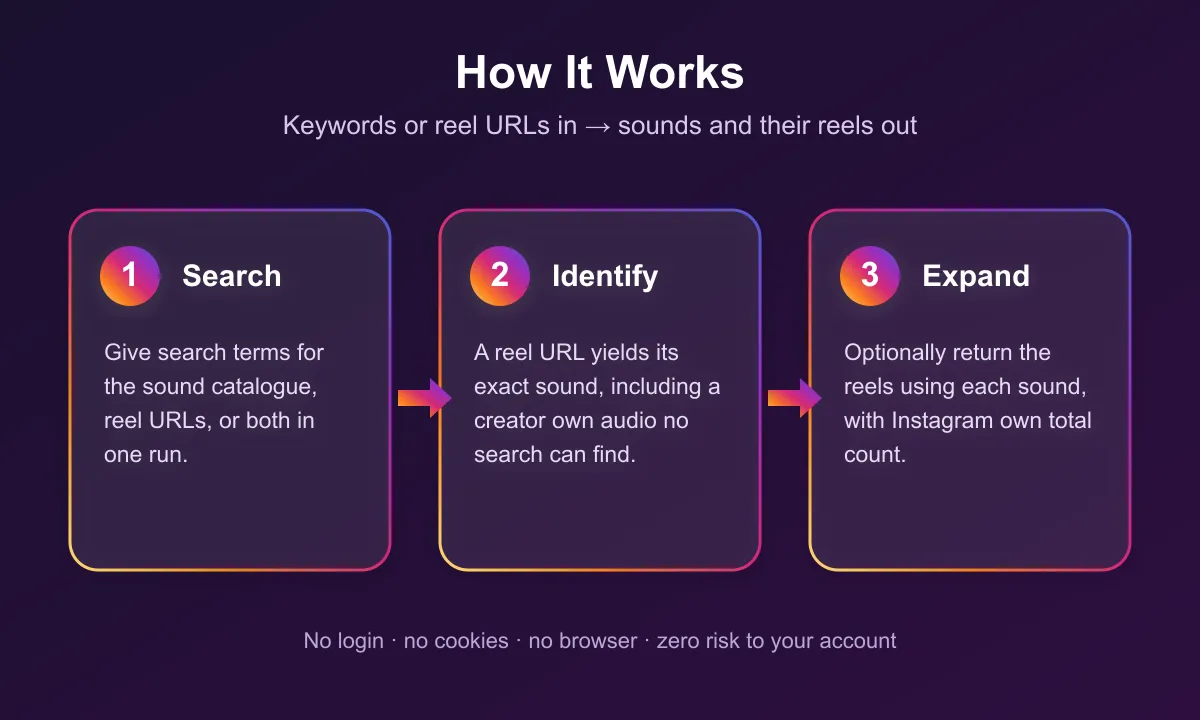
- Input — search terms hit the sound catalogue; reel URLs and profile handles are resolved to media; audio ids are looked up directly.
- Identify — each item is mapped to a sound. A licensed track gets title and artist. A creator recording is flagged
isOriginalAudio: trueand the artist is their handle. - Expand (optional) — when
includeReelsUsingSoundis on, the actor walks the reels using each sound and writes Instagram's catalogue-wide count onto the sound row. - Filter —
datePosteddrops older Reels on profile scans, post URLs, and the expanded reel list before charge. Catalogue search has no post date, so it is unchanged. - Emit —
sound,post-sound, andreelrows share one dataset, told apart byrowType. Error rows are pushed and not billed.
Input Configuration
| Field | Type | Required | Default | Notes |
|---|---|---|---|---|
queries | array of strings | One of the four | — | Words to search the sound catalogue for: a song title, an artist, a phrase. Example: ["lofi","coffee"]. |
postUrls | array of strings | One of the four | — | Reels or posts whose sound you want named. An audio page URL is looked up as a track id. Example: ["https://www.instagram.com/reel/Dcy-7IJhWAP/"]. |
trackIds | array of strings | One of the four | — | Instagram audio ids or instagram.com/reels/audio/<id>/ URLs. Same number as output trackId. Example: ["346308129265917"]. |
profileHandles | array of strings | One of the four | — | Public profiles to scan. Accepts nasa, @nasa, or a profile URL. Private or missing accounts return an error row and are not billed. |
maxReelsPerProfile | integer | No | 50 | How many of a profile's newest Reels to inspect. 1–500. |
datePosted | enum | No | any | any / last-hour / last-day / last-week / last-month / last-year. Applies to profile scans, post URLs, and expanded reels. Catalogue search is unchanged. |
maxSoundsPerQuery | integer | No | unlimited | Cap on sounds per search term. Instagram's catalogue returns about 10 per term, so a cap above that changes nothing. |
includeReelsUsingSound | boolean | No | false | Also return the reels using each sound, as reel rows. This is how search/post/profile rows get totalReelsUsingSound. Track-id lookups already fill that count. |
maxReelsPerSound | integer | No | 24 | Cap on reels collected per sound when expansion is on. Ignored otherwise. |
saveAudio | boolean | No | false | Download each sound into this run's key-value store and set audioKvStoreUrl. Instagram CDN links expire; this copy does not. |
At least one of queries, postUrls, trackIds, or profileHandles must be given.
Example input — catalogue search
Example input — name the sound on a reel
Example input — recent sounds on a profile
Output Overview
Three row shapes in one dataset, told apart by rowType.
sound— a catalogue match from a search term, or a direct track-id lookup.post-sound— the sound behind a post or profile Reel you supplied.isOriginalAudio: truemeans the creator's own recording, andartistis then their handle.reel— a reel using one of the sounds, only when expansion is on. CarriesreelUrl, caption, plays, likes, comments, video URL, and creator, plussoundTrackId/soundTitleso it can be grouped back to its sound.
Error rows are { source, error, message, errorKind } and are never charged.
Output Samples
sound — catalogue match for lofi (trimmed CDN URLs):
post-sound — original audio read off a reel you supplied:
reel — one reel using a sound, when expansion is on:
Key Output Fields
Sound identity
| Field | What it is |
|---|---|
rowType | sound, post-sound, or reel |
trackId | Instagram audio id — the same number you can feed back as trackIds |
audioClusterId | Cluster id when Instagram sends one |
title / artist | Track title and display artist. On original audio, artist is the creator handle |
isOriginalAudio | true for a creator's own recording, false for a licensed catalogue track |
durationMs | Length in milliseconds |
isExplicit | Explicit flag when Instagram sends it |
hasLyrics | true when Instagram says the track has lyrics. Search and track-id rows. |
isTrending | true when Instagram flags is_trending_in_clips. Filled on track-id and post/profile rows; search list does not send it. |
trendRank | Instagram's clip trend rank when present |
Media
| Field | What it is |
|---|---|
coverArtworkUrl | Cover image. Instagram CDN — expires |
audioDownloadUrl | Direct link to the audio file. Instagram CDN — expires. Fetch it during or shortly after the run |
previewUrl | Instagram's 30-second web preview when it sends one. Often empty on catalogue search |
audioKvStoreUrl | Permanent copy in this run's key-value store, only when saveAudio is on |
videoUrl | On reel rows, the video file. Same CDN expiry |
Reach
| Field | What it is |
|---|---|
totalReelsUsingSound | Instagram's catalogue-wide count. Filled on track-id lookups always; on search / post / profile only when expansion is on |
playCount / likeCount / commentCount | Engagement on a reel row |
Provenance
| Field | What it is |
|---|---|
source | The search term, URL, id, or @handle that produced the row |
postUrl / postShortCode / postAuthor / takenAt | On post-sound rows, which post the sound was read off |
soundTrackId / soundTitle | On reel rows, which sound the reel belongs to |
scrapedAt | ISO timestamp of this run |
Error rows
An input the run could not answer for comes back as { source, error, message, errorKind } and is never charged:
error | Meaning |
|---|---|
invalid_post_url | The input is not a post or reel URL |
post_unavailable | The post is private, deleted, or age-restricted |
no_sound | The post carries no sound. Photos and carousels never do, and some videos are silent |
invalid_track_id | Not an Instagram audio id |
track_not_found | No sound has that id |
profile_unavailable | The profile is private, missing, or could not be read |
Pricing
Pay per event. Posts that carry no sound, URLs that are not posts, private profiles, and other error rows are never charged.
| Event | When it fires | Free tier | Diamond tier |
|---|---|---|---|
| Sound | One sound, from a search term, a post, a track id, or a profile Reel | $0.004 | $0.0028 |
| Reel using the sound | One reel, only when expansion is on | $0.0015 | $0.001 |
| Actor start | Once per run, per GB of memory | $0.0001 | $0.0001 |
A 1,000-sound run costs about $4 on the free tier. Reels are billed separately because they are opt-in.
Unpaid runs are capped to a small sample (one search term, two post URLs, one profile, five sounds) so you can try the shape before paying.
Free Apify plan
On the free Apify plan, the first 3 sound rows and the first 3 reel rows of each run come back in full, so you can check the data. After that, sound rows keep the track id, title, artist, duration, flags and the post they came from, and reel rows keep the reel id and URL, caption, creator and sound, while the audio download URL, preview, cover artwork and video URL are hidden and the reel counts (catalogue-wide reels, plays, likes, comments) are rounded to their order of magnitude. A freePlanNote field marks those rows. Any paid Apify plan returns every field in full. The includeReelsUsingSound and saveAudio add-ons run on paid Apify plans only, so a free-plan run returns the sounds without the reels that use them and without stored audio copies.
What Makes This Richer Than the Competition
| Capability | Other audio scrapers | This actor |
|---|---|---|
| Search the sound catalogue | Yes | Yes |
| Artist, duration, cover art, audio URL | Yes | Yes |
| Name the sound behind a given reel | No | Yes, via postUrls |
| A creator's own audio | Unreachable by search | Named from a reel, a profile, or the audio page id |
| Catalogue-wide reel count | No | totalReelsUsingSound |
| The reels using each sound | Partial | Opt-in, with plays, likes and creator |
| Look up a known audio id | khadinakbar yes | Yes — bare id or reels/audio/<id>/ URL, catalogue and original audio |
| Scan a profile for sounds | Rare | Yes, via profileHandles + datePosted |
isTrending / hasLyrics | seemuapps yes | Yes, when Instagram sends them |
| Permanent audio file | seemuapps downloadUrl | Optional saveAudio → audioKvStoreUrl |
| 30s preview | seemuapps previewUrl | previewUrl from Instagram's web 30s clip |
| Search terms, URLs, ids, and profiles in one run | No | Yes |
The post-to-sound direction is the one a keyword search cannot serve. A reel using a creator's own recording has no catalogue entry, so no amount of searching will ever find it — reading it off the post is the only route.
Notes & Limitations
totalReelsUsingSoundis null on search / post / profile rows unlessincludeReelsUsingSoundis on. The count comes back on the reels route. Track-id lookups already hit that route, so they fill the count even with expansion off.audioDownloadUrl,coverArtworkUrlandvideoUrlare Instagram CDN links and expire. Turn onsaveAudioto keep a copy in the run's key-value store (audioKvStoreUrl).- Original audio is identified by the creator who recorded it. It has no catalogue search entry, so
querieswill not find it. UsepostUrls,profileHandles, or the audio page id intrackIds. datePostedcannot filter catalogue search results — those rows have no post date.- This actor does not transcribe speech and does not download video for you. It returns URLs.
FAQ
Can I find which sound a specific reel uses?
Yes — that is what postUrls is for. Creator original audio also comes back from profileHandles and from trackIds when you already have the audio page id.
Can I start from a profile instead of a reel URL?
Yes. Pass handles in profileHandles (nasa, @nasa, or a profile URL). Pair with datePosted and maxReelsPerProfile so you only inspect recent Reels. Private accounts come back as profile_unavailable and are not billed.
What is a track id?
The number in instagram.com/reels/audio/<id>/, or that URL itself in trackIds or postUrls. This actor also emits it as trackId, so you can feed one run's output into the next. Catalogue tracks and creator original audio both resolve.
Does it download the audio file?
By default it returns audioDownloadUrl, an Instagram CDN link that expires. Set saveAudio: true to copy the file into this run's key-value store and get audioKvStoreUrl.
Why is totalReelsUsingSound empty?
Expansion was off, and the row did not come from a track-id lookup. Instagram returns that count on the reels route.
Does it transcribe the audio?
No. This actor names and measures sounds. For speech-to-text on a reel, use Instagram Transcript Scraper.
Do I need to log in or provide cookies?
No. It never asks for a login, password, or session.
Can I scrape private posts or profiles?
No. Private, deleted, and age-restricted content comes back as an error row and is not charged.
Can I mix search terms, URLs, ids, and profiles?
Yes. All four inputs can share one run. Each row is tagged with the source that produced it.
Support
Found a bug or need a field added? Open an issue on the Actor's Issues tab or email muhamed.didovic@gmail.com.
Additional Services
Need a custom export shape, a scheduled sound-watch, or a field this actor does not emit? I do tailored work — muhamed.didovic@gmail.com.
Explore More Scrapers
- Instagram Reels Search & Viral Finder — find trending Reels by keyword or Boolean query
- Instagram Transcript Scraper — speech-to-text on Reels and posts
- Media Transcriber — any video, audio, RSS, or podcast URL to text
Full list at apify.com/memo23.
🤖 For AI Agents & LLM Apps
Compact reference for AI agents calling this actor via the Apify MCP server or the Apify API (actor: memo23/instagram-audio-scraper).
Purpose: Resolve Instagram sounds from search terms, reel/post URLs, audio ids, or public profiles. Returns catalogue metadata, original-audio flags, download URLs, and optional reels using each sound.
Minimal input (tested):
Output: rows discriminated by rowType — sound, post-sound, reel. Sound fields: trackId, audioClusterId, title, artist, durationMs, isExplicit, isOriginalAudio, hasLyrics, isTrending, trendRank, coverArtworkUrl, audioDownloadUrl, previewUrl, audioKvStoreUrl, totalReelsUsingSound. Post-sound adds postUrl, postShortCode, postAuthor, takenAt. Reel fields: reelId, reelUrl, reelCaption, playCount, likeCount, commentCount, videoUrl, creatorUsername, creatorFullName, creatorIsVerified, soundTrackId, soundTitle. Failures: { source, error, message, errorKind }.
Behaviors an agent should know:
- At least one of
queries,postUrls,trackIds,profileHandlesis required. - Branch on
rowTypebefore reading fields. Checkerrorbefore treating a row as a sound. totalReelsUsingSoundis null on search/post/profile unlessincludeReelsUsingSoundis true. Track-id lookups fill it without expansion.- Media and audio URLs expire. Set
saveAudio: truefor a permanentaudioKvStoreUrl. - Billing:
sound$0.004 /reel$0.0015 (Diamond $0.0028 / $0.001) plusapify-actor-start$0.0001 per GB. Error rows are never charged. Bound spend withmaxSoundsPerQuery,maxReelsPerSound,maxReelsPerProfile, and the run max-cost setting. - This actor does not transcribe audio.
⚠️ Disclaimer
This Actor is an independent tool and is not affiliated with, endorsed by, or sponsored by Instagram, Inc., Meta Platforms, Inc., or any of their subsidiaries. All trademarks mentioned are the property of their respective owners.
The scraper accesses only publicly available Instagram pages — no authenticated endpoints, paid features, or content behind a login wall. Audio files remain the property of their rights holders; returning a URL is not a licence to reuse the recording. Users are responsible for ensuring their use complies with Instagram's Terms of Use, applicable data-protection law (GDPR, CCPA, etc.), copyright law, and any contractual obligations of their own organization.
SEO Keywords
instagram audio scraper, instagram sound scraper, instagram music scraper, scrape instagram audio, what sound does this reel use, instagram trending sounds, instagram reel audio finder, instagram original audio, instagram sound analytics, reels using a sound, instagram audio download url, instagram audio id lookup, instagram profile sounds, instagram music catalogue, Apify instagram audio, reel sound identifier, instagram audio API, trending reel music


![Collecting Cars [$3💰] | 33k SOLD prices + live bids avatar](https://images.apifyusercontent.com/Hbn_LDWbVTHAyPL8k_edq8GAZOEin7g5i4_bFf2WimM/rs:fill:76:76/cb:1/aHR0cHM6Ly9hcGlmeS1pbWFnZS11cGxvYWRzLXByb2QuczMudXMtZWFzdC0xLmFtYXpvbmF3cy5jb20vbmduOHZSRVNUa3NleVdFNnAtYWN0b3ItRm1EYVRESkEyWGNYU0s4N24tVkJhU3V5RENuYi1Db2xsZWN0aW5nX0NhcnMud2VicA.webp)


