

MSC Cargo Tracking — Containers, Bills of Lading & Bookings
Pricing
from $4.00 / 1,000 tracked numbers
MSC Cargo Tracking — Containers, Bills of Lading & Bookings
Track MSC containers, bills of lading and bookings in one list. Every recognised number returns the route, vessel, voyage, ETA, terminals and full movement history, one row per container. One charge covers every container on that number. Schedule it or export JSON or CSV.
Pricing
from $4.00 / 1,000 tracked numbers
Rating
0.0
(0)
Developer

Muhamed Didovic
Maintained by CommunityActor stats
0
Bookmarked
2
Total users
1
Monthly active users
a day ago
Last modified
Categories
Features
Share
MSC Cargo Tracking
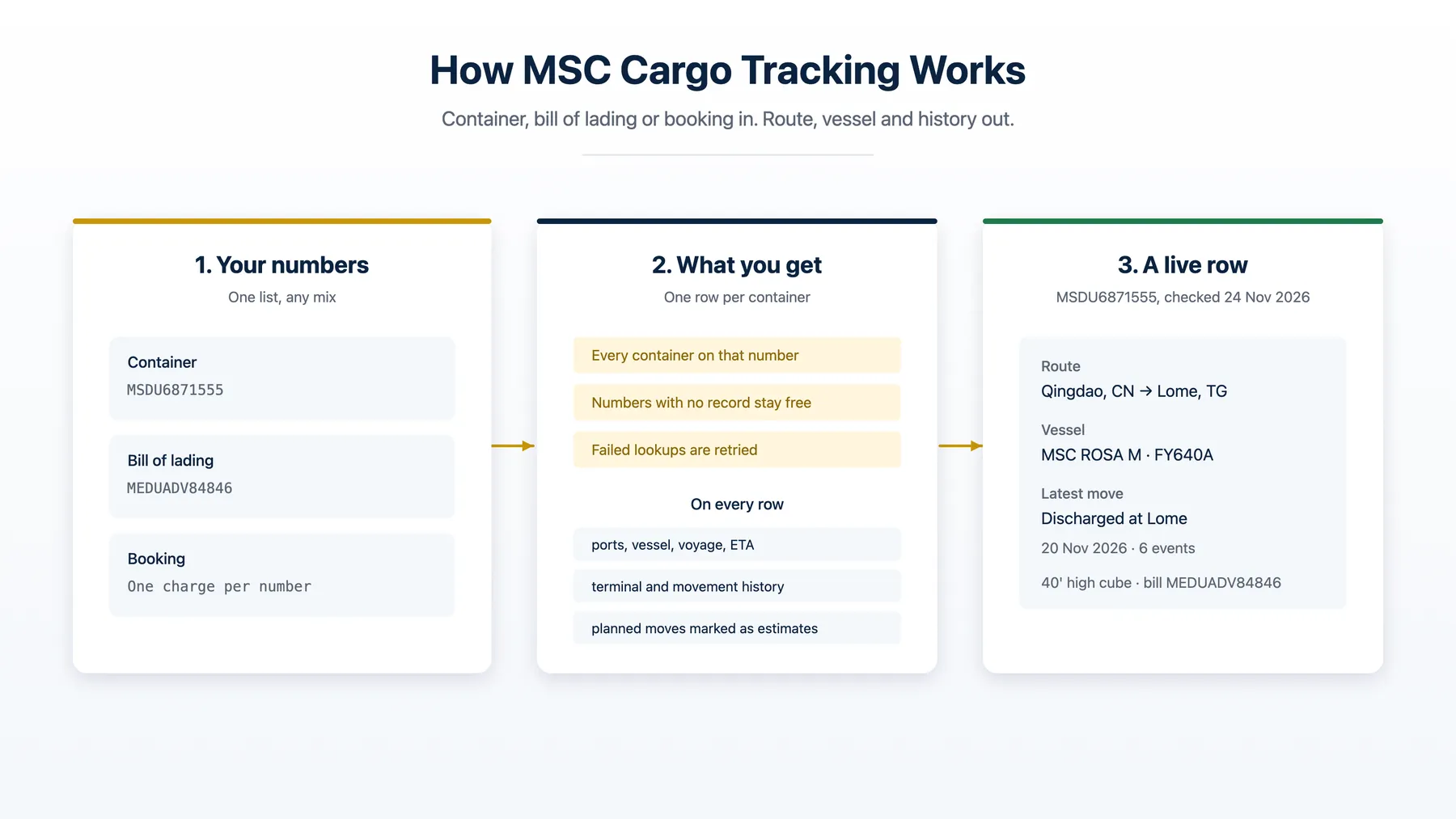
MSC containers, bills of lading and bookings, one row per container. Paste a container number, a bill of lading or a booking and each container comes back with its route, vessel, voyage, ETA, terminal and the full movement history. One charge covers every container on that number. Numbers MSC does not recognise are not charged.
How it works
Why use this actor
- Any MSC number in one list. Container, bill of lading and booking numbers can be mixed. The kind of number is detected, and a bill or booking returns every container on it.
- One charge per number. A bill of lading with eight containers is eight rows and a single charge. A number MSC has no record for is listed in the run summary and is not charged.
- Route and vessel on every row. Origin, destination, port of loading, port of discharge, vessel name, voyage, IMO number and flag.
- The whole movement, oldest first. Each event has the date, place, UN/LOCODE, terminal, vessel and voyage. Estimated moves are flagged, so a planned arrival is not stored as something that already happened.
- Port calls when MSC publishes them. The estimated-arrival move can include the calls in between, with arrival and departure times. Once the container is discharged, MSC often drops that schedule and the list is empty.
- Ready for a daily check. Save the input as a task and schedule it. Each run is a fresh status sheet.
Overview
This actor tracks shipments on MSC (Mediterranean Shipping Company). You give it the numbers you already have from a booking confirmation or a carrier site, and it returns one dataset row per container. A container number returns that box. A bill of lading or a booking returns every container MSC lists on it, each as its own row, all covered by the one charge for that number.
It is built for freight forwarders keeping a status sheet, importers watching an inbound box, and anyone feeding a spreadsheet or a dashboard. The row is flat on purpose: ports, vessel and the latest move are columns, and the history sits in events.
Supported inputs
| Input | What you enter | What comes back |
|---|---|---|
| Container number | An MSC box, for example MSDU6871555 | That container |
| Bill of lading | The B/L number, for example MEDUADV84846 | One row per container on the bill |
| Booking number | The booking reference | One row per container on the booking |
Spaces, dashes and dots in a number are ignored. Mix all three kinds in one list.
Not supported:
- Other carriers. Maersk, CMA CGM, COSCO, ONE, HMM and Wan Hai are on Container Tracking, which accepts a mixed list.
- Numbers MSC has already dropped. A box that is off the tracking page comes back as not found, and it is not charged.
Use cases
| Who | What they get |
|---|---|
| Freight forwarders | A status sheet for a book of MSC shipments |
| Importers | ETA and the latest move for every inbound container |
| Dashboards | Flat rows for a sheet, a TMS or a BI tool |
| Customs brokers | Vessel, voyage, IMO and the discharge port |
How it works
- Paste container, bill of lading or booking numbers.
- Each number is looked up. A bill or a booking expands to its containers.
- You get one row per container: route, vessel, ETA, terminal and the movement history.
- Numbers with no record, and lookups that fail, are listed in the run's
SUMMARYand are not charged. - Schedule the same input to refresh the sheet every day.
Input configuration
| Field | Type | Default | What it does |
|---|---|---|---|
trackingNumbers | string[] | — | Container, bill of lading or booking numbers. Required. Example: MSDU6871555. |
maxItems | integer | every number you pasted | How many numbers to track. Each recognised number is one charge. |
includeRaw | boolean | false | Adds MSC's full tracking record under raw. |
maxConcurrency | integer | 5 | How many numbers to track at once. From 1 to 10. |
proxy | object | empty | Leave empty. The default works out of the box. Set this only to use proxies you pay for yourself. |
One container:
A bill of lading, capped at one number:
A daily list:
Free-plan runs track at most 10 numbers. On a paid plan the run stops when it reaches the maximum cost you set, and rows past that limit are not saved.
Output overview
One dataset row per container. The number you submitted is trackingNumber. numberType says whether that number was a container, a bill of lading or a booking. Route fields are the ports MSC names. latestStatus is the newest move that has actually happened, not a planned one. events is the history, oldest first, and isActual is false on an estimate. portCalls lists intermediate calls when MSC still publishes them on an estimated arrival. priceCalculationDate is the date MSC prints for price calculation. It is indicative. Confirm it with MSC before you rely on it.
Output sample
Container MSDU6871555, collected 24 November 2026. The history is shortened. The live row had six events.
eta is null on this row because the container had already been discharged. While it is still on the water, eta is the estimated arrival at the discharge port.
Key output fields
- Identity:
trackingNumber,numberType,containerNumber,containerType,billOfLading,bookingNumber - Route:
origin,destination,portOfLoading,portOfDischarge,transshipments,portCalls - Voyage:
vessel,voyage,vesselImo,vesselFlag,eta,priceCalculationDate - Status:
latestStatus,latestLocation,latestDate,delivered - History:
eventswithdate,location,locationCode,description,facility,vessel,voyage,isActual
FAQ
Does a bill of lading cost more than a container? No. You are charged once for the number, whether it resolves to one container or many.
What if MSC has no record? The number is listed under notFound in the run's SUMMARY record and is not charged. The run fails only when every number is missing or every lookup fails, so a scheduled run does not report success on an empty sheet.
What does isActual: false mean? A planned move, such as an estimated arrival. latestStatus ignores those and shows the newest move that has happened.
Why is portCalls empty? MSC attaches the intermediate schedule to the estimated arrival. After the container is discharged that schedule is often gone. events still has the load and discharge.
Why is delivered false after discharge? MSC's own flag. Discharge at the port is not the same as the empty box being returned. Read latestStatus for the last move.
Can I track Maersk or COSCO here? No. Use Container Tracking for a mixed list across Maersk, CMA CGM, MSC, COSCO, ONE, HMM and Wan Hai.
Can I schedule it? Yes. Save the input as a task and put it on a schedule.
Support
- Issues: the Issues tab on this actor
- Website: muhamed-didovic.github.io
- Email: muhamed.didovic@gmail.com
Additional services
Need a field this actor does not map, a private feed into your sheet, or the same tracking for another shipping line? Email muhamed.didovic@gmail.com.
Explore more scrapers
- Container Tracking — Maersk, CMA CGM, MSC, COSCO, ONE, HMM and Wan Hai in one list
- More actors — the rest of the catalogue
🤖 For AI Agents & LLM Apps
Compact reference for agents calling this actor via the Apify MCP server or the Apify API (actor: memo23/msc-cargo-tracking).
Purpose: MSC shipment tracking. One dataset row per container, one charge per number that returns data.
Minimal input:
Output: one row per container — trackingNumber, numberType, containerNumber, containerType, billOfLading, bookingNumber, origin, destination, portOfLoading, portOfDischarge, transshipments, vessel, voyage, vesselImo, vesselFlag, eta, priceCalculationDate, latestStatus, latestLocation, latestDate, delivered, portCalls {location, country, eta, etd}, events {date, location, locationCode, description, facility, vessel, voyage, isActual}, eventCount, trackingUrl, scrapedAt.
Behaviors an agent should know:
- Always set
maxItems. Free plans are capped at 10 numbers. - A bill of lading or booking expands to one row per container and is still one charge.
- Numbers with no MSC record are not charged. They are listed in the
SUMMARYkey-value record undernotFound. - The run fails when nothing was tracked, so an empty result is not reported as success.
- Other carriers are not accepted here.
⚠️ Disclaimer
This actor is an independent tool and is not affiliated with, endorsed by, or sponsored by MSC Mediterranean Shipping Company S.A. or any of its subsidiaries. All trademarks mentioned are the property of their respective owners.
It reads only shipment tracking information MSC publishes for anyone to look up. It does not log in, and it does not bypass any access control. You are responsible for using it in line with MSC's terms, applicable data-protection law (GDPR, CCPA and others), and your own contracts. Tracking dates are returned as MSC publishes them. Confirm anything time-critical with MSC.
SEO Keywords
msc cargo tracking, msc container tracking, msc tracking scraper, msc bill of lading tracking, msc booking tracking, msc shipment tracking, msc vessel tracking, msc eta tracking, mediterranean shipping company tracking, msc container status, msc movement history, ocean freight tracking, container tracking api, bill of lading tracker, booking number tracking, shipping line tracking, freight forwarder tracking, import container tracking, vessel voyage tracking, port of discharge tracking, msc terminal tracking, container event history


