
![Trip.com & Ctrip Hotels + Reviews Scraper 携程 [From $1.5] avatar](https://images.apifyusercontent.com/Yo1sly8VM3yBmSQtrTc52t4WCtVX5laiwFBDa_7SAO0/rs:fill:250:250/cb:1/aHR0cHM6Ly9hcGlmeS1pbWFnZS11cGxvYWRzLXByb2QuczMudXMtZWFzdC0xLmFtYXpvbmF3cy5jb20vbmduOHZSRVNUa3NleVdFNnAtYWN0b3ItaTh1bDRJaWVMSm9YZjRMWHMtUUQ0YW9OcEE2My1UcmlwLmNvbV9JY29uXzIwMjIucG5n.webp)
Trip.com & Ctrip Hotels + Reviews Scraper 携程 [From $1.5]
Pricing
from $2.49 / 1,000 hotels
Trip.com & Ctrip Hotels + Reviews Scraper 携程 [From $1.5]
[From $1.5 per 1000 rows] Scrape Trip.com & Ctrip hotels and their guest reviews. Hotels: price and total incl. taxes, star, score, coordinates. Reviews: sub-ratings, photos, original and translated text, hotel replies. No login. Hotels $2.5-4.5, reviews $1.5-3.5 per 1,000 by plan.
Pricing
from $2.49 / 1,000 hotels
Rating
0.0
(0)
Developer

Muhamed Didovic
Maintained by CommunityActor stats
0
Bookmarked
37
Total users
4
Monthly active users
3 days ago
Last modified
Categories
Share
Trip.com Hotels Scraper 🏨
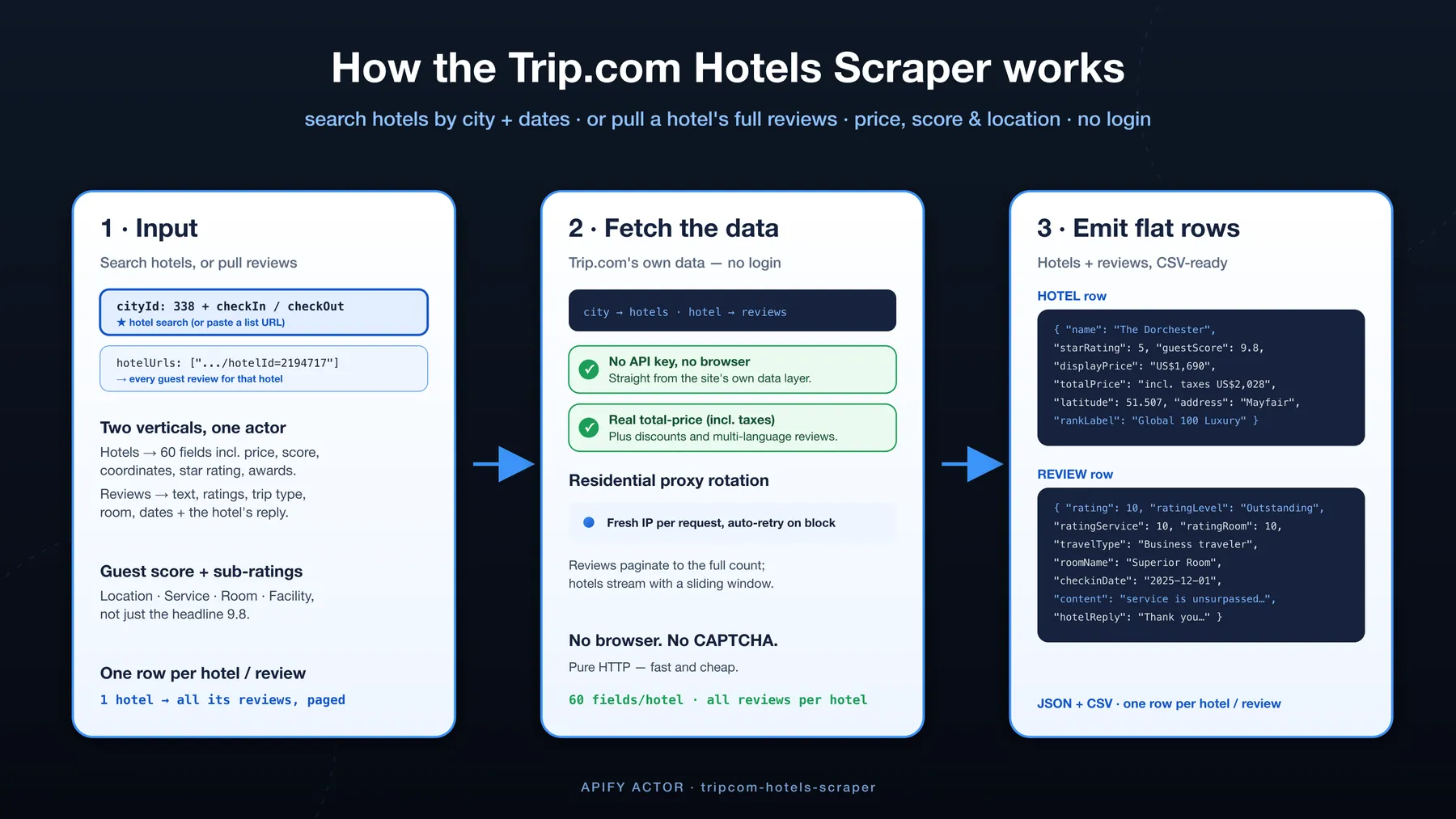
Scrape hotels and guest reviews from Trip.com. Search a city by dates to pull matching hotels — name, star rating, guest score, price (with total incl. taxes), coordinates and more — or point it at a hotel to pull every guest review with ratings, sub-ratings, trip type, room and the hotel's reply. Pure HTTP — no login, no browser, no CAPTCHA. JSON or CSV.
✨ Why use this scraper
- Two verticals in one actor. Scrape hotels (search a city + dates) and reviews (per hotel) — most scrapers do only one.
- Many hotels per run. Pass a whole list of hotels and get one dataset back — no re-running the actor once per property.
- The deepest hotel schema — up to 60 fields. Name, star rating, guest score + review count, nightly price and total incl. taxes, discount strike-price, coordinates, address, city, category, images, tags and Trip.com rankings.
- Full reviews with sub-ratings. Every review carries the text, overall rating and sub-ratings (location / service / room / facility), trip type, room, check-in date, language, helpful-count, photos, video — and the hotel's reply with its date and language.
- Original and translated text. Non-English reviews come with Trip.com's machine translation alongside the original, so a mixed-language property is analysable as one set.
- Cheap scheduled monitoring. Set
cutoffDateand re-runs stop the moment they reach reviews you already have, instead of re-walking the hotel's whole history. - Filter before you pay. Narrow by date range, rating band, language, or reviews-with-media — filtered-out reviews are never charged.
- Real prices, real totals. Both the nightly rate and the all-in total (incl. taxes & fees), plus discounts — as Trip.com actually shows them.
- Pure HTTP. No headless browser, no CAPTCHA solver — via residential proxies. Fast, cheap, reliable.
- Flat, spreadsheet-ready rows. One row per hotel or per review. Open the CSV and filter.
🔁 Coming from another Trip.com scraper?
The things people most often ask other Trip.com/Ctrip scrapers to add are already in every row here:
| What you may be missing | Field in this actor |
|---|---|
| Hotel ID on each review | hotelId (plus hotelUrl) |
| Aggregated hotel scores, not just per-review ratings | hotelRatingOverall + hotelRatingLocation / Service / Room / Facility, hotelReviewCount |
| Review language | language (and contentTranslated when Trip.com has a translation) |
| Room name and traveller type | roomName, travelType |
| Many hotels in one run | hotelUrls / hotelIds take lists — each hotel keeps its own reviews and its own aggregate scores |
Every field above is populated on real output, not aspirational — run the reviews example below and check for yourself.
🎯 Use cases
| You are… | Use it to… |
|---|---|
| Revenue / OTA analyst | Track hotel prices (incl. taxes) and availability across a city over time. |
| Hotel / brand | Monitor competitors' scores, rankings and guest sentiment (reviews mode). |
| Reputation / CX team | Pull every review for a property with sub-ratings and trip type for analysis. |
| Travel app / aggregator | Feed structured hotel + review data into your own product. |
| Researcher | Build a dataset of hotel pricing, quality and guest feedback by market. |
📥 Supported inputs
| Mode | Input | Output |
|---|---|---|
| Hotels — city | cityId: "338" + checkIn / checkOut | Matching hotels for that city + dates |
| Hotels — URL | searchUrls: ["https://www.trip.com/hotels/list?city=338&checkin=…"] | Hotels for that pasted list URL |
| Reviews | hotelUrls: ["https://www.trip.com/hotels/detail/?hotelId=2194717"] (or hotelIds) | Every guest review for each hotel |
The city ID is the city= value in any Trip.com hotel list URL (e.g. 338 = London). Pass as many hotel URLs or IDs as you like in a single run.
Ctrip (携程): Ctrip hotel URLs and IDs are accepted and work for any property that Trip.com also lists — the two sites share a master hotel ID for those. A Ctrip-only property returns no reviews.
Not supported: booking, member-only prices, or anything behind a Trip.com login.
🔄 How it works
- Hotels — for each city/URL the actor reads Trip.com's own hotel-list data and pages through the results, flattening each hotel to one row.
- Reviews — for each hotel it calls Trip.com's guest-review API and paginates to the full review count.
- Emit — hotels are de-duplicated by hotel ID, reviews by review ID; everything is pushed as flat rows, via rotating residential proxies, no browser.
⚙️ Input parameters
| Field | Type | Default | Description |
|---|---|---|---|
cityId | string | — | Trip.com city ID (the city= value in a list URL). |
checkIn / checkOut | string | ~30 days out, 1 night | Dates, YYYY-MM-DD. Leave empty to default to ~30 days from today; past dates are bumped forward automatically. |
adults / rooms | integer | 2 / 1 | Occupancy. |
currency | string | USD | Price currency. |
searchUrls | array | — | Paste Trip.com hotel list URLs (alternative to city + dates). |
hotelUrls | array | — | Hotel detail URLs (Trip.com or Ctrip) → scrape their reviews. |
hotelIds | array | — | Hotel IDs → scrape their reviews. |
maxReviewsPerHotel | integer | 100 | Cap on reviews per hotel (reviews mode). |
sortBy | string | mostRelevant | mostRelevant, mostRecent, ratingHighToLow, ratingLowToHigh. |
cutoffDate | string | — | Keep only reviews after this day (YYYY-MM-DD). Forces newest-first and stops early. |
reviewsFromDate / reviewsToDate | string | — | Keep reviews inside this day range (YYYY-MM-DD, inclusive). |
minRating / maxRating | integer | — | Keep reviews inside this rating band (Trip.com's 0-10 scale). |
reviewLanguages | array | — | Keep only these language codes, e.g. ["en","zh"]. |
onlyWithMedia | boolean | false | Skip text-only reviews. |
maxItems | integer | 200 | Max rows per run. Free-tier capped at 100. |
maxConcurrency | integer | 6 | Parallel fetches. |
proxy | object | Residential | Residential rotation keeps large pulls stable. |
Example — hotels
Example — reviews, several hotels at once
Example — incremental monitoring (run it on a schedule)
Only reviews posted after 20 July come back, and pagination stops at the first older one — so a daily run costs a page or two instead of the property's entire history.
Example — mine the complaints
📊 Output overview
Two row shapes share one dataset. Hotel rows (hotels mode) carry the property, pricing and location; review rows (reviews mode) carry one guest review each. Prices come both as the nightly rate and the all-in total incl. taxes, exactly as Trip.com displays them.
📦 Output samples
Hotel row:
Review row:
🗂 Key output fields
| Field | Meaning |
|---|---|
name / starRating / guestScore / reviewCount | Hotel name, official stars, guest score and how many reviews. |
price / displayPrice / totalPrice / strikePrice | Nightly price, as displayed, the all-in total incl. taxes, and any pre-discount price. |
latitude / longitude / address / cityName | Where the hotel is. |
category / rankLabel / tags | Property type, Trip.com ranking, highlights. |
content / rating / ratingScale / ratingLevel | (review) The review text, overall score, the top of the scale, and the label. |
contentTranslated / translatedLanguage / translationSource | (review) Trip.com's machine translation of a non-English review, and its attribution. |
ratingLocation / ratingService / ratingRoom / ratingFacility | (review) Sub-ratings. |
travelType / roomName / checkinDate | (review) Trip type, room stayed in, stay date. |
reviewerName / reviewerRegion / reviewerLevel / reviewerReviewCount | (review) Who wrote it — country, Trip.com tier, how prolific. |
imageUrls / videoUrls / videoCoverUrls | (review) Full-size review photos, video files and their poster frames. |
hotelReply / hotelReplyTranslated / hotelReplyDate / hotelReplyLanguage | (review) The hotel's response and its translation, when it came and in what language. |
hotelRatingOverall + hotelRating* / hotelReviewCount | (review) The property's aggregate scores, repeated on every row so a CSV stands alone. |
usefulCount / reviewSource | (review) Helpful votes, and which site the review came from. |
❓ FAQ
Do I need a Trip.com account or API key? No — no login and nothing to supply. The actor reads public data only.
Where do I find the city ID?
Open a hotel search on Trip.com and copy the city= value from the URL (e.g. .../hotels/list?city=338 → 338).
How many hotels does a city search return? The top hotels for that city and dates (ranked as Trip.com ranks them), each with the full field set. For a specific hotel's complete data, use reviews mode with its URL.
How many reviews can I get per hotel?
Up to the hotel's full review count — paginated automatically. Cap it with maxReviewsPerHotel.
Can I scrape several hotels in one run?
Yes. hotelUrls and hotelIds both take lists, and the hotels are fetched in parallel into a single dataset.
How do I keep a scheduled run cheap?
Set cutoffDate to the last day you scraped. The run switches to newest-first and stops at the first review older than that day, so it reads a page or two rather than the whole history. Filtered-out reviews are never charged.
Are non-English reviews translated?
Trip.com machine-translates reviews on its side and the actor passes that through as contentTranslated — and the hotel's reply as hotelReplyTranslated. Coverage is high for established reviews but the newest ones can arrive before Trip.com has translated them — in that case content is populated and contentTranslated is null. Sorting by mostRelevant gives the best translation coverage.
Does it work with Ctrip (携程)? Yes for any hotel listed on both sites — paste the Ctrip URL or ID and it resolves to the same property. A Ctrip-exclusive hotel isn't in Trip.com's index and returns nothing.
Can I filter by rating or language?
Yes — minRating / maxRating, reviewLanguages, onlyWithMedia and the date range. Trip.com's own API doesn't accept these, so the actor applies them as it reads; a narrow historical window means paging back to reach it.
Why is price sometimes null?
Some listings show no bookable rate for the given dates; displayPrice reflects what Trip.com returns.
How fresh is the data? Live — each run hits the current listings and reviews.
💬 Support
Found a bug or need an extra field? Open an issue on the actor's Issues tab and we'll take a look.
🛠 Additional services
Need scheduled runs, another travel site, or a custom feed? Reach out via the Apify contact form on the actor page.
🔎 Explore more scrapers
See the full memo23 actor catalog →
🤖 For AI Agents & LLM Apps
Compact reference for AI agents calling this actor via the Apify MCP server or the Apify API (actor: memo23/tripcom-hotels-scraper).
Purpose: Scrape Trip.com hotels (search a city by dates) and guest reviews (per hotel), including Ctrip-shared properties — one flat row per hotel or per review, with prices incl. taxes and full sub-ratings.
Minimal input:
Reviews mode instead: { "hotelIds": ["2194717"], "maxReviewsPerHotel": 25 } (or hotelUrls); paste list URLs via searchUrls as an alternative to cityId + dates.
Output: one row per hotel or per review. Hotel rows — hotelId, name, url, starRating, guestScore, scoreDescription, reviewCount, price, displayPrice, totalPrice, strikePrice, cityName, address, latitude, longitude, category, rankLabel, tags, imageCount, source. Review rows — reviewId, hotelId, hotelUrl, content, contentTranslated, translatedLanguage, rating, ratingScale, ratingLevel, ratingLocation, ratingService, ratingRoom, ratingFacility, reviewerName, reviewerRegion, reviewerLevel, travelType, roomName, createDate, checkinDate, language, usefulCount, reviewSource, imageUrls, videoUrls, hotelReply, hotelReplyTranslated, hotelRatingOverall, hotelReviewCount, source.
Behaviors an agent should know:
- Presence of
hotelUrls/hotelIdsselects reviews mode;cityIdorsearchUrlsselects hotels mode. - Always set
maxItems(default 200, free-tier 100) andmaxReviewsPerHotel(default 100) to bound reviews pulls. - For scheduled monitoring set
cutoffDate— the run switches to newest-first and stops at the first older review; hotels dedupe by hotel ID, reviews by review ID. - Review filters (
minRating/maxRating,reviewLanguages,onlyWithMedia, date range) are applied as the actor reads, and filtered-out reviews are never charged. - Pay-per-event billing — see the Pricing tab on the actor page.
- Public data only — no booking, member-only prices, or anything behind a Trip.com login; Ctrip-exclusive hotels return nothing.
⚠️ Disclaimer
This Actor is an independent tool and is not affiliated with, endorsed by, or sponsored by Trip.com, Trip.com Group, Ctrip, or any of their subsidiaries or affiliates. All trademarks mentioned are the property of their respective owners.
The scraper accesses only publicly available hotel and review pages — no authenticated endpoints, member-only prices, or content behind a Trip.com login. Users are responsible for ensuring their use complies with Trip.com's Terms of Service, applicable data-protection law (GDPR, CCPA, etc.), and any contractual obligations of their own organisation.
SEO Keywords
trip.com scraper, trip.com hotels scraper, scrape trip.com, trip.com api, trip.com hotel data, trip.com reviews scraper, hotel price scraper, hotel reviews scraper, ctrip scraper, travel data scraper, hotel data extractor, ota price monitoring, hotel rate scraper, guest reviews scraper, trip.com hotel prices, hotel ranking data, apify trip.com, hotel json csv export, hotel review sentiment data, trip.com listings scraper


![Car & Classic [$1💰] | Full 46k catalogue | Beats 10k cap avatar](https://images.apifyusercontent.com/yR5ZcWq7huml1KRn39casUADIIm6kQumb9tA8E00od4/rs:fill:76:76/cb:1/aHR0cHM6Ly9hcGlmeS1pbWFnZS11cGxvYWRzLXByb2QuczMudXMtZWFzdC0xLmFtYXpvbmF3cy5jb20vbmduOHZSRVNUa3NleVdFNnAtYWN0b3ItbmRLcGNQOFNyWFNueW5Na3IteGE3RlJRTHRTVy1jYXJfYW5kX2NsYXNzaWMuanBlZw.webp)


![Collecting Cars [$3💰] | 33k SOLD prices + live bids avatar](https://images.apifyusercontent.com/Hbn_LDWbVTHAyPL8k_edq8GAZOEin7g5i4_bFf2WimM/rs:fill:76:76/cb:1/aHR0cHM6Ly9hcGlmeS1pbWFnZS11cGxvYWRzLXByb2QuczMudXMtZWFzdC0xLmFtYXpvbmF3cy5jb20vbmduOHZSRVNUa3NleVdFNnAtYWN0b3ItRm1EYVRESkEyWGNYU0s4N24tVkJhU3V5RENuYi1Db2xsZWN0aW5nX0NhcnMud2VicA.webp)
