
![Workday Jobs [$0.9💰] Scraper — Any Company (/w EMAILS) avatar](https://images.apifyusercontent.com/Wf_pGQLchtZoCYVD4pYNQguR94ZBdqYL_TqMO9pWtpQ/rs:fill:250:250/cb:1/aHR0cHM6Ly9hcGlmeS1pbWFnZS11cGxvYWRzLXByb2QuczMudXMtZWFzdC0xLmFtYXpvbmF3cy5jb20vbmduOHZSRVNUa3NleVdFNnAtYWN0b3ItdUFoenNFdm9DVjJUZVVtSW4tVFA4ZkxpejhvZC13b3JrZGF5LnBuZw.webp)
Workday Jobs [$0.9💰] Scraper — Any Company (/w EMAILS)
Pricing
from $0.90 / 1,000 results
Workday Jobs [$0.9💰] Scraper — Any Company (/w EMAILS)
Scrape any company's Workday careers page. Paste a {tenant}.myworkdayjobs.com URL — get structured rows: title, JR requisition ID, full description, all locations, time type, salary band when published, employer, postedOn, applyUrl. Filter by jobType, jobFamily, or location.
Pricing
from $0.90 / 1,000 results
Rating
5.0
(1)
Developer

Muhamed Didovic
Maintained by CommunityActor stats
0
Bookmarked
34
Total users
5
Monthly active users
7 hours ago
Last modified
Categories
Share
Workday Jobs Scraper — Any Company
Scrape job postings from any company's Workday careers page — paste any {tenant}.myworkdayjobs.com URL and get clean structured rows: title, requisition ID, full HTML description, multi-location capture (one job, every advertised location), employment type, salary band when published, employer + tenant slug, postedOn, startDate, and direct applyUrl. One flat row per posting.
Why this actor
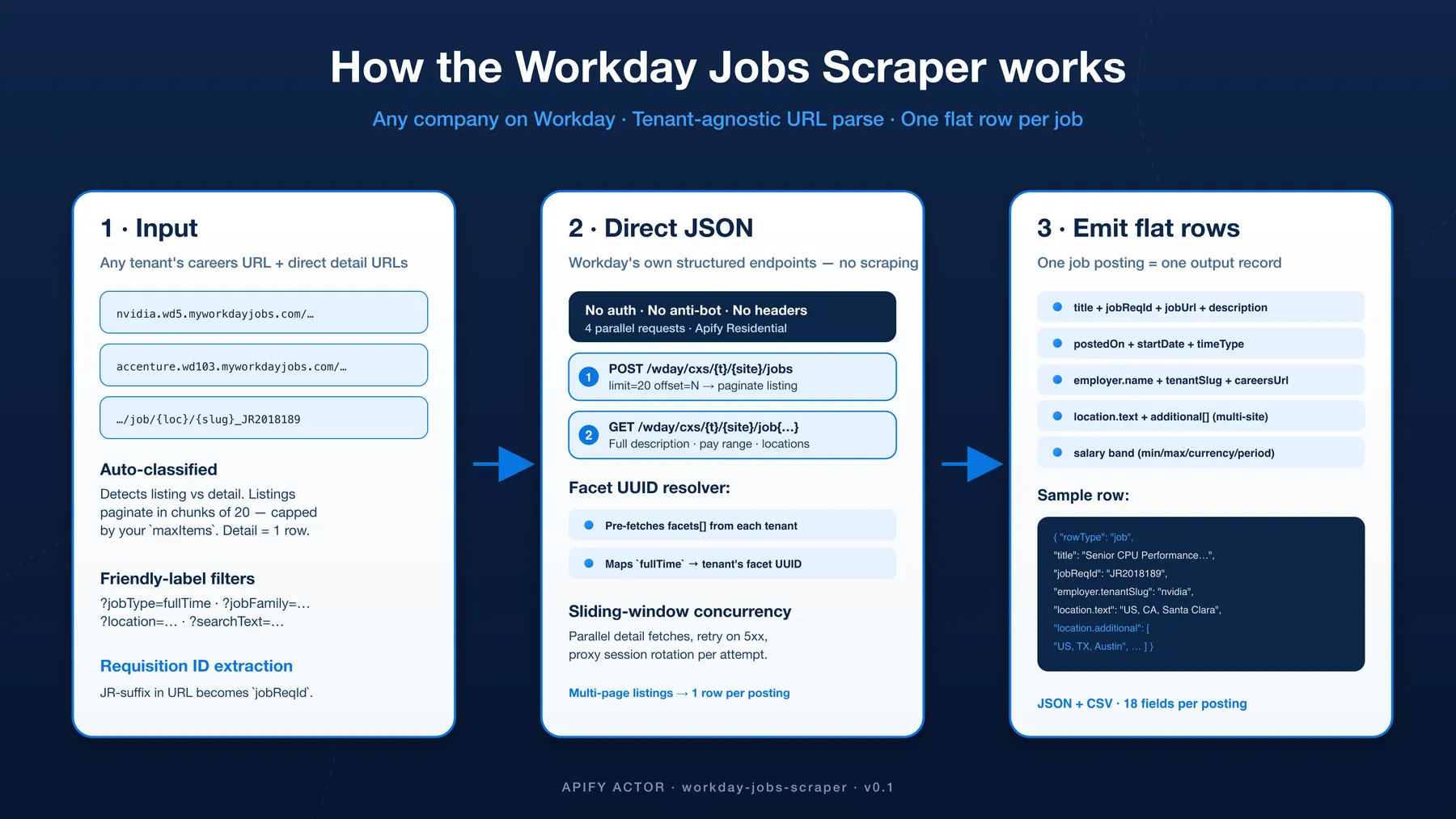
Workday's HCM platform powers careers pages for thousands of large employers — Fortune 500s, Series-A+ startups, government bodies, hospitals, universities. NVIDIA, Accenture, Salesforce, Charles Schwab, Procter & Gamble — anyone on {tenant}.wd{N}.myworkdayjobs.com. This actor delivers clean structured rows from any tenant with zero per-site code:
- Tenant-agnostic URL parser — handles any
{tenant}.wd{1-103}.myworkdayjobs.comURL automatically. No hardcoded tenant list; if it's on Workday, it works. - Workday's own structured JSON endpoints — no HTML scraping. We call the same
/wday/cxs/{tenant}/{site}/jobsendpoint the Workday careers page itself uses. No anti-bot to bypass, no fingerprinting; the data arrives pre-structured. - Friendly-label filter resolver — paste
?jobType=fullTime,?jobFamily=Software Engineering,?location=London,?searchText=engineerin your URL. We pre-fetch each tenant'sfacets[]map at run-start and translate the friendly label to Workday's internal UUID. Filters are applied server-side, identical to the careers-page UI. - Multi-location capture — Workday lists "same job, multiple sites" as one canonical posting with a primary
locationplus anadditional[]array. Both are preserved. Customers who want a single-location-per-row shape can flatten downstream. - Salary band regex (USD / GBP / EUR) — when a tenant publishes pay in the job description (US compliance roles, EU transparency directive), we parse
min / max / currency / periodcleanly. - Mixed input — listing URLs auto-paginate + emit one row per posting (chunks of 20, capped by your
maxItems); direct detail URLs (.../job/{location}/{slug}_JR{reqId}) scrape one row each.
Use cases
- Talent intelligence — track Workday-hosted hiring for any portfolio company; cross-reference req IDs over time to spot ramp-up / freeze patterns
- Sales prospecting (HR-tech / ATS) — discover which Workday-customer companies are hiring in your target verticals + locations
- Comp benchmarking — aggregate published salary bands by
jobFamily+ region (US compliance + EU transparency requirements have grown the share of jobs with structured pay disclosure) - Recruitment market intelligence — Workday powers a meaningful chunk of large-enterprise hiring; tenant-level inventory snapshots feed BI dashboards
- ATS / job-aggregator integration — clean structured rows for downstream pipelines without per-tenant HTML scrapers
- Geospatial analytics — every row carries primary + additional location strings (city/region/country), parse-ready for downstream geocoding
Input
| Field | Type | Required | Notes |
|---|---|---|---|
startUrls | string[] | yes | Mix of careers-page URLs (https://nvidia.wd5.myworkdayjobs.com/en-US/NVIDIAExternalCareerSite) and direct job-detail URLs (.../job/US-CA-Santa-Clara/Senior-CPU-Performance-Architect_JR2018189). Also accepts a company's own careers page (e.g. https://jobs.intel.com, https://www.gilead.com/careers) — if it redirects to or embeds a Workday board, the actor auto-detects and unwraps the underlying Workday URL. Filters supported in the query string: ?searchText=, `?jobType=fullTime |
maxItems | integer | no | Maximum job rows emitted per careers URL. 3 tenant URLs × maxItems: 100 → up to 300 total rows (100 per tenant). Direct detail URLs always emit 1 row each. Each row = one paid dataset item. Default 1000. Free-tier users are additionally capped at 100 total rows across the whole run. |
maxConcurrency | integer | no | Parallel HTTP requests for detail-page fetches. Workday's API has no anti-bot — concurrency 5–10 is comfortable. Default 4. |
maxRequestRetries | integer | no | Per-URL retry budget on transient network errors and 5xx responses. Each retry rotates the proxy session with mild exponential backoff. Default 6. |
language | string (dropdown) | no | Preferred content language as a Workday locale — en-US, de-DE, fr-FR, es-ES, etc. Sent as Accept-Language; Workday returns each job's title + description in this language where the employer published a version in it — a preference, not a translator. Default en-US. |
proxy | object | no | Apify Residential (any country) recommended. Workday tolerates direct + datacenter IPs in our recon, but residential is the safe default. Override if you need a specific geo (some tenants serve different content to US vs EU traffic for compliance). |
Example input
Output schema
Every row has rowType: "job". 19 fields per posting, combining Workday's listing summary, the full detail payload, and the canonical share URL.
Run report — which input URLs worked (and how many jobs each has)
Every run writes a per-input-URL report to the run's key-value store, so you can verify at a glance which of your links fetched jobs and which didn't — for free (the report is not a dataset item, so it's never charged).
Two files, both under the run's Storage → Key-value store:
URL-REPORT.csv— opens straight in Excel / Google Sheets.URL-REPORT(JSON) — the same data plus run totals, for programmatic use.
One row per input line, in the exact order you pasted them:
| Column | Meaning |
|---|---|
inputUrl | The URL exactly as you entered it. |
kind | listing, detail, or invalid. |
status | ok · no_jobs · fetch_failed · invalid_url · duplicate · skipped. |
totalJobsForUrl | How many jobs Workday reports for that URL (listings only). |
jobsScraped | How many rows we actually emitted from that URL. |
note | Human-readable explanation of the outcome. |
Example URL-REPORT.csv:
Output order matches input order. Dataset rows are emitted in the same sequence you pasted your URLs (and in listing order within each URL), so the dataset and the report line up one-to-one.
How it works
- Classify input — listing URLs (
/en-US/{site}or/en-US/{site}/?searchText=…) vs. direct detail URLs (/en-US/{site}/job/{location}/{slug}_JR{reqId}). Listings auto-paginate via the Workday JSON API; details fetch one record each. - Pre-fetch facets per tenant — first listing call requests
limit=1and inspects thefacets[]payload, building adescriptor → UUIDlookup map. Friendly query-string labels (?jobType=fullTime) resolve through this map to the tenant's internal facet UUID before pagination starts. - Paginate —
POST /wday/cxs/{tenant}/{site}/jobswith{ limit: 20, offset: N, searchText, appliedFacets }walks the listing in chunks of 20. (Workday's hard cap.) We stop whenmaxItemsis reached or the response runs out of items. - Fetch each detail —
GET /wday/cxs/{tenant}/{site}/job{externalPath}returns the full payload:jobPostingInfo,hiringOrganization,similarJobs. Sliding-window concurrency (maxConcurrency) keeps the pipeline fast. - Map + emit — combine listing summary + detail + canonical URL into one flat row. Salary regex runs over
jobDescription. One row perexternalPath. Each row carriestotalJobsForUrl(how many jobs Workday reports for its source listing). - Order + report + language — URLs are processed in the order you pasted them, and each URL's rows are written as one ordered block, so dataset order matches input order. A per-URL report (worked / failed / total jobs) is written to the key-value store. Every API call sends
Accept-Language: en-USto prefer English where the tenant publishes it.
Apply flow — applyUrl and applyType
Workday hosts the apply form on the same tenant subdomain as the job page, so the applyUrl is always the canonical detail URL on the tenant's own Workday subdomain. We always set:
| Field | Value | Meaning |
|---|---|---|
applyUrl | https://{tenant}.{wd}.myworkdayjobs.com/{lang-country}/{site}/job{externalPath} | The canonical share / apply URL. Same domain as the job page. |
applyType | "internal" | Workday hosts the form on its own domain — no external recruiter ATS handoff. |
canApply | true / false | From jobPostingInfo.canApply. Some reqs are listed but no longer accepting applications (e.g. "filled, on review"). |
Unlike job-board aggregators where the apply destination is an external ATS, Workday is the ATS — every Workday job's apply form lives on the same {tenant}.myworkdayjobs.com domain.
Notes & limitations
- Same job listed at multiple locations = multiple rows. Workday's search API returns one entry per (jobReqId, location) pair when a req is open at multiple sites. The shared detail payload's
additionalLocationsarray tells you the other sites, so each row'slocation.additional[]is consistent. If you want one-row-per-req, dedupe onjobReqIddownstream — the rows are otherwise identical except for the primarylocation.text. - Salary fill ≈ 25 % across tenants. Salary publication is tenant- and region-dependent. US tenants subject to state pay-transparency laws (CA, CO, NY, WA) and EU tenants under the 2026 Pay Transparency Directive publish bands; many roles outside those rules don't. When unpublished,
salaryisnull. startDatefilled when present. Workday sometimes carries it separately frompostedOn; when onlypostedOnis present,startDateisnull.- Friendly labels resolve case-insensitively.
?jobType=fullTime(camelCase),?jobType=Full-Time,?jobType=full timeall map to the same UUID. - Tenant-specific facets fall back to UUIDs. If you know a tenant's internal UUID, pass it directly as
?appliedFacet_locationMainGroup={UUID}and the actor passes it through verbatim. - No anti-bot on Workday's JSON API. Direct connections work in recon; we still route through Apify Residential by default because (a) some tenants serve geo-restricted listings, (b) residential IPs blend best with normal browser traffic, (c) consistent behaviour across runs is worth the small cost.
FAQ
Which Workday URLs work?
Any {tenant}.{wd_cluster}.myworkdayjobs.com URL — both listing pages (/en-US/{site} with or without filters) and direct detail pages (/en-US/{site}/job/{location}/{slug}_JR{reqId}). The /en-US/ locale segment is optional: tenants that publish without it (e.g. https://agilent.wd5.myworkdayjobs.com/Agilent_Careers) work just the same. You can mix both kinds in the same startUrls array; the actor classifies each one automatically.
Can I paste a company's own careers page instead of the Workday URL?
Yes, in most cases. Many companies link customers to their own careers page (e.g. jobs.intel.com, gilead.com/careers, careers.unilever.com) that redirects to, links to, or iframes a Workday board. The actor fetches the page, detects the embedded Workday board, and unwraps it to the underlying {tenant}.myworkdayjobs.com URL automatically — then scrapes it normally. Verified live on Intel, Gilead, Unilever, and CrowdStrike. The per-URL report shows [embedded Workday → {tenant}/{site}] so you can see what was unwrapped. The one case this can't handle is a careers page that renders its jobs purely client-side with no Workday URL anywhere in the page HTML (a different ATS, or a JavaScript-only widget) — those are reported as "no embedded Workday board found" so you know to grab the Workday link directly.
What does {wd_cluster} mean in the URL?
Workday's regional tenant routing — wd1, wd2, wd5, wd103, etc. Each cluster hosts a different shard of tenants. The actor handles any wd\d+ cluster transparently; you don't need to know which one.
Why are some friendly filter labels unresolved?
Workday's facet labels are tenant-specific — one company's jobFamilyGroup might say "Software Engineering" while another says "Engineering & Technology". The actor logs a [INTERNAL] couldn't resolve friendly filter label … warning when your label doesn't match any value in the tenant's facets[] array. Solution: open the tenant's careers page in a browser, apply the filter manually, copy the appliedFacet UUID out of the URL, and re-run with ?appliedFacet_{facetParameter}={UUID}.
Why does maxItems cap behave per-URL, not per-run?
So that batching multiple tenants stays predictable. If you paste [nvidia, accenture, salesforce] with maxItems: 50, you get up to 150 rows (50 from each), not 50 split arbitrarily across them. Direct detail URLs are always one row regardless.
What's the difference between jobReqId, externalPath, and jobPostingSiteId?
Three distinct identifiers:
jobReqId— the stable Workday requisition ID (e.g.JR2018189,R-12345). Same job across all its location-rows shares this ID. Dedupe on this for one-row-per-req.externalPath— the URL path tail under/job/, including the location segment (e.g./US-CA-Santa-Clara/Senior-CPU-Performance-Architect_JR2018189). Differs across location-rows of the same req.jobPostingSiteId— the tenant's careers-site identifier (e.g.NVIDIAExternalCareerSite,AccentureCareers). Constant within one tenant.
Can the parsed salary handle USD / GBP / EUR / ranges?
Yes. The regex catches $184,000 - $282,000 USD per year, £60k - £85k per annum, €45,000–€60,000 / year, and single values. The period field normalizes to year/hour/day/week/month. When the description has no salary text, salary is null — we don't synthesize.
How do I see which of my input URLs worked or failed?
Every run writes a URL-REPORT.csv (and a JSON copy) to the run's key-value store — one row per input link, in input order, with its status (ok / no_jobs / fetch_failed / invalid_url / duplicate), the total jobs Workday reports for it, and how many we scraped. It's free — the report is not a dataset item. See Run report above.
Can I get the total number of jobs for each company URL?
Yes, in two places. Every job row carries totalJobsForUrl (the count Workday reports for its source listing), and the URL-REPORT lists it once per input URL.
Can the output keep the same order as my input URLs? Yes. URLs are scraped in the order you paste them, and each URL's rows are written as one block, so the dataset order matches your input order.
Can I choose the language? Can I force English?
Yes — use the language dropdown (en-US, de-DE, fr-FR, …). It's sent as Accept-Language, and Workday's detail endpoint returns each job's title + description in that language where the employer published a version in it. Verified live: on a bilingual tenant, en-US returns the English body and de-DE returns the German body of the same posting. Two caveats, because it's a preference and not a translator: (1) if a posting was written only in one language, that language is returned regardless of your choice; (2) the job-list/search step isn't localizable, but since every row's title + description come from the detail step, the row data still follows your language choice. For guaranteed output in one language when employers didn't publish it, ask us about the optional machine-translation add-on.
What does each dataset-item charge cover?
One job row with all 19 fields. maxItems is per listing URL, so a maxItems: 100 run with 3 tenant URLs = up to 300 charges. The Apify Store pricing event is apify-default-dataset-item — Apify auto-charges per row written to the default dataset.
My run returned fewer rows than the careers page shows — why?
Three possibilities: (1) maxItems cap — it's per-listing-URL; if you set maxItems: 100 and pasted one URL, that's the ceiling. (2) Same req at multiple locations — Workday's totalItems counts each (req, location) pair; one req at 3 locations counts as 3 items in the API's view. (3) Closed reqs filtered out — Workday excludes positions that have been removed from the public listing; the count badge on the page can include stale rows.
Can I scrape multiple tenants in parallel?
Yes. Each tenant URL in startUrls runs independently, sharing the global maxConcurrency pool for detail-page fetches. There's no per-tenant rate cap from Workday in our recon, but Apify's request queue enforces sane parallelism overall.
Support
- Bugs / feature requests — open an issue on the GitHub repo
- Custom exports / tailored fields — drop a note via the Apify Store contact form
- Other actors — see my Apify Store profile for the rest of the catalog
⚠️ Disclaimer
This Actor is an independent tool and is not affiliated with, endorsed by, or sponsored by Workday Inc. or any of the companies whose careers pages it can scrape. All trademarks mentioned are the property of their respective owners.
The scraper extracts only publicly visible job postings served by each tenant's own Workday careers page — no login, no CAPTCHA solving, no API-key forgery, no access to non-public Workday APIs. It calls the same structured JSON endpoints (/wday/cxs/{tenant}/{site}/jobs) that the careers page itself uses on every page load. The actor rate-limits via concurrency cap (default 4) to avoid burdening any tenant's infrastructure.
Users are responsible for:
- Complying with each scraped tenant's careers-page terms of use
- Following GDPR, CCPA, and your jurisdiction's data-protection laws when storing or processing scraped postings
- Not contacting candidates or employees listed in scraped postings
- Not republishing scraped data in a way that competes commercially with Workday or its customers
SEO Keywords
workday scraper, scrape workday jobs, workday careers scraper, myworkdayjobs scraper, workday jobs api, workday job scraper any company, fortune 500 careers scraper, enterprise job board scraper, workday hcm scraper, multi-tenant workday scraper, apify workday, nvidia jobs scraper, accenture jobs scraper, salesforce jobs scraper, workday json api, jobposting scraper, requisition id scraper, ats scraper, multi-location job scraper, workday facet filter, workday salary band scraper, workday pay transparency, hiring intelligence, talent intelligence, hr-tech data, b2b sales prospecting, comp benchmarking, salary data api


