

YouTube Transcript Scraper · Subtitles, Captions & Whisper AI
Pricing
from $1.80 / 1,000 transcripts
YouTube Transcript Scraper · Subtitles, Captions & Whisper AI
YouTube transcripts, subtitles and captions from videos, Shorts, live replays, channels and playlists, as plain text, timestamped JSON, SRT and VTT in any language. AI speech-to-text covers videos with no captions. Callable from AI agents over MCP. Failed videos are never charged.
Pricing
from $1.80 / 1,000 transcripts
Rating
5.0
(3)
Developer

Muhamed Didovic
Maintained by CommunityActor stats
0
Bookmarked
54
Total users
5
Monthly active users
2 days ago
Last modified
Features
Share
Paste a YouTube link and get its transcript back in seconds: plain text for your LLM, timestamped segments for search and chapters, and ready-to-save SRT and VTT subtitle files, with the video's title, channel and views on the same row. Works on single videos, Shorts, live stream replays, whole channels and playlists, in any caption language. Videos that have no captions at all can still be transcribed by AI speech-to-text.
No YouTube API key, no login. Export as JSON, CSV, Excel, or call it from your code, n8n, Make, Zapier or an AI agent over MCP.
Why Use This Scraper?
- Text even when a video has no captions. Switch on AI transcription and caption-less videos come back transcribed by Whisper speech-to-text instead of empty. It is billed only when it produces text.
- Every format on one row.
transcript_only_textfor prompts and RAG, timestampedtranscriptsegments, and completetranscript_srt/transcript_vttfiles. No conversion step. - Any language. Ask for
en,de,es,ja… and when the video has no track in that language, YouTube's translation into it is returned. Every row says the language it came back in, whether the captions were written by a person or auto-generated, and whether they were translated. - Whole channels and playlists. Paste a channel or playlist link and every video is transcribed, newest first, up to your cap.
- Scheduled runs bill only new uploads. Give the run a watchlist name and switch on Only new videos: a daily run transcribes what the channel posted since yesterday and nothing else.
- You pay for transcripts, not attempts. A video that cannot be transcribed writes no row and costs nothing. The run's
ERRORSrecord names it with the reason and what to change. - Video metadata included. Title, channel and @handle, publish date, views, duration, keywords, description and thumbnails ride along on every transcript at no extra cost.
- Live replays and Shorts.
youtube.com/live/…and/shorts/…links work as pasted.
Overview
This actor is for anyone who needs what was said in YouTube videos as text: AI and LLM builders, content and SEO teams, researchers, subtitle and localisation teams, and media monitoring.
The dataset holds one row per video. Each row has the transcript three ways (plain text, timestamped segments, SRT and VTT), the track details (language, auto-generated or not, translated or not, every caption track the video offers), the video's metadata, and the first 3 seconds of speech. Videos that could not be transcribed are not rows; they are listed in the run's ERRORS key-value record with a reason.
Supported Inputs
URL types
| Input | Example | What you get |
|---|---|---|
| Video | https://www.youtube.com/watch?v=dQw4w9WgXcQ | One transcript row |
| Short link | https://youtu.be/dQw4w9WgXcQ | One transcript row |
| Shorts | https://www.youtube.com/shorts/{id} | One transcript row |
| Live stream replay | https://www.youtube.com/live/{id} | One transcript row once YouTube has published the captions |
| Bare video id | dQw4w9WgXcQ | One transcript row |
| Channel | https://www.youtube.com/@handle (also /channel/…, /c/…, /user/…, the /videos or /streams tab) | One row per video, newest first, up to Maximum results |
| Playlist | https://www.youtube.com/playlist?list=PL… | One row per playable video, in playlist order, up to Maximum results |
| Chained run | datasetId of a finished YouTube scraper run | Every video and channel link found in its rows |
| Pasted rows | datasetItems: [{ "url": "https://youtu.be/…" }] | Every video and channel link found in the rows |
Copy-pasteable start URLs
Unsupported inputs
- Private, members-only and age-restricted videos.
- A stream that is still live, or ended so recently that YouTube has not published captions yet. It is reported as
live_not_readyand not charged; captions usually appear a few hours after the stream ends. - Keyword search. Run a YouTube search scraper first and pass its dataset ID in
datasetId. - A watch link carrying
&list=is read as one video. Use theplaylist?list=link for the whole playlist.
Use Cases
| Who | What they do with it |
|---|---|
| AI and LLM builders | Feed plain-text transcripts to RAG pipelines, summarisers and agents; cite with timestamps |
| Content and SEO teams | Turn videos into articles, show notes and quotes; study what competitor channels talk about |
| Researchers and analysts | Build searchable text corpora from talks, interviews, lectures and news |
| Subtitle and localisation teams | Download SRT and VTT files, including YouTube's translated tracks |
| Creators and agencies | Compare video openers with hook3s, archive a channel's back catalogue as text |
| Media monitoring | Track what is said about brands, products and people across channels on a schedule |
How It Works
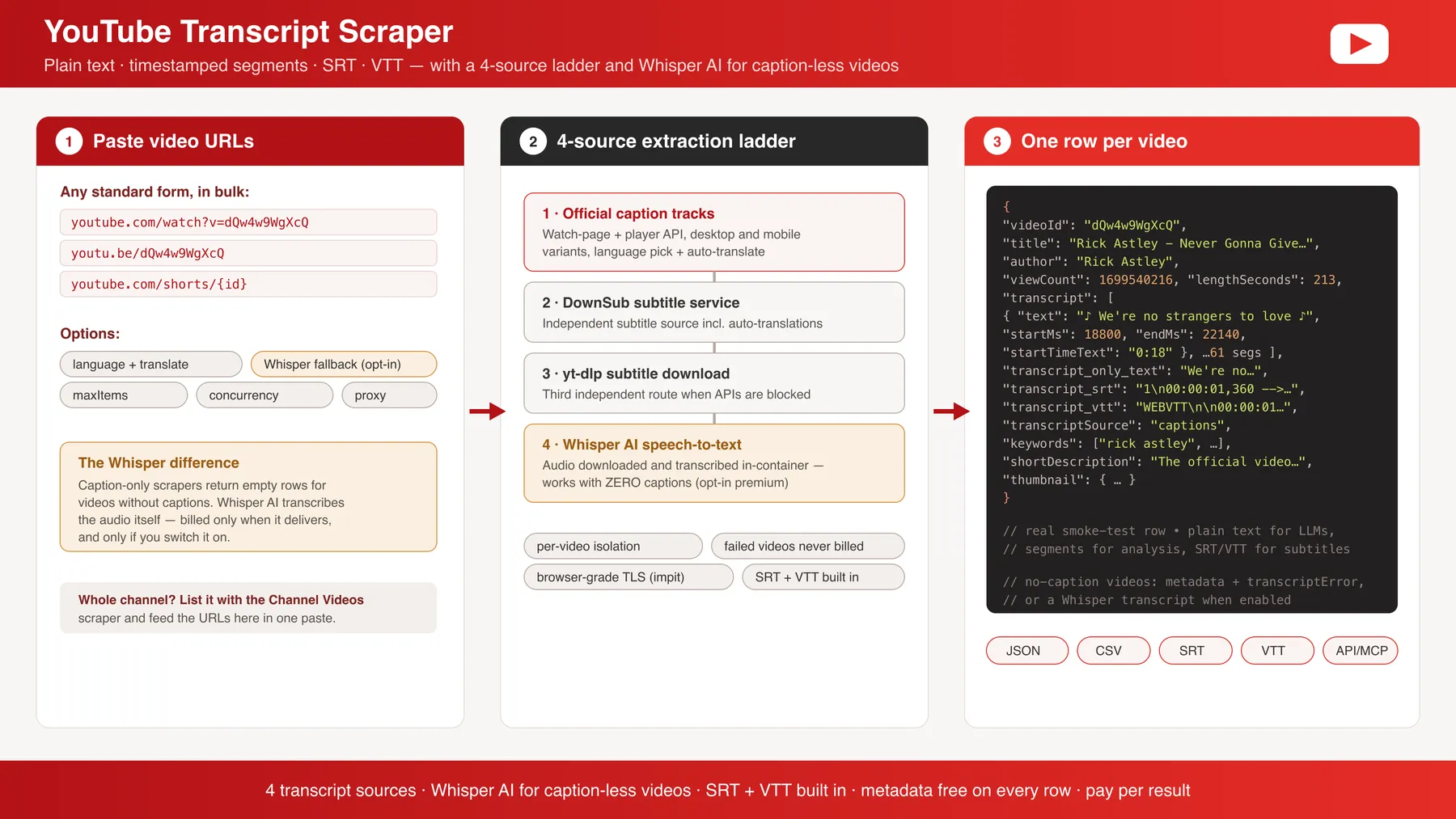
- You paste video, Shorts, live, channel or playlist links (or chain a dataset from another run).
- Channels and playlists are expanded into their videos, up to your Maximum results.
- For each video the caption track in your language is found, or YouTube's translation into it.
- When a video has no captions and AI transcription is on, its audio is transcribed with Whisper speech-to-text.
- One row per video lands in the dataset: transcript as text, segments, SRT and VTT, plus metadata. Anything not delivered is listed in
ERRORS, unbilled.
Input Configuration
Input fields
| Field | Type | Default | What it does |
|---|---|---|---|
startUrls | array | — | Video, Shorts, live, channel or playlist URLs, or bare video ids. One row per video |
language | string | default | Caption language code (en, de, es…). default = the video's original track. Translated when the exact track is missing |
whisperFallback | boolean | false | AI speech-to-text for videos with no captions, up to 30 minutes long. Premium event, charged only when it produces text |
maxItems | integer | 100 | Most transcript rows the run writes, across all URLs. Your spend cap |
datasetId | string | — | Dataset of a finished YouTube scraper run; every video and channel link in its rows is transcribed |
datasetItems | array | — | Rows pasted from a scraper instead of a dataset ID |
watchlistId | string | — | Name of a memory of transcribed videos, for scheduled runs |
newItemsOnly | boolean | false | Skip videos already stored under watchlistId. Needs watchlistId |
maxConcurrency | integer | 10 | Most videos fetched at the same time |
minConcurrency | integer | 1 | Fewest videos fetched at the same time |
maxRequestRetries | integer | 3 | Retries per video after a temporary error before it is skipped (and not billed) |
proxy | object | automatic | Nothing to configure. Switch off Apify Proxy and add your own proxy URLs to use them |
Also accepted in JSON input, not shown in the form: videoUrl (one URL as a string), urls (a list of { "url": … } objects) and targetLanguage (same as language). An input written for another transcript actor in those shapes runs unchanged.
Common scenarios
One video, in Spanish:
A channel's last 50 videos, with AI transcription for any that have no captions:
A daily schedule that transcribes only new uploads:
Call it from code, n8n or an AI agent
Every Apify actor is an API. From Python, with the apify-client package:
One HTTP call that waits for the run and returns the rows:
- AI agents (Claude, Cursor, VS Code, ChatGPT): add the Apify MCP server at
https://mcp.apify.com/?tools=memo23/youtube-transcript-scraperwith your Apify token, and the agent gets a tool that takes YouTube links and returns transcripts. - n8n, Make, Zapier: use the Apify node or app, pick this actor, and map
transcript_only_textinto your next step.
Output Overview
One row per transcribed video. The transcript appears as transcript_only_text (one plain string), transcript (timestamped segments), data (the same segments as start / dur / text in seconds) and transcript_srt / transcript_vtt (whole subtitle files as strings). Next to it: which language and track it came from, every caption track the video offers, the video's metadata, and its spoken opening.
Every video the run set out to transcribe ends either as a row or as an entry in the run's ERRORS record (default key-value store), never neither. The record is written on every run, with an empty items list when everything was delivered, so an integration can read it without checking first. Each entry has a reason, a plain-language detail and a retryable flag:
reason | What happened | Re-run as-is? |
|---|---|---|
no_captions | No caption track, and AI transcription is off | Switch on whisperFallback |
no_speech | No captions, and the audio is only music, silence or noise | No |
too_long | No captions, and the video is over the 30-minute AI transcription limit | No |
live_not_ready | Still live, not started, or ended before YouTube published captions | Later |
unavailable | Private, removed, members-only or age-restricted | No |
login_required | YouTube asked for a sign-in on this video | Yes |
rate_limited | YouTube refused the request for a while | Yes, in a few minutes |
fetch_failed | Another temporary error | Yes |
The run's status line adds it up, for example "Delivered 48 of 50 videos. 2 not delivered and not charged: 2 no captions and no Whisper fallback — see the ERRORS record."
Output Samples
A video URL start, trimmed (real row from a run):
Key Output Fields
Transcript
| Field | Meaning |
|---|---|
transcript_only_text | The whole transcript as one plain string |
transcript[] | Timestamped segments: text, startMs, endMs, startTimeText |
data[] | The same segments as start, dur, text, in seconds (strings) |
transcript_srt / transcript_vtt | Complete subtitle files as strings, ready to save |
Track details
| Field | Meaning |
|---|---|
transcriptLanguage | Language code of the text you got; null when the source did not say |
isAutoGenerated | true for YouTube's automatic captions, false for a person's, null when it cannot be told |
isTranslated | true when the text was translated into the language you asked for |
transcriptSource | Where the text came from: a caption track, or whisper when the audio was transcribed by AI |
availableCaptionTracks[] | Every caption track on the video: languageCode, name, kind (manual or auto-generated), isTranslatable |
Video
| Field | Meaning |
|---|---|
videoId, title, author, channelId, channelHandle | Video and channel identity |
publishDate / uploadDate | When the video was published |
viewCount, lengthSeconds, keywords, shortDescription, thumbnail | Video metadata, included free |
liveBroadcastDetails | Start and end time when the video was a live stream |
Opening
| Field | Meaning |
|---|---|
hook3s | The first 3 seconds of speech; a music-only opening reads as the caption marker, for example [♪♪♪] |
hookStartSeconds | When the speaking starts |
FAQ
What happens with videos that have no captions?
With AI transcription off they write no row and cost nothing; the ERRORS record lists them as no_captions. With whisperFallback: true the audio is transcribed by Whisper speech-to-text, charged as a premium event only when it returns text. A result made only of filler that speech-to-text produces over music or silence ("Thank you.", "♪") counts as no transcript: the video is listed as no_speech and nothing is charged. Videos up to 30 minutes long.
Which languages are supported?
Any language YouTube has a caption track for, plus YouTube's translations. Set language to a code like de or pt; the row's transcriptLanguage, isAutoGenerated and isTranslated say exactly what you got. availableCaptionTracks lists every track if you want to choose yourself.
Can I transcribe a whole channel or playlist?
Yes. A channel link is walked newest first and a playlist link in playlist order, both up to maxItems. On a schedule, add watchlistId with newItemsOnly: true so only new uploads are transcribed and billed.
Can my AI agent call it?
Yes. Connect the Apify MCP server (https://mcp.apify.com/?tools=memo23/youtube-transcript-scraper) to Claude, Cursor, VS Code or ChatGPT and ask for the transcript of a link. The agent reads transcript_only_text; a video it could not get is in ERRORS with a reason.
How much does a run cost?
From $1.80 to $2.50 per 1,000 delivered transcripts, depending on your Apify plan ($2.50 Free, $2.25 Bronze, $2.00 Silver, $1.80 Gold and above), plus a start fee of $0.00005 per GB of memory. AI transcription adds $0.20 per caption-less video it transcribes. Set maxItems to cap a run.
Do failed videos cost anything?
No. A video without a transcript writes no row, so nothing is billed for it. AI transcription is charged only when it returns text.
My integration starts runs with a short timeout. What happens to a long run?
About 45 seconds before the run's timeout the actor stops taking new videos, finishes the ones in progress and ends normally. Delivered rows stay in the dataset, the status line says the run stopped early, and unfinished videos are not charged.
Do I need to set up proxies?
No. The default works at any volume. To use your own proxies, switch off "Use Apify Proxy" in the proxy input and add your proxy URLs.
Support
Found a bug or missing a field? Open an issue on the actor's Issues tab in Apify Console. Issues are answered within 1–2 business days.
Additional Services
Need scheduled transcript archives, one feed that merges YouTube, TikTok, Instagram and Loom transcripts, or delivery straight into your database? Custom builds and SLAs are available; get in touch through the actor page.
Explore More Scrapers
- Video & Audio Transcriber: AI transcription for any video or audio URL
- Instagram Transcript Scraper
- YouTube Comments Scraper
- YouTube Search Results Scraper: find videos, then chain the dataset here
- The full catalogue: memo23 on Apify Store
🤖 For AI Agents & LLM Apps
Quick reference for agents calling this actor through the Apify MCP server or the Apify API (actor: memo23/youtube-transcript-scraper).
Purpose: YouTube transcripts from video, Shorts, live replay, channel or playlist links, with optional AI speech-to-text for videos that have no captions.
Minimal input:
Output: one dataset row per video: videoId, title, author, channelHandle, publishDate, lengthSeconds, viewCount, transcript_only_text, transcript [{text, startMs, endMs, startTimeText}], data [{start, dur, text}], transcript_srt, transcript_vtt, transcriptLanguage, isAutoGenerated, isTranslated, transcriptSource, availableCaptionTracks, hook3s.
Behaviors an agent should know:
- Always set
maxItemswhen passing a channel or playlist; it defaults to 100 rows. - Read
transcript_only_textfor the text. Videos not delivered are in the run'sERRORSkey-value record withreasonandretryable. languagetakes a code (en,de…);defaultreturns the original track.whisperFallback: truetranscribes caption-less videos up to 30 minutes, at $0.20 each, charged only on success.- Billing: $0.0018 to $0.0025 per delivered row depending on the Apify plan; failed and skipped videos are free.
- Private, members-only and age-restricted videos are not supported.
⚠️ Disclaimer
This Actor is an independent tool and is not affiliated with, endorsed by, or sponsored by Google LLC, YouTube or any of their subsidiaries. All trademarks mentioned are the property of their respective owners.
The scraper reads only publicly available video pages and captions: no login, and no private, members-only or age-restricted content. Users are responsible for making sure their use complies with YouTube's Terms of Service, copyright law as it applies to transcript content, applicable data-protection law (GDPR, CCPA, etc.), and any contractual obligations of their own organisation.
SEO Keywords
youtube transcript scraper, youtube transcript api, youtube transcript downloader, youtube subtitles downloader, youtube captions scraper, extract youtube transcript, youtube video to text, youtube srt download, youtube vtt subtitles, youtube shorts transcript, youtube channel transcripts, youtube playlist transcript, transcribe youtube without captions, whisper youtube transcription, youtube transcript for llm, youtube rag pipeline, youtube transcript mcp, bulk youtube transcripts, video to text api, Apify youtube transcript


