

ZIM Cargo Tracking — Containers, Bills of Lading & Bookings
Pricing
from $5.00 / 1,000 tracking results
ZIM Cargo Tracking — Containers, Bills of Lading & Bookings
Track ZIM containers, bills of lading and bookings. Each number returns the route, vessel, voyage, ETA, agreed arrival and full movement history, one row per container. One charge covers every container on that number. Schedule it daily or call it from your app. JSON or CSV.
Pricing
from $5.00 / 1,000 tracking results
Rating
0.0
(0)
Developer

Muhamed Didovic
Maintained by CommunityActor stats
0
Bookmarked
2
Total users
1
Monthly active users
a day ago
Last modified
Categories
Features
Share
ZIM Cargo Tracking — Containers, Bills of Lading and Bookings
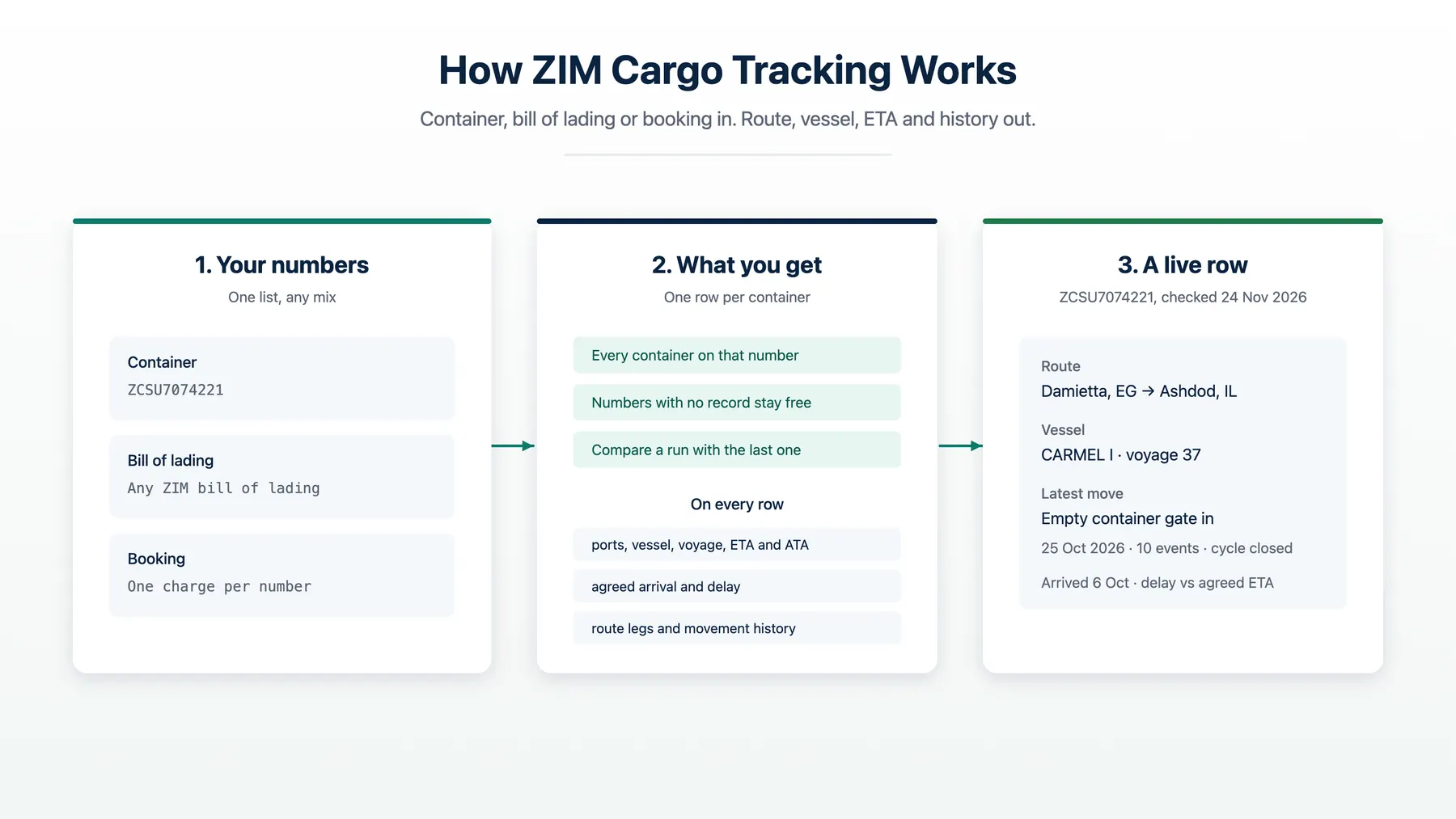
Paste a ZIM container, bill of lading or booking number and get the route, the vessel, the voyage, the arrival ZIM agreed, the arrival it now shows, and every move on the box. One row per container. A bill of lading with several boxes comes back as several rows, on a single charge.
No ZIM login and no API key.
Why Use This Scraper?
- Container, bill of lading and booking numbers go in the same list.
- One row per container: ports, vessel, voyage, ETA, actual arrival, agreed arrival and whether ZIM marks the arrival as delayed.
- The full movement history, oldest first, plus each leg of the route with sailing and berth dates.
- A number ZIM does not recognise is not charged. A failed lookup is retried.
- Turn on Track changes for a daily schedule and see what moved since the previous run.
Overview
This actor is for freight forwarders, consignees and anyone watching boxes on ZIM Integrated Shipping Services. You give it the references you already have. It returns the same facts the public tracking page shows: where the box is, which ship it is on, when it sailed, when it arrived or is due, and the earlier arrival date when ZIM has revised it.
A container number returns one row. A bill of lading or booking returns one row for each container on it. The charge is per number you submitted, not per container.
Supported Inputs
| Input | Example | What you get |
|---|---|---|
| Container number | ZCSU7074221 | That box: route, vessel, arrival, movements |
| Bill of lading | a ZIM bill of lading | One row per container on the bill |
| Booking number | a ZIM booking | One row per container on the booking |
Mix all three in trackingNumbers. Spaces and dashes are ignored.
Not accepted: sailing schedules with no shipment number, freight quotes, customs filings, and anything behind a ZIM login.
Use Cases
| Who | What they do with it |
|---|---|
| Freight forwarders | Drop a morning list of boxes and bills into one run |
| Consignees | Watch an arrival date and the delay against the date ZIM agreed |
| Operations | Schedule a daily run and keep only the containers that moved |
| Developers | Call the actor from a dashboard or a spreadsheet export |
How It Works
- Paste container, bill of lading and booking numbers, one per line.
- Start the run. Each number is looked up on its own.
- Every container on a recognised number is saved as its own row.
- Open the dataset, or the run summary for numbers that had no record.
- Optional: turn on Track changes and schedule the run. The next run lists what moved.
Input Configuration
| Field | Type | What it does |
|---|---|---|
trackingNumbers | string list | Required. Container, bill of lading or booking numbers, one per line. Example: ZCSU7074221. |
maxItems | integer | Stop after this many numbers. Leave empty to track every number you pasted. |
trackChanges | boolean | Compare each container with the previous run and add a changes list. Default false. |
onlyChanged | boolean | With Track changes on, save only containers that moved. The first run still saves everything it finds. Default false. |
watchlistName | string | Keeps one schedule's history separate from another. Letters, numbers and dashes. Leave empty for one shared history. |
includeRaw | boolean | Add ZIM's full tracking record under raw. Default false. |
maxConcurrency | integer | How many numbers to track at once. Default 5, maximum 10. |
proxy | object | Leave empty. The default works out of the box. |
One container
A daily watch
Output Overview
Each row is one container. The top fields are the route and the arrival. legs is the route in order, including a local move after the sea leg when ZIM shows one. events is the movement history, oldest first. eta is set only while the ship has not arrived. Once it has, ata holds the actual arrival and eta is empty. agreedEta is the arrival ZIM originally agreed, and etaStatus is DELAY, EARLY or ON TIME when ZIM reports that.
delivered is true when ZIM has closed the container cycle, which on this sample is the empty box gated back in.
Output Samples
Shortened from a real run of ZCSU7074221 on 24 Nov 2026. The live row has 10 movements and 2 legs.
With Track changes on, the first time a container is seen the row also has:
A later run lists only the fields that moved, such as arrival or vessel.
Key Output Fields
The box
containerNumber,containerType,containerTypeCode,status,deliverednumberType:container,bill_of_lading,bookingorunknownbillOfLadingorbookingNumberwhen that is what you submitted
The voyage
origin,destination,portOfLoading,portOfDischarge,transshipmentsvessel,voyageeta,ata,agreedEta,etaStatus,previousEtalegs: each hop, with sailing, arrival and berth dates
The history
events: date, location, description, vessel, voyagelatestStatus,latestLocation,latestDatechanges: only when Track changes is ontrackingUrl: the public tracking page for the number you submitted
FAQ
Do I need a ZIM account? No. The actor reads the public tracking page. It does not log in.
What if the number is wrong?
It is listed in the run summary under notFound and it is not charged. The run fails only when every number was unknown or every lookup failed.
A bill of lading returned several rows. Was I charged several times? No. One recognised number is one charge, however many containers are on it.
Why is eta empty?
The ship has already arrived. Read ata. eta is only filled while the arrival is still estimated.
What does Track changes remember?
The cycle status, the arrival, the vessel, the voyage, and the latest move. watchlistName keeps two schedules from overwriting each other. It does not store the full history of every past run.
What is not included?
Freight rates, customs status, documents behind a login, and a live map position. includeRaw adds the rest of the tracking record ZIM showed for that number.
Support
- Open an issue on the actor's Issues tab in Apify Console.
- Website: https://muhamed-didovic.github.io/
- Email: muhamed.didovic@gmail.com
Additional Services
- A private feed of your own boxes, on a schedule, into a sheet or a database: muhamed.didovic@gmail.com
- The same row shape for another carrier, or a combined run across carriers: muhamed.didovic@gmail.com
Explore More Scrapers
- Container Tracking: Maersk, CMA CGM, MSC, COSCO, ONE, HMM and Wan Hai in one list
🤖 For AI Agents & LLM Apps
Compact reference for AI agents calling this actor via the Apify MCP server or the Apify API (actor: memo23/zim-cargo-tracking).
Purpose: Public ZIM shipment tracking. One row per container for a container, bill of lading or booking number, with route, vessel, ETA or ATA, agreed arrival, delay and movement history.
Minimal input:
Output: trackingNumber, carrier, numberType, containerNumber, containerType, containerTypeCode, billOfLading, bookingNumber, status, origin, destination, portOfLoading, portOfDischarge, transshipments, vessel, voyage, eta, ata, agreedEta, etaStatus, previousEta, latestStatus, latestLocation, latestDate, delivered, legs [{vessel, voyage, portFrom, portTo, sailingDate, arrivalDate, berthSailingDate, berthArrivalDate}], events [{date, location, description, vessel, voyage, isActual}], eventCount, legCount, trackingUrl, scrapedAt, changes [{field, from, to}].
Behaviors an agent should know:
- Always set
maxItems. One input number can return several container rows and is still one charge. etais null once the ship has arrived; useata.etaStatusis DELAY, EARLY or ON TIME when present.- Unknown numbers are not charged and are listed in the key-value record
SUMMARYundernotFound. trackChangesaddschanges. The first sighting is{ "field": "firstSeen" }.onlyChangedthen skips containers that did not move.- Two schedules need different
watchlistNamevalues or they share one history. - Free plan: the first 10 numbers. Pay-per-event: a small start fee plus one
tracking-resultcharge per recognised number.
⚠️ Disclaimer
This Actor is an independent tool and is not affiliated with, endorsed by, or sponsored by ZIM Integrated Shipping Services Ltd. or any of its subsidiaries. All trademarks mentioned are the property of their respective owners.
The scraper accesses only publicly available shipment tracking pages — no authenticated endpoints, paid features, or content behind the zim.com login wall. Users are responsible for ensuring their use complies with zim.com's Terms of Service, applicable data-protection law (GDPR, CCPA, etc.), and any contractual obligations of their own organization.
SEO Keywords
ZIM cargo tracking, ZIM container tracking, ZIM bill of lading tracking, ZIM booking tracking, ZIM shipment status, ZIM vessel tracking, ZIM ETA, ZIM container number lookup, track ZIM container, ZIM arrival date, ocean freight tracking, container tracking API, bill of lading lookup, shipping container status, freight forwarder tracking, supply chain visibility, import container tracking, export container tracking, vessel voyage lookup, port of discharge ETA, agreed ETA delay, container movement history, logistics tracking automation, ZIM Integrated Shipping tracking


