

Backlink Checker: Backlinks & Referring Domains
Pricing
from $30.00 / 1,000 domain summaries
Backlink Checker: Backlinks & Referring Domains
Backlink checker and backlinks API: full backlink lists, referring domains, domain rank, dofollow share, spam score and optional organic traffic for up to 1,000 domains or URLs per run. $0.03 per domain + $6 per 1,000 backlinks; failed lookups are free.
Pricing
from $30.00 / 1,000 domain summaries
Rating
0.0
(0)
Developer

Meridian Labs
Maintained by CommunityActor stats
0
Bookmarked
54
Total users
52
Monthly active users
2 days ago
Last modified
Categories
Security
Limited permissionsShare
Backlink Checker returns the full backlink profile of any domain or page: a summary per target (domain rank, backlinks, referring domains, dofollow share, spam score, broken backlinks, first seen) and, if you want them, every backlink (linking page, anchor text, dofollow, domain rank, spam score, first and last seen) or every referring domain, strongest first. Check up to 1,000 domains per run, and get up to 20,000 backlinks per domain: real lists, not a capped sample. The input form is pre-filled, so the easiest way to try it is to click Start. One domain summary costs $0.03. Switch What to return to Referring domains to get the 50 strongest sites linking to it ($0.23).
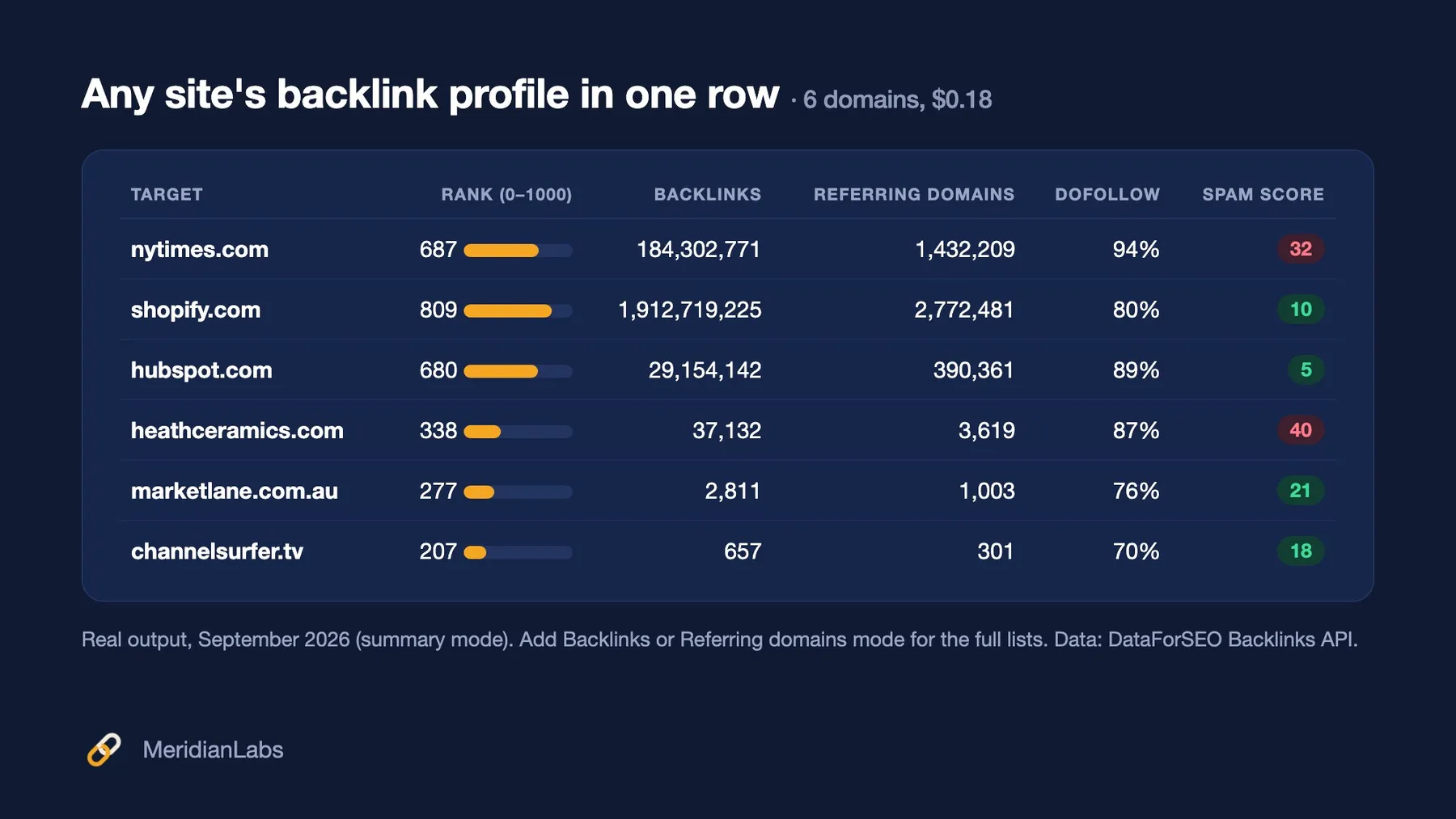
It's built for SEO specialists and link builders, agencies running backlink audits, domain investors vetting a domain's link profile, and AI agents that need backlink data through an API, without a monthly SEO-suite subscription.
What backlink data do you get?
One summary row per domain or URL (rowType: "summary"):
- 🏆 Domain rank (
rank, 0–1000): an authority score computed from the link graph, PageRank-style. Roughly: 300+ is an established site, 600+ a major one. - 🔗 Backlinks (
backlinks) and referring domains (referringDomains,referringMainDomains): how many live links point to the target, and from how many sites. - ✅ Dofollow share (
dofollowReferringDomainsPct): the share of linking domains that pass at least one dofollow link. - 🚩 Spam score (
spamScore, 0–100): how spammy the target's backlinks look on average. - 🧱 Referring IPs and subnets, broken backlinks, first seen and the target's own spam score (in runs of 1–4 targets; see the FAQ).
Then, if you choose a list mode:
- 📄 Backlinks mode: one row per backlink (
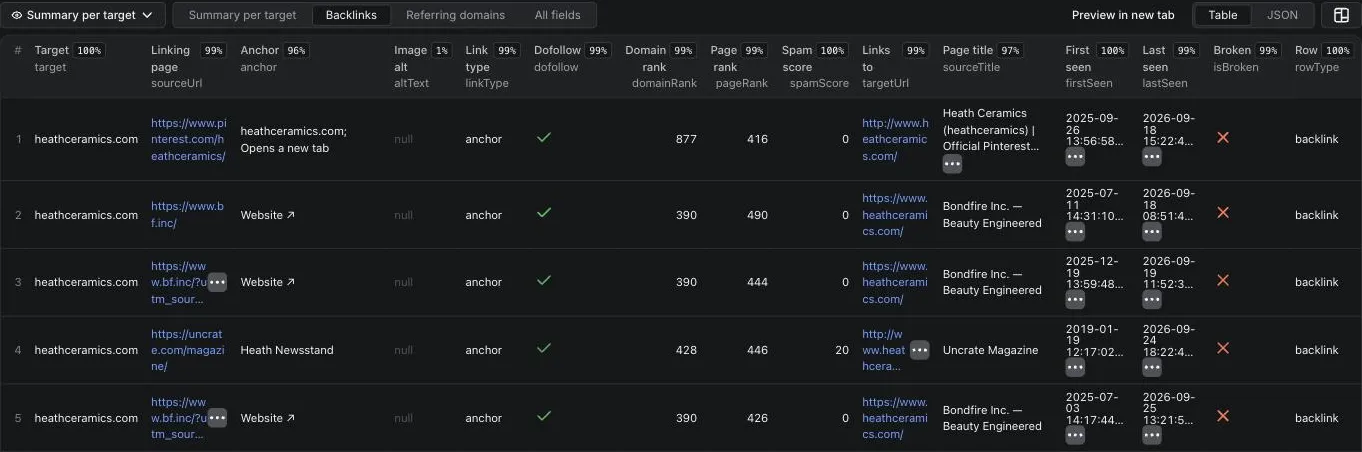
rowType: "backlink"): linking page URL and title, anchor text (or image alt text for image links), link type, dofollow, rel attributes, domain rank and page rank of the linking site, spam score, target URL, first and last seen, broken or lost flags. - 🌐 Referring domains mode: one row per linking domain (
rowType: "referring_domain"): domain, domain rank, backlinks to your target, linking pages (and how many are dofollow), spam score, first seen, lost date.
Lists come strongest first (backlinks by the link's own rank, referring domains by domain rank), so maxRowsPerTarget: 100 gives you the 100 best.
Why use this backlink checker?
- 📚 Complete lists, not samples. Ask for 5,000 backlinks and you get 5,000 when the index has them (up to 20,000 per target). In our September 2026 test, every request returned exactly the rows asked for.
- 🧮 Bulk domain checks. Paste up to 1,000 domains and get rank, backlinks, referring domains, dofollow share and spam score for each, plus estimated Google organic traffic if you switch it on: ideal for vetting link prospects, guest-post sites or expired domains.
- 🎯 Filters that save money. Dofollow only, minimum domain rank and a spam-score ceiling are applied by the data provider, so you pay only for the rows you want.
- 💸 Fair billing. You pay per domain checked and per row returned. Failed lookups, invalid entries and domains that don't exist are free, and the run stops exactly at your maximum spending limit.
- 🤖 AI-agent ready. Documented output schema, three table views and stable field names. It works from the Apify API, integrations (Make, Zapier, n8n, Google Sheets) and MCP clients.
How do I check the backlinks of a website?
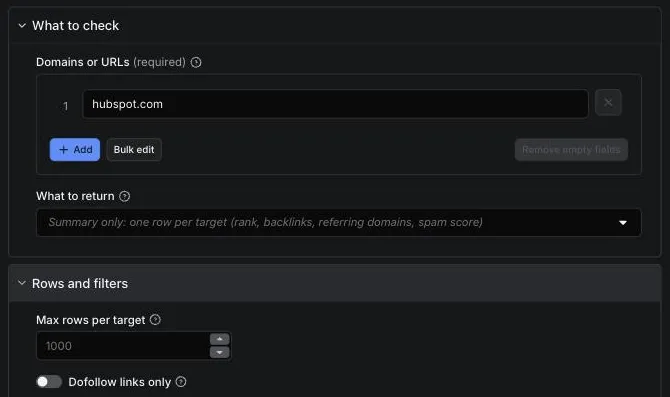
- Enter one or more domains (
example.com, includes subdomains) or page URLs (https://example.com/page), one per line. - Choose what to return: Summary only, Backlinks or Referring domains.
- For the lists, set Max rows per target (default 1,000) and any filters: Dofollow links only, Minimum domain rank, Exclude spam score above.
- Click Start. Open the Summary per target, Backlinks or Referring domains view on the Output tab, or export everything as JSON, CSV or Excel.
How do I find the referring domains of a competitor?
Pick Referring domains, enter the competitor's domain and set Max rows per target (e.g. 500). Add Dofollow links only and a Minimum domain rank of 300 to keep only the linking sites worth approaching. Each row is one site linking to them, with how many links and pages it has.
How do I check a list of domains for link building?
Keep Summary only and paste the list (up to 1,000 domains). You get one row per domain with domain rank, referring domains, dofollow share and spam score: sort by rank, drop anything with a spam score above ~30, and you have a shortlist. 100 domains cost $3. Switch on Add organic search traffic to add each site's estimated monthly Google visits and ranking keywords, worldwide or for one country, at no extra cost. Sites that get links sold on them but no search visitors stand out straight away.
How much does it cost to check backlinks?
$0.03 per domain or URL checked, plus $0.006 per backlink or referring-domain row ($6 per 1,000 rows). Failed lookups are free.
| Event | Price | Charged when |
|---|---|---|
| Domain summary | $0.03 per target | The lookup for a domain or URL answered, including a clean "no backlinks found" for a site that exists: the lookup ran and answered. |
| Backlink or referring-domain row | $0.006 per row | Each row saved in Backlinks or Referring domains mode. |
- 🆓 Free: errors, invalid entries, domains that don't exist (no DNS record and nothing in the index), and targets or rows skipped because the run reached your maximum spending limit or its time limit.
- Examples: 1 domain summary = $0.03. 100 domains, summary only = $3. 1 domain with its top 1,000 backlinks = $6.03. 5 competitors × 200 referring domains = $6.15.
- Free to try: Apify's free plan includes $5 of platform usage every month: about 160 domain summaries, or one domain with about 830 backlinks. Free accounts can check up to 5 domains or URLs per run; any paid Apify plan has no limit. Platform usage is included in the price.
- Set a maximum cost per run in the run options: the Actor only fetches rows it can charge for and stops exactly there. Targets it didn't reach are listed as
skippedand not charged.
Output example
Data source: the DataForSEO Backlinks API (DataForSEO's own web crawler and live link index), stated on every row as dataSource.
The Backlinks view on the Output tab (real run: heathceramics.com, dofollow only, domain rank ≥ 100, spam score ≤ 30):
A summary row (real output, September 2026, trimmed):
A backlink row (real output, filtered to dofollow, domain rank ≥ 100, spam score ≤ 30):
Summary status is one of:
ok: backlinks found.no_backlinks: the site exists but the index has no links to it. Charged: the lookup ran and answered.error: the lookup failed, the entry isn't a valid domain or URL, or the domain doesn't exist (DOMAIN_NOT_FOUND). Not charged.skipped: not checked because the run hit its spending, time or data-cost limit. Not charged.
In the list modes, each summary row also says how many rows you got (rowsReturned), how many match your filters in the index (matchingRows) and, if you got fewer, why (rowsLimitedBy). For each target, its list rows come first and the summary row last.
Input
| Field | What it does |
|---|---|
targets | Domains or page URLs, one per line (up to 1,000). https://www.example.com/ counts as the domain example.com (subdomains included); a URL with a path checks that page only. Duplicates are removed. |
mode | summary (default), backlinks or referring_domains. |
maxRowsPerTarget | List modes: most rows per target, strongest first (1–20,000; default 1,000). |
dofollowOnly | Backlinks: dofollow links only. Referring domains: only domains with at least one dofollow link. |
minDomainRank | Skip linking sites ranked below this (0–1000). |
excludeSpamAbove | Skip rows with a spam score above this (0–100). Empty = keep everything. |
includeOrganicTraffic | Adds estimated monthly Google organic visits and ranking keywords to each summary row. Runs of 5+ targets; included in the domain price. |
trafficCountry | worldwide (default) or a two-letter country code such as US, GB, AU. |
failOnErrors | Mark the run failed if any lookup errors (for schedules and monitoring). Failed lookups are still free. |
Example:
How to read the numbers
- Domain rank is 0–1000, not 0–100: it's computed from the whole link graph, and a few hundred points separate a small shop (200–350) from a major publisher (650+).
- Referring domains beat backlinks. One site can link thousands of times (sidebars, footers);
referringDomainscounts sites,referringMainDomainscounts root domains. - Image links have no anchor text. Their
anchoris empty andaltTextholds the image's alt text; redirects and canonicals (linkType) have neither. - Counts differ between tools. Every backlink index crawls differently; compare trends and rankings within one source rather than exact counts across sources.
- Organic traffic is an estimate (
organicTraffic,organicKeywords), worked out from where a site ranks in Google and how often those searches happen. It isn't total visits (no direct, social or paid traffic), and traffic tools often differ by 2x or more on small sites. 0 means no Google organic traffic was found.
How do I monitor backlinks every month?
- Fill in the input (your domains, Referring domains mode, a row limit) and click Save as a new task.
- Open Schedules → Create new, pick the task and choose monthly.
- Compare months on
firstSeen(new linking domains) andlostDate(lost ones), or send the dataset to a spreadsheet (next section).
How do I send backlink data to Google Sheets, Make, Zapier, n8n or an AI agent?
- Google Sheets (one formula): save your input as a task and schedule it, then put this in cell A1 of a sheet and click Allow access on the yellow bar Sheets shows about external data:
=IMPORTDATA("https://api.apify.com/v2/acts/meridianlabs~backlink-checker/runs/last/dataset/items?status=SUCCEEDED&format=csv&view=summary&token=YOUR_TOKEN")It loads your latest successful run, and picks up a newer one when Google refreshes imported data (about once an hour) or when you reopen the sheet. For the full lists, changeview=summarytoview=backlinksorview=referringDomains. Anyone who can open the sheet can see the token, so create one with limited permissions in Console → Settings → API & Integrations. For a saved task, useactor-tasks/<your-username>~<task-name>/runs/last/...instead. - Make: Apify "Run an Actor" (Run synchronously: Yes) → Apify "Get Dataset Items" → Google Sheets, add rows.
- n8n: Apify trigger "Actor Run Finished" → Apify "Get Items" (Datasets) with the run's
defaultDatasetId→ Google Sheets, append. - Zapier: trigger "Finished Actor run" → "Fetch dataset items" → Google Sheets.
- Webhooks: Integrations → HTTP webhook on "Run succeeded" sends the run details to your URL.
- AI agents (MCP): add
https://mcp.apify.com?tools=meridianlabs/backlink-checkerto your MCP client (Claude, Cursor, VS Code and others). - Code: see the Python example in the FAQ.
Limitations
- Summaries for 5+ targets are bulk metrics: rank, backlinks, referring domains (root and nofollow counts), dofollow share and spam score. Referring IPs/subnets, broken backlinks, crawled pages and first seen come from the detailed summary, used for runs of 1–4 targets. In list modes every target still gets its full list.
- Up to 20,000 rows per target per run (the index pages by offset up to 20,000).
- Filters apply to the list rows; the summary row always describes the whole profile.
- Organic traffic needs 5 or more targets per run. Runs of 1-4 domains return the detailed backlink summary without traffic.
FAQ
Where does the backlink data come from?
From the DataForSEO Backlinks API, which runs its own web crawler and keeps a live index of about 1.8 trillion backlinks across 185 billion pages (September 2026). Domain rank and spam score are DataForSEO's metrics. This Actor queries the index live on every run; it isn't a scraper of any SEO tool's website, so it doesn't break when a website changes. Organic traffic comes from DataForSEO Labs, an estimate built from Google rankings and search volumes; it is only looked up when you switch it on.
Why does a run of 1–4 domains show more summary fields than a bigger run?
Runs of 1–4 targets use one detailed summary lookup per target. From 5 targets the Actor switches to bulk lookups that return the core metrics for up to 1,000 domains at once, which is what keeps big domain lists fast. The price is the same either way.
Can I use it with the API, AI agents or MCP?
Yes. Run it through the Apify API or client libraries, schedule it, connect it to Make, Zapier, n8n or Google Sheets, or call it from MCP clients.
Python (pip install apify-client):
Does it collect personal data?
No personal data is collected on purpose. Rows contain public web-page URLs, titles and link text from pages that link to your target, as published by those sites. The Actor doesn't store anything in your account beyond the run's own dataset.
What happens if a run times out or restarts?
If a run approaches its timeout, the Actor stops starting new lookups: targets it didn't reach are listed as skipped (not charged), and a target cut short keeps the rows already delivered, with rowsLimitedBy: "RUN_TIME_LIMIT". If the platform restarts a run, it picks up where it left off without charging twice.
More from Meridian Labs
- AI Visibility Tracker: whether ChatGPT, Perplexity, Gemini and Claude name your brand, with share of voice vs competitors. From $0.008 per answer.
- Competitor Keyword Research: every keyword a website ranks for in Google, with position, ranking page, search volume and estimated traffic, plus a plain-English summary per domain. $0.03 per domain + $2 per 1,000 keywords.
- Google Jobs Scraper: Salaries, Apply Links & API: every job Google Jobs shows for a search, up to 200, with full descriptions, every apply link and salary normalised to yearly and hourly. $1.50 per 1,000 jobs.
- Keyword Search Volume & CPC API + Google Trends: monthly search volume, CPC, competition, difficulty and intent for keyword lists, plus a Google Trends summary per keyword. From $5 per 1,000 keywords.
- Google Trends Scraper & API: interest over time, by region and rising related searches for hundreds of keywords, as a maintained pytrends alternative. $5 per 1,000 keyword lookups.
- Facebook Ads Library Scraper: every ad a competitor runs on Facebook and Instagram, with days running and a plain-English summary per advertiser. $0.10 per 1,000 ads.
- YouTube Transcript API & Scraper: full transcripts with timestamps in the video's original language, for videos and Shorts. $3 per 1,000 transcripts; videos without captions are free.
- Greenhouse, Lever & Ashby Jobs Scraper: open jobs from companies on six hiring systems, with salary normalised to min, max, currency and period. $2 per 1,000 jobs.
- Instagram Transcript Scraper: Reels Transcript API: what is said in each Instagram Reel, as text with timestamps and SRT subtitles, in its original language. $3 per 1,000 reels; music-only reels free.
Support
Something looks wrong, or you need a field we don't return? Open an issue on the Issues tab with the input you used. We read every one.
If this saved you time, a rating helps others find it; if something's off, open an issue and we'll fix it fast.


