

Keyword Search Volume, CPC & Keyword Ideas API
Pricing
from $5.00 / 1,000 keyword metrics
Keyword Search Volume, CPC & Keyword Ideas API
Keyword search volume API from $5 per 1,000: monthly volume, CPC, competition (Keyword Planner figures, no Ads account), difficulty, intent and 12-month history. Up to 1,000 keyword ideas per seed. Optional Google Trends summary per keyword. Failed lookups are free.
Pricing
from $5.00 / 1,000 keyword metrics
Rating
0.0
(0)
Developer

Meridian Labs
Maintained by CommunityActor stats
0
Bookmarked
33
Total users
20
Monthly active users
2 days ago
Last modified
Share
Keyword Search Volume + Google Trends looks up search volume, CPC, competition, keyword difficulty and search intent for hundreds of keywords in one run, the same monthly figures Google's Keyword Planner shows, and adds a Google Trends summary for every keyword: is interest rising or falling, how it compares year on year, when it peaks and whether it's seasonal. Volume, trend and seasonality in one row per keyword. Or give it seed keywords and get up to 1,000 keyword ideas per seed (longer searches that contain the seed, or related ones), each with the same volume, CPC, competition and difficulty. The input form is pre-filled, so the easiest way to try it is to click Start. A 5-keyword run costs $0.03.
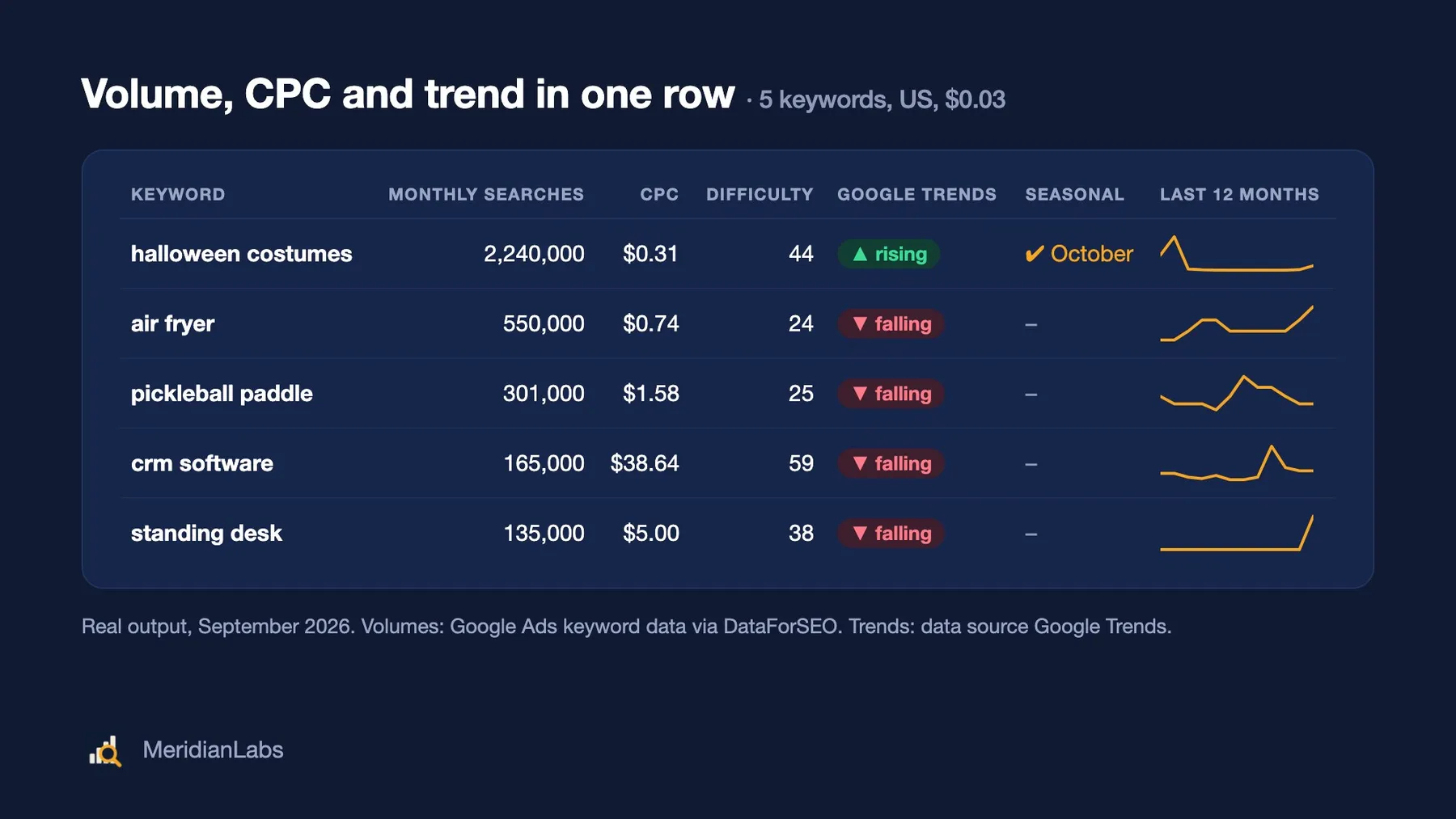
It's built for SEO and content marketers, e-commerce and Amazon/Etsy/Shopify sellers doing product research, PPC managers and AI agents who need keyword data for more than a handful of keywords, without a Semrush or Ahrefs subscription.
What keyword data do you get?
For each keyword, Keyword Search Volume + Google Trends returns:
- 🔢 Search volume (
searchVolume): average monthly searches over the last 12 months (Google Ads figure). - 📅 12-month search history (
monthlySearches): searches per month, oldest first, plus the volume change month on month, quarter on quarter and year on year (searchVolumeTrend). - 💰 CPC and competition (
cpc,competition,competitionLevel,lowTopOfPageBid,highTopOfPageBid): what advertisers pay per click in USD, and how contested the keyword is. - 🧗 Keyword difficulty (
keywordDifficulty, 0–100): how hard it is to rank in Google's top 10 organic results. - 🎯 Search intent (
searchIntent): informational, navigational, commercial or transactional. - 📈 Google Trends summary (
trends, optional, on by default) with the key numbers as separate, filterable fields:- momentum: rising, falling or stable over the last 13 weeks
- change year on year
- peak date, and "now" compared with the average
- seasonality, e.g. peaks every October, including seasons across the new year such as November–January
- a one-sentence plain-English summary
- 🅱️ Bing search volume (
bing, optional, off by default): Bing's monthly searches, CPC, competition and 12-month history from Microsoft Advertising, next to the Google figures. United States, United Kingdom, Canada, Australia, Germany and France.
Why use this keyword search volume tool?
- 🧩 Volume + trend + seasonality in one row. Search volume tells you how big a keyword is; Google Trends tells you where it's heading and when it peaks. Other keyword tools give you one or the other. Sort 500 keywords by volume and filter to "rising and seasonal in Q4" in one spreadsheet.
- ✅ Keyword Planner figures. Volumes, CPC and competition are Google Ads data (see Data source below). In our September 2026 test they matched Google Ads figures exactly on 175 of 175 keywords.
- 🚀 Bulk by design. Paste hundreds or thousands of keywords; volumes are fetched in bulk, and Trends lookups run in parallel.
- 🌍 94 countries, each with its main language pre-selected (or pick another, e.g. French in Canada).
- 💸 Fair billing. You pay per keyword. Failed lookups are free, the Trends part is only charged when it answers, and the run stops exactly at your maximum spending limit.
- 🤖 AI-agent ready. A documented output schema, a keyword table view and stable field names. It works from the Apify API, integrations (Make, Zapier, n8n, Google Sheets) and MCP clients.
How do I check search volume for a list of keywords?
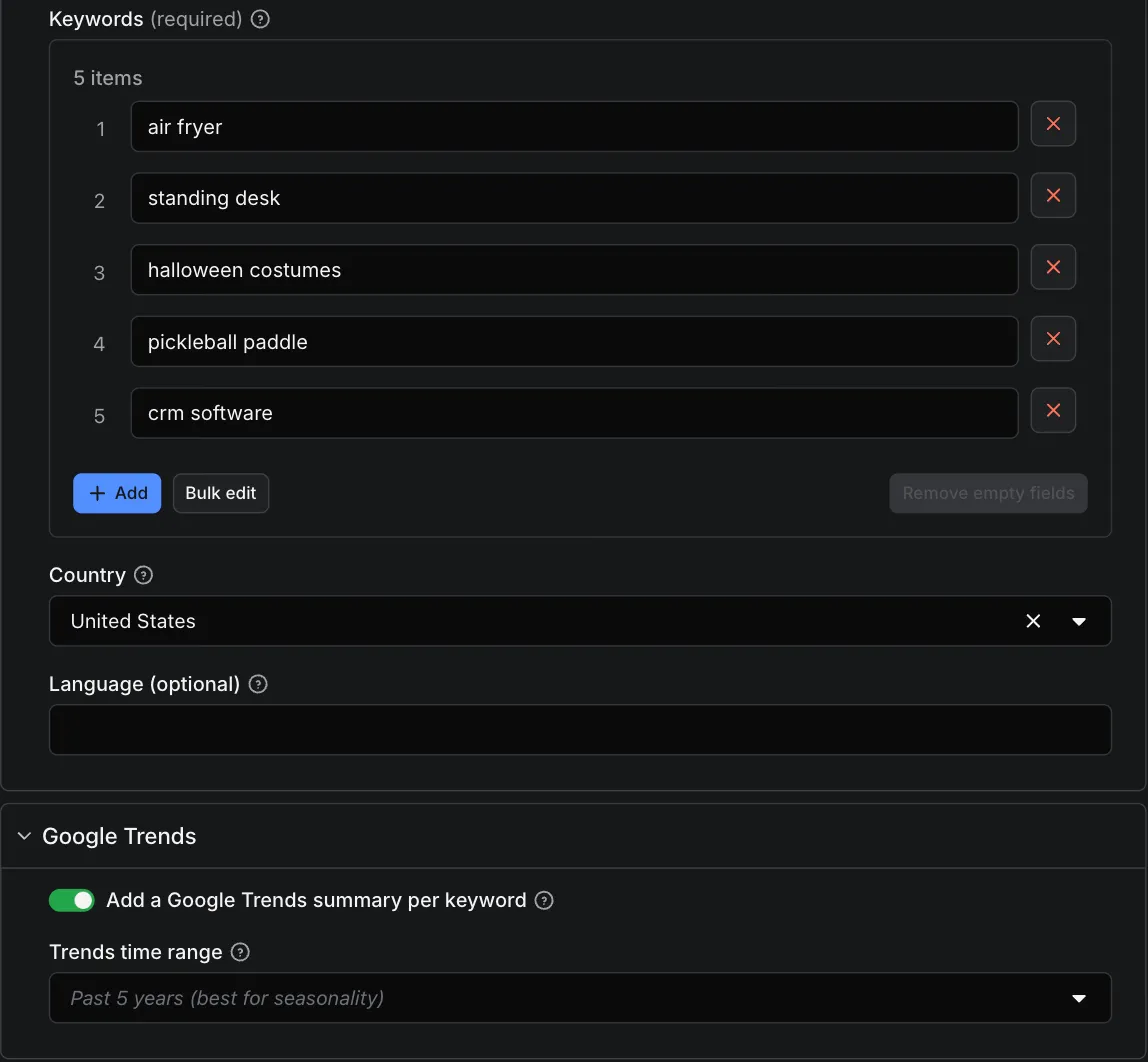
- Enter your keywords, one per line (paste a whole list).
- Choose the country (and a language, only if the country has several).
- Keep Add a Google Trends summary on for trend and seasonality, or turn it off for volumes only ($5 per 1,000).
- Click Start. Open the Keyword table view for one line per keyword, or export everything as JSON, CSV or Excel.
Can I get Google Keyword Planner data without a Google Ads account?
Yes. You don't need a Google Ads account, Google Ads API access or a running ad campaign: the Actor returns the monthly Keyword Planner figures (search volume, CPC, competition and top-of-page bids) for your list, plus keyword difficulty, search intent and the Google Trends summary.
How do I find keyword ideas from a seed keyword?
Set What to get to Keyword ideas from seed keywords, enter up to 20 seeds and pick an idea type:
- Suggestions: longer searches that contain your seed, biggest first. For "air fryer" you get "air fryer recipes" (301,000 searches a month), "ninja air fryer" (301,000), "chicken wings in an air fryer" (135,000) and so on. Google groups close spellings ("air fryer recipe", "recipes air fryer") under one volume, so expect some of those side by side.
- Related: searches on the same topic that may not contain the seed, most relevant first. Good for widening a topic.
Each idea comes back as a normal keyword row (volume, 12-month history, CPC, competition, difficulty, intent) plus seedKeyword, ideaSource and ideaRank. Open the Keyword ideas view for one line per idea. Set Max ideas per seed (default 100) and, if you only want bigger keywords, Minimum monthly searches. Ideas that two seeds share appear once. The Google Trends summary is not added in this mode: run the volume mode on your shortlist for that.
Can I get Bing search volume too?
Yes. Turn on Add Bing search volume and each row gets a bing object with Bing's monthly searches, CPC, competition (low, medium or high) and the last 12 months, from Microsoft Advertising. Open the Google and Bing view to see both engines side by side.
- Bing figures are much smaller than Google's (in our October 2026 test of 100 US keywords, Bing was a median 6% of Google's volume) but rank keywords in nearly the same order, and some keywords are relatively much bigger on Bing. That's what matters if you run Microsoft Ads.
- Bing data is one month more recent than the Google figures.
- Microsoft sells this data for six countries only: United States, United Kingdom, Canada, Australia, Germany and France, in English, French or German. Anywhere else the Bing part is skipped and not charged.
- It needs a paid Apify plan. On a free plan the Bing part is skipped and not charged.
- Volume mode only, not keyword ideas.
What the bing object looks like (trimmed; real "air fryer" figures for the US, October 2026):
How much does it cost to get keyword search volume?
$5 per 1,000 keywords for search volume and metrics, plus $3 per 1,000 for the Google Trends summary: $8 per 1,000 keywords with both. Failed lookups are free.
| Event | Price | Charged when |
|---|---|---|
| Keyword metrics | $0.005 per keyword | The volume lookup answered, including keywords Google has no data for or withholds (see Limitations): the lookup ran and answered. |
| Google Trends summary | $0.003 per keyword | Add a Google Trends summary is on and the Trends lookup answered (including "too little Trends data"). |
| Bing search volume | $0.25 per run of up to 1,000 keywords | Add Bing search volume is on and Microsoft's data came back. One charge covers up to 1,000 keywords; 1,001 to 2,000 keywords is two. Not charged when the country isn't supported, on a free plan, or when the lookup fails. |
- 🆓 Free: errors, invalid keywords, Trends lookups that fail, keywords Google has no search data for at all (their Trends lookup is skipped), and keywords skipped because the run reached your maximum spending limit or its time limit.
- Examples: 5 keywords with Trends = $0.04; 100 keywords = $0.50 volumes only or $0.80 with Trends; 1,000 keywords = $5 or $8.
- With Bing: 100 keywords = $0.50 + $0.25 = $0.75 volumes only.
- Keyword ideas cost the same $0.005 per idea row ($5 per 1,000). 100 ideas for one seed = $0.50; 10 seeds × 50 ideas = $2.50. A seed with no ideas is free.
- Free to try: Apify's free plan includes $5 of platform usage every month, which covers about 1,000 keywords volumes-only, or about 620 keywords with the Google Trends summary. Platform usage is included in the price.
- Set a maximum cost per run in the run options and the Actor stops exactly there. Keywords it didn't reach are listed as
skippedand not charged.
Output example
Volumes, CPC and competition: Google Ads keyword data via DataForSEO (each row's volumeDataSource). Trends: data source: Google Trends (https://www.google.com/trends) (each row's trends.dataSource).
The Keyword table view on the Output tab gives one line per keyword:
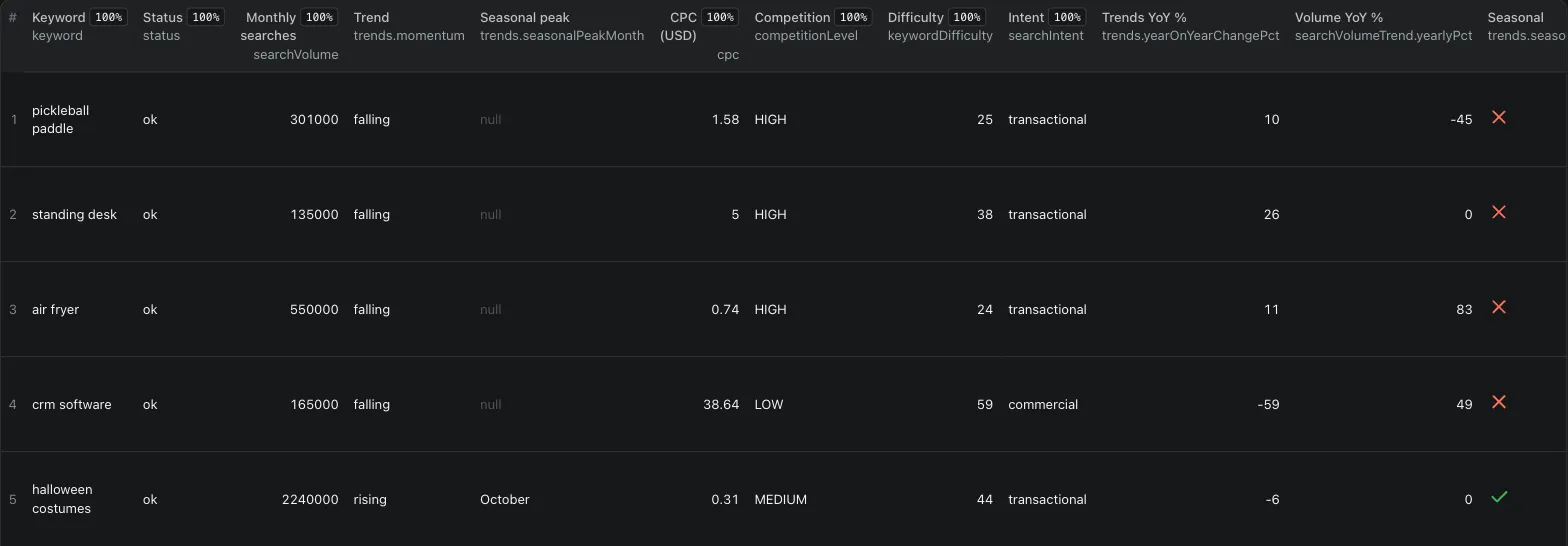
One row per keyword (trimmed; real output from September 2026):
status is one of:
ok: search volume returned.no_data: Google Ads has no volume for this keyword (noDataReason:withheldfor restricted topics,not_foundfor keywords with too few searches). Charged, because the lookup ran and answered.error: the lookup failed; not charged.skipped: not looked up because the run hit its spending, time or data-cost limit; not charged.
Input
| Field | What it does |
|---|---|
keywords | Search terms, one per line. Duplicates are removed. Google Ads limits: 80 characters and 10 words per keyword. |
country | Two-letter country code, e.g. US, GB, DE, AU, CA (94 countries). Used for both volume and Trends. |
language | Optional: en, fr, French... Empty = the country's main language. |
includeTrends | Add the Google Trends summary (default on, +$0.003 per keyword). |
trendsTimeRange | Past 90 days, Past 12 months, Past 5 years (default; needed for seasonality) or 2004 to present. |
includeBing | Add Bing search volume (default off; $0.25 per run of up to 1,000 keywords; US, GB, CA, AU, DE, FR; paid Apify plan). |
maxConcurrency | Trends lookups in parallel (1–10). |
failOnErrors | Mark the run failed if any lookup errors (for schedules and monitoring). Failed lookups are still free. |
Example:
How to read the numbers
- Search volume is a monthly average over the last 12 months, rounded the way Google Ads rounds it (e.g. 8,100, 9,900, 12,100). Use
monthlySearchesto see the season. - Trends values are relative, not searches. The Trends summary compares a keyword with its own past (100 = its peak in the range). Use volume for "how big", Trends for "which way and when".
- Both come from the same country, so a keyword's volume and trend describe the same market.
- Volumes refresh monthly.
volumeUpdatedAtshows when the figure was last updated.
How do I refresh keyword volumes every month?
Google Ads volumes update monthly, so a monthly schedule keeps a keyword list current:
- Fill in the input (your keyword list and country) and click Save as a new task.
- Open Schedules → Create new, pick the task and choose monthly (e.g. the 3rd of each month).
- Each run adds a fresh dataset; send it to a spreadsheet or workflow (next section).
500 keywords a month cost $2.50 volumes-only or $4 with the Google Trends summary. Set Fail the run if any lookup fails on scheduled tasks so a failed run shows up in your run list and monitoring alerts. Failed lookups stay free.
How do I send keyword data to Google Sheets, Make, Zapier, n8n or an AI agent?
- Google Sheets (one formula): save your input as a task and schedule it, then put this in cell A1 of a sheet and click Allow access on the yellow bar Sheets shows about external data:
=IMPORTDATA("https://api.apify.com/v2/acts/meridianlabs~keyword-search-volume/runs/last/dataset/items?status=SUCCEEDED&format=csv&view=overview&token=YOUR_TOKEN")It loads your latest successful run, and picks up a newer one when Google refreshes imported data (about once an hour) or when you reopen the sheet. For a keyword-ideas run, changeview=overviewtoview=ideas. Anyone who can open the sheet can see the token, so create one with limited permissions in Console → Settings → API & Integrations. For a saved task, useactor-tasks/<your-username>~<task-name>/runs/last/...instead. - Make: Apify "Run an Actor" (Run synchronously: Yes) → Apify "Get Dataset Items" → Google Sheets, add rows.
- n8n: Apify trigger "Actor Run Finished" → Apify "Get Items" (Datasets) with the run's
defaultDatasetId→ Google Sheets, append. - Zapier: trigger "Finished Actor run" → "Fetch dataset items" → Google Sheets.
- Webhooks: Integrations → HTTP webhook on "Run succeeded" sends the run details to your URL.
- AI agents (MCP): add
https://mcp.apify.com?tools=meridianlabs/keyword-search-volumeto your MCP client (Claude, Cursor, VS Code and others). The agent can then look up volumes, CPC and trends for any keyword list. - Code: see the Python example in the FAQ below.
Limitations
- Google withholds volume for restricted topics. Keywords in areas such as finance, health, legal, gambling, weapons or VPNs (e.g. vpn, bitcoin price, car accident lawyer, baby names) can come back as
no_datawithnoDataReason: "withheld". Keyword difficulty, intent and the Google Trends summary are usually still available for them. - Very new or very niche keywords return
no_data(not_found). That's Google's answer, not an error. - Country level only. Volumes are per country, not per city or region.
FAQ
Where does the search volume data come from?
Search volume, CPC and competition are Google Ads (Keyword Planner) figures, supplied by the licensed data provider DataForSEO (Labs database, refreshed monthly). Keyword difficulty and intent are DataForSEO estimates. The trend summary is computed from Google Trends data. This Actor is not affiliated with or endorsed by Google. Data source for trends: Google Trends (https://www.google.com/trends). Optional Bing figures are Microsoft Advertising keyword data, also supplied by DataForSEO, and this Actor is not affiliated with or endorsed by Microsoft.
How is keyword search volume different from Google Trends?
Google Trends shows relative interest (0–100), not how many people search. This Actor gives you the absolute monthly search volume and the ad metrics, and adds the Trends direction and seasonality on top. If you only need Trends data (with regions and rising related searches), use our Google Trends Scraper.
Can I use it with AI agents, the API or MCP?
Yes. Run it through the Apify API or client libraries, schedule it, connect it to Make, Zapier, n8n or Google Sheets, or call it from MCP clients (see How do I send keyword data… above). All output fields are documented in the dataset schema.
Python (pip install apify-client):
How many keywords can I look up at once?
Thousands per run. Volumes come back in bulk in seconds; with Trends on, expect roughly 1–2 minutes per 100 keywords at the default 5 parallel lookups.
Does the Actor store anything in my account?
Yes, a small cache named keyword-volume-cache in your Apify key-value stores, so repeat lookups of the same keyword and country within 30 days are fast. You're charged the same either way. You can delete it at any time.
What happens if a run times out or restarts?
If a run approaches its timeout, the Actor stops starting new lookups: keywords whose volumes are already in hand are delivered without the Trends part (only the metrics are charged), and the rest are listed as skipped (not charged), so you can run them again. If the platform restarts a run, it picks up where it left off without charging twice.
More from Meridian Labs
- AI Visibility Tracker: whether ChatGPT, Perplexity, Gemini and Claude name your brand, with share of voice vs competitors. From $0.008 per answer.
- Google Jobs Scraper: Salaries, Apply Links & API: every job Google Jobs shows for a search, up to 200, with full descriptions, every apply link and salary normalised to yearly and hourly. $1.50 per 1,000 jobs.
- Google Trends Scraper & API: the full Google Trends data behind the summary (interest over time, by region, rising related searches) for hundreds of keywords, as a maintained pytrends alternative. $5 per 1,000 keyword lookups.
- Competitor Keyword Research: every keyword a website ranks for in Google, with position, ranking page, search volume and estimated traffic, plus a plain-English summary per domain. $0.03 per domain + $2 per 1,000 keywords.
- Backlink Checker: Referring Domains & Spam Score: domain rank, backlinks, referring domains, dofollow share and spam score for up to 1,000 domains per run, plus every backlink if you want them. $0.03 per domain, $6 per 1,000 backlink rows.
- Facebook Ads Library Scraper: every ad a competitor runs on Facebook and Instagram, with days running and a plain-English summary per advertiser. $0.10 per 1,000 ads.
- YouTube Transcript API & Scraper: full transcripts with timestamps in the video's original language, for videos and Shorts. $3 per 1,000 transcripts; videos without captions are free.
- Greenhouse, Lever & Ashby Jobs: open jobs from companies on six hiring systems, with salary normalised to min, max, currency and period. $2 per 1,000 jobs.
- Instagram Transcript Scraper: Reels Transcript API: what is said in each Instagram Reel, as text with timestamps and SRT subtitles, in its original language. $3 per 1,000 reels; music-only reels free.
Support
Something looks wrong, or you need a field we don't return? Open an issue on the Issues tab with the input you used. We read every one.
If this saved you time, a rating helps others find it; if something's off, open an issue and we'll fix it fast.


