

New Job Postings API: Greenhouse, Lever & Ashby
Pricing
$2.00 / 1,000 jobs
New Job Postings API: Greenhouse, Lever & Ashby
Track new job postings at any company on Greenhouse, Lever, Ashby, Workable, Recruitee or Teamtailor, with salary as min, max, currency and period. Filter to jobs posted in the last 24 hours or by minimum salary. Paste URLs, domains or names. $2 per 1,000 jobs; unsupported companies free.
Pricing
$2.00 / 1,000 jobs
Rating
0.0
(0)
Developer

Meridian Labs
Maintained by CommunityActor stats
0
Bookmarked
2
Total users
1
Monthly active users
2 days ago
Last modified
Categories
Share
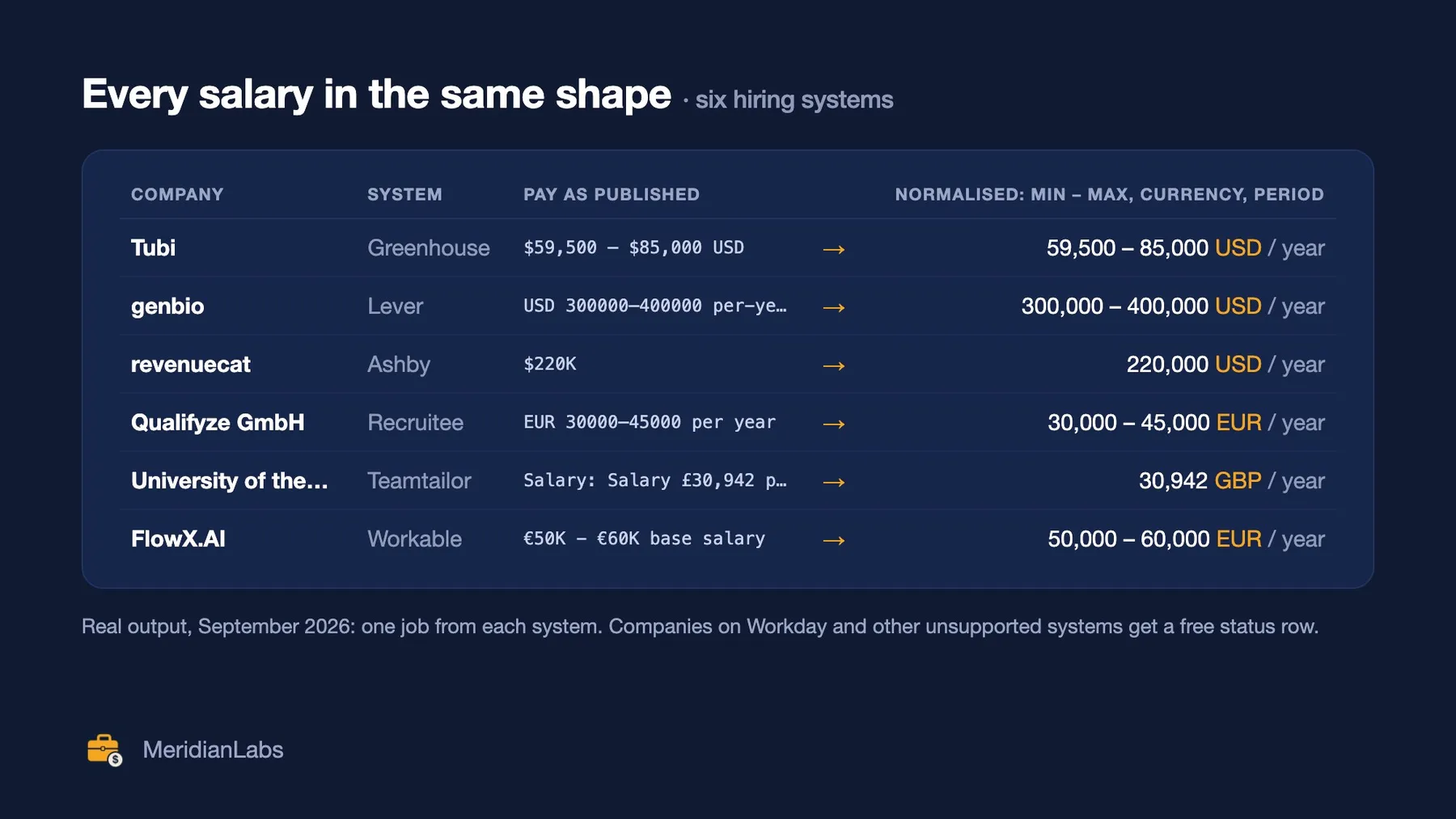
Greenhouse, Lever & Ashby Jobs reads the open jobs of any company on Greenhouse, Lever, Ashby, Workable, Recruitee or Teamtailor, straight from the company's public job board, and gives every job a normalised salary: min, max, currency and period (hour, day, week, month or year), from the hiring system's own pay field or the ad text, with every pay zone or level. Paste job-board URLs, careers page URLs, plain domains (company.com) or company names: the hiring system is detected for you, and every company gets a free status row saying what was found. The input form is pre-filled, so the easiest way to try it is to click Start (about $0.09).
Same-day jobs, filtered the way you need. Each run reads the boards live, so a job posted this morning is in this morning's run. Set Posted within the last N hours to 24 for a daily feed, and Minimum salary to keep only jobs paying at least that much, in any of 25 currencies (hourly or monthly pay is converted before comparing). Jobs that don't list a salary are kept by default, so you don't miss roles that hide pay; one switch drops them.
It's built for recruiters and sourcers, sales and market-intelligence teams tracking who is hiring, salary and labour-market researchers, job-board builders and AI agents that need clean, structured job data from company career pages.
What does the Greenhouse, Lever & Ashby jobs scraper do?
For each company you give it, it finds the company's job board and returns one row per open job:
- 💰 Normalised salary (
salary):{min, max, currency, period, source, raw_text, basis, tiers, eu_pay_range}, e.g.$59,500 — $85,000 USDbecomes59500,85000,USD,year. - 🏷️ Job basics:
title,department,employment_type(full_time, part_time, contract, internship…),posted_at,updated_at,url,apply_url. - 📍 Location: the location as published plus
city,regionand an ISOcountrycode, andworkplace(remote, hybrid or onsite) with a strictremoteflag (fully remote only). - 📝 Description as plain text or HTML (or none), with personal email addresses and phone numbers removed.
- 🔁 Monitor mode: only jobs that are new or changed since your last run, plus free notices for jobs that closed.
- 🆔 Stable IDs (
greenhouse:tubitv:8099700) that stay the same across runs, and thesource_urlevery row came from.
Which hiring systems are supported?
| System | Found from | Salary source |
|---|---|---|
| Greenhouse | job-boards.greenhouse.io/<company>, embedded boards, careers pages | Greenhouse's pay-transparency block, else the ad text |
| Lever (US and EU) | jobs.lever.co/<company> | Lever's salary range field, else the ad text |
| Ashby | jobs.ashbyhq.com/<company> | Ashby's compensation tiers, else the ad text |
| Workable | apply.workable.com/<company>, embedded widgets | the ad text |
| Recruitee | <company>.recruitee.com or the company's own careers domain | Recruitee's salary field, else the ad text |
| Teamtailor | <company>.teamtailor.com or the company's own careers domain | the ad text |
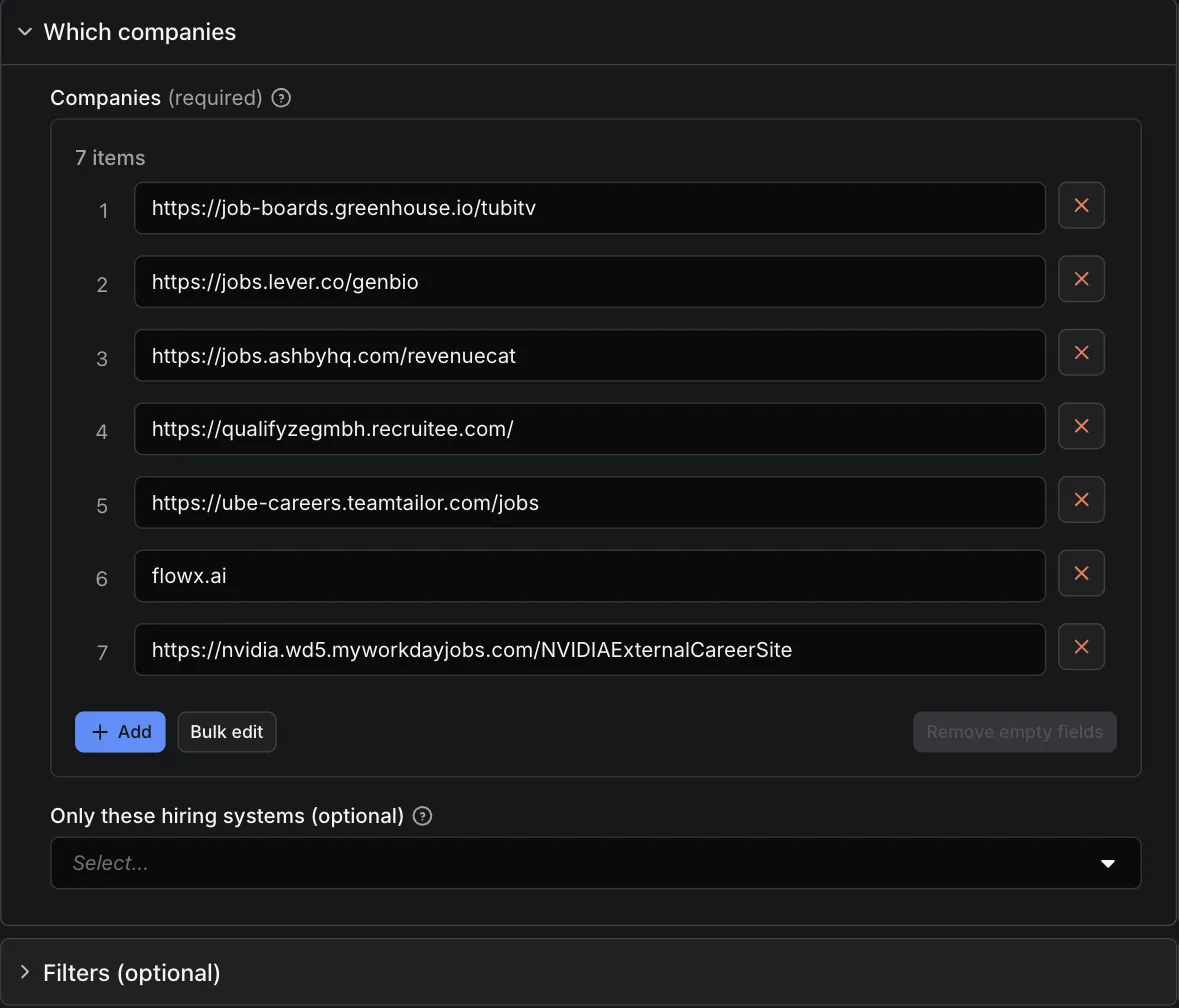
Not supported, and never charged: Workday, iCIMS, SmartRecruiters, Personio, SAP SuccessFactors, Oracle Taleo, Eightfold, BambooHR and others. Their public endpoints are blocked by robots.txt or bot checks, or their terms don't allow this use. When a company uses one of them you get a free status row with status: "not_supported" naming the system, for example "The board URL is on Workday. Workday is not supported…", so you know exactly why there are no jobs and can move on.
How is the salary normalised?
Pay is read from the hiring system's own pay field first (source: "ats_field"), and from the ad text otherwise (source: "description_text"), in English, Dutch, German, French, Spanish, Polish and the Nordic languages, with European number formats (€ 3.035 - € 4.052 bruto per maand) and hourly, monthly and annual periods.
- Every pay range, not just the first. Postings that list pay zones or levels ("Zone 1 … Zone 4", medior/senior) get all of them in
tiers, each with itslabel; the headlinemin/maxis the first one. - Base pay first. When a posting shows both base pay and OTE / total compensation, the base range is the headline and
basissays"base". If only OTE is given you get it withbasis: "ote". - Typos flagged, not hidden. If an employer types
73.8in an annual pay field (meaning 73,800), you get the number as entered withsuspect: trueand the reason. - EU pay transparency.
eu_pay_rangeistruefor jobs in the EU/EEA that publish pay (the EU Pay Transparency Directive 2023/970),falseoutside it andnullwhen the country is unknown. - Tested: on 50 fresh jobs showing pay (September 2026), 49 were read exactly right: values, currency, period and every tier.
Why use this job scraper?
- 💰 Salary you can sort and filter, not a string: comparable
min/max/periodacross systems, countries and currencies. - 🔎 Paste anything. A board URL resolves with a single request. For a domain it scans the careers pages and checks the six systems' public APIs; in our test on 50 fresh companies it found the right board for 47 from their domain alone. A board is only reported after its API answered, so it doesn't return another company's jobs.
- 🧾 Clean billing. You pay per job saved. Company status rows, unsupported and not-found companies, duplicates and closed-job notices are free. The same board given twice is fetched and charged once, and a restarted run never charges a job twice.
- 🔁 Monitoring that doesn't bill you for nothing. In monitor mode only new or changed jobs are saved and charged.
- 🛡️ Personal-data clean. Individual people's email addresses and phone numbers are removed from descriptions, and Recruitee's per-job inbox address is never output. Role mailboxes such as careers@ stay, because that's how candidates apply.
- 🤝 Polite and simple. Public job-board endpoints only: no login, no API keys, no proxies. robots.txt is obeyed, including Lever's crawl delay, with one request at a time per hiring system.
- 🤖 AI-agent ready. A documented output schema, table views and stable field names. It works from the Apify API, integrations (Make, Zapier, n8n, Google Sheets) and MCP clients.
How do I scrape jobs from Greenhouse, Lever or Ashby?
- Paste your companies, one per line: job-board URLs work best, but careers page URLs, domains and names also work.
- Optionally add filters: title keywords, locations, fully remote only, posted within N days, only jobs showing a salary.
- Choose the mode: all open jobs, or monitor for new and changed jobs only.
- Click Start. Open the Jobs view, or export JSON, CSV or Excel. The Companies view shows what happened with each company.
How much does it cost to scrape jobs?
$2 per 1,000 jobs ($0.002 per job saved). That's the only charge.
- ✅ Charged: each job row saved to your dataset, after your filters and
maxJobsPerCompany. - 🆓 Free: company status rows; companies on unsupported systems (
not_supported); companies with no board found (not_found); boards that failed to load; duplicates; closed-job notices in monitor mode; anything skipped by your spending limit or the run's time limit. - 🔁 Monitor mode: only new or changed jobs are charged. Unchanged jobs cost nothing. The first run of a monitor sees every job as new.
- Examples: a company with 40 open jobs = $0.08; 100 companies with 30 jobs each = $6; a daily monitor on the same 100 companies that finds 50 new or changed jobs = $0.10 that day.
- Free to try: Apify's free plan includes $5 of platform usage every month, which covers about 2,500 jobs here. Platform usage is included in the price.
- Set a maximum cost per run and the Actor stops exactly there. The status rows show how many jobs were not saved because of it, and in monitor mode those jobs are still "new" next time.
Output example
The Jobs view on the Output tab gives one line per job, salary first:
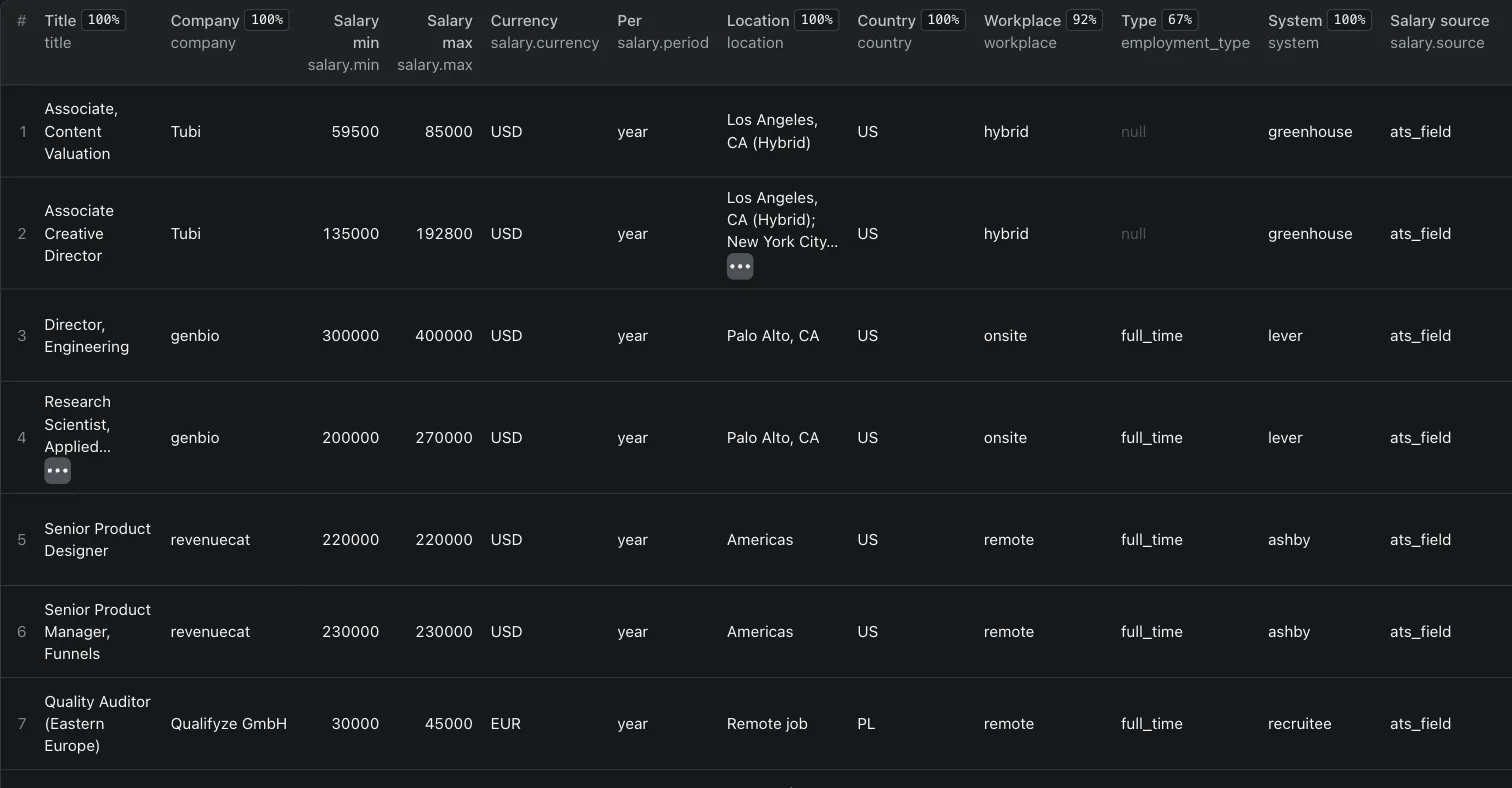
A job row (description shortened):
A multi-zone salary:
A company status row (free):
Job rows and company rows share one dataset; filter on record_type = "job" for jobs only, or switch off includeCompanyRows.
Input
| Field | What it does |
|---|---|
companies | Job-board URLs, careers page URLs, domains or company names, one per line. Duplicates are removed. |
systems | Only use these hiring systems (default: all six). |
titleKeywords / excludeTitleKeywords | Keep / drop jobs whose title contains any of these words (whole words, case-insensitive). |
locations | Keep jobs whose location, city or region contains one of these, or whose country matches a 2-letter code (US, DE). |
remoteOnly | Fully remote jobs only (hybrid isn't remote). |
postedWithinDays | Jobs first published in the last N days. |
postedWithinHours | Jobs first published in the last N hours (24 = last day). |
keepJobsWithoutPostedDate | With a date filter: keep jobs that have no publish date (default: dropped). |
onlyWithSalary | Only jobs that show a salary. |
minSalary | Drop jobs paying less than this, in minSalaryCurrency (default USD) per minSalaryPeriod (default year). |
minSalaryAppliesTo | Compare the minimum with the top (default) or bottom of each job's pay range. |
minSalaryExcludeUnknown | With a minimum salary: also drop jobs whose pay is missing or can't be compared (default: kept). |
mode | all (every open job) or newSinceLastRun (monitor: new or changed jobs only, plus free closed notices). |
monitorName | Separate memories for separate watch lists (monitor mode). |
includeDescription | text (default), html or none (structured fields only). Same price. |
maxJobsPerCompany | Save at most N jobs per company. Leave empty for all. |
includeCompanyRows | Put the free company status rows in the dataset (default) or only in the COMPANIES record. |
maxConcurrency | Companies processed in parallel (1–10). |
failOnErrors | Mark the run failed if a board can't be fetched or a board URL no longer exists (for schedules). |
How the date and salary filters work
Dates. The date filters use posted_at, which comes from each system's own publish date: Greenhouse first_published (its updated_at when that is missing), Lever createdAt (Lever has no separate publish date), Ashby publishedAt, Workable published_on (a date without a time: a job dated the day the window starts counts as inside it), Recruitee published_at, Teamtailor pubDate. Jobs with no date are dropped while a date filter is on, unless keepJobsWithoutPostedDate is on. If you set both days and hours, both must pass.
Minimum salary. Each job's normalised salary (the headline min/max) is converted to your currency and period, then compared. Currencies are converted at the European Central Bank's daily reference rates, fetched once per run (built-in rates if that fetch fails). Periods are converted on a full-time basis: 1 year = 12 months = 52 weeks = 260 days = 2,080 hours. With minSalaryAppliesTo: "top", a job paying 100,000 to 140,000 passes a 120,000 minimum; with "bottom" it doesn't. Jobs with no salary, no currency or period, or a salary flagged suspect, can't be compared: they are kept by default and dropped with minSalaryExcludeUnknown. (onlyWithSalary still drops every job without a salary.)
Jobs removed by any filter are not saved and not charged. In monitor mode a filtered-out job is not remembered, so it is still new if it later passes the filter.
Example:
Personal data
Job ads sometimes include a recruiter's own email address or phone number. This Actor:
- replaces personal-looking email addresses with
[email removed]and phone numbers with[phone removed], in both text and HTML descriptions and in salary text; - keeps role mailboxes (careers@, recruiting@, jobs@, accommodations@, and their Dutch, German, Polish, French and Nordic equivalents), because they're how candidates apply;
- never outputs Recruitee's per-job
mailbox_emailfield; - does not remove people's names written in the ad text (e.g. "contact Maria"). Use
includeDescription: nonefor structured fields only.
None of the six endpoints exposes recruiter or hiring-manager contact fields, and this Actor doesn't try to find any.
How do I get a daily feed of new jobs?
- Paste the companies, add your filters, set Mode to Monitor: only new or changed jobs since the last run (
newSinceLastRun) and click Save as a new task. - Open Schedules → Create new, pick the task and choose daily.
- The first run returns every open job; after that, each run returns only jobs that are new or changed, plus free
closednotices. Unchanged jobs cost nothing.
Only want the last 24 hours? Set Posted within the last N days to 1. A daily monitor on 100 companies that finds 50 new or changed jobs a day costs about $0.10 a day.
How do I send jobs to Google Sheets, Make, Zapier, n8n or an AI agent?
- Google Sheets (one formula): save your input as a task and schedule it, then put this in cell A1 of a sheet and click Allow access on the yellow bar Sheets shows about external data:
=IMPORTDATA("https://api.apify.com/v2/acts/meridianlabs~greenhouse-lever-ashby-jobs-scraper/runs/last/dataset/items?status=SUCCEEDED&format=csv&view=jobs&token=YOUR_TOKEN")It loads your latest successful run, and picks up a newer one when Google refreshes imported data (about once an hour) or when you reopen the sheet. Anyone who can open the sheet can see the token, so create one with limited permissions in Console → Settings → API & Integrations. For a saved task, useactor-tasks/<your-username>~<task-name>/runs/last/...instead. - Make: Apify "Run an Actor" (Run synchronously: Yes) → Apify "Get Dataset Items" → Google Sheets, add rows.
- n8n: Apify trigger "Actor Run Finished" → Apify "Get Items" (Datasets) with the run's
defaultDatasetId→ Google Sheets, append. - Zapier: trigger "Finished Actor run" → "Fetch dataset items" → Google Sheets.
- Webhooks: Integrations → HTTP webhook on "Run succeeded" sends the run details to your URL.
- AI agents (MCP): add
https://mcp.apify.com?tools=meridianlabs/greenhouse-lever-ashby-jobs-scraperto your MCP client (Claude, Cursor, VS Code and others). The agent can then pull a company's open jobs and salaries.
Python (pip install apify-client):
For a daily feed, run it as a scheduled task in monitor mode (see How do I get a daily feed of new jobs?).
Limitations
- Six hiring systems only. Companies on Workday, iCIMS, SmartRecruiters, Personio and others get a free
not_supportedrow, not jobs. - You bring the companies. This is a live fetch of the companies you list, not a keyword search across every company on the internet.
- Detection from a name is weaker than from a URL or domain (38 of 50 in our test, against 47 of 50 from the domain). Careers pages built entirely in JavaScript may hide the board; paste the board URL for those.
- Salary is only as good as what the employer publishes. Most jobs outside pay-transparency regions show none. Amounts are never guessed; suspicious entries are flagged, not changed.
- Teamtailor's feed doesn't give an employment type, and Workable's doesn't give an updated date.
FAQ
Is it legal to scrape Greenhouse, Lever or Ashby jobs?
This Actor reads the public job-board endpoints the hiring systems publish so that anyone can list a company's open jobs (Greenhouse, for example, documents that "Job Board data is publicly available, so authentication is not required"). It doesn't log in, use keys or get around robots.txt or bot checks, and it asks for each board once per run. The job ads belong to the employers; use the data in line with the laws that apply to you, especially if you republish ads. Not affiliated with or endorsed by Greenhouse, Lever, Ashby, Workable, Recruitee or Teamtailor.
How do I find a company's job-board URL?
Open the company's careers page and click through to a job: the address usually shows the system (jobs.lever.co/…, job-boards.greenhouse.io/…, jobs.ashbyhq.com/…). Or just paste the company's domain and let the Actor find it.
Why did a company come back "not_found"?
Nothing on its careers pages pointed to a supported board, and no board on the six systems matched its name. Common causes: the company uses an unsupported system hidden behind a JavaScript careers page, or no system at all. The reason says what was tried. Paste the board URL if you know it.
Does monitor mode charge for jobs I've already received?
No. Unchanged jobs are skipped and free. A job counts as changed when its title, location, department, employment type, workplace, pay, apply link or description changes. Closed jobs come back as free change_status: "closed" rows.
What happens if a run times out or restarts?
Companies that are finished are not fetched or charged again after a restart. When the time limit is near, the remaining companies get free skipped rows and the run still ends as succeeded.
More from Meridian Labs
- AI Visibility Tracker: whether ChatGPT, Perplexity, Gemini and Claude name your brand, with share of voice vs competitors. From $0.008 per answer.
- Google Jobs Scraper: Salaries, Apply Links & API: every job Google Jobs shows for a search, up to 200, with full descriptions, every apply link and salary normalised to yearly and hourly. $1.50 per 1,000 jobs.
- Google Trends Scraper & API: Google Trends for hundreds of keywords at once, with a plain-English summary per keyword (rising or falling, year on year, peak, seasonality). $5 per 1,000 keyword lookups.
- Competitor Keyword Research: every keyword a website ranks for in Google, with position, ranking page, search volume and estimated traffic, plus a plain-English summary per domain. $0.03 per domain + $2 per 1,000 keywords.
- Keyword Search Volume + Google Trends: monthly search volume, CPC, competition and keyword difficulty (Google Ads figures) plus a Google Trends summary for every keyword. From $5 per 1,000 keywords.
- Backlink Checker: Referring Domains & Spam Score: domain rank, backlinks, referring domains, dofollow share and spam score for up to 1,000 domains per run, plus every backlink if you want them. $0.03 per domain, $6 per 1,000 backlink rows.
- Facebook Ads Library Scraper: every ad a competitor runs on Facebook and Instagram, with days running and a plain-English summary per advertiser. $0.10 per 1,000 ads.
- YouTube Transcript API & Scraper: full transcripts with timestamps in the video's original language, for videos and Shorts. $3 per 1,000 transcripts; videos without captions are free.
- Instagram Transcript Scraper: Reels Transcript API: what is said in each Instagram Reel, as text with timestamps and SRT subtitles, in its original language. $3 per 1,000 reels; music-only reels free.
Support
Found a board that doesn't parse right, or a salary format it misses? Open an issue on the Issues tab with the board URL. We read every one.
If this saved you time, a rating helps others find it; if something's off, open an issue and we'll fix it fast.


