
YouTube Transcript Scraper - Captions + AI + Translation
Pricing
from $0.60 / 1,000 results
YouTube Transcript Scraper - Captions + AI + Translation
Extract YouTube transcripts by video, channel, from captions or AI when none exist. Multi-format output: JSON, SRT, VTT, plain text, LLM-ready. Optional DeepL translation into 30+ languages. Videos, channels - pay only for successful transcripts.
Pricing
from $0.60 / 1,000 results
Rating
0.0
(0)
Developer

Vladimir Efimenco
Maintained by CommunityActor stats
1
Bookmarked
16
Total users
5
Monthly active users
a month ago
Last modified
Categories
Share
YouTube Transcript Scraper & AI Translator - Captions, Subtitles & Speech-to-Text
Extract YouTube transcripts, captions and subtitles from any video, channel, or playlist. Convert YouTube videos to text using manual captions, auto-generated captions, or a Whisper AI speech-to-text fallback when no captions exist at all. Translate any transcript into 30+ languages with DeepL, built right in. No YouTube API key required.
🎥 What this YouTube transcript scraper does
This YouTube transcript scraper and subtitle extractor pulls clean, structured text out of any video: plain text, LLM-ready text, SRT subtitles, VTT subtitles, and timestamped JSON segments. Give it a list of video URLs, video IDs, a channel, or a playlist, and it extracts a transcript for every video in the batch - turning YouTube videos into text automatically, without manual transcription.
Most YouTube caption scrapers stop the moment a video has no subtitles. This one doesn't. When a video has no captions available, it falls back to AI transcription running on a dedicated remote GPU, powered by OpenAI's Whisper Turbo model - the same speech-to-text engine behind many professional transcription tools. And if you need the transcript translated into another language, DeepL translation is built into the same run, so you don't need a second scraper or a separate translation API.
Why people use this YouTube caption and subtitle extractor
- 🎯 Manual captions, auto-generated captions, or AI transcription - your choice. Pick exactly which caption or subtitle type to prioritize, with automatic fallback if you want it.
- 🤖 Real AI speech-to-text, not a corner-cutting version. Runs on Whisper Turbo (809M parameters, ~8x realtime) - the model OpenAI recommends for near-
largetranscription accuracy at a fraction of the compute cost. See the Whisper model comparison below. - 🌍 Built-in transcript translation. Send any extracted transcript straight through DeepL without leaving the actor or wiring up a separate translation tool.
- 🧾 Five transcript formats per video. Plain text, LLM-ready text, SRT subtitles, VTT subtitles, and timestamped JSON - pick what you need, skip what you don't.
- 📡 Channel and playlist scraping. Don't want to collect video links by hand? Point the scraper at a YouTube channel or playlist and set how many videos to pull.
- 🛡️ Proxies included, no setup. Bandwidth and proxy rotation for scraping YouTube captions at scale are included - you're never billed for them separately.
- 💸 Pay only for what you use. Simple token-based pricing (see Pricing) - no surprise per-minute charges hidden in the fine print.
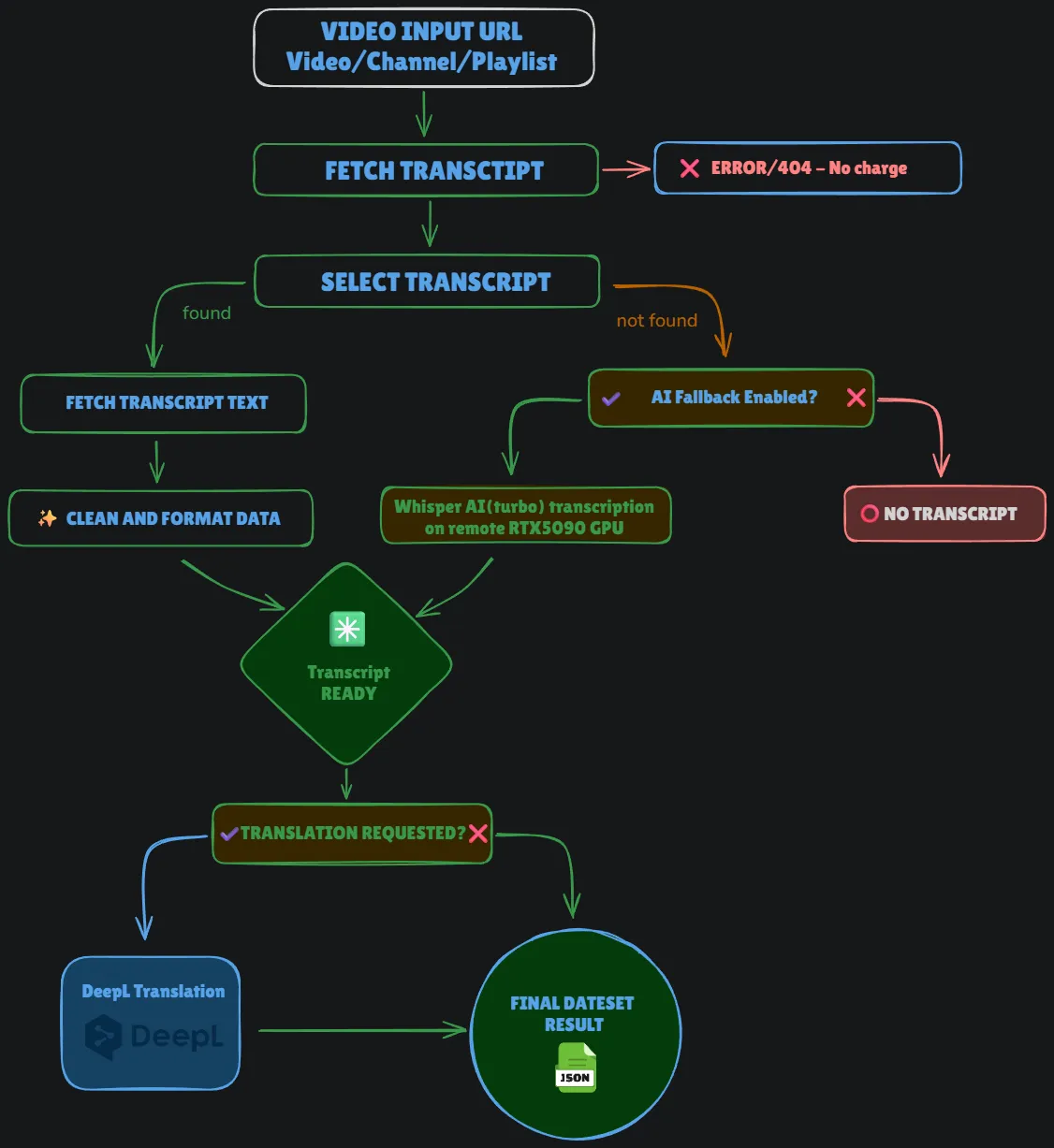
⚙️ How this YouTube transcript extractor works
The flow behind every transcript extraction run is simple by design:
- Video input - you provide a YouTube URL, a bare video ID, or a channel/playlist link.
- Fetch transcript - the scraper requests the transcript list for that video. If the video genuinely doesn't exist or is unreachable, it's marked as an error and the run keeps going - you're not charged for it.
- Select transcript - it looks for a caption track matching your language and type preferences (manual captions first, then auto-generated, or whatever priority order you set).
- Found a transcript?
- Yes - the caption text is fetched and cleaned up (timing normalized, formatting fixed) into your requested output format.
- No - if AI transcription fallback is turned on, the video's audio is sent to Whisper Turbo running on a remote GPU for speech-to-text transcription. If AI fallback is off, the item is marked as "no transcript available" and the run moves to the next video.
- Translation (optional) - if you requested translation, the finished transcript is sent to DeepL and translated into your target language.
- Final dataset - every transcript lands in your dataset as structured JSON, ready to download or pull via the Apify API.
📊 Workflow Diagram
📥 Input
Run this YouTube transcript scraper from the Apify Console with the input form below, or pass the same fields as JSON through the API.
Video input
| Field | Type | Default | What it does |
|---|---|---|---|
videoIds | array of strings | - | YouTube videos to extract transcripts from. Paste full URLs or bare video IDs - mixing both in the same list is fine. Ignored when channel/playlist mode is on. |
channelMode | boolean | false | Switches from a manual video list to pulling videos from a YouTube channel or playlist. |
channelUrl | string | - | Channel or playlist URL (e.g. https://www.youtube.com/@channelname/videos). |
channelVideoCount | integer | 10 | How many of the channel's or playlist's most recent videos to process. |
Transcript settings
| Field | Type | Default | What it does |
|---|---|---|---|
languages | array | [] (any available) | Preferred caption languages, in priority order. Leave empty and the scraper grabs whatever subtitle language the video has. |
transcriptType | string | auto_detect | auto_detect tries manual captions first, then falls back to auto-generated captions. Or force manual / auto only. |
fallbackToAuto | boolean | false | If you locked in manual only and no manual captions exist, allow falling back to auto-generated captions instead of erroring out. |
Whisper AI transcription (fallback)
Used only when a video has no existing captions or subtitles at all.
| Field | Type | Default | What it does |
|---|---|---|---|
useAiFallback | boolean | false | Turns on AI speech-to-text transcription for videos with no captions. |
maxMinutes | integer | 0 (full video) | Caps AI transcription to the first N minutes of a video. |
skipAiIfLongerThanMinutes | integer | 0 (no limit) | Skips AI transcription entirely for videos longer than N minutes - useful for keeping transcription cost predictable on long-form video and podcast content. |
DeepL translation
| Field | Type | Default | What it does |
|---|---|---|---|
translationRequired | boolean | false | Translates the final transcript text with DeepL. |
translateTo | string | English (American) | Target language for the translated transcript - 30+ options, from Arabic to Ukrainian. |
📤 Output
Every processed video becomes one transcript item in your dataset. Here's what's in it:
| Field | Type | Description |
|---|---|---|
video_id | string | The YouTube video ID. |
source | string | Where the transcript came from: manual captions, auto (auto-generated) captions, or ai (Whisper transcription). |
is_auto_generated | boolean | true if this is YouTube's own auto-generated captions track. |
is_ai_generated | boolean | true if Whisper AI transcription generated the text. |
detected_language | string | Language code of the transcript. |
plain_text | string | The transcript as a plain text block. |
llm_ready | string | Cleaned-up transcript text formatted for feeding into an LLM, RAG pipeline, or AI agent. |
srt | string | Subtitle file content in SRT format. |
vtt | string | Subtitle file content in WebVTT format. |
json_segments | array | Timestamped transcript segments: [{start, end, text}, ...]. |
translation_text | string | Translated transcript text, if translation was requested. |
translated_to | string | Target language of the translation. |
translation_units | integer | Translation units charged for this item (see Pricing). 1 unit = 1 minute. |
error | string | Error message, if the transcript couldn't be extracted. |
video_metadata | object | Title, channel, view count, video length, description, thumbnail, keywords, and more. |
Example output
🧠 Which Whisper model is this?
Not every "AI transcription" feature is built the same. Here's the actual lineup of Whisper speech-to-text models and where this scraper's AI transcription sits:
| Size | Parameters | Required VRAM | Relative speed |
|---|---|---|---|
| tiny | 39M | ~1 GB | ~10x |
| base | 74M | ~1 GB | ~7x |
| small | 244M | ~2 GB | ~4x |
| medium | 769M | ~5 GB | ~2x |
| large | 1550M | ~10 GB | 1x |
| turbo | 809M | ~6 GB | ~8x ✅ |
This actor runs on Turbo - not tiny or base, the lightweight models most low-cost YouTube transcript tools default to just to keep their own infrastructure cheap. Turbo gives you transcription accuracy close to large while running at roughly 8x realtime speed, and it runs on a dedicated remote GPU rather than sharing compute with the actor's own container - so transcript quality isn't the thing getting cut to save a few cents.
Full model details: github.com/openai/whisper
🛡️ Proxy and infrastructure
Proxy access for scraping YouTube captions and subtitles is included in the price - you're never billed separately for bandwidth or IP rotation. Everything needed to extract transcripts reliably at scale is handled on the actor's side.
💸 Pricing
This YouTube transcript scraper uses simple, transparent pricing split by task:
- Transcript extraction (captions) — priced per line of transcript.
- AI transcription (Whisper fallback) — priced per minute of audio processed.
- Translation (DeepL) — priced per
translation_unit, where 1 unit = 500 characters of translated text. Reported per item in thetranslation_unitsfield, so you always know exactly what a run cost.
No proxy fees, no separate GPU line item, no monthly subscription - you pay for what the actor actually processes.
Check the actor's Pricing tab in Apify Store for exact rates.
💡 Use cases
📚 Building a RAG knowledge base from YouTube transcripts
Pull every video from a company channel, educational account, or YouTube playlist and store the llm_ready transcript field in a vector database, indexed by video_id and title. Instant retrieval-augmented generation (RAG) corpus grounded in your own video content, extracted straight from YouTube captions and subtitles.
✍️ Content repurposing from video transcripts
Turn video tutorials, podcasts, or interviews into blog posts, newsletter sections, or social threads. Feed the llm_ready transcript text straight into your writing pipeline - no manual transcription needed to convert a YouTube video to text.
🌍 Multilingual transcript and subtitle translation
Extract a transcript or subtitle track in its original language, then translate it with the built-in DeepL step - one run, no second translation tool needed.
🎬 Subtitle and caption workflows
Grab srt or vtt subtitle output directly and drop it into a video editor or player - useful for anyone building caption files from YouTube videos without existing subtitles.
🔍 Competitor and market research on video content
Point channel or playlist mode at a competitor's channel, cap it to their latest N videos, and read the full transcript of what they're actually saying in their video content - not just what's in their titles and descriptions.
🧠 NLP and academic research on spoken video content
Batch-extract transcripts from lecture series, conference talks, or niche channels for sentiment analysis, topic modeling, keyword research, or building a language corpus from spoken video content.
🚀 Getting started via API
Python
Channel or playlist mode example
JavaScript / Node.js
❓ Frequently asked questions
What is a YouTube transcript scraper?
A YouTube transcript scraper is a tool that extracts the spoken text, captions, or subtitles from a YouTube video - converting a YouTube video to text automatically, without manually watching and typing it out. This actor pulls captions when YouTube provides them, and can transcribe the audio with AI speech-to-text when it doesn't.
Can I use this to convert a YouTube video to text?
Yes. Paste the video URL, run the scraper, and get the transcript back as plain text, LLM-ready text, SRT subtitles, VTT subtitles, or timestamped JSON.
Does it extract YouTube captions and subtitles, or just AI transcription?
Both. It checks for existing YouTube captions and subtitles first - manual or auto-generated - and only uses AI transcription as a fallback when no captions exist.
Does it work if a video has no captions or subtitles at all?
Yes, if you turn on useAiFallback. The audio is sent to a remote GPU running Whisper Turbo and transcribed from scratch. Without AI fallback enabled, videos with no captions are marked as having no transcript available, and the run continues.
Does it support YouTube channels?
Yes. Turn on channelMode, give it a channel URL, and set how many recent videos to pull with channelVideoCount.
Does it support YouTube playlists?
Yes. Playlist URLs work the same way as channel URLs in channel/playlist mode - set channelUrl to the playlist link and channelVideoCount to how many videos to pull.
Can it translate the transcript into another language?
Yes, through a built-in DeepL translation integration. Set translationRequired to true and pick a translateTo language from 30+ supported languages.
Do I need a YouTube API key to extract transcripts?
No. The actor doesn't require any YouTube Data API credentials to scrape captions, subtitles, or transcripts.
Do I pay for proxies separately when scraping YouTube?
No. Proxy and bandwidth costs for extracting YouTube transcripts at scale are included - you're only billed based on the token pricing described above.
How is transcript extraction priced?
By tokens, where 1 token equals 500 characters of processed transcript text. Translation cost is reported per dataset item in translation_units, where 1 unit equals 1 minute of translated audio/text.
Which Whisper model does the AI transcription fallback use?
Turbo (809M parameters) - not one of the lightweight tiny or base models many low-cost transcript scrapers use. See the Whisper model table above for the full comparison.
⚠️ Notes
- Free-tier accounts are capped at a small sample size per run. Upgrade to a paid Apify plan for full-volume transcript extraction.
- Caption and subtitle availability reflects what's publicly listed on YouTube at the time of the run; YouTube's own caption data updates continuously.
🔗 See also
Need a scraper for another platform? Check out:


