

Instagram Logo Detection & Brand Recognition
Pricing
Pay per event
Instagram Logo Detection & Brand Recognition
Detect logos and brands in Instagram hashtag posts, profiles, carousels and reels. See where each brand appears and whether the post credits it, spot replica sellers, get likes and tags. From $2.50 per 1,000 images with a brand. No login.
Pricing
Pay per event
Rating
0.0
(0)
Developer

Monkey D. Scraping
Maintained by CommunityActor stats
0
Bookmarked
1
Total users
0
Monthly active users
a day ago
Last modified
Categories
Features
Share
Instagram Logo Detection & Brand Recognition — Hashtags, Profiles & Posts
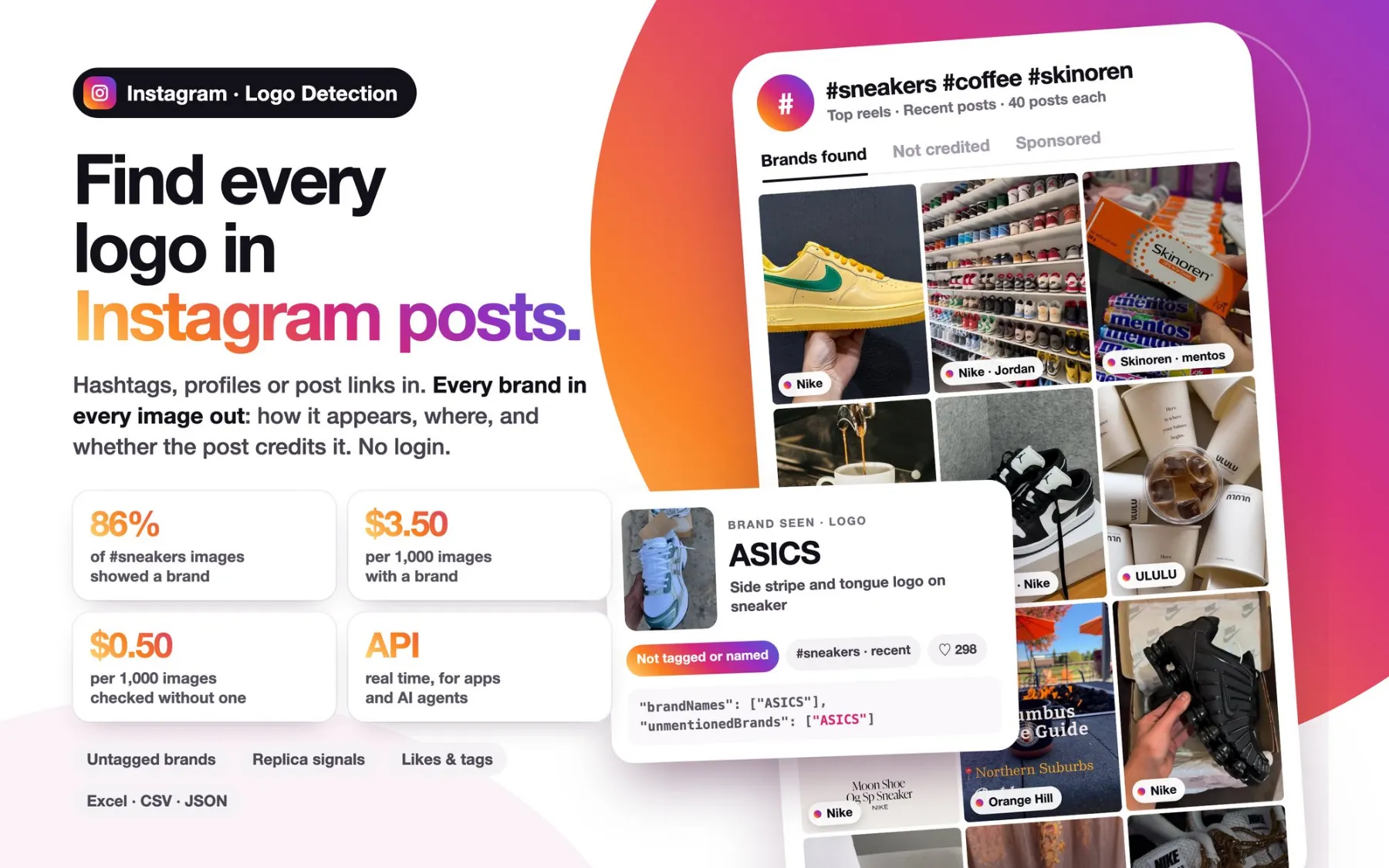
Logo detection and brand recognition for Instagram, from $2.50 per 1,000 images with a brand. Give it hashtags, usernames, profile links or post and reel links: it reads every public image and returns the brands and logos it shows, how each one appears (logo, monogram, printed name or product design), on which object, and whether the post credits it with a tag, a mention or the brand name. Images without a brand cost $0.50 per 1,000. No login, no cookies.
Use it for visual brand monitoring and brand protection: find your logo, or a client's, in posts that never tag it; spot replica and counterfeit sellers under hashtags like #replicabags; see which brands appear in a creator's posts and which of those posts are sponsored. Post data comes with every image: likes, comments, caption, hashtags, mentions, tagged accounts, collaborators and location.
Need logo detection inside your own app or AI agent? This Actor is also a real-time logo detection API: send a post link or a username in one HTTP request and get the brands back in the response.
What can you get?
| Field | Example |
|---|---|
brandNames | ["Gucci", "Chanel"] |
unmentionedBrands | ["Chanel"]: brands seen in the image but not tagged, mentioned, named in the caption or posting it |
brands | [{"name": "Gucci", "category": "brand", "evidence": "monogram", "where": "GG canvas handbag"}] |
teamsAndEvents | ["Paris Saint-Germain", "Paris 2024"] |
hasBrand | true |
description | Woman holding a GG canvas bag in a boutique |
postUrl, ownerUsername, postType | link, account and type (photo, carousel, reel) |
hashtag, listedAs | the hashtag the post was found for, and how: top, recent, profile or link |
imageIndex, imageCount | which image of the post, out of how many |
caption, createdAt, imageUrl | caption, posting date and the analyzed picture |
likeCount, commentCount, locationName | engagement and place of the post |
hashtags, mentions, taggedInImage, taggedUsers, collaborators | who and what the post credits, including the accounts tagged on this very image |
possiblyReplica, replicaSignals | replica words in the caption or hashtags (replica, dupe, 1:1, AAA, mirror quality, 高仿, …) |
possiblySponsored, sponsoredSignals | ad or partnership signals in the caption (#ad, "paid partnership", …) |
ownerFullName, ownerIsVerified | name of the account and its verified badge |
Only images with a brand are listed (turn on Also list images without brands to see all of them); the run summary counts every image checked. Only brands detected with high confidence are listed, each with one spelling per run. Sports teams, leagues and events (club crests, tournament logos) are kept apart in teamsAndEvents. Faces and people are never identified.
Want the comments of these posts too? Send the postUrl values to our Instagram Comments Scraper. Need every post of a hashtag with views, comments and hashtag analytics, without the image analysis? Use our Instagram Hashtag Scraper.
Use cases
1. Find a brand's logo where nobody credits it
For brands and for agencies working on their clients: run the hashtags of the products, campaigns or category (#nikedunk, #sneakers, #campaignname) and keep the images where unmentionedBrands names the brand: user-generated content, unpaid placements and competitors' posts that show the product without tagging, mentioning or naming it. Sort them by likeCount to see which ones reached the most people, then read what people answered with the Instagram Comments Scraper.
2. Spot replica and counterfeit sellers
Run replica hashtags (#replicabags, #dupebags, #1to1) and filter the images where the brand you protect is in brandNames and possiblyReplica is true: the account, the post, the caption and the replica words it uses (replicaSignals) are in every row, ready for a takedown review. In a test on 21 November 2026, Chanel, Louis Vuitton, Hermès, Saint Laurent, Burberry and Fendi all appeared under #replicabags and #dupebags, most of them never named in the caption. The Actor reports the brand it sees and the words the seller uses; it does not judge whether an item is authentic.
3. Audit influencers and sponsorships
Add creator usernames to see which brands appear in their posts, how often, and whether each post is marked as sponsored (possiblySponsored), tags the brand (taggedInImage, taggedUsers) or shows a competitor. Useful before signing a creator and to check that a campaign was delivered. For followers, engagement rate and best posting times of the same creators, add our Instagram Profile Scraper.
Ready-made tasks
| Task | Use case | What you get |
|---|---|---|
| Find brand logos in Instagram hashtag posts | Brand monitoring for brands and agencies | Every brand in #sneakers posts, with the posts that show a brand without crediting it |
| Find replica and counterfeit sellers on Instagram | Brand protection | Designer brands seen under #replicabags and #dupebags, with the seller's account and replica words |
Open a task, change the hashtags and run it.
How to use it
- Add hashtags (
sneakers,#nikedunk) and/or usernames or links (etro,@etro,https://www.instagram.com/p/...,https://www.instagram.com/reel/...). - Choose Carousel images: the first image of each post, or every image of the carousel.
- Set Max posts per hashtag (top reels and recent posts, half each), Max posts per profile (from the latest 12 up to a whole profile) and, optionally, Max images per run.
- Run, then export the results as JSON, CSV or Excel.
Input example
How much does it cost?
You pay for what the analysis finds:
| Free & Starter | Scale | Business | |
|---|---|---|---|
| Image with a brand | $3.50 per 1,000 | $3 per 1,000 | $2.50 per 1,000 |
| Image checked, no brand | $0.50 per 1,000 | $0.50 per 1,000 | $0.50 per 1,000 |
Finding the posts of a hashtag or profile, the post data and the run summary are included. Images that cannot be analyzed are not charged, and a post found twice (under two hashtags, or under a hashtag and in a profile) is checked and charged once. A hashtag where almost no image shows a brand is stopped early, so you do not pay for hundreds of images without one.
Free Apify plans include a one-time trial of 20 checked images per account. Paid Apify plans have no image limit; set Max images per run or a spending limit to control the cost of each run.
Tips
- Pick hashtags about products, brands or campaigns. In a test on 21 November 2026, 69% of recent #sneakers images and 95% of its top reels showed a brand, against 5–23% for #coffee and #ootd. Images without a brand cost little, and the share of images with brands is in the run summary for each hashtag: try a few posts per hashtag first.
- Recent posts count only when they carry the hashtag (or name it in the caption); the others are skipped and never charged.
- Brands on products, packaging, shopping bags, signs and clothing are detected, including well-known product designs.
- Reels are analyzed through their cover image.
- Private profiles and deleted posts are listed as not available in the run summary. Hashtags without public posts are named there with the reason.
Real-time brand detection API for apps and AI agents
Need the brands of a post inside an HTTP response? Use the Server tab. Send post links or usernames in targets, with the same options, to POST /analyze (or GET /analyze?url=<post link or username>) and the results come back in seconds, ready for apps, AI agents, n8n and Make.
Copy the server URL from the Server tab. Each image costs the same as in a normal run (with or without a brand), and images that cannot be analyzed are free. The real-time API is available on paid Apify plans; on the Free plan, use a normal run with the free trial.
The server runs in multi-tenant mode: you pay only for the images you receive, with no platform usage on top, and every request's results are kept separate and returned only to its caller. For whole profiles and long lists, use a normal run; if the server is busy, retry after a few seconds.
FAQ
How does Instagram logo detection work here? Every image is analyzed by a vision AI model that names the brands it can see: logos, monograms, brand names printed on products, packaging, signs or clothing, and well-known product designs. Only brands detected with high confidence are kept.
Can it find posts that show my brand without tagging it?
Yes. unmentionedBrands lists the brands seen in the image that the post does not tag, mention, name in the caption or publish from its own account.
Can it detect counterfeit products?
It finds the posts and accounts that show a brand next to replica words such as replica, dupe, 1:1, AAA or mirror quality (possiblyReplica, replicaSignals), so your team can review them and file takedowns. It reports what it sees; it does not certify whether an item is authentic.
Do I pay for images without a brand? $0.50 per 1,000. Images with a brand cost $3.50 per 1,000 on Free and Starter plans, $3 on Scale and $2.50 on Business. Images that cannot be analyzed are free.
Does it recognize people? No. Faces and people are never identified, and a person's name is never reported as a brand.
Which content is analyzed? Public photos, every image of a carousel (or only the first, as you choose) and the cover image of reels, from hashtags, profiles and post or reel links.
Can I export to Excel, CSV or Google Sheets? Yes. Download the results as JSON, CSV or Excel, or send them to Google Sheets, Make, n8n or Zapier with an Apify integration. You can also call the Actor from Python, JavaScript or the Apify MCP server in Claude, ChatGPT and Cursor.
For AI agents
- Input:
hashtags(array of hashtags, with or without #, or hashtag links),targets(array of Instagram usernames or post/reel/profile URLs),slides(first|all),includeImagesWithoutBrands(default false),postsPerHashtag(1–1,000, half top reels and half recent posts),postsPerProfile(1–10,000, newest first),maxImages(0 = no limit). - Output: one dataset item per image with a brand (every checked image with
includeImagesWithoutBrands):brandNames(string array),unmentionedBrands(brands not credited by the post),brands(name,category: brand | team | event,evidence: logo | monogram | text | product_design,where),teamsAndEvents(string array),hasBrand,description,postUrl,ownerUsername,postType,hashtag,listedAs(top|recent|profile|link),imageIndex,imageCount,caption,hashtags,mentions,taggedInImage,taggedUsers,collaborators,possiblyReplica,replicaSignals,possiblySponsored,likeCount,commentCount,locationName,createdAt,imageUrl. - Run summary in the key-value store record
SUMMARY, with one entry per hashtag (posts,top,recent,images,imagesWithBrands,status,reason). - Real-time: for an answer inside a single HTTP call, use the server endpoint
POST /analyzewithtargets(post links or usernames) and the same options (see the Server tab); results are inimages, with a per-inputsummary.
Also known as: Instagram logo detection API, logo recognition tool, brand logo detector, Instagram hashtag brand detection, Instagram counterfeit and replica detection, brand protection on Instagram, Instagram logo recognition, Instagram brand detection, visual brand monitoring for Instagram, Instagram brand mentions in images.
Chinese Simplified
中文说明:Instagram Logo 识别与品牌检测
Instagram 图片 Logo 识别、品牌检测与品牌保护工具。 输入话题标签(hashtag)、账号用户名、主页链接或帖子 / Reels 链接,即可获取每张公开图片中出现的品牌与 Logo:出现方式(Logo、花押字、印刷品牌名或标志性产品设计)、出现在什么物品上,以及帖子是否标注、@提及或写出了该品牌。无需登录,无需 Cookie。
适用场景
- 品牌监测: 在产品或活动话题下找出展示你(或客户)品牌却未标注的用户内容、免费曝光和竞品帖子,按点赞数排序。
- 品牌保护与打假: 在 #replicabags、#dupebags 等仿品话题下,找出展示品牌并使用“replica / dupe / 1:1 / AAA / 高仿”等字样的帖子和账号,便于投诉下架。工具只报告看到的品牌与卖家用语,不鉴定真伪。
- 达人与赞助审核: 查看达人帖子中出现的品牌、是否为赞助内容、是否标注品牌。
使用方法
- 在 Hashtags 中输入话题标签(如
sneakers),或在 Usernames or post links 中输入账号或帖子链接。 - 选择轮播图只分析第一张还是全部图片。
- 设置每个话题 / 每个账号的帖子数量,点击 Start,结果可导出为 Excel、CSV 或 JSON。
价格
| Free / Starter | Scale | Business | |
|---|---|---|---|
| 含品牌的图片 | 每 1,000 张 $3.50 | $3 | $2.50 |
| 未发现品牌的图片 | 每 1,000 张 $0.50 | $0.50 | $0.50 |
查找话题和主页的帖子、帖子数据(点赞、评论、标注账号、话题、地点)均已包含;无法分析的图片不收费。Free 套餐每个账号可免费试用 20 张图片。
常见问题
- 能识别人脸或人物吗? 不能,工具从不识别人物。
- 能找出未标注我品牌的帖子吗? 可以,查看
unmentionedBrands字段。 - 支持 API 吗? 支持,付费套餐可使用实时 API(Server 模式),也可通过 Python、JavaScript 或 MCP 调用。
Chinese Traditional
中文說明(繁體):Instagram Logo 辨識與品牌偵測
輸入主題標籤(hashtag)、帳號或貼文連結,取得每張公開圖片中的品牌與 Logo、出現位置,以及貼文是否標註或提及該品牌。適用於品牌監測、仿冒品與山寨賣家偵測(#replicabags、#dupebags)、網紅與業配審核。免登入、免 Cookie。
- 價格: 含品牌的圖片每 1,000 張 $3.50(Scale $3、Business $2.50),未發現品牌的圖片每 1,000 張 $0.50;無法分析的圖片不收費。Free 方案每個帳號可免費試用 20 張圖片。
- 匯出: Excel、CSV、JSON,或透過 API、Make、n8n、Zapier 串接。
- 不辨識人臉或人物。
More Instagram tools by the same author
Every Instagram Actor below reads public data without login and takes the same post links and usernames, so the results of one are the input of the next.
- Instagram Hashtag Scraper: posts and reels of any hashtag with likes, comments and hashtag analytics.
- Instagram Profile, Reels & Keyword Search Scraper: profiles with all their posts and reels, engagement rate and best posting times.
- Instagram Comments Scraper: every comment of posts and reels.
- Facebook Ads Library Scraper: the ads brands and competitors run on Facebook and Instagram.


