
Google Ads Transparency Scraper: Competitor Ad Library
Pricing
from $1.50 / 1,000 ads
Google Ads Transparency Scraper: Competitor Ad Library
See every competitor ad in the Google Ads Transparency Center. Search by brand, website or advertiser ID and get ad text, images, YouTube videos, format, first and last shown dates, regions and EU reach. No login, no proxy fees.
Pricing
from $1.50 / 1,000 ads
Rating
0.0
(0)
Developer

Jason
Maintained by CommunityActor stats
0
Bookmarked
2
Total users
1
Monthly active users
2 days ago
Last modified
Categories
Share
Pull every ad a company runs on Google (Search, YouTube, Shopping, Maps and Play) from the public Google Ads Transparency Center. Search by website, brand name or advertiser ID and get one clean row per ad: format, first and last shown, days running, every country it ran in, headline and description, landing page, image and YouTube video links, EU impressions ranges per country and platform, and the audience targeting the advertiser used.
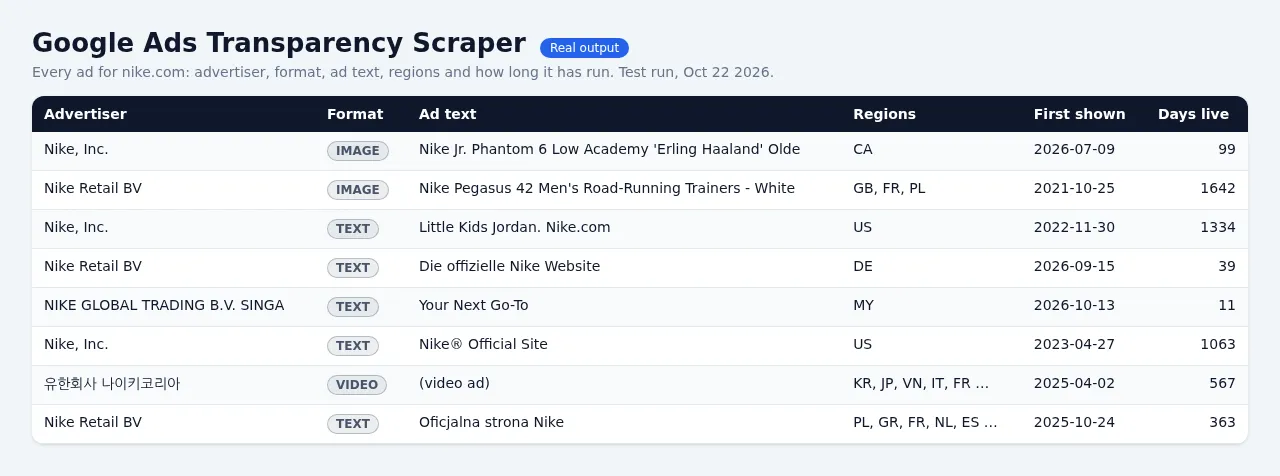
$1.50 per 1,000 ads, with full details included. No login, no cookies, no Google account, and no proxy fees.
Independent tool. Not affiliated with, endorsed by or sponsored by Google LLC. It reads only the data Google publishes for ad transparency.
Why this scraper?
| Typical ad-library scrapers | This Actor | |
|---|---|---|
| Price per 1,000 ads | $1.50–$2.00 | $1.50 |
| Full ad details (every country with dates, EU reach, audience, variations) | extra event, often +$3 per 1,000 | included, no extra charge |
| Ad text (headline, description, call to action, landing URL) | missing or a paid add-on | included where Google shows it |
| YouTube video link, thumbnail, duration and channel for video ads | preview link only | included |
| Proxy | example inputs often use residential proxies | direct connection first, then Apify datacenter, then residential only as a last resort, at no extra cost to you |
| Ads with problems | silently missing | free row with the reason (no ads, unknown advertiser, rate-limited) |
| Spending cap | sometimes overshoots | stops exactly at your max charge |
What you can search
- Websites (domains):
nike.comreturns every ad that points at nike.com, from every advertiser account (brand, retailers, agencies). - Brand names or keywords:
HelloFreshis matched to advertiser accounts with the Transparency Center's own search. The biggest matching account comes first; raise Advertiser accounts per brand name to take more. When no account carries the brand's name (Grammarly advertises as "Superhuman Platform Inc."), we use the website Google suggests for the brand (grammarly.com) and say so inmatchedVia. - Advertiser IDs:
AR16735076323512287233(from the advertiser page URL). - Transparency Center links: paste advertiser pages, single-ad (creative) pages or domain searches.
Filters: region (any country or anywhere), ad format (text, image, video), platforms (Search, YouTube, Shopping, Maps, Play), date range, max ads per target and per run.
Example input
Only new ads, for a daily competitor watch:
Example output (one ad)
Field notes:
daysShown: how long the ad has been running. Long-running ads are usually the ones that work.impressionsMin/impressionsMaxand per-countryregions[].impressions*: Google's "times shown" ranges. Google publishes them only for ads shown in the EU (Digital Services Act), so they are empty for ads that never ran there.audienceSelection: whether the advertiser used demographics, locations, contextual signals, topics or customer lists (EU ads).headline,description,callToAction,destinationUrl,adTextLines: read from Google's own ad preview (textSource: "preview"). Many text ads are archived by Google only as a picture; we read the headline, description and display URL from that picture (textSource: "ocr_snapshot", withocrConfidenceandtextQuality), and the picture itself stays inimageUrl. Latin-script ads read best; text in other scripts that cannot be read is left out (named inocrUnreadableParts) and the row is markedtextQuality: "low".textAvailable: whether the row has ad text. Some local/Maps ads use a headline Google writes on the fly from the landing page; thenheadlineis empty,headlineIsDynamicis true andtextUnavailableReasonsays so (the description is still there).- Text ads with no readable text are kept with their dates, regions and links but get
status: "text_unavailable"and are not charged (switch onchargeTextAdsWithoutTextto treat them as normal ads). - Domain searches return every advertiser account whose ads point to that website, exactly like the Transparency Center (it says "This domain includes results for multiple advertiser accounts"). Placeholder domains such as example.com really do have thousands of ads from unrelated advertisers; the run summary lists
advertisersFoundper domain. imageUrl: the ad image (or Google's archived picture of a text ad).variationImageUrlslists every A/B variation.landingDomain: where the ad sends people.
Free rows have status set to no_ads, no_advertiser, no_new_ads, text_unavailable, invalid_input, error or charge_limit_too_low, with a plain-English error or textUnavailableReason.
Pricing
Pay per event:
- $1.50 per 1,000 ads saved ($0.0015 per ad). Details, ad text, video links and advertiser info are included.
- A tiny start fee of $0.00005 per run.
- Free: rows for targets with no ads, unknown advertisers, invalid input, rate-limit errors, and ads skipped in monitor mode.
Set Maximum cost per run in the run options and the Actor stops exactly there. If the cap is below the price of one ad, you get one free row explaining it and nothing else is charged.
Reliability and fair use
- Uses the same public endpoints the Transparency Center website uses. No login and no personal data: advertisers are businesses.
- Polite by design: paced requests, automatic slow-down and retry when Google pushes back, then a switch to Apify datacenter proxy. It never solves CAPTCHAs or works around Google's bot checks; if Google keeps refusing, you get a free error row and keep every ad already saved.
- Residential proxy is a last resort, and free for you. It is used only when Google rate-limits both the direct connection and Apify datacenter proxy, only for the small data requests (a few KB per ad), and its cost is included in the price. Switch off "Allow residential proxy as a last resort" to never use it. If you turn on Apify Proxy in the input yourself, your choice is used from the first request.
Good to know
- Google filters by date only for roughly the last 12 months. Older windows return nothing; leave the dates empty to get every ad with its first and last shown dates.
- Platform filters apply only to ads shown since 4 September 2023 (Google's rule).
- Google's ad counts (in the run summary as
googleAdCountApprox) are Google's own rough ranges. - Brand names can match several accounts (for example a person called "Nike Smith"). For exact results, use the website or the advertiser ID.
Use cases
- Competitor ad intelligence: see every ad a rival runs right now, which ones have run longest, and where.
- Creative research and swipe files: headlines, descriptions, images and YouTube videos at scale.
- Reach and media mix (EU): compare impressions by country and platform.
- Monitoring: schedule a daily run with monitor mode and get only newly launched ads.
- Lead generation and ad checks: find which companies advertise on Google and under which legal entity.
Integrations
Run it from the Apify API, the Python or JavaScript client, schedules, webhooks, Make, Zapier or n8n, and export to JSON, CSV, Excel or Google Sheets.


