
Bulk PageSpeed Insights & Core Web Vitals Checker
Pricing
from $6.00 / 1,000 page auditeds
Bulk PageSpeed Insights & Core Web Vitals Checker
Run Google PageSpeed Insights on hundreds of URLs or a whole sitemap. Get Lighthouse scores and real-user Core Web Vitals (LCP, INP, CLS) for mobile and desktop in CSV-ready rows, plus alerts when a page's score drops.
Pricing
from $6.00 / 1,000 page auditeds
Rating
0.0
(0)
Developer

Jason
Maintained by CommunityActor stats
0
Bookmarked
2
Total users
1
Monthly active users
3 days ago
Last modified
Categories
Share
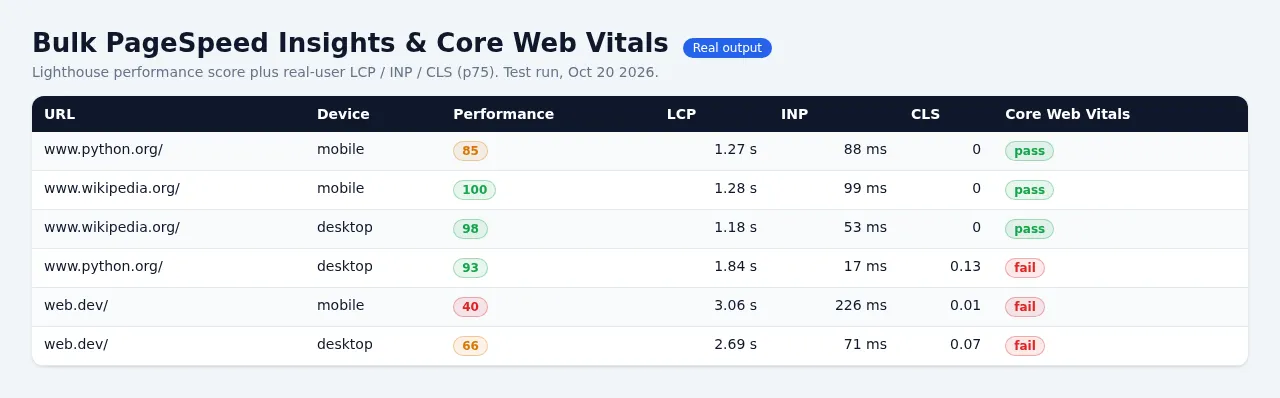
Run Google PageSpeed Insights on hundreds of pages at once. Give it a list of URLs or a sitemap.xml. For every page and device (mobile and/or desktop) you get:
- Lighthouse lab scores (0–100): Performance, Accessibility, Best Practices, SEO.
- Lab metrics: FCP, LCP, TBT, CLS, Speed Index, TTI, TTFB.
- Real-user Core Web Vitals from the Chrome UX Report (CrUX): LCP, INP, CLS, FCP and TTFB at the 75th percentile. Each comes with a good / needs-improvement / poor rating and a Core Web Vitals pass/fail assessment.
- The top 5 fixes, ranked by estimated time saved. Examples: render-blocking requests, image delivery, unused JavaScript.
- A link to the full report on pagespeed.web.dev.
Every result is one flat row, ready for Excel, Google Sheets, Looker Studio or a CSV export. A ready-made RESULTS.csv with a fixed column order is also saved.
Regression monitor
Set mode to monitor and schedule the Actor daily or weekly. Every page is compared with its result from the previous run, and the Actor flags:
- a Lighthouse score that dropped by 10 or more points (you can change this threshold);
- a Core Web Vitals assessment that went from pass to fail;
- a field LCP, INP or CLS rating that got worse (for example good → needs improvement);
- lab LCP that grew by 50% or more and by at least 1 second.
Regressions get regression: true and a plain-English regressionReasons, such as "performance score 92->71 (-21); field LCP good->poor". They also go to the REGRESSIONS and REGRESSIONS.csv records. To get emailed only when something regressed, connect an Apify integration or webhook, or filter the dataset on regression.
Google API key (free, about 2 minutes)
This Actor uses Google's official PageSpeed Insights API v5 and the Chrome UX Report API.
- Without a key, the Actor runs a limited free preview: it audits only the first 2 URLs with one strategy (mobile by default), so you can see real results right away. Those audits are billed like any other. OUTPUT and the log say "Ran a limited free preview; add your own free Google key for full runs". Anything past the first 2 URLs is not audited and not charged.
- With your own free key you get about 25,000 audits per day. No billing account is needed.
To create a key:
- Open the Google Cloud console and create a project (or pick one).
- Enable PageSpeed Insights API. Optionally also enable Chrome UX Report API for the freshest field data.
- Go to APIs & Services → Credentials → Create credentials → API key. Restricting the key to those two APIs is recommended.
- Paste the key into Google API key. It is stored encrypted, sent only to Google in a request header, and never logged.
If the CrUX API isn't enabled for your key, the Actor falls back to the field data that PageSpeed Insights returns.
Pricing
$8.00 per 1,000 audits, falling to $7.00 / $6.50 / $6.00 per 1,000 on Bronze / Silver / Gold+ Apify plans. One audit is one URL on one device, so mobile + desktop counts as 2.
You are not charged for:
- audits that fail (page didn't load, Lighthouse error);
- URLs that are blocked (private network, adult sites);
- audits skipped because the Google quota ran out or your maximum charge was reached.
For comparison, other PageSpeed Actors charge $0.03–$0.10 per page.
Output columns
url, strategy, finalUrl, performanceScore, accessibilityScore, bestPracticesScore, seoScore, coreWebVitals, fieldDataScope, fieldLcpP75Ms, fieldLcpRating, fieldInpP75Ms, fieldInpRating, fieldClsP75, fieldClsRating, fieldFcpP75Ms, fieldFcpRating, fieldTtfbP75Ms, fieldTtfbRating, labFcpMs, labLcpMs, labTbtMs, labCls, labSpeedIndexMs, labTtiMs, labTtfbMs, monitorStatus, regression, regressionReasons, prevPerformanceScore, performanceScoreDelta, prevCheckedAt, topOpportunities, fieldDataSource, fieldCollectionPeriod, lighthouseVersion, lighthouseWarnings, psiReportUrl, auditedAt, monitorId
fieldDataScopeisurlwhen the page has its own CrUX data,originwhen site-wide data was used because the page has too little traffic, andnonewhen there is no data. Low-traffic sites often have no CrUX data at all.fieldDataSourceiscrux-apiorpagespeed-api.
Use cases
- Bulk PageSpeed test: check every page in a sitemap at once instead of pasting URLs into pagespeed.web.dev one by one.
- Core Web Vitals report for SEO audits and client reporting. Export the CSV to Google Sheets or Looker Studio.
- Performance regression alerts: after deploys, theme or plugin updates, or tag-manager changes.
- Competitor benchmarking: compare Lighthouse and CrUX numbers across competitor sites.
FAQ
Is this the official Google data? Yes. Lab scores come from Google's PageSpeed Insights API (Lighthouse, run on Google's servers). Field data comes from the Chrome UX Report.
Why are my field (CrUX) columns empty?
Google only publishes real-user data for pages and sites with enough Chrome traffic. Check fieldDataScope: if it says none, there isn't enough data yet. Lab scores are still returned.
Why do scores differ slightly from run to run? Lighthouse lab tests vary with network and server conditions. Use the regression threshold to ignore small swings.
Can I run it on a schedule?
Yes. Create an Apify schedule with mode: monitor, then add an email, Slack or webhook integration that fires on regressions.
Tips and limits
- Lab scores vary by a few points between runs because of network and server noise. That's why the regression threshold defaults to 10 points.
- CrUX field data is a rolling 28-day window and is updated daily, so field ratings move slowly. Lab scores react immediately.
- Google audits the page from its own servers. Only public pages can be tested. Login-only pages, localhost and private IPs don't work, and private addresses are refused up front.
- Concurrency defaults to 6 parallel audits with a key and 2 without. Google allows about 4 requests per second per project.
Acceptable use
- Audit only sites you own, manage, or are allowed to test.
- Adult sites and private or internal addresses are refused.
- Use of the Google APIs is subject to Google's API Terms of Service. Your key and its quota are yours.


