

Website Screenshot API & URL to PDF: Full-Page, Bulk
Pricing
from $1.60 / 1,000 screenshot or pdf delivereds
Website Screenshot API & URL to PDF: Full-Page, Bulk
Take full-page website screenshots and PDFs of any URL list or sitemap in bulk. Desktop, tablet and mobile sizes, cookie banners and ads removed, PNG, JPEG, WebP or PDF output, plus visual change detection for page monitoring.
Pricing
from $1.60 / 1,000 screenshot or pdf delivereds
Rating
0.0
(0)
Developer

Jason
Maintained by CommunityActor stats
0
Bookmarked
2
Total users
1
Monthly active users
3 days ago
Last modified
Categories
Share
Take screenshots or PDFs of many public web pages in one run. You get clean output: cookie banners, ads, chat bubbles and "subscribe" pop-ups are removed before capture. Turn on change-detection mode to re-capture a list of pages on a schedule. You pay the screenshot fee only for pages that changed. Unchanged pages cost only a small comparison fee. Each changed page comes with a red-highlighted diff image.
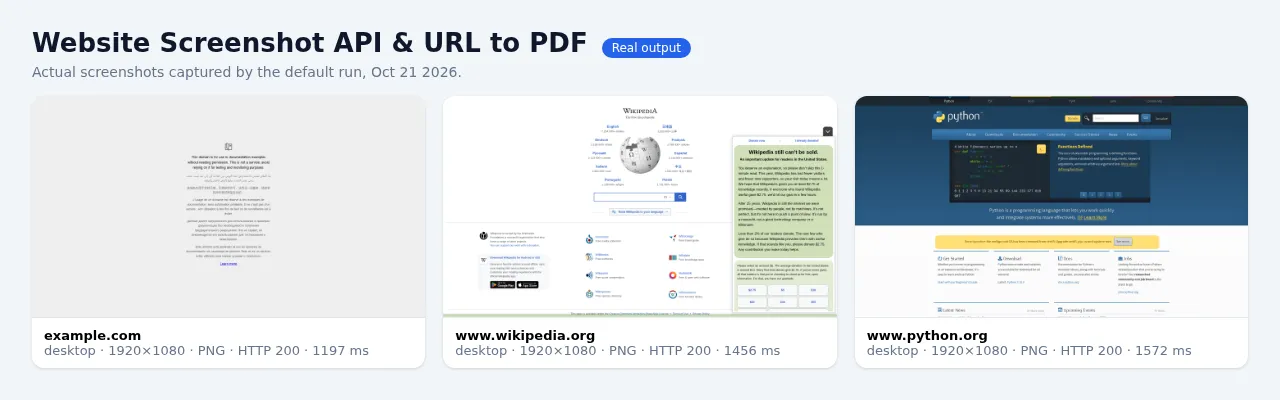
Built on Playwright and headless Chromium.
What it does
- Batch URLs or sitemaps. Paste up to 500 URLs per run, or give a
sitemap.xml(sitemap indexes work too). - Viewport or full page. Full-page mode scrolls the page first so lazy-loaded images appear. Height is capped by
maxHeight, default 15,000 px. - Device presets:
desktop(1920×1080),laptop(1366×768),tablet(iPad),mobile(Pixel 7) andiphone(iPhone 14 at 3×). You can also set acustomviewport, scale factor and mobile emulation. - Formats: PNG, JPEG, WebP or PDF. PDF paper size is A4, Letter, Legal, A3 or Tabloid, in portrait or landscape. PDFs use screen or print CSS.
- Clean captures:
- Built-in rules for OneTrust, Cookiebot, Usercentrics, Quantcast, Didomi, TrustArc, Termly, Osano and other consent tools.
- Blocks requests to common ad and tracker hosts.
- A generic sweep hides fixed or sticky consent bars, full-screen modals and newsletter overlays.
- Add your own CSS selectors with
hideSelectors.
- Element screenshots: capture just one CSS selector, such as a pricing table or a chart.
- Dark mode: sets
prefers-color-scheme: dark,waitForSelector, extra delay and a custom User-Agent. - Change detection (
mode: changeDetection):- Each page is compared with its baseline from the previous run of the same
monitorId. - Pages that changed more than
diffThresholdPercentare delivered withdiffPercentand a diff image, then the baseline is updated. - Unchanged pages are not delivered and pay only the comparison fee ($1.00 / 1,000), never the screenshot fee.
- For PDFs, the page text is compared instead of pixels.
- Each page is compared with its baseline from the previous run of the same
Output
Each delivered page is one dataset row:
- The files are stored in the run's default key-value store and linked from
fileUrl. - The
OUTPUTrecord holds a run summary, with counts and the status of every URL. - The
ERRORSrecord lists every page that failed, was blocked or was skipped, with the reason.
Pricing (pay per event)
| Event | Price |
|---|---|
| Screenshot or PDF delivered (one dataset row) | $2.00 / 1,000, falling to $1.80 / $1.70 / $1.60 on Bronze / Silver / Gold+ Apify plans |
| Full-page screenshot or PDF (add-on) | +$2.50 / 1,000, so $4.50 / 1,000 in total |
| Page compared with the previous run (change-detection mode, from the second run on) | +$1.00 / 1,000 |
Examples:
- 1,000 viewport screenshots cost $2.00.
- 1,000 full-page screenshots or PDFs cost $4.50.
- A daily monitor of 1,000 pages in which 50 change costs $1.00 (comparisons) + $0.10 (50 changed screenshots) = about $1.10 per day.
You are not charged for:
- pages that failed, timed out, or returned HTTP errors;
- pages that were blocked or skipped (see acceptable use below);
- the screenshot of an unchanged page in change-detection mode. Only the comparison fee applies.
You can set a maximum total charge for the run. The Actor stops cleanly when it reaches that limit.
Use cases
- Bulk website screenshots: capture thumbnails or previews for directories, link previews, portfolios and lead lists.
- URL to PDF: archive articles, invoices, documentation and legal pages as printable PDFs.
- Full-page screenshots for design reviews, client reports, SEO audits and competitor tracking.
- Visual regression testing: compare staging and production, or yesterday and today, with diff images.
- Website change monitoring: watch competitors' pricing pages, landing pages and terms of service, and get alerted only when something visibly changes.
- Mobile screenshots: see how pages render on an iPhone, an Android phone or a tablet.
FAQ
Can I use this as a screenshot API?
Yes. Call the Actor through the Apify API, or run it synchronously with run-sync-get-dataset-items, and read fileUrl from the response. It also works from Make, Zapier, n8n and webhooks via Apify integrations.
How do I get rid of cookie banners and pop-ups?
They are removed by default (blockCookieBanners, blockAds, removeOverlays). Add any leftover selector to hideSelectors.
Does it handle lazy-loaded images? Yes. Full-page mode scrolls the page before capturing so lazy images and infinite-scroll sections render.
Can it log in to a site? No. It captures public pages only, by design. Login pages are skipped and not charged.
Why did a site fail?
Some sites block cloud servers (HTTP 403) or show a CAPTCHA. Those pages are reported in ERRORS and never charged.
Acceptable use
This Actor is for capturing public web pages that you are allowed to access and copy. Typical uses are QA, visual regression, archiving, monitoring your own or competitors' public pages, and building previews. By default:
- Login-walled pages are skipped. These are pages that show a password field,
/loginand/signinURLs, andaccounts.orauth.hosts. HTTP 401 pages are skipped too.CookieandAuthorizationheaders inextraHeadersare ignored. The Actor never captures behind a login. - Adult sites are refused, using domain, TLD and keyword checks plus
ratingandRTAmeta tags. - Private networks are refused. That covers
localhost, private, loopback and link-local IPs, internal hostnames, non-HTTP schemes and URLs with embedded credentials. This check applies to every redirect and sub-request. - CAPTCHA and bot-challenge pages fail and are not charged. The Actor does not try to solve CAPTCHAs.
Do not use this Actor to capture illegal content or private, personal or copyrighted material you have no right to copy. Do not use it to break any site's terms of service. You are responsible for how you use the captures.
Tips and limits
- Some sites block datacenter traffic, for example nytimes.com and ebay.com, which return HTTP 403. These pages are reported as failed and are not charged.
- A/B-tested pop-ups can occasionally slip through. Add their selector to
hideSelectors. - Very tall pages are cut at
maxHeight. Images larger than about 8.5 MB are re-encoded or downscaled automatically. - For monitoring, schedule the Actor (for example daily) with the same
monitorIdand the same device settings. Combine it with an Apify integration, such as email, Slack or a webhook, triggered when the dataset is not empty. - Default memory is 2 GB, which handles about 4 parallel viewport pages or 1 full-page capture at a time. 1 GB works for viewport screenshots. Give the run 4 GB to work through large batches faster.


