

Broken Link Checker: Bulk URL Status, 404 & Redirect Checker
Pricing
from $0.70 / 1,000 url checkeds
Broken Link Checker: Bulk URL Status, 404 & Redirect Checker
Find broken links, 404 errors and redirect chains across a whole website. Check sitemap URLs or URL lists in bulk: HTTP status code, redirect chain, response time and the page each broken link sits on, plus canonical, noindex and soft-404 flags.
Pricing
from $0.70 / 1,000 url checkeds
Rating
0.0
(0)
Developer

Jason
Maintained by CommunityActor stats
0
Bookmarked
1
Total users
1
Monthly active users
3 days ago
Last modified
Categories
Share
What does Broken Link & Sitemap Checker do?
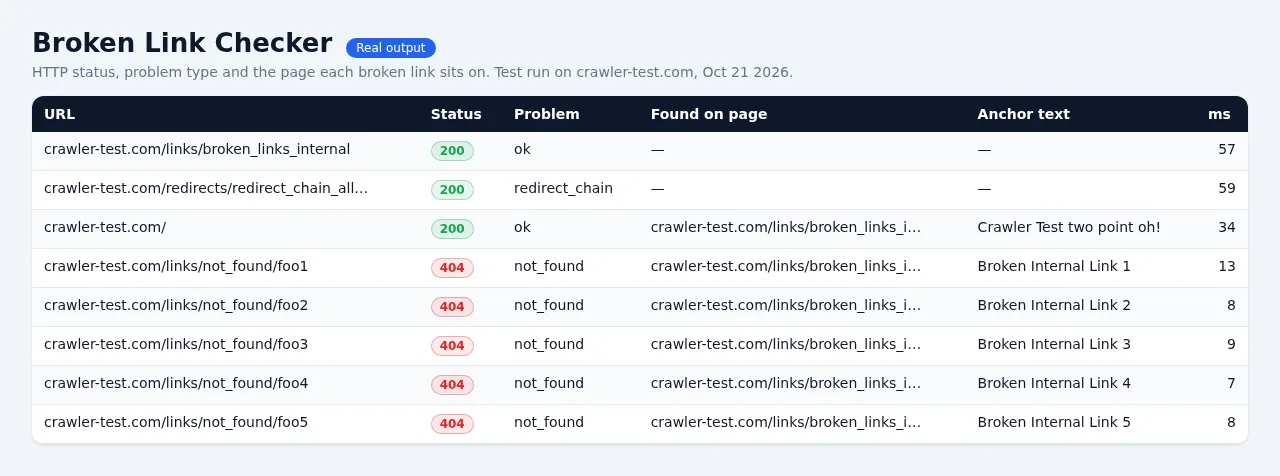
It checks every URL on your website and tells you what's broken, what redirects and what hurts your SEO. Give it page URLs, sitemaps (including sitemap index files and gzipped .xml.gz sitemaps) or just your homepage with crawling turned on, and you get one clean row per URL:
- HTTP status (200, 301, 404, 500 ...) and a plain-English
problemlabel - Full redirect chain: every hop with its status code and
Location, plus the final URL and final status - Broken links with the page they were found on, the anchor text, and how many pages link to them
- Response time in milliseconds, content type and size
- SEO flags on your pages: canonical URL and canonical mismatch,
noindex(meta robots andX-Robots-Tag), mixed content (http:// images/scripts on https pages) and soft-404 hints - Redirect loops, DNS failures, SSL certificate errors, timeouts are reported, never silently dropped
HTTP only, no browser, so it is fast and cheap: 500 URLs take about 10 seconds.
Why use it?
- Site migrations: confirm every old URL 301s to the right new page in one hop, and find chains and loops.
- SEO audits: find 404s, soft 404s,
noindexpages that are in your sitemap, and pages whose canonical points elsewhere. - Content QA: find dead outbound links in your blog and see exactly which article to fix.
- Monitoring: schedule a weekly run and get alerted when something breaks.
How much does it cost?
You pay only for URLs actually checked. No platform usage is billed to you.
| Apify plan | Price per 1,000 URLs checked |
|---|---|
| Free | $0.75 |
| Starter (Bronze) | $0.75 |
| Scale (Silver) | $0.72 |
| Business (Gold) and up | $0.70 |
Plus $0.00005 per run start. Checking 1,000 URLs costs $0.75. Checking a 10,000-URL sitemap costs $7.50.
Free, never charged: duplicate URLs, input that is not a URL, the sitemap files themselves, sitemaps that fail to load, and URLs found above your Max URLs to check limit or your run's cost cap. The cost cap is respected before checking starts, so you are never charged for more than you allowed.
How to use it
- Paste your pages into Start URLs and/or your sitemap into Sitemap URLs.
- Leave Check links on pages on to find broken links on those pages. Turn on Crawl internal links to discover more pages from your homepage.
- Set Max URLs to check (default 1,000) to control cost.
- Click Start and filter the results by
isBroken,problemorisRedirect.
Example input
Input options
| Field | What it does | Default |
|---|---|---|
startUrls | Pages to check. Links on them are checked too. URLs that look like sitemaps are read as sitemaps. | 2 demo URLs |
sitemapUrls | XML sitemaps, sitemap indexes (nested), .xml.gz, or plain-text URL lists | none |
discoverSitemaps | Read robots.txt of each start URL's site for Sitemap: lines (falls back to /sitemap.xml) | off |
maxUrls | Hard cap on URLs checked and charged | 1,000 |
checkLinks | Check every link on the start URL pages and crawled pages | on |
checkExternalLinks | Also check links to other websites | on |
crawlInternalLinks / maxCrawlDepth / maxPagesToCrawl | Discover more of your own pages by following internal links | off / 1 / 100 |
checkLinksOnSitemapPages | Also check the links on every sitemap page (multiplies URL count) | off |
maxConcurrency / maxConcurrencyPerDomain | Total parallel requests / politeness limit per host | 20 / 4 |
requestTimeoutSecs, maxRedirects, slowThresholdMs | Timeouts, redirect limit, "slow" flag threshold | 15 s, 10, 3,000 ms |
userAgent, proxyConfiguration | Custom user agent; optional Apify Proxy for sites that block datacenter IPs | honest UA, no proxy |
Output
One row per unique URL. Example (a link that redirects twice):
problem values
| Value | Meaning | isBroken |
|---|---|---|
ok | 2xx, no issues | no |
redirect / redirect_chain | 1 hop / 2+ hops before the final page | no |
not_found | 404 or 410 | yes |
client_error | other 4xx (400, 405, ...) | yes |
server_error | 5xx | yes |
blocked | 401, 403, 429 or 999: the site refused an automated request. Usually fine in a browser; try a proxy | no |
redirect_loop, too_many_redirects, bad_redirect | Redirect problems | yes |
dns_error, connection_refused, connection_error, ssl_error, timeout | No usable response | yes |
soft_404_hint | 200 but the page says "not found", or a deep URL redirects to the homepage | no (review) |
noindex, canonical_mismatch, mixed_content, slow | SEO / performance flags | no |
problems lists every flag on the row; problem is the most serious one.
Run summary (OUTPUT record)
Counts per problem, the top broken links (most-linked first, with the pages that link to them), the status of every sitemap file read, skipped input, and how many URLs were left unchecked by your limits.
How it checks
- Pages (start URLs, sitemap URLs, crawled pages) are fetched with
GETso their HTML can be analysed. - Links are checked with
HEADfirst. If the server refusesHEADor answers with an error, it retries withGET(many servers answer HEAD wrongly), so you don't get false 404s/405s. ThemethodandheadFallbackfields show what happened. - Redirects are followed manually, hop by hop, so the whole chain is recorded and loops are caught.
- Requests run in parallel, but never more than
maxConcurrencyPerDomainat once to one host. robots.txtcrawl rules are not applied to checks: this tool is meant for checking your own sites and the links on them.
Limits
- No JavaScript rendering: links added by JavaScript after page load are not seen. Most sites put their links in the HTML.
- Some big sites (news, social networks) block datacenter IPs and answer
403. Those rows are labelledblocked, not broken. Turn on the proxy option for them. - Soft-404 detection is a hint (wording in the title/heading, or a redirect to the homepage), not a verdict.
Other tools from this developer
- Website Contact Extractor: emails, phones and social links from any website.
- URL to Markdown: turn pages or a whole sitemap into clean Markdown for AI.
FAQ
Does it support sitemap index files and .xml.gz? Yes. Nested indexes are followed, gzipped sitemaps are unpacked, and plain-text URL lists work too. Each sitemap file's status is in the OUTPUT record.
Will it hammer my server? No. The default is at most 4 requests at a time per host (adjustable), with HEAD requests for links.
How do I only get the broken ones? Sort or filter the results table by isBroken or problem, or download only the rows you need in CSV/Excel/JSON. The OUTPUT record also lists the top broken links.
Can I schedule it? Yes, save the input as a task and add a schedule. Compare brokenCount in OUTPUT between runs.


