
B2B Leads Finder — Prospects by Title, Industry & Location API
Pricing
from $30.00 / 1,000 b2b lead records
B2B Leads Finder — Prospects by Title, Industry & Location API
Describe your ideal buyer by job title, industry & location and get net-new B2B leads: name, title, seniority, company, domain, LinkedIn URL, and a candidate business email with a deliverability status you can verify. Finds new contacts, not a URL scraper. Export CSV/JSON/Excel.
Pricing
from $30.00 / 1,000 b2b lead records
Rating
0.0
(0)
Developer

NexGenData
Maintained by CommunityActor stats
0
Bookmarked
182
Total users
4
Monthly active users
5 days ago
Last modified
Categories
Share
B2B Leads Finder — by Job Title, Industry & Location
Don't have a prospect list yet? Describe your ideal buyer — job title, industry, company size, and location — and get back a ready-to-export list of B2B leads with verified emails, LinkedIn URLs, phone numbers, and firmographics. Unlike a URL scraper, this discovers net-new contacts you didn't know existed; you start from a search, not from a list of domains you already have.
This is a lead-discovery tool. If you already have a list of websites or domains and just want the contact details off each one, use the Website Contact Scraper instead — this actor is for finding people from scratch by who they are and where they work.
📊 Sample Output
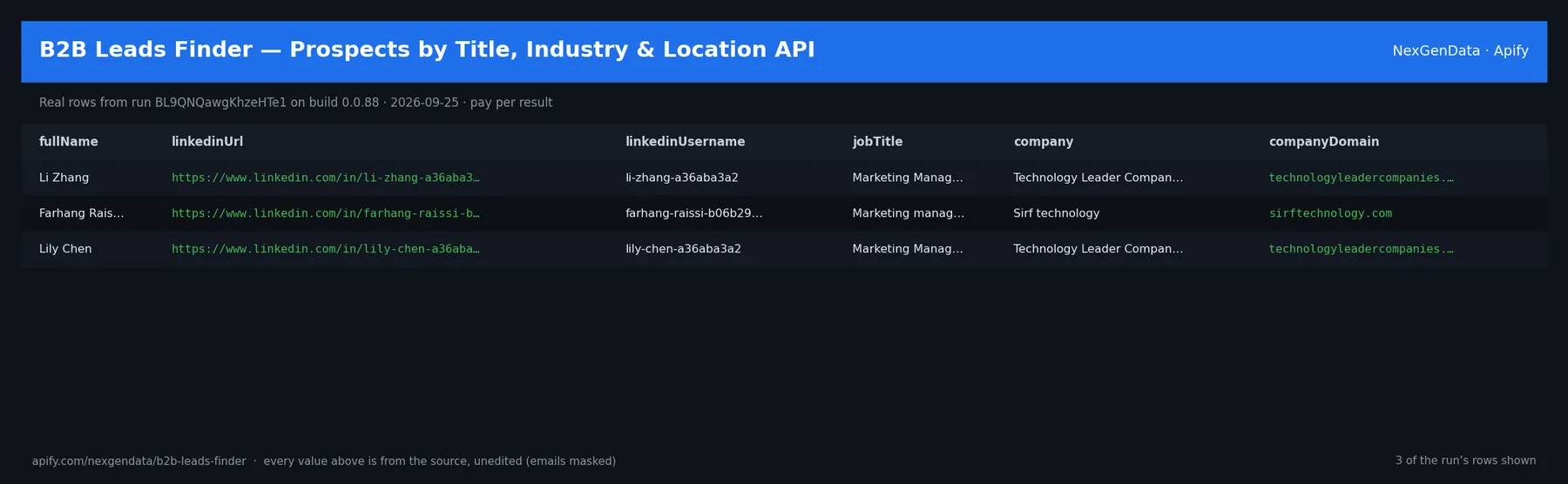
fullName | linkedinUrl | linkedinUsername | jobTitle | company | companyDomain |
|---|---|---|---|---|---|
| Li Zhang | https://www.linkedin.com/in/li-zhang-a36aba3a2 | li-zhang-a36aba3a2 | Marketing Manager | Technology Leader Companies | technologyleadercompanies.com |
| Farhang Raissi | https://www.linkedin.com/in/farhang-raissi-b06b29193 | farhang-raissi-b06b29193 | Marketing manager | Sirf technology | sirftechnology.com |
| Lily Chen | https://www.linkedin.com/in/lily-chen-a36aba3a2 | lily-chen-a36aba3a2 | Marketing Manager | Technology Leader Companies | technologyleadercompanies.com |
Real rows from run BL9QNQawgKhzeHTe1 on build 0.0.88 (2026-09-25), unedited apart from masked emails/phones and shortened long text; fields the source does not publish are empty.
🔧 Input reference
| Field | Type | Default | What it does |
|---|---|---|---|
searchQuery | string | "" | Custom search query (overrides other fields if provided). Example: 'Marketing Manager at tech companies in San Francisco' |
jobTitle | string | "Marketing Manager" | Job title to search for. Example: 'Marketing Manager', 'Sales Engineer' |
company | string | "" | Specific company to search within (leave empty to search broadly). Example: 'Acme Corp' |
industry | string | "Technology" | Industry to filter by. Example: 'Technology', 'Finance', 'Healthcare' |
location | string | "San Francisco" | Geographic location to search in. Example: 'San Francisco', 'New York', 'United States' |
maxResults | integer | 50 | Maximum number of leads to find (1-500) |
notionConnector | string | Optional. Connect your Notion workspace and the leads are also written as a Notion page in the same run — the Actor never sees your Notion credentials. Authorize a Notion MCP conn… | |
notionParentId | string | Optional. The Notion page ID to create the page under. If blank, Notion creates a private page in your workspace. | |
supabaseConnector | string | Optional. Connect your own Supabase project and the results are also inserted into a table in the same run — the Actor never sees your Supabase credentials. Authorize a write-scop… | |
supabaseTable | string | "nexgendata_leads" | Target table in the public schema (created if missing, with id, a jsonb data column, and a scraped_at timestamp). Default: nexgendata_leads. |
supabaseProjectId | string | Your Supabase project reference (e.g. abcdefghijklmnop). Required unless your connector URL is already project-scoped. Find it in your project URL: supabase.com/dashboard/project/… | |
deliveryDedup | boolean | true | When on (default), records already delivered in a previous run are not delivered again to the same destination — so scheduled runs only push new items. Turn off to deliver every r… |
addonVerifyEmail | boolean | false | MX + SMTP verify each synthesized primary email so you know if it's deliverable. Opt-in addon; charged only when a verification verdict is produced. |
🧾 JSON sample record
One real record from run BL9QNQawgKhzeHTe1 (emails/phones masked, long text shortened):
💰 Pricing
| Event | Price (USD) | When it is charged |
|---|---|---|
Actor Start (apify-actor-start) | $5e-05 | Charged when the Actor starts running. Number of events charged depends on Actor memory (one event per GB, minimum one event). |
B2B lead record (apify-default-dataset-item) | $0.03 | Single result in the default dataset. |
Add-on: LinkedIn enrichment (addon-linkedin-enrich) | $0.05 | For each lead, fetch LinkedIn profile data including title, company, tenure and education when matchable. Charge fires per lead successfull… |
Add-on: Email verification (addon-email-verify) | $0.02 | SMTP-validate each lead email and return deliverability score. Only valid (non-bounced) emails are charged. |
Pay-per-event: you pay only for what the run delivers. A run that delivers nothing bills no result events (only the actor-start event, when the actor defines one). Example: a run that delivers 100 results costs 100 × $0.03 = $3.00 plus the start fee.
🔗 Related Actors
More from the NexGenData Leads, contacts & enrichment family:
- B2B Contact Enricher — Emails, Roles & Firmographics API
- B2B Lead List Cleaner — Dedupe, Normalize & MX-Verify API
- Building Permit Leads — New Construction Project Prospects API
- Childcare License Leads — Licensed Provider Prospects API
- Company Data Aggregator — LEI, SEC Funding & Tech
31 more in this family on the NexGenData Store page.
What you get per lead
company,domain,linkedin_urlindustry,size_range,hq_city,hq_countrycontacts— array of{name, role, seniority, email, email_status, linkedin, phone}- Firmographics for ICP scoring (size, industry, location)
Use cases
- SDR / BDR teams — build a monthly ABM list by ICP filters (title + industry + size + geo).
- Agencies — run cold outreach for multiple clients without per-client seats.
- Founders — bootstrap an outbound pipeline before committing to a seat-based database.
- Recruiters / executive search — find decision-makers across a vertical.
- Investors / corp-dev — map a niche (e.g. "EU Series A fintech founders").
Sample input
Sample output
How to use
- Click Try for free to open the Actor in the Apify Console.
- Fill in Job Title, Industry, and Location (or a free-text Search Query).
- Set Maximum Results and click Start.
- Download leads as JSON, CSV, or Excel, or pull them via the REST API.
FAQ
Do I need an existing list of companies? No — this discovers leads from your filters. Give it a job title, industry, and location and it finds matching people and companies for you.
How is this different from a website contact scraper? A contact scraper extracts emails and phones from URLs you supply. This finds people you don't yet know about, by their job title, industry, and location.
Can I export to CSV or Google Sheets? Yes — results download as JSON, CSV, or Excel, and route through the built-in Apify Sheets, Zapier, Make, and n8n integrations.
Are the emails verified?
Each contact carries an email_status field (for example verified / risky / unknown) so you can filter before outreach.
Can I search within a specific company? Yes — set the Company field to scope the search to one organization, or leave it blank to search broadly.
Is the output compliant to use? The output is B2B contact data; you are the data controller for downstream outreach — follow your jurisdiction's prospecting and opt-out rules.
Related NexGenData actors
- Website Contact Scraper — Emails & Phones from a URL List — already have the domains? Extract contacts off each site.
- Company Enrichment — Bulk Domain to Firmographics & Tech Stack — enrich the companies you just discovered.
- Company Email Finder — B2B Contact Scraper — find decision-maker emails on a known domain.
- Lead List Enricher — Emails, Phones & Social from Any Domain — turn a CSV of leads into an enriched CSV.
- Sales Intelligence MCP — Lead-Gen Tools for AI Agents — all of these tools behind one MCP endpoint for AI agents.


![B2B 🟢 Leads Finder [NO COOKIES] - like apollo, linkedIn avatar](https://images.apifyusercontent.com/pmNk2HVEQxnz9G6TI30r99fkbrtzL1pwMtXpGuv-Kjw/rs:fill:76:76/cb:1/aHR0cHM6Ly9hcGlmeS1pbWFnZS11cGxvYWRzLXByb2QuczMudXMtZWFzdC0xLmFtYXpvbmF3cy5jb20va2FzMWhZNXVSNFlvaUpRaXUtYWN0b3ItSkExZTVCWGIxNzR3S0NpcWotUWpza0JIb2Ziby1TY3JlZW5fU2hvdF8yMDI1LTA4LTE0X2F0XzIuMDAuNTRfUE0ucG5n.webp)


