🔒 SSL Certificate Checker — Bulk Expiry Monitor avatar

🔒 SSL Certificate Checker — Bulk Expiry Monitor

Pricing

from $2.00 / 1,000 results

Go to Apify Store
🔒 SSL Certificate Checker — Bulk Expiry Monitor

🔒 SSL Certificate Checker — Bulk Expiry Monitor

Monitor SSL certificate expiry dates, issuers & security configs across all your domains. Get alerts before certs expire. Bulk scanning for agencies & enterprises. Pay per check.

Pricing

from $2.00 / 1,000 results

Rating

0.0

(0)

Developer

Stephan Corbeil

Stephan Corbeil

Maintained by Community

Actor stats

0

Bookmarked

2

Total users

1

Monthly active users

19 hours ago

Last modified

Share

SSL Certificate Checker

Secure website communication depends entirely on valid SSL certificates, yet expired or misconfigured certificates cause website outages and security warnings. SSL Certificate Checker automatically validates the SSL certificate configuration on any domain, checking certificate validity, expiration dates, certificate chain integrity, and issuer details. Security teams, hosting providers, and compliance auditors rely on this actor to continuously monitor certificate status, identify upcoming expirations before they cause problems, and verify that certificate chains are properly configured. The actor provides detailed reports that enable proactive certificate management and help organizations maintain continuous compliance with security standards.

What It Does

SSL Certificate Checker connects to any domain and retrieves the complete SSL certificate information, performing validation checks against industry standards. The actor extracts the certificate's subject name, issuer details, and validity dates, comparing the current date against the certificate expiration to identify expired or soon-to-expire certificates. It validates the entire certificate chain, ensuring that each certificate in the chain is properly signed and traces back to a trusted root certificate authority. The actor checks certificate key usage attributes, extended key usage extensions, and alternative names to ensure the certificate is properly configured for the domain. Results include detailed information about the certificate's cryptographic properties, signature algorithm, and key strength. The actor returns structured data identifying any certificate issues or warnings that require attention.

Who Uses This

Information security teams use SSL Certificate Checker to monitor critical domain certificates across their entire infrastructure, setting up alerts for certificates expiring within thirty days. Hosting providers and managed service providers monitor customer domains at scale, proactively notifying customers of upcoming expirations before certificates fail. Compliance auditors verify that certificate configurations meet industry requirements, documenting proper certificate chains and valid issuers for audit trails. Website owners and DevOps teams integrate the actor into monitoring dashboards, automatically checking certificate status on a daily or weekly schedule. System administrators managing multiple domains use batch checking to audit certificate inventory and identify gaps in their certificate management process. Security consultants use the actor during penetration testing and security assessments to evaluate certificate configuration quality.

What You Get Back

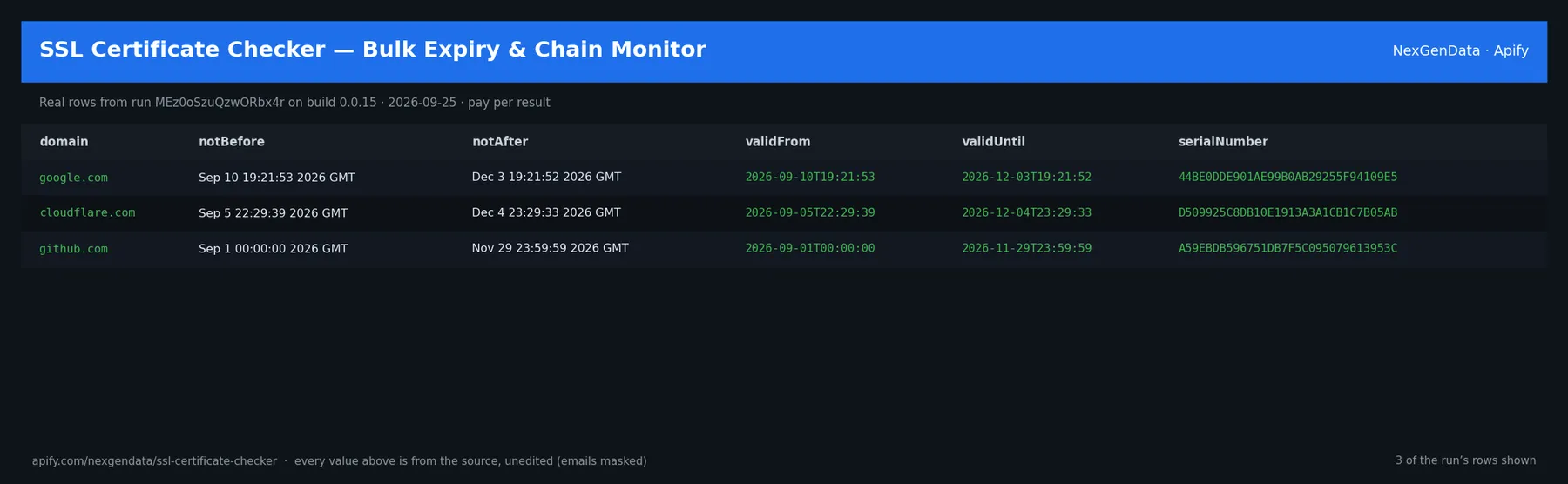
SSL Certificate Checker returns comprehensive certificate details in structured JSON format. The response includes the certificate subject, issuer name, and issuer organization, along with validity start and end dates. The actor calculates days remaining until expiration, highlighting certificates that expire within thirty, seven, or one day. The response includes the complete certificate chain with all intermediate certificates and root certificate information. Technical details encompass the signature algorithm, key size in bits, cryptographic curve for elliptic curve certificates, and version information. Alternative Subject Names (SANs) list all additional domains covered by the certificate. The actor flags any validation issues, such as chain problems, invalid signatures, or mismatched domains. Configuration warnings highlight suboptimal certificate setups that don't cause immediate failures but indicate maintenance issues.

Comparison to Alternatives

SSL Labs provides excellent online tools for single certificate testing, but requires manual checking for each domain and doesn't support batch operations or scheduled monitoring. Built-in browser certificate viewers show basic information but lack automation and structured output. OpenSSL commands require system administration knowledge and manual interpretation of results. Commercial SSL monitoring tools often cost thousands monthly and include unnecessary features for small deployments. SSL Certificate Checker offers the flexibility of single-domain checks or large-scale batch monitoring, returns structured JSON data ready for integration with existing systems, and supports programmatic scheduling without requiring system administration knowledge. The actor integrates seamlessly with monitoring platforms and alerting systems, enabling automated certificate lifecycle management.

Sample JSON Output

{
"domain": "example.com",
"checkedAt": "2026-03-28T14:22:15Z",
"certificate": {
"subject": "CN=example.com,O=Example Inc,C=US",
"issuer": "CN=Let's Encrypt Authority X3,O=Let's Encrypt,C=US",
"validFrom": "2025-10-15T12:00:00Z",
"validUntil": "2026-01-13T12:00:00Z",
"daysUntilExpiry": 260,
"signatureAlgorithm": "sha256WithRSAEncryption",
"keySize": 2048,
"version": 3,
"serialNumber": "04e1b73e45d3c8e2f3a9c7b6d8e2f4a5",
"subjectAltNames": ["example.com", "www.example.com"],
"status": "valid"
},
"chain": [
{
"subject": "CN=example.com",
"issuer": "CN=Let's Encrypt Authority X3",
"valid": true
},
{
"subject": "CN=Let's Encrypt Authority X3",
"issuer": "CN=ISRG Root X1",
"valid": true
}
],
"warnings": [],
"issues": []
}

Use Cases

E-commerce companies with multiple domains and subdomains monitor certificate status across their entire web presence, preventing outages from expired certificates that would block customer transactions. SaaS platforms serving thousands of customers integrate certificate checking into their monitoring stack, receiving alerts when certificates approach expiration. Organizations managing compliance with PCI DSS or SOC 2 requirements use the actor to document certificate validity for audit purposes, generating reports that prove proper certificate management. Development teams set up daily certificate checks as part of their CI/CD pipeline, failing deployments if certificate issues are detected. Multi-tenant hosting platforms monitor customer domains automatically, proactively reaching out to customers whose certificates will expire soon. Cybersecurity firms use the actor during security assessments to evaluate certificate configuration quality and identify organizational risks.

Pricing

SSL Certificate Checker costs two dollars per one thousand certificate checks, with a minimum charge of one dollar per actor run. Checking a single domain costs approximately one dollar. Checking one hundred domains costs approximately twenty cents. Checking five hundred domains costs approximately one dollar. Most organizations check between fifty and five hundred domains per run, with average costs between ten and fifty cents. Enterprise customers with thousands of domains often negotiate volume discounts or set up dedicated runs. Daily monitoring of one hundred domains costs approximately six dollars monthly. The pricing structure supports both single checks and large-scale batch operations, scaling efficiently as monitoring needs grow.

FAQ

What happens when a certificate is expired? The actor detects expired certificates and returns a status indicating expiration with details about how long ago the certificate expired. Does the actor warn about certificates expiring soon? Yes, the actor returns the number of days remaining until expiration and flags certificates expiring within thirty days. Can you check certificates on non-standard ports? The default HTTPS check uses port 443, and non-standard ports are not currently supported. Does the actor validate domain ownership? The actor only validates that the certificate is properly signed and valid for the domain name. Does the actor access certificate transparency logs? No, the actor only retrieves information from the actual certificate presented by the domain. Are results cached? Each check retrieves fresh certificate data from the domain, ensuring current accuracy. Can the actor detect self-signed certificates? Yes, self-signed certificates are detected and marked with appropriate warnings. What certificate authorities are trusted? The actor uses the system's standard certificate authority store, trusting all major commercial and non-profit CAs.