

Code Runner Sandbox — Run Python & JavaScript Code in the Cloud
Pricing
from $33.50 / 1,000 code runs
Code Runner Sandbox — Run Python & JavaScript Code in the Cloud
Run Python or Node.js code in an isolated cloud container from an API call, a schedule or an AI agent: pip/npm packages, data on stdin, one run per list item, parsed JSON, stdout/stderr, exit code, time limits and saved files. Part of NexGen Signal — data tools and official-source data products
Pricing
from $33.50 / 1,000 code runs
Rating
0.0
(0)
Developer
NexGen Signal
Maintained by CommunityActor stats
0
Bookmarked
4
Total users
3
Monthly active users
3 days ago
Last modified
Categories
Share
🧪 Code Runner Sandbox — Run Python & JavaScript Code in the Cloud
Run Python 3.12 or Node.js 22 code in an isolated cloud container from an API call, a schedule, a webhook or an AI agent, and get back standard output, standard error, the exit code, the run time and your output parsed as JSON — one row per run.
Install pip or npm packages for the run, pass data on standard input, run the same code once per item of a list (up to 10,000 items, one row each), set environment variables, a time limit per run (1 second to an hour) and an output cap, and save files your code writes (CSV, images, reports) with download links.
Your code runs in its own folder, the process and anything it starts are stopped at the time limit, and the Apify token and other platform secrets are removed from the environment your code sees. The unit is one completed code run (a run that errors or times out is still a completed run).
Who buys this and for what job
- AI agents that need to execute code they wrote and read the result.
- No-code automations (Make, Zapier, n8n) that need a step of real Python or JavaScript.
- Data teams running a transform over many inputs in parallel with your own logic.
- Developers testing snippets with packages without setting up a machine.
Buyers usually search for this as "code runner", "run Python in the cloud" or "code sandbox API".
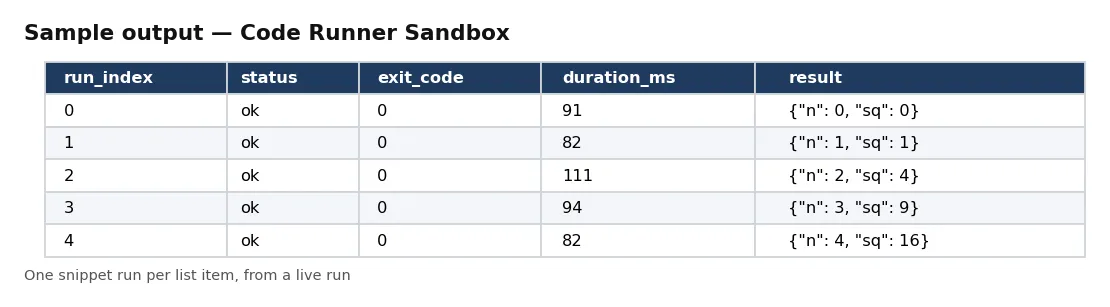
📊 Sample Output
| run_index | status | exit_code | duration_ms | result |
|---|---|---|---|---|
| 0 | ok | 0 | 91 | {"n": 0, "sq": 0} |
| 1 | ok | 0 | 82 | {"n": 1, "sq": 1} |
| 2 | ok | 0 | 111 | {"n": 2, "sq": 4} |
| 3 | ok | 0 | 94 | {"n": 3, "sq": 9} |
| 4 | ok | 0 | 82 | {"n": 4, "sq": 16} |
| 5 | ok | 0 | 147 | {"n": 5, "sq": 25} |
Rows from live run GQ4RfMKTle5Xld6ZG on Apify (one Python snippet run once per item of a 40-item list). Notice each run gets its own row with its own parsed result, so a list job maps straight to a table.
✅ What you get
Every field of each record:
record_id,run_index,language— the run and its position in your list.status,exit_code,timed_out,duration_ms— ok / error / timeout, exit code, run time.result,result_parse_error— stdout parsed as JSON (whole output or last line).stdout,stderr,stdout_truncated,stderr_truncated— the raw output, capped at maxOutputKb.input— the list item this run received.files— saved files: path, bytes, download URL.packages,runtime_version,started_at,finished_at— what ran, and when.
⚙️ Sample inputs
Sum a list in Python (the Store example)
Returns sum, count and mean in result.
JavaScript with npm packages and a saved file
Run once per item
Five rows, five billed runs.
pandas with a 5-minute limit
Input fields:
| Field | Meaning |
|---|---|
language, code | python or javascript; your program (up to 500 KB). |
stdin, inputs | data for one run, or a list to run once per item (each item as JSON on stdin and in $INPUT_FILE). |
packages | pip or npm packages (up to 30), installed once per actor run. |
env | environment variables for your code. |
timeoutSecs, maxOutputKb | limit per run (default 60 s) and output cap (default 1 MB). |
parseJsonOutput | parse stdout as JSON into result (default on). |
saveFiles | relative paths or patterns of files to keep, with download links. |
maxRuns | stop after this many runs (default 1,000). Each completed run is billed. |
🧾 JSON sample record
🔧 How it works
Packages are installed once at the start (pip into a private folder, npm into the run's folder); a package that cannot be installed stops the run with the installer's message and nothing charged. Each run then starts a fresh process in its own folder, writes your input to stdin and $INPUT_FILE, and collects output up to the cap. At the time limit the whole process group is killed. JavaScript that uses import/export or top-level await runs as an ES module; otherwise as CommonJS.
Your code can reach the internet (it is your run). The environment it sees has Apify's tokens and anything named like a token, secret, password or key removed, except variables you pass in env.
Each run's row is pushed and then charged. The run receipt (RUN_RECEIPT) has the install log, every run's status and time, files stored, and the delivered and charged counts (your code itself is not copied into the receipt).
💰 Pricing example
Per code run delivered, no start fee, no monthly charge:
| Apify plan | Price per code run |
|---|---|
| Free | $0.05 |
| Bronze | $0.045 |
| Silver | $0.04 |
| Gold, Platinum, Diamond | $0.0335 |
- 10 code runs: $0.50 on the Free plan, $0.34 on Gold.
- 1,000 code runs: $50.00 on the Free plan, $33.50 on Gold.
- 10,000 code runs: $500.00 on the Free plan, $335.00 on Gold.
Coverage and size. Proof runs on 18 Oct 2026: 40 list items through one Python snippet in 10 seconds; Node.js 22 with lodash and date-fns plus a saved CSV in 5 seconds (the Apify token was not visible to the code); a sleep past a 3-second limit was stopped at 3.0 seconds and reported as timeout; a package that does not exist stopped the run with pip's message and nothing charged. Default memory is 1 GB; give the run more memory for heavier code.
⚖️ Legal & ToS
You are responsible for the code you run and what it does. Do not use it to attack, scrape against a site's rules, or process data you have no right to.
The actor does not keep your code after the run; it is not copied into the dataset or the receipt.
❓ FAQ
Which versions? Python 3.12 and Node.js 22.
Is a failing run billed? Yes, a run that exits with an error or times out is a completed run (its stderr tells you why). A run stopped before it starts (bad package, invalid input) is not billed.
Can my code use the network? Yes.
How do I return data?
Print JSON to stdout; it comes back parsed in result. Or write files and list them in saveFiles.
🆘 Troubleshooting
- result is empty but stdout has text — stdout was not JSON; see result_parse_error, or turn parseJsonOutput off.
- status timeout — Raise timeoutSecs (up to 3,600).
- Invalid input: the packages could not be installed — Check the package names and versions.
🔗 Related Actors
- CMS & Hosting Detector — what a website is built with
- Website Performance Audit API — Lighthouse scores and web vitals
- Bulk Email Extractor from Domain List — contact details from website lists
🏢 About NexGen Signal — data tools and official-source data products. Browse the catalog: apify.com/nexgensignal
⭐ Found this useful?
If this actor saved you time, a rating on its Apify Store page helps other buyers find it.
Part of NexGen Signal — data tools and official-source data products.


![Google News Scraper [only $0.7/1K] avatar](https://images.apifyusercontent.com/Twu1TG04ITI_hwjby-GKjS3ch9YgJ3AaSAGKR67WRFo/rs:fill:76:76/cb:1/aHR0cHM6Ly9hcGlmeS1pbWFnZS11cGxvYWRzLXByb2QuczMudXMtZWFzdC0xLmFtYXpvbmF3cy5jb20vUmVkNnNHSEFOa0x6b3NzdkUtYWN0b3ItemVOd3Z2dk5VNnpWMWFra1MtMTBnTFVnUzdoSS1nb29nbGVfbmV3c19zY3JhcGVyX2Zhc3QucG5n.webp)


