
Media Converter — Convert, Compress & Trim Video and Audio
Pricing
from $33.50 / 1,000 media minutes
Media Converter — Convert, Compress & Trim Video and Audio
Convert video and audio files by link with FFmpeg: MP4, WebM, MKV, MOV, GIF, MP3, M4A, WAV, OGG, FLAC. Compress to a target size, trim, resize, watermark, extract or remove audio. Saved with download links. Billed per minute. Part of NexGen Signal — data tools and official-source data products
Pricing
from $33.50 / 1,000 media minutes
Rating
0.0
(0)
Developer
NexGen Signal
Maintained by CommunityActor stats
0
Bookmarked
3
Total users
2
Monthly active users
3 days ago
Last modified
Categories
Share
🎬 Media Converter — Convert, Compress & Trim Video and Audio
Give direct links to audio or video files and get each one converted with FFmpeg and saved with a download link: MP4, WebM, MKV, MOV, animated GIF, MP3, M4A, WAV, OGG or FLAC.
In the same step you can compress (three quality levels, or a target file size in MB hit with two-pass encoding), trim to a start and end time, resize to a maximum width or height, change the frame rate, add a text or image watermark, extract the sound from a video (choose an audio format), or remove it. Each row gives the new file's size, length, picture size and codecs next to the original's, and how much smaller it got.
The unit of billing is one started minute of output: a 20-second GIF is 1 minute, a 40-minute podcast is 40. Files that cannot be converted are not billed.
Who buys this and for what job
- Marketers and creators compressing videos and making GIFs for the web.
- Podcasters turning recordings into MP3 or M4A at the right bitrate.
- AI and data teams pulling audio out of video before transcription.
- Developers adding a conversion step to an Apify workflow without running FFmpeg themselves.
Buyers usually search for this as "video converter", "compress video", "video to mp3" or "ffmpeg online".
📊 Sample Output
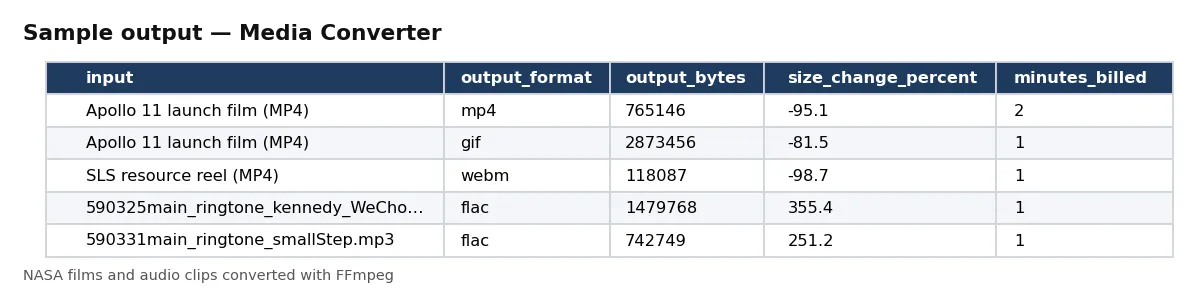
| input | output_format | output_duration_seconds | output_bytes | size_change_percent | minutes_billed |
|---|---|---|---|---|---|
| Apollo 11 launch film (MP4) | mp4 | 84.2 | 765146 | -95.1 | 2 |
| Apollo 11 launch film (MP4) | gif | 6 | 2873456 | -81.5 | 1 |
| SLS resource reel (MP4) | webm | 30 | 118087 | -98.7 | 1 |
| 590325main_ringtone_kennedy_WeChoose.mp3 | flac | 20.088 | 1479768 | 355.4 | 1 |
| 590331main_ringtone_smallStep.mp3 | flac | 12.983 | 742749 | 251.2 | 1 |
| NATIONALAERONAUTICSANDSPACEADMINISTRATIO | m4a | 2400 | 29484275 | -83 | 40 |
Rows from live run kRgjI9drZGTPoFb8P on Apify (five proof runs on NASA films, clips and a podcast episode). Notice the 40-minute M4A: it is cut from a 72-minute episode with endSeconds, and only the 40 minutes kept are billed.
✅ What you get
Every field of each record:
record_id,input_url,output_format— the file and what it became.file_key,file_url— the converted file in the run's key-value store.output_bytes,input_bytes,size_change_percent— sizes before and after.output_duration_seconds,minutes_billed— length of the result and the started minutes billed.output_width,output_height,output_video_codec,output_audio_codec— the result's picture size and codecs.input_duration_seconds,input_format,input_width,input_height,input_video_codec,input_audio_codec— the original.trim_start_seconds,trim_end_seconds— the cut.target_size_mb,video_kbps,watermark— the size target and the bitrate used for it; which watermark was applied.processing_seconds,converted_at— FFmpeg's time, and when (UTC).
⚙️ Sample inputs
Compress a video (the Store example)
84 seconds of film: 15.5 MB down to 0.77 MB, 2 minutes billed.
A GIF from six seconds of video
320 px wide, 10 frames per second.
Extract the audio as MP3
Audio formats keep only the sound.
Under 25 MB with a watermark
Two-pass encode to the size, text drawn in the corner.
Input fields:
| Field | Meaning |
|---|---|
mediaUrls | direct audio or video file links (up to 500). Not YouTube or social media pages. |
outputFormat | mp4, webm, mkv, mov, gif, mp3, m4a, wav, ogg, flac. |
videoQuality | high, balanced or small (H.264 CRF 20/24/30; VP9 CRF 31/36/42). |
targetSizeMb | video formats: two-pass encode to land at or under this size (0 = use videoQuality). |
watermarkText, watermarkImageUrl, watermarkPosition, watermarkOpacity | a text and/or image (PNG keeps transparency, scaled to a fifth of the width) watermark in a corner or the centre; with both, the image takes the position and the text the opposite side. |
startSeconds, endSeconds | trim. |
maxWidth, maxHeight, fps | resize and frame rate (GIF defaults to 480 px and 10 fps). |
audioBitrateKbps, removeAudio | sound bitrate (default 128) or no sound. |
maxInputMb, maxMinutesPerFile | skip files over these limits (defaults 1,000 MB, 60 minutes). |
maxFiles | stop after this many files (default 100). Billing is per started minute of output. |
🧾 JSON sample record
🔧 How it works
Each file is downloaded, read with FFprobe, and converted with FFmpeg: H.264 (veryfast preset) with AAC sound for MP4, MKV and MOV, VP9 with Opus for WebM, a two-pass palette for GIF, and LAME, AAC, Vorbis, FLAC or PCM for audio. With targetSizeMb the video bitrate is worked out from the length (less the audio) and the file is encoded in two passes, which lands at or a little under the target; text watermarks use the DejaVu Sans Bold font at about 1/22 of the frame height. MP4 and MOV are written with the index at the front so they start playing before they finish downloading. Metadata is not copied to the result.
Before a file is converted, its minutes are checked against your maximum charge: a file that would go over is skipped (not cut short) and smaller files can still follow.
Every run reads each host's robots.txt first: a path it disallows is skipped, listed in the run receipt and never charged. Only public internet addresses are fetched (no private, loopback or cloud-metadata addresses, checked again on every redirect). No logins, no CAPTCHA solving, no proxies.
Saved files go to the run's own key-value store. If your Apify account keeps storages private, add your API token to the link (?token=…) or open the store from the run in Apify Console.
The minutes for each file are charged when its row is delivered. The run receipt (RUN_RECEIPT) lists every link with its outcome and minutes, and the minutes billed and charged.
💰 Pricing example
Per minute delivered, no start fee, no monthly charge:
| Apify plan | Price per minute |
|---|---|
| Free | $0.05 |
| Bronze | $0.045 |
| Silver | $0.04 |
| Gold, Platinum, Diamond | $0.0335 |
- The Store example, an 84-second video: 2 minutes = $0.10 on the Free plan, $0.067 on Gold.
- A 40-minute podcast to M4A: $2.00 on Free, $1.34 on Gold.
- 10 hours of video: $30.00 on Free, $20.10 on Gold.
Coverage and size. Proof runs on 17 Oct 2026: the first 40 minutes of a 173 MB NASA podcast MP3 converted to M4A in about 2.5 minutes (83% smaller); an 84-second video compressed to MP4 in about 5 seconds (95% smaller); 30 seconds of a reel to a 1 MB target with text and image watermarks in two passes (0.67 MB); 30 seconds of a reel to silent WebM, a 6-second GIF and two clips to FLAC in seconds each. Runs use 4 GB of memory (one CPU core) by default; more memory gives more cores and faster video conversion.
⚖️ Legal & ToS
Files belong to their owners. You choose the links. Make sure you have the right to download and use the content you point it at; the actor fetches only what you give it (and, where you turn it on, what those pages link to).
Every run reads each host's robots.txt first: a path it disallows is skipped, listed in the run receipt and never charged. Only public internet addresses are fetched (no private, loopback or cloud-metadata addresses, checked again on every redirect). No logins, no CAPTCHA solving, no proxies.
❓ FAQ
Can I give a YouTube link? No. Give a direct link to the media file.
How is a minute counted? Started minutes of the result: 61 seconds is 2 minutes. Trimming lowers the bill.
Is my file sent to another service? No. FFmpeg runs inside the actor.
🆘 Troubleshooting
- no video stream (audio only) — Choose an audio format such as mp3 for audio files.
- not converted: your maximum charge does not cover its N minute(s) — Raise your maximum charge or trim the file.
- SOURCE UNAVAILABLE — None of your links could be reached after retries. Nothing was charged.
🔗 Related Actors
- Bilibili Video Scraper — video data by keyword or creator
- PR Newswire Scraper — press releases by company or topic
- Website Tech Stack Detector — what a site is built with
🏢 About NexGen Signal — data tools and official-source data products. Browse the catalog: apify.com/nexgensignal
⭐ Found this useful?
If this actor saved you time, a rating on its Apify Store page helps other buyers find it.
Part of NexGen Signal — data tools and official-source data products.


