

📺 Bilibili Trends Watch — Trending & Ranking Deltas
Pricing
from $20.10 / 1,000 trend deltas
📺 Bilibili Trends Watch — Trending & Ranking Deltas
Bilibili public trending/popular/ranking watch — new and changed entries with deltas; original Chinese retained alongside translation.
Pricing
from $20.10 / 1,000 trend deltas
Rating
0.0
(0)
Developer
NexGen Watch
Maintained by CommunityActor stats
0
Bookmarked
1
Total users
0
Monthly active users
2 days ago
Last modified
Categories
Share
📣 📺 Bilibili Trends Watch — Trending & Ranking Deltas
Watch public Bilibili Popular, rankings, and selected searches for confirmed entry, exit, rank, and engagement changes.
Output is one trend_record row per result; billing is pay-per-event, the value event being one trend delta (a $0.02 start fee per run, then $0.03 per trend delta plus one $0.10 source check per run that reads the source). Source: api.bilibili.com, search.bilibili.com, www.bilibili.com.
7. Use with
China media teams monitoring high-heat videos; agencies watching category movement; brands tracking public topic/search visibility; researchers building time-stamped chart histories.
📊 Sample Output
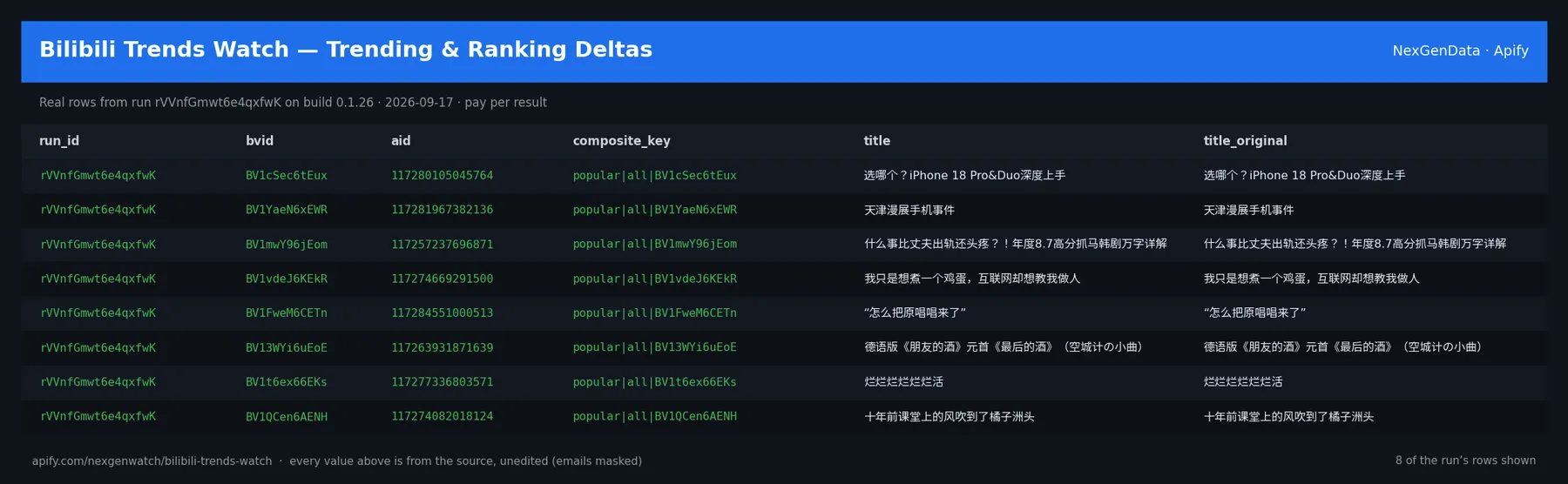
Real rows from run rVVnfGmwt6e4qxfwK on build 0.1.26 (2026-09-17), the same input as the Quick start below — every value is as the source published it (emails masked, long text shortened):
| run_id | bvid | aid | composite_key | title | title_original |
|---|---|---|---|---|---|
| rVVnfGmwt6e4qxfwK | BV1cSec6tEux | 117280105045764 | popular|all|BV1cSec6tEux | 选哪个?iPhone 18 Pro&Duo深度上手 | 选哪个?iPhone 18 Pro&Duo深度上手 |
| rVVnfGmwt6e4qxfwK | BV1YaeN6xEWR | 117281967382136 | popular|all|BV1YaeN6xEWR | 天津漫展手机事件 | 天津漫展手机事件 |
| rVVnfGmwt6e4qxfwK | BV1mwY96jEom | 117257237696871 | popular|all|BV1mwY96jEom | 什么事比丈夫出轨还头疼?!年度8.7高分抓马韩剧万字详解 | 什么事比丈夫出轨还头疼?!年度8.7高分抓马韩剧万字详解 |
| rVVnfGmwt6e4qxfwK | BV1vdeJ6KEkR | 117274669291500 | popular|all|BV1vdeJ6KEkR | 我只是想煮一个鸡蛋,互联网却想教我做人❤️ | 我只是想煮一个鸡蛋,互联网却想教我做人❤️ |
| rVVnfGmwt6e4qxfwK | BV1FweM6CETn | 117284551000513 | popular|all|BV1FweM6CETn | “怎么把原唱唱来了” | “怎么把原唱唱来了” |
| rVVnfGmwt6e4qxfwK | BV13WYi6uEoE | 117263931871639 | popular|all|BV13WYi6uEoE | 德语版《朋友的酒》元首《最后的酒》(空城计の小曲) | 德语版《朋友的酒》元首《最后的酒》(空城计の小曲) |
| rVVnfGmwt6e4qxfwK | BV1t6ex66EKs | 117277336803571 | popular|all|BV1t6ex66EKs | 烂烂烂烂烂烂活 | 烂烂烂烂烂烂活 |
| rVVnfGmwt6e4qxfwK | BV1QCen6AENH | 117274082018124 | popular|all|BV1QCen6AENH | 十年前课堂上的风吹到了橘子洲头 | 十年前课堂上的风吹到了橘子洲头 |
The run finished with the status message: NORMAL: records=100; surfaces_complete=1/1
✅ What you get
One of three record types, discriminated by record_type: trend_record, trend_delta, or source_receipt.
Each row is flat JSON with these fields (from the dataset schema and the sample run; a field the source does not publish for a given row is null):
record_type(string) — Discriminator.run_id(string) — Apify run id that produced this item.surface(string/null) — popular | ranking | search.query(string/null) — Search keyword for the search surface; null otherwise.category_id(integer/null) — Ranking rid for the ranking surface; null otherwise.rank(integer/null) — 1-based rank within the surface/query (non-null on trend_record).bvid(string/null) — Bilibili source-native video id.aid(integer/null) — Bilibili numeric av id.composite_key(string/null) — surface|normalized-query-or-category|bvid.title(string/null) — Original-script (Chinese) title (non-null on trend_record).title_original(string/null) — Original Chinese-script title, retained verbatim.title_translated(string/null) — Published translation only; null when none is published. Never machine-translated.translation_status(string/null) — source_provided | none_published.video_url(string/null) — Public video URL.author_name(string/null) — Uploader display name.author_mid(string/null) — Uploader member id.published_at(string/null) — Video publish time (RFC3339 UTC) when available.duration_seconds(integer/null) — Video duration in seconds when available.description(string/null) — Public summary when includeDescriptions is set.description_truncated— e.g.Falsemetrics(object/null) — views, danmaku, replies, favorites, coins, shares, likes (nullable non-negative integers).metric_basis(array/null) — Metric keys actually present for this row.source_url(string) — Exact public request URL supporting this item.observed_at(string) — RFC3339 UTC time after shape validation.content_hash(string/null) — SHA-256 over canonical buyer-visible mutable fields.delta_type(string/null) — trend_delta only.previous_rank(integer/null) — Rank at the prior observation (trend_delta).current_rank(integer/null) — Rank at this observation (trend_delta).rank_change(integer/null) — current_rank - previous_rank.metric_changes(object/null) — Per-metric before/after/absolute/percent on an engagement delta.changed_fields(array/null) — Sorted changed field names on a change delta.absence_confirmations(integer/null) — Consecutive eligible absences recorded (trend_delta).baseline_id(string/null) — Watch baseline id (trend_delta).terminal(string/null) — source_receipt only.reason_code(string/null) — Stable terminal reason code.canary_passed(boolean/null) — Whether the source-shape canary passed for this surface.
3. Output
Three record types: trend_record (normalized ranked video with bilingual titles, metrics, and content_hash), trend_delta (entered / rank_changed / engagement_changed / exited / reentered with rank_change, metric_changes, changed_fields), and source_receipt (per surface/query terminal: NORMAL / GENUINE_EMPTY / PARTIAL / BLOCKED). Every item carries record_type, schema_version, run_id, exact source_url, and observed_at.
Every run also writes a RUN_RECEIPT record to its key-value store with the source checks it made and the counts it charged — diagnostics never land in the paid dataset.
⚙️ Sample inputs
1. Quick start — the Store example (this is what the sample above came from)
The sample run charged exactly: 1 × $0.02 actor-start + 100 × $0.02 trend-record + 0 × $0.03 trend-delta + 0 × $0.10 source-check = $2.02 on the Free tier — snapshot preview rows are delivered unbilled; only the source check and the start fee were charged.
2. A smaller, narrowed run
Caps the run at 5 rows; same billing shape as the sample run above.
3. Watch mode on a schedule
The first run seeds a private baseline and emits zero deltas; every later run emits one row per change, billed at $0.03 each plus the $0.10 source check.
🧾 JSON sample record
One real record from run rVVnfGmwt6e4qxfwK, exactly as it lands in the dataset (emails masked, long text shortened):
🔧 How it works
Source. The actor reads api.bilibili.com, search.bilibili.com, www.bilibili.com — endpoints: https://api.bilibili.com/x/web-interface/popular, https://api.bilibili.com/x/web-interface/ranking/v2, https://api.bilibili.com/x/web-interface/search/type, https://search.bilibili.com/all. Public pages and feeds only; nothing behind a login.
Transport. Plain HTTPS from the Apify platform, no proxy.
Watch semantics. Snapshot mode (watch_mode: false) returns a preview. Watch mode keys every record on a source-native id, stores a private baseline in a named key-value store, and on each later run emits one delta row per change (new / changed / removed). A blocked fetch is never diffed, so a source outage cannot show up as a mass removal.
Terminal states. A run ends NORMAL, CAPPED (your cap was reached), PARTIAL (something was withheld and the message says what), GENUINE_EMPTY (the source was read and truly had nothing in scope) or BLOCKED (the source refused or changed shape — the run FAILS loud and bills nothing). A zero-row run is never reported as a silent success.
Charging. Each trend delta is charged at the moment it is pushed (trend-delta); a row that fails to charge is not delivered, so the dataset count always equals the charged count. One source-check is charged per run that actually read the source.
1. What it does
The actor records logged-out Bilibili public trend surfaces, establishes a zero-alert first-run baseline, and emits only qualified changes afterward. It is built for media monitoring, market research, agencies, and APAC brand teams needing record-backed recurring collection rather than dashboard screenshots. Snapshot mode returns current records; watch mode seeds a private baseline and returns confirmed later deltas. Receipts separate complete, empty, partial, and blocked checks.
Original Chinese-script titles are always retained (title_original). A title_translated field carries a published translation only and is null otherwise — the actor never machine-translates silently.
5. Watch mode
Named key-value store bilibili-trends-v1-{baselineId} holds the baseline. The first complete run seeds and emits zero deltas. Later scheduled runs emit at most one confirmed delta per video, combining rank and engagement changes. A video is exited only after it is absent from the complete topN for exitConfirmations consecutive eligible runs; partial or blocked surfaces never increment absence. Same video = exact composite key surface|normalized-query-or-category|bvid.
8. Honest limits
Bilibili's web data endpoints are undocumented and volatile; search results may vary; no historical backfill, comments, account-only data, login, CAPTCHA solving, or risk-control bypass. exited means absent from the configured complete topN, not deleted from Bilibili. The actor stops loudly (BLOCKED) when anonymous public access or the required shape cannot be proved.
9. Compliance
Public logged-out GET only; no accounts, cookies, QR login, copied signatures, CAPTCHA solving, or proxy evasion. Comply on objection. Buyers are responsible for lawful use and source terms.
Preview vs Watch mode
Preview (snapshot) mode (watchMode: false) returns the current trend records for the requested surfaces and bills one trend-record per emitted row — use it for a one-off pull or to see the shape of the data before committing to a schedule.
Watch mode (watchMode: true, the default) seeds a private baseline on the first run (zero deltas, no trend-record billing), then on later runs emits only qualified trend-delta rows against that baseline. A zero-delta watch poll over a complete surface charges a single source-check so a listed price stays a charged price; active runs bill via trend-delta and are not double-charged. source_receipt diagnostics are written to the RUN_RECEIPT key-value record and the log — never to the dataset, and never billed.
What is not done. No login, no cookie or CAPTCHA bypass, no private or personal-account data, no browser automation.
⏰ Set it on a schedule
A single run is a snapshot. The value is the feed: open the actor in Apify Console → Schedules → Create new, add this actor with input 3 above (watch_mode: true), and pick a cadence:
- Daily —
0 7 * * *(07:00 UTC): catch changes within a day. - Weekly —
0 7 * * 1: a Monday digest.
Each run is independent; keep the same input on the schedule so the results stay comparable. Schedules can also POST results to a webhook (Console → Integrations).
💰 Pricing example
| Event | Free | Bronze | Silver | Gold |
|---|---|---|---|---|
Actor start (actor-start) | $0.02 | $0.02 | $0.02 | $0.02 |
Trend record (trend-record) | $0.02 | $0.02 | $0.02 | $0.01 |
Trend delta (trend-delta) | $0.03 | $0.03 | $0.02 | $0.02 |
Source check (source-check) | $0.10 | $0.09 | $0.08 | $0.07 |
Worked at the live Free-tier price (watch mode, one delta per change):
- 8 trend deltas: $0.02 start + $0.10 source check + 8 × $0.03 = $0.36
- 25 trend deltas: $0.02 start + $0.10 source check + 25 × $0.03 = $0.87
- 1000 trend deltas: $0.02 start + $0.10 source check + 1000 × $0.03 = $30.12
A run that delivers zero rows charges the $0.02 start fee plus the $0.10 source check (the source was read and reported empty). A BLOCKED run (source refused) fails loud and charges no value event. The start fee is charged once per GB of run memory; the default run memory is 1024 MB.
Yield on the sample run: NORMAL: records=100; surfaces_complete=1/1. maxItems is a hard ceiling on what is delivered and billed, never a target.
⚖️ Legal & ToS
This actor reads public, logged-out pages and feeds published by api.bilibili.com, search.bilibili.com, www.bilibili.com. It collects only what the source publishes to any visitor, identifies itself, and does not access accounts, private data or anything behind authentication. Use the output in line with the source's terms and your local law; the intended use is B2B research and monitoring.
❓ FAQ
Q: Do I need an API key or a login?
A: No. The source (api.bilibili.com, search.bilibili.com, www.bilibili.com) is read logged-out; the input schema has no key field and the actor carries no secrets.
Q: Why did my run return 0 rows?
A: Read the run's status message. GENUINE_EMPTY means the source was read and had nothing in scope for your input (in watch mode the first run always seeds the baseline and returns zero deltas); BLOCKED means the source refused and the run failed without billing a value event — retry later or narrow the input. A zero-row run bills the start fee plus one source check.
Q: How many rows can one run return?
A: Up to maxItems (default 1000). Raise the cap for a bigger run; you pay per delivered row.
Q: What does watch mode remember between runs?
A: A private baseline of source-native record ids in a named key-value store. Each later run diffs the live source against it and emits only changes.
Q: How fresh is the data?
A: Every run reads the source live at run time; nothing is cached between runs except the watch baseline. Put it on a schedule for a continuous feed.
Q: What formats can I export?
A: The dataset downloads as JSON, CSV, Excel, XML or RSS from the run's Dataset tab or the Apify API, and any run can push to a webhook or integration.
Q: How is this different from the other market announcement watches actors?
A: Same output shape and billing model; this one covers api.bilibili.com, search.bilibili.com, www.bilibili.com. The siblings under Related Actors cover the other sources or slices — run several on one schedule for a combined feed.
🆘 Troubleshooting
- Run FAILED with BLOCKED → the source refused the request or changed its page shape → nothing was billed beyond the start fee; retry after a while, and if it persists open an Issue with the run id.
- Status says CAPPED → your cap (
maxItems) was reached → raise it for a bigger run. - Input validation error on start → a field is outside the schema's allowed values → start from the Quick start block and change one field at a time.
- Run TIMED-OUT → a very wide request on a slow day → raise the run timeout in Run options or narrow the input; what was delivered before the timeout is still in the dataset.
- First watch run shows no deltas → expected: it seeds the baseline; changes appear from the second run.
🔗 Related Actors
- ASX Announcement Event Watch — ASX company announcements per issuer: headline, announcement type and price-sensitive flag, keyed on the source-native documentKey
- GOV.UK Press Release Feed — official search API — Press releases from the official GOV.UK search API — title, department, date, link. Filter by keyword or organisation. No API key; pay per release
- Korea DART Corporate Filing Watch — Snapshot or watch new corporate disclosure filings from Korea's DART system. Watch mode reports only newly appeared filings
- 📰 Press-Release Event Feed — Official Newsroom Watch — One deduped press-release event feed from buyer-supplied official newsroom feeds, with confirmed cross-feed deltas. No licensed wires
- 🏢 About NexGenData — NexGen Watch is NexGenData's fleet of 256 public monitoring and lookup actors built on official sources, pay-per-result. Browse the catalog at apify.com/nexgenwatch.
⭐ Found this useful?
If this actor saved you a manual check, a quick review on the Apify Store helps other teams find it. Feature request or a source that changed? Open it from the Issues tab — every one is read.


