
Tiktok Trend Discovery Scraper
Pricing
from $1.60 / 1,000 video records
Tiktok Trend Discovery Scraper
TikTok Trend & Discovery Scraper extracts trending TikTok videos, hashtags, creators, and discovery data. Use it to monitor trends, find viral content early, analyze momentum, and power research, alerts, analytics, and AI workflows.
Pricing
from $1.60 / 1,000 video records
Rating
0.0
(0)
Developer

Delowar Munna
Maintained by CommunityActor stats
0
Bookmarked
73
Total users
8
Monthly active users
7 days ago
Last modified
Categories
Security
Limited permissionsShare
TikTok Trend & Discovery Scraper
Discover what's trending on TikTok — scrape hashtags, topics, and viral videos into structured datasets for research, content planning, and AI analysis.
What does this actor do?
TikTok Trend & Discovery Scraper is an Apify Actor that helps you discover trending content on TikTok by scraping search results and hashtag pages. It collects structured, analytics-ready data you can use for trend monitoring, content ideation, competitive research, and AI-powered workflows.
It extracts two types of records:
- Video records — video metadata, engagement metrics (plays, likes, comments, shares, saves), author info, hashtags, and computed scores
- Hashtag records — hashtag entity data with view counts, video counts, and descriptions
Every record is tagged with the input query that produced it, making it easy to compare results across keywords and hashtags.
Why use this actor?
- Trend intelligence, not just scraping — discover what's trending across keywords, hashtags, and topics in a single run
- Normalized output — consistent schema across all discovery modes, ready for CSV, JSON, or API consumption
- Engagement scoring — computed fields like
engagementTotal,engagementRateProxy, anddiscoveryScorehelp you identify viral content instantly - Multi-source discovery — combine keyword searches and hashtag pages in one run
- AI-ready datasets — feed results into clustering, summarization, trend scoring, and reporting pipelines
- Part of a suite — pairs with TikTok Video Scraper and TikTok Comment Scraper for a full discovery-to-analysis workflow
Input
| Parameter | Type | Default | Description |
|---|---|---|---|
resultType | string | "videos" | What the run outputs: videos, hashtags, sounds, creators, or a global sound chart (musicChartViral50 / musicChartTop50). See Result types |
searchQueries | string[] | — | Keywords or topics to discover trending content for |
hashtags | string[] | — | Hashtags to inspect (with or without #) |
startUrls | object[] | [] | Direct URLs — optional TikTok URLs to scrape directly: keyword search (/search?q=), hashtag (/tag/<name>), or a single video (/@user/video/<id>, returned as one video record) |
resultsPerQuery | integer | 50 | Maximum results per keyword or hashtag (1–500). A ceiling, not a guarantee — see Limits |
sortBy | string | "default" | Requested sort for keyword searches: default, relevance, latest, popular. Best-effort — TikTok may ignore it |
enrichAuthorStats | boolean | false | Fetch each creator's full profile — followers, likes, bio, business email, TikTok Shop status. The only setting that adds a charge — see Pricing |
No proxy setting, and none needed. This actor talks to TikTok through a hosted API rather than driving a browser, so there is nothing to configure — no proxy, no account, no cookies. Just enter what you want to discover and run it.
Result types
A run returns one kind of record, so the dataset is a clean table that exports straight to CSV or Google Sheets. Pick the one you want with resultType:
resultType | You get | Use it for |
|---|---|---|
videos (default) | The trending videos themselves — engagement, author, music, computed scores | Trend monitoring, viral content research |
hashtags | For each keyword, the hashtags TikTok ranks for it, with real view and video counts. For each hashtag you list, its entity record | Hashtag research, campaign planning, finding the right tags before you post |
sounds | The sounds driving your keywords and hashtags, ranked by how many of the discovered videos use them | Finding the audio behind a niche trend before it saturates |
creators | The creators driving your keywords and hashtags, ranked by the engagement they pulled within that trend — with full profiles (followers, bio, links, business email, TikTok Shop status) | Influencer discovery, outreach, finding who is actually moving a topic |
musicChartViral50 | TikTok's own global Viral 50 sound chart (breakout — sounds gaining fast), with rank movement | Catching mainstream sounds before they peak. ⚠️ A fixed global chart — it ignores your keywords and hashtags |
musicChartTop50 | TikTok's own global Top 50 sound chart (most used), with rank movement | Tracking the biggest mainstream sounds. ⚠️ A fixed global chart — it ignores your keywords and hashtags |
Both charts are fixed global leaderboards capped at 50 sounds; set resultsPerQuery below 50 to return fewer.
sounds and creators are derived from the videos your query finds, so they answer "what's driving this trend" — not "what's big on TikTok globally". That's a question the global-chart scrapers can't answer. Raise resultsPerQuery to widen the sample they're built from.
Tip for
sounds: most videos carry the creator's own audio, so the list is dominated by one-use "original sound" entries. Filter onisOriginalSound: falseto see only reusable tracks — the ones you can actually make a video with.
Each record type has its own per-record price (see Pricing) — a hashtag row costs less than a video, a creator row more (it includes a full profile) — and you're only charged for records actually collected. Creator enrichment is the only setting that adds a charge.
You are only charged for what you ask for.
searchQueriesandhashtagshave no default values — supply either one, or both, and only those are scraped. The form starts withtrendingas an example keyword; clear it if you only want to scrape hashtags, or it will be scraped (and charged) alongside them.
Sample input: Keyword discovery
Discover trending content around specific topics.
Sample input: Hashtag + keyword mixed discovery
Combine hashtag and keyword discovery in a single run to compare trends across topics.
Sample input: Hashtag research
Find the hashtags TikTok ranks for your topics, with their real view and video counts.
Sample input: Creators behind a trend
Find who is actually driving a topic — ranked by the engagement they pulled within it, with full profiles and public contact details.
Sample input: Sounds in your niche
Find the audio behind a trend. Filter the output on isOriginalSound: false for reusable tracks.
Sample input: TikTok's global Viral 50 chart
Breakout sounds, TikTok-wide. Needs no keywords — it's a fixed chart.
Output
A run outputs one record type, selected by resultType, so the dataset is always a clean table with no blank columns — it exports straight to CSV, Excel, or Google Sheets. Every record carries a recordType field (video, hashtag, sound, or creator).
Five dataset views are available:
- Videos — full video details with engagement and author data
- Hashtags — hashtag entity records with view and video counts
- Engagement — video engagement metrics and computed scores
- Sounds — sounds driving your trend (or a global chart), ranked by usage/performance
- Creators — creators driving your trend, with profile and in-trend engagement
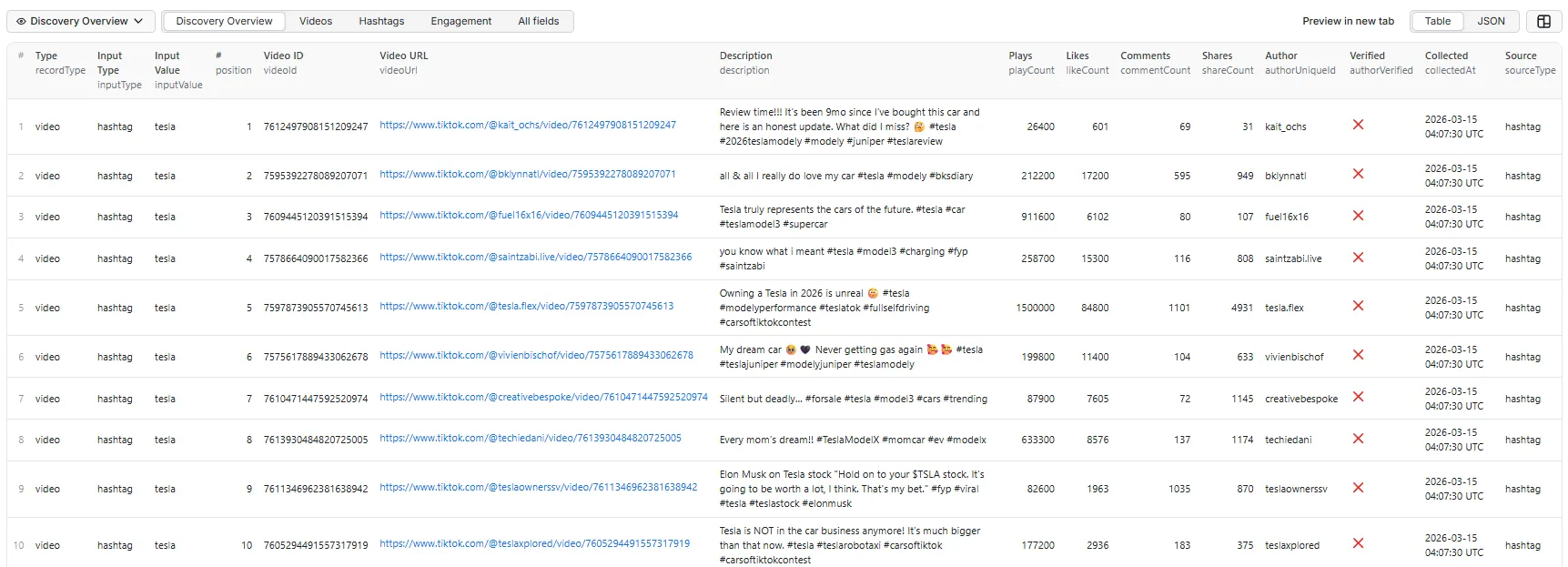
Video record example
Real record from a resultType: "videos" run for skin care. The author… profile block at the end (from authorFollowingCount onward) appears only when enrichAuthorStats is enabled; long image URLs are trimmed here for readability.
Direct-URL (single video) example
When you pass a /@user/video/<id> permalink in Direct URLs, you get that one video as a normal video record — with inputType: "url" and sourceType: "video":
(Remaining fields match a normal video record — trimmed here.)
Hashtag record example
Sound record example (resultType: "sounds")
A sound driving your query, derived from the run's own videos (soundSource: "niche"). Filter on isOriginalSound: false to see only reusable tracks.
Global sound chart example (resultType: "musicChartViral50" / "musicChartTop50")
TikTok's own leaderboard (soundSource: "chart"). A fixed global chart — no keywords, capped at 50.
Creator record example (resultType: "creators")
Ranked by the engagement they pulled within your trend, with full profile. Long image URLs are trimmed here.
Output fields
Common fields (all records)
| Field | Description |
|---|---|
recordType | "video", "hashtag", "sound", or "creator" |
inputType | "searchQuery", "hashtag", "url", or "musicChart" |
inputValue | The original input that produced this record |
position | Rank/order in results |
collectedAt | ISO 8601 timestamp of extraction |
sourceUrl | The URL that was scraped |
sourceType | "search", "hashtag", "video", or "musicChart" |
Video fields
| Field | Description |
|---|---|
videoId | TikTok video ID |
videoUrl | Full video URL |
description | Video caption/description |
createTime | Video creation time (ISO 8601) |
duration | Duration in seconds |
region | Region/country code (best-effort, may be null) |
language | Content language (if available) |
musicId, musicTitle, musicAuthorName | Sound/music info |
musicIsOriginal | true = the creator's own audio; false = a reusable track |
authorId, authorUniqueId, authorNickname | Author identification |
authorProfileUrl, authorAvatarUrl | Author links |
authorVerified | Verified badge status |
authorFollowerCount, authorHeartCount, authorVideoCount | Author stats (if available) |
authorStatsStatus | Why the three counts above are null — not_requested (enrichment was off) · paid_plan_only (Free plan skipped it; not charged) · success (fetched) · failed (requested and attempted, but TikTok returned nothing for that author) |
playCount | Play/view count |
likeCount, commentCount, shareCount | Engagement counts |
saveCount, repostCount | Save and repost counts (if available) |
hashtags | Hashtags used in the caption |
mentions | Users mentioned in the caption |
thumbnailUrl, coverUrl | Video cover images |
isAd, isPinned, isSponsored | Content flags |
engagementTotal | Sum of likes + comments + shares + saves |
engagementRateProxy | engagementTotal / playCount |
discoveryScore | Weighted viral score: (shares*3 + saves*2 + comments*1.5 + likes) / plays * 100 |
Sound fields (resultType: "sounds", "musicChartViral50", or "musicChartTop50")
| Field | Description |
|---|---|
musicId, musicTitle, musicAuthorName, musicUrl | Sound identity and its TikTok page |
isOriginalSound | true = the creator's own audio; false = a reusable track. Filter on false to find sounds you can actually use |
videosInTrend | How many of the discovered videos use this sound (niche sounds) |
totalPlays, totalLikes, totalShares, totalEngagement | Combined performance of the videos using it (niche sounds) |
avgDiscoveryScore | Mean viral score of those videos (niche sounds) |
topVideoUrl, topVideoId | The strongest video using this sound (niche sounds) |
videoCount | How many videos use it TikTok-wide (global chart) |
rank, trend | Chart position and TikTok's rank-movement signal (global chart) |
duration, language, isCommerceMusic, coverImageUrl, playUrl, musicAlbum | Track metadata (global chart) |
soundSource | niche (derived from your query) or chart (TikTok's global leaderboard) |
Creator fields (resultType: "creators")
Ranked by the engagement the creator pulled within your trend — who is driving it, not who has the biggest account.
| Field | Description |
|---|---|
creatorUniqueId, creatorNickname, creatorProfileUrl, creatorAvatarUrl, creatorId, secUid | Creator identity |
creatorVerified, isPrivate, category, accountType | Account status |
followerCount, heartCount, videoCount, followingCount | Real account stats |
signature, bioUrl, bioEmail | Bio, link in bio, and the business email they published — see Compliance |
isCommerce | TikTok Shop seller |
videosInTrend | How many of the discovered videos are theirs |
totalPlays, totalLikes, totalShares, totalEngagement | What they pulled within this trend |
avgDiscoveryScore | Mean viral score of their videos in the trend |
topVideoUrl, topVideoId | Their strongest video in the trend |
Author fields on video records (only with enrichAuthorStats)
TikTok omits these from search and hashtag results. Enable enrichAuthorStats to fetch them — see Pricing.
| Field | Description |
|---|---|
authorFollowerCount, authorHeartCount, authorVideoCount, authorFollowingCount | Real creator counts (null without enrichment — never 0) |
authorSignature | Creator bio text |
authorBioUrl | Link in bio |
authorBioEmail | Business email the creator published on their public profile — see Compliance |
authorCategory | Creator category (e.g. Others, Comedy) |
authorVerified | Verification status (from TikTok's verification, custom-verify, and enterprise flags) |
authorIsPrivate | Whether the account is private |
authorIsCommerce, authorAccountType | TikTok Shop seller / business-account signals |
authorSecUid | TikTok's stable secondary user ID |
Hashtag fields
| Field | Description |
|---|---|
hashtag | Hashtag name (without #) |
hashtagTitle | Display title |
hashtagUrl | Full hashtag page URL |
viewCount | Total view count |
videoCount | Total video count (if available) |
coverImageUrl | Cover image URL (if available) |
description | Hashtag description (if available) |
Use cases
- Content ideation — find trending hashtags and videos in a niche before creating content
- Trend monitoring — track recurring keywords, hashtags, or topics across repeated scheduled runs
- Competitive research — see what types of content are performing around a topic
- Influencer discovery — identify creators associated with emerging trends
- E-commerce/product discovery — detect trending products, categories, and buying signals
- Campaign validation — check whether a hashtag or theme is growing before investing in content or ads
- AI/LLM workflows — feed discovered videos and hashtags into clustering, summarization, trend scoring, and reporting pipelines
Tips and best practices
- Use
inputValueto trace results — every record includes the original query or hashtag that produced it, making cross-topic comparison easy - Start small — use
resultsPerQuery: 10–20for initial exploration, then increase for deeper collection - Combine inputs — mix
searchQueriesandhashtagsin a single run to compare keyword trends with hashtag trends - Schedule for monitoring — run on a schedule to track trend momentum over time
- Use
discoveryScore— higher scores indicate stronger viral signals (weighted toward shares, saves, and comments) - Filter by
recordType— use the dataset views or filter byrecordTypeto separate video and hashtag records
How it works
This actor collects TikTok data through a hosted API rather than by driving a headless browser over a proxy. That has three consequences worth knowing about:
- Nothing to configure. No proxy, no account, no cookies, no session. There is no setup step between entering a keyword and getting data.
- More reliable. TikTok's logged-out search page is heavily bot-gated, and browser-based scrapers get soft-blocked there. This actor does not touch it.
- Cheaper to run. No browser means less compute, which is why the per-result price can stay low.
Integrations
Connect this actor with other tools and services:
- Google Sheets — export trend data to spreadsheets for team dashboards
- Slack/email — set up notifications when new trends are detected
- Webhooks — trigger downstream workflows when a run completes
- API — access results programmatically via the Apify API
- Other actors — feed discovered video URLs into TikTok Video Scraper for deeper video analysis
Pricing
This actor is pay per event — you pay for what it actually collects, not for compute time. There are six events, and any one run only triggers the ones for its resultType:
| Event | Price (from) ᵖ | When it's charged |
|---|---|---|
actor-start | $0.020 | Once per run. A run with no usable input exits before this is charged. |
video-result | $0.0020 | Once per video record (40+ fields: engagement, author, music, computed scores). |
hashtag-result | $0.0010 | Once per hashtag entity record (7 fields). Priced below a video record, because it carries less. |
sound-result | $0.0030 | Once per sound record — whether derived from your niche or pulled from the global chart. |
creator-result | $0.0050 | Once per creator record. Includes the full profile (followers, bio, contact, TikTok Shop status): every creator costs a profile lookup, so this is priced above a video record. A creator whose profile can't be fetched is dropped, not charged. |
author-enriched | $0.0020 | Only when enrichAuthorStats is on during a videos run. Once per unique creator — a creator appearing in five of your videos is charged once, not five times. Never charged on a creators run, where the profile is already part of creator-result. |
ᵖ Entry (free-tier) price per event; it drops with your Apify subscription tier — higher plans pay less per record.
What a run costs
You pay actor-start once, plus the per-record price for whatever your chosen resultType returns — and only for records actually collected. Examples at the entry prices above:
| Run | Returns | Roughly |
|---|---|---|
videos, 1 keyword × 50 | ~50 videos | ~$0.12 |
videos, 3 keywords × 50 | ~150 videos | ~$0.32 |
videos, 5 hashtags × 100 | ~500 videos | ~$1.02 |
videos + enrichAuthorStats, 3 keywords × 50 | ~150 videos + ~120 profiles | ~$0.56 |
hashtags, 5 hashtags | ~50 hashtag records | ~$0.07 |
sounds, 1 hashtag × 100 | ~60 sounds | ~$0.20 |
creators, 1 hashtag × 100 | ~40 creators | ~$0.22 |
musicChartViral50 | up to 50 chart sounds | ~$0.17 |
Daily monitoring: videos, 3 keywords × 20 | ~60 videos/day | ~$0.14/day |
Turning on enrichAuthorStats adds roughly one author-enriched charge per unique creator (most videos have a distinct one), so expect a videos run to cost about double. Leave it off unless you actually need creator metrics.
Prices are also shown on the actor's pricing tab. Start with resultsPerQuery: 10–20 to see what a query returns before scaling up.
Free plan limitations
enrichAuthorStats requires a paid Apify plan. On the Free plan it is skipped and you are not charged for it — video rows come back without author follower/like/video counts, exactly as they do when the option is off.
| Free plan | Any paid plan | |
|---|---|---|
videos, hashtags, sounds records | ✅ Full, no row cap | ✅ Full |
| Engagement stats, computed scores, sorting | ✅ Included | ✅ Included |
creators Result Type (includes full profiles) | ✅ Included | ✅ Included |
enrichAuthorStats on a videos run | ❌ Skipped, not charged | ✅ Included |
Why only that one: it costs an extra API call per unique creator on top of a search that already returned the rows — the doubling described above. Discovery spreads a single call across up to resultsPerQuery records, so it stays open.
resultType: creators is deliberately unaffected. There the profile lookup is the record — a creator row without a follower count would be useless — so it is priced accordingly and available on every plan.
Runs are never failed because of this. You'll see it in the log and in the run's status message.
Limits and known issues
Stated plainly, so nothing here surprises you mid-run.
resultsPerQueryis a ceiling, not a promise. TikTok decides how deep a search or hashtag feed goes. A broad query liketrendingwill fill 500; a niche one may return 20 and stop. You are only charged for records actually collected.sortByis best-effort. The sort is passed to TikTok as a hint; TikTok may ignore it and return its default ranking. It applies to keyword searches only — hashtag pages always come back in TikTok's own order. If you need a guaranteed order, sort the dataset yourself onplayCount,engagementTotal, ordiscoveryScore.- Creator stats need
enrichAuthorStats. TikTok does not includeauthorHeartCountorauthorVideoCountin search or hashtag results, and omitsauthorFollowerCountfrom hashtag results too. Without enrichment these come backnull— never a misleading0. Turn onenrichAuthorStatsto fetch them properly. Anullalways means "this was not returned", never "zero" — andauthorStatsStatuson the same row tells you which of the four reasons applies, so you never have to guess whether anullis a plan limit, a setting you left off, or missing upstream data. - Most hashtags have no
descriptionorcoverImageUrl. TikTok only curates these for large, editorially-managed tags (#trendinghas both;#teslahas neither). When TikTok provides them, you get them. - Creator contact fields depend on the niche.
authorBioEmail,authorBioUrl, andauthorCategoryonly exist if the creator chose to publish them. In business-leaning niches (marketing, SaaS, coaching) a meaningful share of creators do; in entertainment niches (dance, comedy, viral) almost none do. A run over#trendingmay return no emails at all, while one overai toolsreturns several. This is TikTok's data, not a gap in the scraper. mentionsis usually empty — most captions don't@-mention anyone.- Each run returns one record shape. A video record and a hashtag record share only a handful of fields, so mixing them in one table would leave the other type's columns blank on export. That's why
videos,hashtags,sounds, andcreatorsare separate modes and whyvideosis the default — a single-type run exports as a clean table. Need both videos and hashtags? Run the actor twice. viewCounton hashtag records is TikTok's own rounded figure (e.g. 45.2B), not a precise count.- No ranked trend leaderboards yet. This actor discovers trending content by keyword and hashtag. Country-scoped, time-windowed trend charts (ranked hashtags and sounds) are on the roadmap.
- No creator trend rankings yet. Creators appear as the authors of discovered videos (with follower, heart, and video counts), not as a separate ranked "trending creators" list.
- This actor does not scrape individual video pages or full profile histories. For that, use TikTok Video Scraper.
Compliance
This actor collects only publicly available data from TikTok — the same content any logged-out visitor can see. It does not require a TikTok account, log in, or use cookies, and it never accesses private or non-public data.
On creator contact details: when enrichAuthorStats is enabled, the output includes authorBioEmail — the business email a creator has chosen to publish on their own public profile — along with their bio link. These are self-published business contacts, not private data, and they are only collected when you explicitly turn enrichment on. They are still personal data under GDPR/CCPA, so if you use them for outreach, that obligation is yours: have a lawful basis, identify yourself, and honour opt-outs. If you don't need contact details, leave enrichAuthorStats off and none are collected.
You are responsible for using the collected data in line with TikTok's terms and any privacy laws that apply to you.
FAQ
How many results can I get per query? Up to 500 per keyword or hashtag — but that is a ceiling, not a guarantee. The actual number depends on how much data TikTok returns for that query, and you are only charged for what is actually collected.
Why are some fields null?
A null means TikTok did not return that field — it never means zero. The most common cases are authorHeartCount and authorVideoCount, which TikTok omits from search responses. Everything else, including saveCount and repostCount, is populated whenever TikTok provides it.
Do I need a proxy, a TikTok account, or cookies? No. There is nothing to configure — see How it works.
Which resultType do I want?
Most people want videos (the default) — the trending videos with their engagement metrics. Choose hashtags when you're researching which tags to use: for every keyword you enter, you get the hashtags TikTok actually ranks for it, with their real view and video counts. Choose sounds or creators to see what's driving your own niche, or a musicChart… option for TikTok's global sound leaderboards. Each run returns one record type — run the actor twice if you need two.
How do I tell what a record came from?
Every record carries inputType (searchQuery, hashtag, or url) and inputValue (the keyword or hashtag itself). Both are always populated, whichever way the record was discovered, so you can group or pivot on them directly.
Can I scrape specific video pages? This actor is designed for trend discovery (search + hashtags). For scraping specific video URLs, use TikTok Video Scraper.
How is discoveryScore calculated?
discoveryScore = (shares * 3 + saves * 2 + comments * 1.5 + likes) / plays * 100. It weights actions that signal stronger intent (sharing and saving) higher than passive engagement (likes).


![TikTok Scraper - Trends, Creators, Hashtags [NO COOKIES] ✅ avatar](https://images.apifyusercontent.com/9jOQ5CjFNCQ8qsr_s1_FPEV-CTxYQrHmTN8yyFaLSE0/rs:fill:76:76/cb:1/aHR0cHM6Ly9hcGlmeS1pbWFnZS11cGxvYWRzLXByb2QuczMudXMtZWFzdC0xLmFtYXpvbmF3cy5jb20vc0NDU2R3bm1LTUoxUTJzVG4tYWN0b3ItUVhpYU04VnRYY1R2Y0M5TDgtQUFZY2FjTmg3Ri10aWt0b2stbG9nby1wbmctZmlsZS0xMTY2MTYzNzYyNng0cTF3c2djc3kucG5n.webp)


