

Cross-Border Sanctions Resolution MCP Server
Pricing
from $50.00 / 1,000 tool calls
Cross-Border Sanctions Resolution MCP Server
Resolve a party name against the US OFAC SDN, EU consolidated and UK OFSI sanctions lists in one MCP call, with the match basis and each list's as-of date.
Pricing
from $50.00 / 1,000 tool calls
Rating
0.0
(0)
Developer
NexGen Watch
Maintained by CommunityActor stats
0
Bookmarked
1
Total users
0
Monthly active users
2 days ago
Last modified
Share
🧰 Cross-Border Sanctions Resolution MCP Server
Resolve a party name against the US OFAC SDN, EU consolidated and UK OFSI sanctions lists in one call. Every match states its basis, the list it came from, and that list's as-of date. Built for agents: it is an MCP server, not a scraper.
This is a standby MCP server: it stays warm on Apify and answers tool calls from any MCP client (Claude Desktop, Cursor, an agent framework) at https://nexgenwatch--cross-border-sanctions-resolution-mcp.apify.actor/mcp. Billing is pay-per-event: $0.05 when the server starts, then $0.05 per tool call (mcp-tool-call). Source: eu.europa.ec, ofsistorage.blob.core.windows.net, sanctionslistservice.ofac.treas.gov.
📊 Sample Output
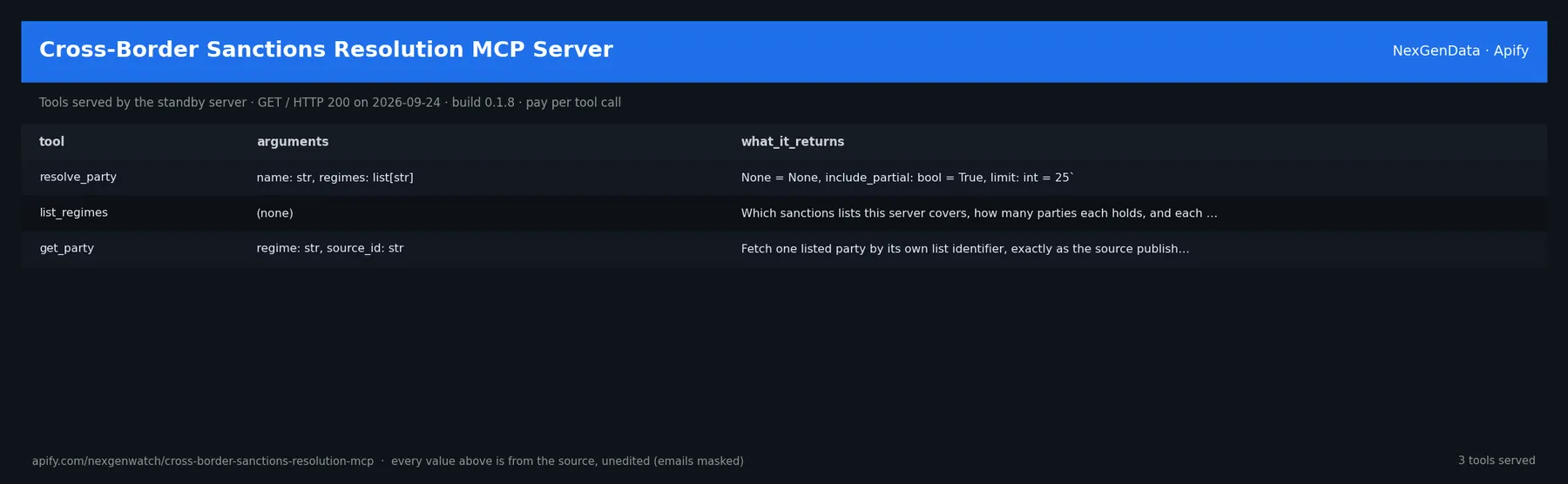
A standby server answers tool calls rather than writing a dataset, so the sample is the server's own live health answer (GET https://nexgenwatch--cross-border-sanctions-resolution-mcp.apify.actor/, HTTP 200, read on 2026-09-17) followed by its tool table:
| Tool | Arguments | What it returns |
|---|---|---|
resolve_party | `name: str, regimes: list[str] | None = None, include_partial: bool = True, limit: int = 25` |
list_regimes | `` | Which sanctions lists this server covers, how many parties each holds, and each list's as-of date. Use this to check freshness and coverage before relying on a resolve_party result. |
get_party | regime: str, source_id: str | Fetch one listed party by its own list identifier, exactly as the source publishes it. Use the regime and source_id returned by resolve_party. |
✅ What you get
3 tools, each returning a JSON object built only from what the source answered. A lookup the source answers with 'not found' is a sourced answer (charged); malformed input or a source failure returns a notice that is NOT charged; nothing is ever fabricated.
What it is not
This narrows a search. It is not a sanctions screening determination and does not discharge
any screening obligation. Every response says so. There is no fuzzy similarity score, on
purpose — a number like 0.87 invites a reader to treat it as a probability, and it is not one.
A partial match is flagged requires_human_review: true and left for a human.
Tools
| tool | what it answers |
|---|---|
resolve_party | Is this name on any of the three lists, and on what basis? |
list_regimes | Which lists are loaded, how many parties each holds, and how fresh each is |
get_party | The full record for one listed party, by the list's own identifier |
Sources — public, logged-out, no key
| regime | source |
|---|---|
US-OFAC-SDN | sanctionslistservice.ofac.treas.gov/.../SDN.XML |
EU-FSD | webgate.ec.europa.eu/fsd/fsf/public/files/xmlFullSanctionsList_1_1 |
UK-OFSI | ofsistorage.blob.core.windows.net/publishlive/2022format/ConList.csv |
All three load at start-up and are served from memory, so a tool call answers in milliseconds
rather than downloading 70 MB. If a list fails to load, every answer says so: responses carry
coverage_complete and regimes_not_searched. A no-match against a partial corpus is never
allowed to look like a clean no-match — that is the one failure that would matter most here.
Matching
exact— the normalised name equals a listed name or aliasall-tokens— every meaningful word of your query appears in a listed name (handles word order and corporate suffixes like Ltd / GmbH / OOO)partial— a majority of your words appear; always flagged for human review
Normalisation (accent folding, punctuation, corporate suffixes) is applied identically to the index and to your query, so the two can never disagree.
⚙️ Sample inputs
1. Connect an MCP client (Claude Desktop / Cursor style config; your Apify API token goes in the header):
2. One tool call over JSON-RPC (what the client sends to /mcp; each call is one mcp-tool-call event):
3. Health check from a shell (free — no tool call is charged):
🧾 JSON sample record
The live health record above is the server's own answer; a tool result carries the fields listed in the tool table plus scope and note.
🔧 How it works
Source. eu.europa.ec, ofsistorage.blob.core.windows.net, sanctionslistservice.ofac.treas.gov — endpoints: http://eu.europa.ec/fpi/fsd/export}, https://ofsistorage.blob.core.windows.net/publishlive/2022format/ConList.csv, https://sanctionslistservice.ofac.treas.gov/api/PublicationPreview/, https://sanctionslistservice.ofac.treas.gov/api/PublicationPreview/exports/SDN.XML. Public, logged-out reads only.
Standby. Apify keeps one server process warm; each MCP session is served by that process and idle servers are stopped by the platform. Nothing is cached between calls except what the source itself caches.
Charging. Every tool call charges one mcp-tool-call at $0.05 through Apify's pay-per-event billing before the answer is returned; the declared events are asserted against the live pricing at startup (billing_gate in the health answer).
What is not done. No login, no CAPTCHA bypass, no private data, no scraping of pages the source does not publish to any visitor.
💰 Pricing example
| Event | Free | Bronze | Silver | Gold |
|---|---|---|---|---|
Actor Start (apify-actor-start) | $0.05 | $0.05 | $0.05 | $0.05 |
Tool call (mcp-tool-call) | $0.05 | $0.05 | $0.05 | $0.05 |
- 10 tool calls in one session: $0.05 start + 10 × $0.05 = $0.55
- 100 tool calls in one session: $0.05 start + 100 × $0.05 = $5.05
- 1000 tool calls in one session: $0.05 start + 1000 × $0.05 = $50.05
A health check or a connection that makes no tool call charges only the $0.05 start fee. A sourced 'not found' answer is a completed tool call and is charged; a notice for malformed input or a source failure is not charged (settle() charges only chargeable outcomes).
⚖️ Legal & ToS
The server reads public data published by eu.europa.ec, ofsistorage.blob.core.windows.net, sanctionslistservice.ofac.treas.gov to any visitor, identifies itself with a contact User-Agent, and does not access accounts or private data. Use the answers in line with the source's terms and your local law; the intended use is B2B research and agent tooling.
❓ FAQ
Q: Do I need a source API key?
A: No. eu.europa.ec, ofsistorage.blob.core.windows.net, sanctionslistservice.ofac.treas.gov is read logged-out. You need only your Apify API token to connect to the server.
Q: Which MCP clients work?
A: Any client that speaks the MCP HTTP transport: Claude Desktop, Cursor, Windsurf, LangChain/LlamaIndex MCP adapters and Apify's own MCP client. Point it at the /mcp URL above.
Q: What happens when the source has no answer?
A: A sourced 'not found' (for example a 404 for an unknown identifier) comes back as an answer with scope and note explaining what was checked (where the server carries those fields), and is charged as a completed call; malformed input or a source outage returns a notice that is not charged. Nothing is invented.
Q: How is a call billed?
A: One mcp-tool-call event per tool call at $0.05, plus $0.05 when the server starts. Idle time is not billed to you.
Q: Is it rate limited?
A: The server paces requests to the source and answers calls in the order they arrive.
Q: Can I call it without an MCP client?
A: Yes — the /mcp endpoint is plain JSON-RPC over HTTP (sample input 2), and GET / is a free health check.
🆘 Troubleshooting
- 401 / 403 from the server → the Authorization header is missing or the token is wrong → use
Bearer <your Apify API token>. - 400
Missing session ID→ the client hit/mcpwithout initialising an MCP session → let the MCP client connect (it performs the handshake); raw JSON-RPC needs the session header the initialise call returns. - Tool returns a notice instead of data → the input was malformed or empty, or the source failed → the call was not charged; check the
note/reasonfield, fix the input and call again. - First call is slow → the standby server was cold and Apify started it → later calls in the same session are fast.
🔗 Related Actors
- Companies House Control MCP Server — Answer questions about UK companies from the Companies House public register: company profile, filing history, and who the register says controls the…
- Crossref Citation MCP Server — An MCP server over the official Crossref REST API (api.crossref.org) — scholarly work
- EPO Publication Evidence MCP Server — Retrieve official European patent publications by number or publication day from the EPO publication server, with the INID-coded front page parsed in…
- Eurostat Labor Stats MCP Server — An MCP server over the official Eurostat dissemination API (ec.europa.eu/eurostat) — EU
- 🏢 About NexGenData — NexGen Watch is NexGenData's fleet of 256 public monitoring and lookup actors built on official sources, pay-per-result. Browse the catalog at apify.com/nexgenwatch.
⭐ Found this useful?
If this server answered a question your agent could not, a quick review on the Apify Store helps other teams find it. Feature request or a source that changed? Open it from the Issues tab — every one is read.


