
California Grant Opportunities Scraper
Pricing
from $67.00 / 1,000 new-opportunity deltas
California Grant Opportunities Scraper
Scrape California state grant opportunities from the Grants Portal: program, agency, amount and closing date. Every run returns the current records as a dataset. Optional watch mode returns only what changed since your last run. Pay per result.
Pricing
from $67.00 / 1,000 new-opportunity deltas
Rating
0.0
(0)
Developer
NexGen Watch
Maintained by CommunityActor stats
0
Bookmarked
2
Total users
1
Monthly active users
a month ago
Last modified
Categories
Security
Limited permissionsShare
🎓 California Grant Opportunities Scraper
Scrape California state grant opportunities from the Grants Portal: program, agency, amount and closing date. Run it once and you get the current records as a dataset — that is the default. Turn on watch mode and a scheduled run returns only what changed since the last run (see Optional: run it on a schedule).
New grant opportunities as the California Grants Portal publishes them - the portal's own id, the funding agency, who may apply, the deadline exactly as stated, and a link to the listing.
Output is one ca_grant_record row per result; billing is pay-per-event, the value event being one new-opportunity delta (a $0.02 start fee per run, then $0.10 per new-opportunity delta plus one $0.10 source check per run that reads the source). Source: data.ca.gov.
No login, no API key and no CAPTCHA solving are involved: the source is read logged-out with an identified contact User-Agent.
Who buys this
Buyers usually search for California grants or California grant opportunities.
- Grant consultants and research-development offices tracking California grants.
- Universities, nonprofits and companies watching California grant opportunities relevant to their field.
- Analysts and journalists following where public funding goes.
📊 Sample Output
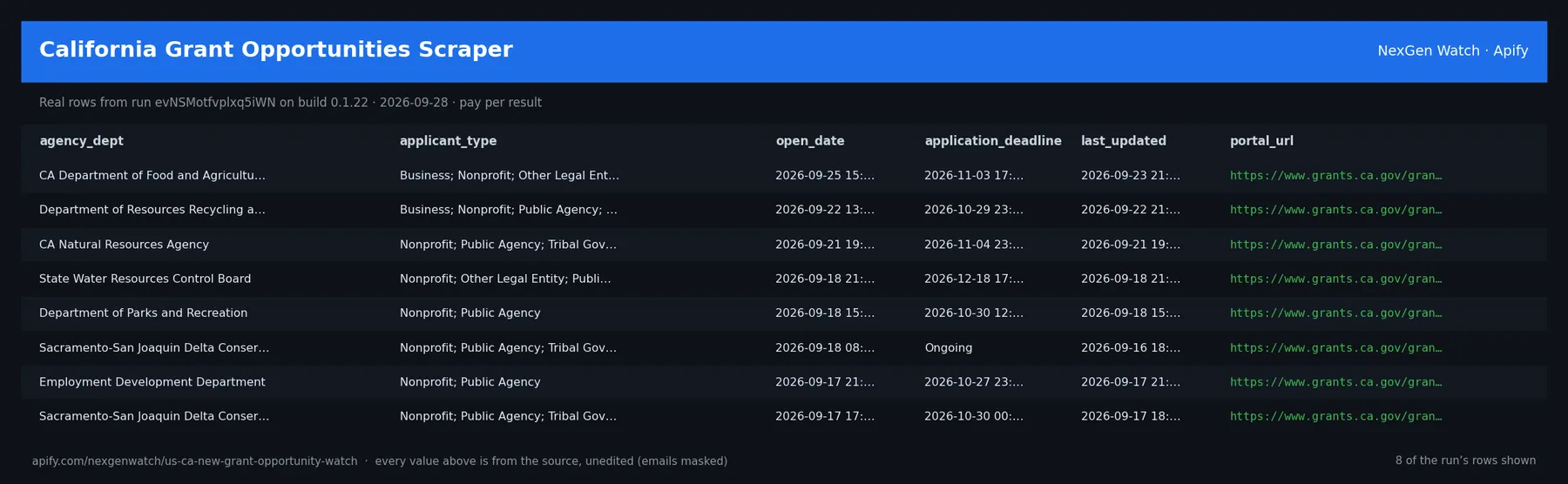
Real rows from run evNSMotfvplxq5iWN on build 0.1.22 (2026-09-28), the same input as the Quick start below — every value is as the source published it (emails masked, long text shortened):
| agency_dept | applicant_type | open_date | application_deadline | last_updated | portal_url |
|---|---|---|---|---|---|
| CA Department of Food and Agriculture | Business; Nonprofit; Other Legal Entity; Tribal Government | 2026-09-25 15:00:00 | 2026-11-03 17:00:00 | 2026-09-23 21:50:54 | https://www.grants.ca.gov/grants/191343/ |
| Department of Resources Recycling and Recovery | Business; Nonprofit; Public Agency; Tribal Government | 2026-09-22 13:00:00 | 2026-10-29 23:59:00 | 2026-09-22 21:04:52 | https://www.grants.ca.gov/grants/191505/ |
| CA Natural Resources Agency | Nonprofit; Public Agency; Tribal Government | 2026-09-21 19:30:00 | 2026-11-04 23:59:00 | 2026-09-21 19:32:03 | https://www.grants.ca.gov/grants/191673/ |
| State Water Resources Control Board | Nonprofit; Other Legal Entity; Public Agency; Tribal Government | 2026-09-18 21:19:00 | 2026-12-18 17:00:00 | 2026-09-18 21:27:40 | https://www.grants.ca.gov/grants/191763/ |
| Department of Parks and Recreation | Nonprofit; Public Agency | 2026-09-18 15:00:00 | 2026-10-30 12:00:00 | 2026-09-18 15:01:29 | https://www.grants.ca.gov/grants/191211/ |
| Sacramento-San Joaquin Delta Conservancy | Nonprofit; Public Agency; Tribal Government | 2026-09-18 08:00:00 | Ongoing | 2026-09-16 18:53:23 | https://www.grants.ca.gov/grants/191454/ |
| Employment Development Department | Nonprofit; Public Agency | 2026-09-17 21:00:00 | 2026-10-27 23:59:00 | 2026-09-17 21:07:15 | https://www.grants.ca.gov/grants/191679/ |
| Sacramento-San Joaquin Delta Conservancy | Nonprofit; Public Agency; Tribal Government | 2026-09-17 17:28:00 | 2026-10-30 00:00:00 | 2026-09-17 18:18:23 | https://www.grants.ca.gov/grants/191667/ |
The run finished with the status message: NORMAL: emitted 10 item(s)
✅ What you get
One row per record delivered by California New Grant Opportunity Watch; in watch mode a delta row carries delta_type, before, after and changed_fields. Field names come from the actor's real output; fields the source does not publish are null.
Each row is flat JSON with these fields (from the dataset schema and the sample run; a field the source does not publish for a given row is null):
record_key(string/null) — e.g.ca-grant:191343portal_id(string/number/integer/boolean/null) — e.g.191343grant_id(string/number/integer/boolean/null) — e.g.Employment Development Departmenttitle(string/number/integer/boolean/null) — e.g.2026 California Nutrition Incentive Programagency_dept(string/number/integer/boolean/null) — e.g.CA Department of Food and Agriculturestatus(string/number/integer/boolean/null) — e.g.activeapplicant_type(string/number/integer/boolean/null) — e.g.Business; Nonprofit; Other Legal Entity; Tribal Governmentcategories(string/number/integer/boolean/null) — e.g.Disadvantaged Communities; Food & Nutrition; Health & Human Servicesopen_date(string/number/integer/boolean/null) — e.g.2026-09-25 15:00:00application_deadline(string/number/integer/boolean/null) — e.g.2026-11-03 17:00:00application_deadline_iso(string/number/integer/boolean/null) — e.g.2026-11-03deadline_is_a_date(string/number/integer/boolean/null) — e.g.Trueest_available_funds(string/number/integer/boolean/null) — e.g.$13,500,000last_updated(string/number/integer/boolean/null) — e.g.2026-09-23 21:50:54change_notes(string/number/integer/boolean/null) — e.g.Updated advance language and application deadlinegrant_url(string/number/integer/boolean/null) — e.g.https://cafarmtofork.cdfa.ca.gov/farm_to_fork/grants/cnip.htmlportal_url(string/number/integer/boolean/null) — e.g.https://www.grants.ca.gov/grants/191343/record_type(string) — e.g.ca_grant_recorddelta_type(string/null) — null in every sample rowbefore(object/array/string/number/integer/boolean/null) — null in every sample rowafter(object/array/string/number/integer/boolean/null) — null in every sample rowchanged_fields(array/object/string/null) — null in every sample rowobserved_at(string/null) — null in every sample row
✅ What you get
record_key(string/null) — e.g.ca-grant:191505portal_id(string/number/integer/boolean/null) — e.g.191505grant_id(string/number/integer/boolean/null) — e.g.Employment Development Departmenttitle(string/number/integer/boolean/null) — e.g.Increased Recycling of Empty Glass Beverage Containers Grant Program, FY 2026-27agency_dept(string/number/integer/boolean/null) — e.g.Department of Resources Recycling and Recoverystatus(string/number/integer/boolean/null) — e.g.activeapplicant_type(string/number/integer/boolean/null) — e.g.Business; Nonprofit; Public Agency; Tribal Governmentcategories(string/number/integer/boolean/null) — e.g.Environment & Wateropen_date(string/number/integer/boolean/null) — e.g.2026-09-22 13:00:00application_deadline(string/number/integer/boolean/null) — e.g.2026-10-29 23:59:00application_deadline_iso(string/number/integer/boolean/null) — e.g.2026-10-29deadline_is_a_date(string/number/integer/boolean/null) — e.g.Trueest_available_funds(string/number/integer/boolean/null) — e.g.$14,198,550last_updated(string/number/integer/boolean/null) — e.g.2026-09-22 21:04:52change_notes(string/number/integer/boolean/null) — e.g.Updated advance language and application deadlinegrant_url(string/number/integer/boolean/null) — e.g.https://calrecycle.ca.gov/bevcontainer/grants/egr/fy202627/portal_url(string/number/integer/boolean/null) — e.g.https://www.grants.ca.gov/grants/191505/record_type(string) — e.g.ca_grant_recorddelta_type(string/null) — null in every sample rowbefore(object/array/string/number/integer/boolean/null) — null in every sample rowafter(object/array/string/number/integer/boolean/null) — null in every sample rowchanged_fields(array/object/string/null) — null in every sample rowobserved_at(string/null) — null in every sample row
✅ What you get
record_key(string/null) — e.g.ca-grant:191499portal_id— e.g.191499grant_id— e.g.SWC 108title— e.g.Scaling Dyadic Care Grant Programagency_dept— e.g.Department of Health Care Servicesstatus— e.g.activeapplicant_type— e.g.Business; Nonprofit; Other Legal Entity; Public Agency; Tribal Governmentcategories— e.g.Disadvantaged Communities; Education; Health & Human Services; Housing, Communitopen_date— e.g.2026-09-16 19:01:00application_deadline— e.g.2026-10-26 17:00:00application_deadline_iso— e.g.2026-10-26deadline_is_a_date— e.g.Trueest_available_funds— e.g.$17,000,000last_updated— e.g.2026-09-16 22:44:12change_notes— e.g.Updated grant data.grant_url— e.g.https://www.dhcs.ca.gov/providers-partners/dyadic-services-as-a-medi-cal-benefitportal_url— e.g.https://www.grants.ca.gov/grants/191499/record_type(string) — e.g.ca_grant_recorddelta_type(string/null) — null in every sample row
Every run also writes a RUN_RECEIPT record to its key-value store with the source checks it made and the counts it charged — diagnostics never land in the paid dataset.
⚙️ Sample inputs
1. Quick start — the Store example (this is what the sample above came from)
The sample run charged exactly: 1 × $0.02 apify-actor-start + 1 × $0.10 source-check + 0 × $0.10 ca-grant-delta = $0.12 on the Free tier — snapshot preview rows are delivered unbilled; only the source check and the start fee were charged.
2. A smaller, narrowed run
Caps the run at 5 rows; same billing shape as the sample run above.
3. Optional watch mode (changes only, for a schedule)
The first run seeds a private baseline and emits zero deltas; every later run emits one row per change, billed at $0.10 each plus the $0.10 source check; billed deltas are capped at 500 per run.
🧾 JSON sample record
One real record from run evNSMotfvplxq5iWN, exactly as it lands in the dataset (emails masked, long text shortened):
🔧 How it works
Source. The actor reads data.ca.gov — endpoints: https://data.ca.gov/dataset/e1b1c799-cdd4-4219-af6d-93b79747fffb/resource/. Public pages and feeds only; nothing behind a login.
Transport. Plain HTTPS from the Apify platform, no proxy. robots.txt is read first and a disallowed path is never fetched. Every request carries an identified contact User-Agent.
Watch semantics. Snapshot mode (watch_mode: false) returns a preview capped at 25 records. Watch mode keys every record on a source-native id, stores a private baseline in a named key-value store, and on each later run emits one delta row per change (new / changed / removed). A blocked fetch is never diffed, so a source outage cannot show up as a mass removal.
Terminal states. A run ends NORMAL, CAPPED (your cap was reached), PARTIAL (something was withheld and the message says what), GENUINE_EMPTY (the source was read and truly had nothing in scope) or BLOCKED (the source refused or changed shape — the run FAILS loud and bills nothing). A zero-row run is never reported as a silent success.
Charging. Each new-opportunity delta is charged at the moment it is pushed (ca-grant-delta); a row that fails to charge is not delivered, so the dataset count always equals the charged count. One source-check is charged per run that actually read the source.
🔧 How it works
🔧 How it works
Source
California Grants Portal, published as a daily CSV on data.ca.gov (public, logged-out)
https://data.ca.gov/dataset/california-grants-portal
Measured 2026-07-28: 1,973 rows, 36 columns, resource last updated 2026-07-27 08:01.
PortalID is the source-native key and is unique — 1,973 distinct of 1,973. The whole file
is read every run, so a listing that disappears really has gone; there is no sliding window.
The deadline is not always a date
ApplicationDeadline carries three shapes, measured on the live file:
| shape | rows |
|---|---|
a timestamp, 2026-09-01 23:59:00 | 1,845 |
the literal string Ongoing | 127 — every one an active grant |
| empty | 1 |
So the deadline is signed as the source's own string, and a separate
application_deadline_iso field is populated only when the source actually gave a date —
null for Ongoing. A grant moving from Ongoing to a real date therefore reports as
acquiring a deadline, not as a date change and not as a parse failure.
The small-business slice is a filter, not another Actor
applicant_types: ["Business"] — 477 of 1,973 rows on 2026-07-28. The source lists several
types per row separated by ;, so matching is substring and case-insensitive. Other tokens:
Public Agency 1,557, Nonprofit 1,309, Tribal Government 959, Individual 375, Other Legal
Entity 146.
Snapshot mode is a PREVIEW
watch_mode: false returns at most 25 records, hard-capped in code, labelled
output_mode: "preview". This Actor sells change detection, not bulk export.
Watch semantics
The first watch run stores a private baseline and emits zero deltas. Later runs emit
NEW / CHANGED keyed on PortalID, with before / after and changed_fields. Billed
deltas are capped at 500 per run; the overflow is a named PARTIAL withholding, never billed,
and re-detected on the next run.
One delta type per Actor
This Actor emits new-opportunity and nothing else. Its sibling reads the same file for the other
slice, each with its own baseline and its own price.
Terminal states
NORMAL · SUCCEEDED-0: GENUINE_EMPTY · SUCCEEDED-0 (no change) · PARTIAL · BLOCKED.
A zero with no evidence FAILS loud rather than exiting 0 quietly.
A file that arrives and does not parse BLOCKS. It is never reported as an empty source.
The portal serves this CSV with a UTF-8 byte-order mark; on build 0.1.2 that made every
PortalID lookup miss, so a 6,401,507-byte read parsed to zero rows and the run announced
GENUINE_EMPTY about a file holding 1,973 live grants. Since 0.1.3 the mark is stripped, the
key column is checked by name, and a large body that yields no rows fails the run loudly
naming what arrived. An outage you can see beats an emptiness you cannot.
What is not done. No login, no cookie or CAPTCHA bypass, no private or personal-account data, no browser automation.
⏰ Optional: run it on a schedule
A single run returns the current records. If you also want to be told what changed over time, open the actor in Apify Console → Schedules → Create new, add this actor with the watch-mode input above (watch_mode: true) so each run returns only the changes, and pick a cadence:
- Daily —
0 7 * * *(07:00 UTC): catch changes within a day. - Weekly —
0 7 * * 1: a Monday digest.
The baseline persists in a named key-value store between runs, so every scheduled run compares against the last one; use a different baseline_id for independent watches. Schedules can also POST results to a webhook (Console → Integrations).
💰 Pricing example
| Event | Free | Bronze | Silver | Gold |
|---|---|---|---|---|
Actor Start (apify-actor-start) | $0.02 | $0.02 | $0.02 | $0.02 |
Source check (source-check) | $0.10 | $0.09 | $0.08 | $0.067 |
New-opportunity delta (ca-grant-delta) | $0.10 | $0.09 | $0.08 | $0.067 |
Worked at the live Free-tier price (watch mode, one delta per change):
- 8 new-opportunity deltas: $0.02 start + $0.10 source check + 8 × $0.10 = $0.92
- 25 new-opportunity deltas: $0.02 start + $0.10 source check + 25 × $0.10 = $2.62
- 5000 new-opportunity deltas: $0.02 start + $0.10 source check + 5000 × $0.10 = $500.12
A run that delivers zero rows charges the $0.02 start fee plus the $0.10 source check (the source was read and reported empty). A BLOCKED run (source refused) fails loud and charges no value event. The start fee is charged once per GB of run memory; the default run memory is 1024 MB.
Yield on the sample run: NORMAL: emitted 10 item(s). max_items is a hard ceiling on what is delivered and billed, never a target. Snapshot output is capped at 25 records regardless of the cap you set; watch mode is the full feed.
⚖️ Legal & ToS
This actor reads public, logged-out pages and feeds published by data.ca.gov. It collects only what the source publishes to any visitor, keeps to the source's robots rules (checked on every run), identifies itself with a contact User-Agent, and does not access accounts, private data or anything behind authentication. Use the output in line with the source's terms and your local law; the intended use is B2B research and monitoring.
❓ FAQ
Q: Do I need an API key or a login?
A: No. The source (data.ca.gov) is read logged-out; the input schema has no key field and the actor carries no secrets.
Q: Why did my run return 0 rows?
A: Read the run's status message. GENUINE_EMPTY means the source was read and had nothing in scope for your input (in watch mode the first run always seeds the baseline and returns zero deltas); BLOCKED means the source refused and the run failed without billing a value event — retry later or narrow the input. A zero-row run bills the start fee plus one source check.
Q: How many rows can one run return?
A: Up to max_items (default 5000); snapshot previews stop at 25. Raise the cap for a bigger run; you pay per delivered row.
Q: What does watch mode remember between runs?
A: A private baseline of source-native record ids in a named key-value store (baseline_id names it, so several independent watches can coexist). Each later run diffs the live source against it and emits only changes.
Q: How fresh is the data?
A: Every run reads the source live at run time; nothing is cached between runs except the watch baseline. Put it on a schedule for a continuous feed.
Q: What formats can I export?
A: The dataset downloads as JSON, CSV, Excel, XML or RSS from the run's Dataset tab or the Apify API, and any run can push to a webhook or integration.
Q: How is this different from the other grant and research-funding scrapers actors?
A: Same output shape and billing model; this one covers data.ca.gov. The siblings under Related Actors cover the other sources or slices — run several on one schedule for a combined feed.
🆘 Troubleshooting
- Run FAILED with BLOCKED → the source refused the request or changed its page shape → nothing was billed beyond the start fee; retry after a while, and if it persists open an Issue with the run id.
- Status says CAPPED → your cap (
max_items) was reached → raise it for a bigger run. - Input validation error on start → a field is outside the schema's allowed values → start from the Quick start block and change one field at a time.
- Run TIMED-OUT → a very wide request on a slow day → raise the run timeout in Run options or narrow the input; what was delivered before the timeout is still in the dataset.
- First watch run shows no deltas → expected: it seeds the baseline; changes appear from the second run.
🔗 Related Actors
- UKRI Project Funding Changes Scraper — Scrape UKRI project funding changes: project, original and revised amounts, and change date. Every run returns the current records as a dataset. Opti…
- UKRI Project Status Scraper — Scrape UKRI research project status: project, organisation, status and status changes. Every run returns the current records as a dataset. Optional w…
- California Grant Deadlines Scraper — Scrape California state grant deadlines from the Grants Portal: program, agency, closing date and deadline changes. Every run returns the current rec…
- US Grants.gov Deadline Amendments Scraper — Scrape US Grants.gov application deadline amendments: opportunity, agency, old and new close date. Every run returns the current records as a dataset…
- US Grants.gov Eligibility Changes Scraper — Scrape US Grants.gov applicant eligibility changes: opportunity, agency and eligibility before and after. Every run returns the current records as a…
- US Grants.gov Forecast to Posted Scraper — Scrape US Grants.gov opportunities that moved from forecast to posted: opportunity, agency, amount and dates. Every run returns the current records a…
- 🏢 About NexGen Watch — NexGen Watch is a catalog of more than 300 public data actors built on official sources, pay-per-result. Browse the catalog at apify.com/nexgenwatch.
⭐ Found this useful?
If this actor saved you a manual check, a quick review on the Apify Store helps other teams find it. Feature request or a source that changed? Open it from the Issues tab — every one is read.


