

ASX Company Announcements Scraper
Pricing
from $100.50 / 1,000 announcement deltas
ASX Company Announcements Scraper
Scrape ASX company announcements for the tickers you name: headline, type, price-sensitive flag, date and a direct link to the announcement PDF (the source serves the 5 most recent per issuer). Optional watch mode returns only what changed since your last run. Pay per result.
Pricing
from $100.50 / 1,000 announcement deltas
Rating
0.0
(0)
Developer
NexGen Watch
Maintained by CommunityActor stats
0
Bookmarked
3
Total users
1
Monthly active users
16 days ago
Last modified
Categories
Share
📣 ASX Company Announcements Scraper
Scrape ASX company announcements for the tickers you name: headline, announcement type, price-sensitive flag, date and a direct link to the announcement PDF (the source serves the 5 most recent per issuer). Run it once and you get the current records as a dataset — that is the default. Turn on watch mode and a scheduled run returns only what changed since the last run (see Optional: run it on a schedule).
Output is one announcement_record row per result; billing is pay-per-event, the value event being one announcement delta (a $0.02 start fee per run, then $0.15 per announcement delta plus one $0.10 source check per run that reads the source). Source: asx.api.markitdigital.com.
No login, no API key and no CAPTCHA solving are involved: the source is read logged-out with an identified contact User-Agent.
How many rows to expect. The ASX source answers with at most the 5 most recent announcements per issuer and has no paging, so count above 5 changes nothing and a snapshot is up to 5 × the issuers you name — the Store example (BHP + CBA) returns up to 10. Run it daily in optional watch mode and you keep a growing, de-duplicated record on your side; it is not an archive search.
Who buys this
Buyers usually search for ASX announcements or ASX company announcements.
- Investors, analysts and IR teams following ASX announcements.
- Compliance and data teams tracking ASX company announcements for a watchlist of issuers.
- Researchers and journalists building dated disclosure records.
📊 Sample Output
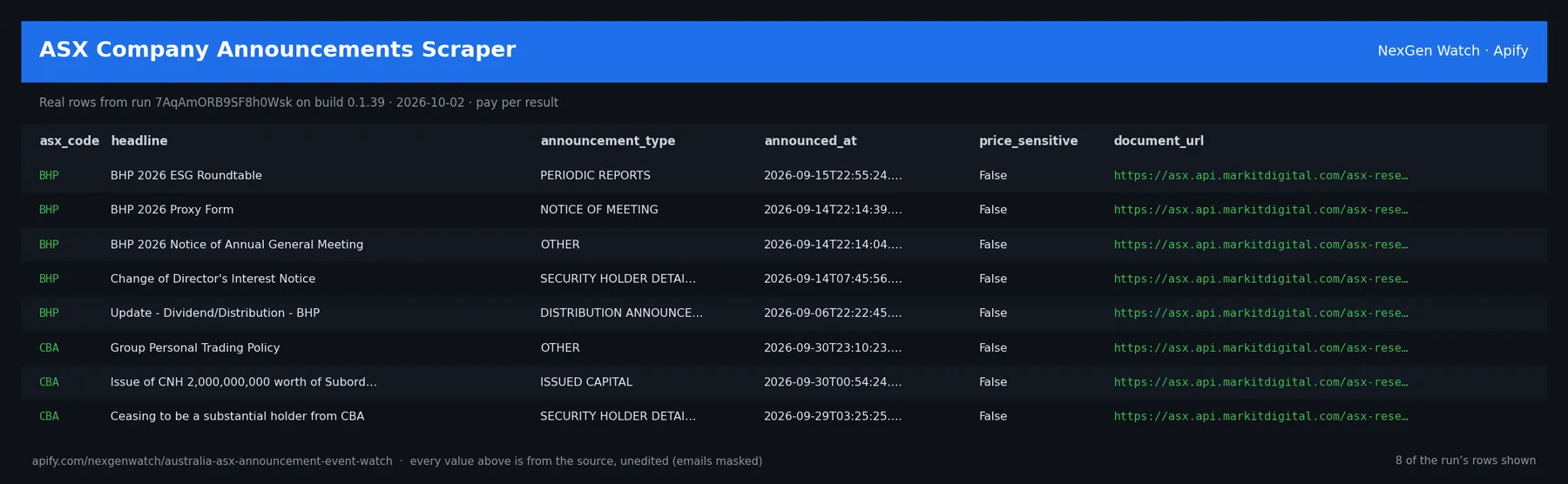
Real rows from run 7AqAmORB9SF8h0Wsk on build 0.1.39 (2026-10-02), the same input as the Quick start below — every value is as the source published it (emails masked, long text shortened):
| asx_code | headline | announcement_type | announced_at | price_sensitive | document_url |
|---|---|---|---|---|---|
| BHP | BHP 2026 ESG Roundtable | PERIODIC REPORTS | 2026-09-15T22:55:24.000Z | False | https://asx.api.markitdigital.com/asx-research/1.0/file/2924-03135917- |
| BHP | BHP 2026 Proxy Form | NOTICE OF MEETING | 2026-09-14T22:14:39.000Z | False | https://asx.api.markitdigital.com/asx-research/1.0/file/2924-03135386- |
| BHP | BHP 2026 Notice of Annual General Meeting | OTHER | 2026-09-14T22:14:04.000Z | False | https://asx.api.markitdigital.com/asx-research/1.0/file/2924-03135379- |
| BHP | Change of Director's Interest Notice | SECURITY HOLDER DETAILS | 2026-09-14T07:45:56.000Z | False | https://asx.api.markitdigital.com/asx-research/1.0/file/2924-03135309- |
| BHP | Update - Dividend/Distribution - BHP | DISTRIBUTION ANNOUNCEMENT | 2026-09-06T22:22:45.000Z | False | https://asx.api.markitdigital.com/asx-research/1.0/file/2924-03132213- |
| CBA | Group Personal Trading Policy | OTHER | 2026-09-30T23:10:23.000Z | False | https://asx.api.markitdigital.com/asx-research/1.0/file/2924-03142997- |
| CBA | Issue of CNH 2,000,000,000 worth of Subordinated Notes | ISSUED CAPITAL | 2026-09-30T00:54:24.000Z | False | https://asx.api.markitdigital.com/asx-research/1.0/file/2924-03141971- |
| CBA | Ceasing to be a substantial holder from CBA | SECURITY HOLDER DETAILS | 2026-09-29T03:25:25.000Z | False | https://asx.api.markitdigital.com/asx-research/1.0/file/2924-03141253- |
The run finished with the status message: NORMAL: emitted 10 item(s)
✅ What you get
One row per record delivered by ASX Announcement Event Watch; in watch mode a delta row carries delta_type, before, after and changed_fields. Field names come from the actor's real output; fields the source does not publish are null.
Each row is flat JSON with these fields (from the dataset schema and the sample run; a field the source does not publish for a given row is null):
record_key(string/null) — e.g.asx:BHP:2924-03135917-3A701845asx_code(string/number/integer/boolean/null) — e.g.BHPissuer_name(string/number/integer/boolean/null) — e.g.BHP GROUP LIMITEDdocument_key(string/number/integer/boolean/null) — e.g.2924-03135917-3A701845headline(string/number/integer/boolean/null) — e.g.BHP 2026 ESG Roundtableannouncement_type(string/number/integer/boolean/null) — e.g.PERIODIC REPORTSannounced_at(string/number/integer/boolean/null) — e.g.2026-09-15T22:55:24.000Zprice_sensitive(string/number/integer/boolean/null) — e.g.Falsefile_size(string/number/integer/boolean/null) — e.g.3071KBdocument_url(string/null) — Direct link to the announcement PDF on the ASX API (asx-research/1.0/file/{documentKey})document_url_checked(boolean/null) — Whether this run's one live check of the document-link pattern answered with a PDF (true), did not (false), or could not be reached (null)record_type(string) — e.g.announcement_recorddelta_type(string/null) — null in every sample rowbefore(object/array/string/number/integer/boolean/null) — null in every sample rowafter(object/array/string/number/integer/boolean/null) — null in every sample rowchanged_fields(array/object/string/null) — null in every sample rowobserved_at(string/null) — null in every sample row
✅ What you get
✅ What you get
✅ What you get
record_key(string/null) — e.g.asx:BHP:2924-03135917-3A701845asx_code(string/number/integer/boolean/null) — e.g.BHPissuer_name(string/number/integer/boolean/null) — e.g.BHP GROUP LIMITEDdocument_key(string/number/integer/boolean/null) — e.g.2924-03135917-3A701845headline(string/number/integer/boolean/null) — e.g.BHP 2026 ESG Roundtableannouncement_type(string/number/integer/boolean/null) — e.g.PERIODIC REPORTSannounced_at(string/number/integer/boolean/null) — e.g.2026-09-15T22:55:24.000Zprice_sensitive(string/number/integer/boolean/null) — e.g.Falsefile_size(string/number/integer/boolean/null) — e.g.3071KBrecord_type(string) — e.g.announcement_recorddelta_type(string/null) — null in every sample rowbefore(object/array/string/number/integer/boolean/null) — null in every sample rowafter(object/array/string/number/integer/boolean/null) — null in every sample rowchanged_fields(array/object/string/null) — null in every sample rowobserved_at(string/null) — null in every sample row
✅ What you get
record_key(string/null) — e.g.asx:BHP:2924-03135917-3A701845asx_code— e.g.BHPissuer_name— e.g.BHP GROUP LIMITEDdocument_key— e.g.2924-03135917-3A701845headline— e.g.BHP 2026 ESG Roundtableannouncement_type— e.g.PERIODIC REPORTSannounced_at— e.g.2026-09-15T22:55:24.000Zprice_sensitive— e.g.Falsefile_size— e.g.3071KBrecord_type(string) — e.g.announcement_recorddelta_type(string/null) — null in every sample row
Every run also writes a RUN_RECEIPT record to its key-value store with the source checks it made and the counts it charged — diagnostics never land in the paid dataset.
⚙️ Sample inputs
1. Quick start — the Store example (this is what the sample above came from)
The sample run charged exactly: 1 × $0.02 apify-actor-start + 1 × $0.10 source-check + 0 × $0.15 announcement-delta = $0.12 on the Free tier — snapshot preview rows are delivered unbilled; only the source check and the start fee were charged.
2. A smaller, narrowed run
Caps the run at 5 rows; same billing shape as the sample run above.
3. Optional watch mode (changes only, for a schedule)
The first run seeds a private baseline and emits zero deltas; every later run emits one row per change, billed at $0.15 each plus the $0.10 source check; billed deltas are capped at 500 per run.
🧾 JSON sample record
One real record from run 7AqAmORB9SF8h0Wsk, exactly as it lands in the dataset (emails masked, long text shortened):
🔧 How it works
Source. The actor reads asx.api.markitdigital.com — endpoints: https://asx.api.markitdigital.com/asx-research/1.0/companies. Public pages and feeds only; nothing behind a login.
Transport. Plain HTTPS from the Apify platform, no proxy. Every request carries an identified contact User-Agent.
Watch semantics. Snapshot mode (watch_mode: false) returns a preview. Watch mode keys every record on a source-native id, stores a private baseline in a named key-value store, and on each later run emits one delta row per change (new / changed / removed). A blocked fetch is never diffed, so a source outage cannot show up as a mass removal.
Terminal states. A run ends NORMAL, CAPPED (your cap was reached), PARTIAL (something was withheld and the message says what), GENUINE_EMPTY (the source was read and truly had nothing in scope) or BLOCKED (the source refused or changed shape — the run FAILS loud and bills nothing). A zero-row run is never reported as a silent success.
Charging. Each announcement delta is charged at the moment it is pushed (announcement-delta); a row that fails to charge is not delivered, so the dataset count always equals the charged count. One source-check is charged per run that actually read the source.
🔧 How it works
🔧 How it works
🔧 How it works
Watch semantics. Snapshot mode (watch_mode: false) returns a preview capped at 25 records. Watch mode keys every record on a source-native id, stores a private baseline in a named key-value store, and on each later run emits one delta row per change (new / changed / removed). A blocked fetch is never diffed, so a source outage cannot show up as a mass removal.
🔧 How it works
Source
ASX company announcements API (public, logged-out)
Public, logged-out only — no API key, login, cookie or CAPTCHA.
Snapshot mode is a PREVIEW
watch_mode: false returns at most 25 records, hard-capped in code regardless
of max_items, labeled output_mode: "preview". This cell sells change detection,
not bulk record export.
Watch semantics
First watch run stores a private baseline and emits zero deltas. Later runs emit
NEW / CHANGED / REMOVED keyed on the source-native id with before / after
and changed_fields.
Terminal states
NORMAL · SUCCEEDED-0: GENUINE_EMPTY · SUCCEEDED-0 (no change) · PARTIAL · BLOCKED.
A zero with no evidence FAILS loud rather than exiting 0 quietly.
What is not done. No login, no cookie or CAPTCHA bypass, no private or personal-account data, no browser automation.
⏰ Optional: run it on a schedule
A single run returns the current records. If you also want to be told what changed over time, open the actor in Apify Console → Schedules → Create new, add this actor with input 3 above (watch_mode: true) so each run returns only the changes, and pick a cadence:
- Daily —
0 7 * * *(07:00 UTC): catch changes within a day. - Weekly —
0 7 * * 1: a Monday digest.
The baseline persists in a named key-value store between runs, so every scheduled run compares against the last one; use a different baseline_id for independent watches. Schedules can also POST results to a webhook (Console → Integrations).
⏰ Optional: run it on a schedule
A single run returns the current records. If you also want to be told what changed over time, open the actor in Apify Console → Schedules → Create new, add this actor with the watch-mode input above (watch_mode: true) so each run returns only the changes, and pick a cadence:
⏰ Optional: run it on a schedule
💰 Pricing example
| Event | Free | Bronze | Silver | Gold |
|---|---|---|---|---|
Actor Start (apify-actor-start) | $0.02 | $0.02 | $0.02 | $0.02 |
Source check (source-check) | $0.10 | $0.09 | $0.08 | $0.067 |
Announcement Delta (announcement-delta) | $0.15 | $0.135 | $0.12 | $0.1005 |
Worked at the live Free-tier price (watch mode, one delta per change):
- 8 announcement deltas: $0.02 start + $0.10 source check + 8 × $0.15 = $1.32
- 25 announcement deltas: $0.02 start + $0.10 source check + 25 × $0.15 = $3.87
- 300 announcement deltas: $0.02 start + $0.10 source check + 300 × $0.15 = $45.12
A run that delivers zero rows charges the $0.02 start fee plus the $0.10 source check (the source was read and reported empty). A BLOCKED run (source refused) fails loud and charges no value event. The start fee is charged once per GB of run memory; the default run memory is 1024 MB.
Yield on the sample run: NORMAL: emitted 10 item(s). max_items is a hard ceiling on what is delivered and billed, never a target.
⚖️ Legal & ToS
This actor reads public, logged-out pages and feeds published by asx.api.markitdigital.com. It collects only what the source publishes to any visitor, identifies itself with a contact User-Agent, and does not access accounts, private data or anything behind authentication. Use the output in line with the source's terms and your local law; the intended use is B2B research and monitoring.
❓ FAQ
Q: Do I need an API key or a login?
A: No. The source (asx.api.markitdigital.com) is read logged-out; the input schema has no key field and the actor carries no secrets.
Q: Why did my run return 0 rows?
A: Read the run's status message. GENUINE_EMPTY means the source was read and had nothing in scope for your input (in watch mode the first run always seeds the baseline and returns zero deltas); BLOCKED means the source refused and the run failed without billing a value event — retry later or narrow the input. A zero-row run bills the start fee plus one source check.
Q: How many rows can one run return?
A: Up to max_items (default 300). Raise the cap for a bigger run; you pay per delivered row.
Q: What does watch mode remember between runs?
A: A private baseline of source-native record ids in a named key-value store (baseline_id names it, so several independent watches can coexist). Each later run diffs the live source against it and emits only changes.
Q: How fresh is the data?
A: Every run reads the source live at run time; nothing is cached between runs except the watch baseline. Put it on a schedule for a continuous feed.
Q: What formats can I export?
A: The dataset downloads as JSON, CSV, Excel, XML or RSS from the run's Dataset tab or the Apify API, and any run can push to a webhook or integration.
Q: How is this different from the other market announcement scrapers actors?
A: Same output shape and billing model; this one covers asx.api.markitdigital.com. The siblings under Related Actors cover the other sources or slices — run several on one schedule for a combined feed.
🆘 Troubleshooting
- Run FAILED with BLOCKED → the source refused the request or changed its page shape → nothing was billed beyond the start fee; retry after a while, and if it persists open an Issue with the run id.
- Status says CAPPED → your cap (
max_items) was reached → raise it for a bigger run. - Input validation error on start → a field is outside the schema's allowed values → start from the Quick start block and change one field at a time.
- Run TIMED-OUT → a very wide request on a slow day → raise the run timeout in Run options or narrow the input; what was delivered before the timeout is still in the dataset.
- First watch run shows no deltas → expected: it seeds the baseline; changes appear from the second run.
🔗 Related Actors
- Bilibili Trending Videos Scraper — Scrape Bilibili trending and ranking lists: video, uploader, views, rank and rank movement. Every run returns the current records as a dataset. Optio…
- GOV.UK Press Releases Scraper — Scrape GOV.UK press releases and announcements: department, title, summary, date and link from the official search API. One record per result. Pay pe…
- Korea DART Corporate Filings Scraper — Scrape Korean corporate filings from DART: company, report type, filing date and link. Every run returns the current records as a dataset. Optional w…
- Company Newsroom Press Releases Scraper — Scrape the press releases a company's own newsroom or investor-relations feed currently lists: publisher, headline, summary, date and link, from as m…
- 🏢 About NexGen Watch — NexGen Watch is a catalog of more than 300 public data actors built on official sources, pay-per-result. Browse the catalog at apify.com/nexgenwatch.
⭐ Found this useful?
If this actor saved you a manual check, a quick review on the Apify Store helps other teams find it. Feature request or a source that changed? Open it from the Issues tab — every one is read.


