

Website Screenshot API — Full Page, Mobile, PDF, No Login
Pricing
from $33.50 / 1,000 screenshot checks
Website Screenshot API — Full Page, Mobile, PDF, No Login
Website screenshot API for URL lists: full page or first screen, desktop/tablet/phone presets, PNG/JPEG/WebP/PDF, dark mode, cookie-banner and ad hiding, wait/scroll/selector/clip controls. Image URL, final URL, status and SHA-256 per row. Pay per capture.
Pricing
from $33.50 / 1,000 screenshot checks
Rating
0.0
(0)
Developer
NexGen Watch
Maintained by CommunityActor stats
0
Bookmarked
2
Total users
1
Monthly active users
6 days ago
Last modified
Categories
Share
Take a website screenshot of any list of URLs in headless Chromium and get the image back with proof attached: a public image URL, final URL, HTTP status, page title, capture timestamp, browser build and SHA-256 hash. Full-page or first screen; desktop, laptop, tablet or phone presets; PNG, JPEG, WebP or PDF; dark mode; hide cookie banners, chat widgets and ads; wait for a selector, delay, scroll to load lazy content; capture one element or a clip. Pay per capture — blocked or unreachable pages are reported and never billed.
- Batch: up to 100 URLs per run, one row and one stored image each.
- Every capture is evidence: timestamp, final URL after redirects, HTTP status, browser version and SHA-256 on the row.
- No login, no CAPTCHA solving: each site's robots.txt is checked first; the browser identifies itself with a contact User-Agent. Optional Apify Proxy for sites that block data-centre IPs.
- Direct image links:
image_urlopens the stored PNG/JPEG/WebP/PDF straight from the run's key-value store.
Billing: $0.02 per run start, then $0.05 per completed capture (screenshot_check).
Who uses this
- Compliance, legal and brand teams that need dated website screenshots as evidence.
- QA, SEO and monitoring teams screenshotting page lists on a schedule (mobile and desktop, light and dark).
- Agencies and researchers archiving how pages looked, or turning pages into PDFs.
📊 Sample Output
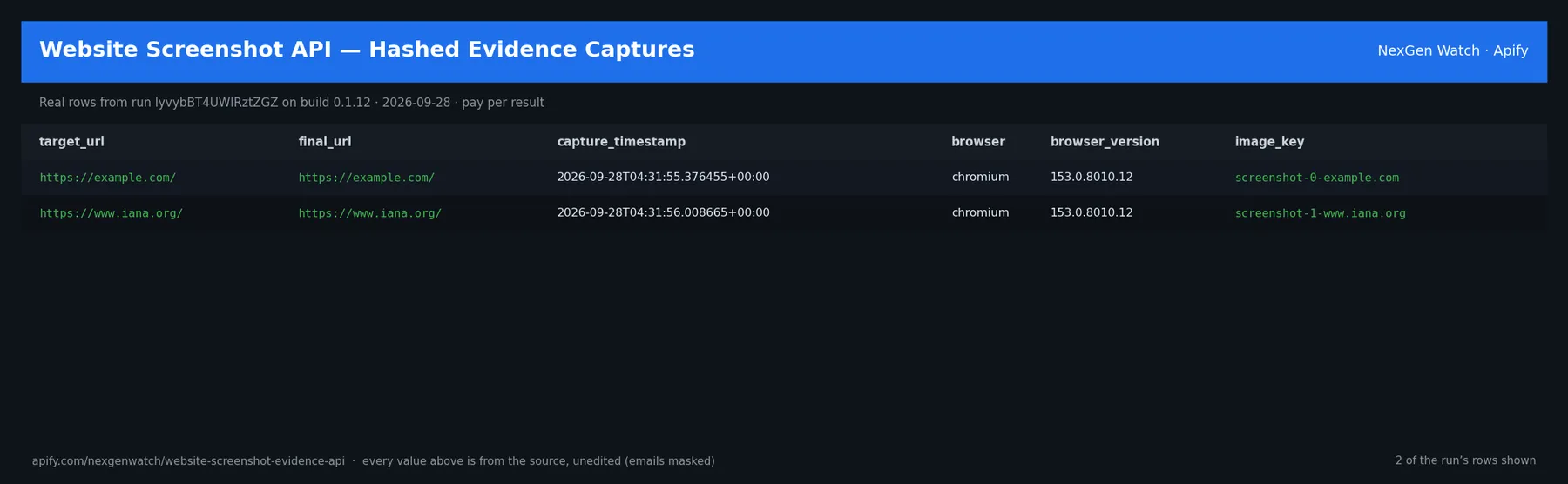
Real rows from run cUFIUzrvtGqMjlhdw on build 0.1.36 (2026-10-18), the Quick start input below:
| target_url | outcome | http_status | page_title | device | format | width×height | image_sha256 |
|---|---|---|---|---|---|---|---|
| https://example.com/ | answer | 200 | Example Domain | desktop | png | 1280×800 | 018344bad235b72b… |
| https://www.iana.org/ | answer | 200 | Internet Assigned Numbers Authority | desktop | png | 1280×800 | 6f08a23db67efe72… |
The run finished with the status message: 2 URL(s): 2 capture(s) stored+charged, 0 unbilled (blocked/unreachable/unparseable) | screenshot_check charged=2
✅ What you get
One screenshot_evidence row per URL (every URL gets a row; only outcome: answer rows are billed):
target_url,final_url,http_status,page_title— what was asked for, where it landed, and what the page called itself.image_url,image_key,image_bytes,image_sha256— the stored capture (public URL in this run's key-value store) and its hash.format(png/jpeg/webp/pdf),device,full_page,width,height,device_scale_factor— how it was captured.capture_timestamp,browser,browser_version,load_time_ms— when and with what.outcome—answer(captured, billed),blocked(robots / 403 / 429 / 5xx / private host — not billed),unreachable(DNS, timeout, navigation or capture fault — not billed),unparseable(not a usable URL — not billed), withoutcome_reason.render_warnings— e.g. awaitForSelectorthat never appeared, or an output truncated at the size cap.
⚙️ Sample inputs
1. Quick start — the Store example
About $0.12 on the Free tier ($0.02 start + 2 × $0.05).
2. Full-page mobile capture with lazy content loaded, as JPEG
3. Page to PDF, dark mode, German locale
4. One element only, after the app has settled, with widgets hidden
5. Retina desktop-HD capture through Apify residential proxy
Older inputs still work: viewport: "desktop" | "mobile" | "full".
🧾 JSON sample record
🔧 How it works
Capture. Headless Chromium (Playwright) opens each URL in a fresh context with the chosen device size, pixel density, colour scheme, locale and timezone; waits for waitUntil (+ optional selector, scroll pass and delay); applies hide/custom CSS; then writes PNG/JPEG (Chromium), WebP (converted from a lossless PNG) or PDF (print to PDF with backgrounds). Captures above 12 MB are truncated with a warning — lower the size, scale or use JPEG.
Gates before the browser opens a URL. The host must resolve only to public addresses (no localhost, private ranges or cloud metadata), and the site's robots.txt must allow the path for our user agent. A disallowed or non-public target is a blocked row, never a capture.
Blocking. blockAds aborts requests to well-known ad/tracking hosts; blockImages skips image and media downloads; blockCookieBanners hides common consent containers by CSS — nothing is clicked, accepted or bypassed.
Proxy. Direct by default. proxyConfiguration turns on Apify Proxy (datacenter or residential groups, optional country) for sites that refuse data-centre IPs; no third-party proxies.
Billing. Each completed capture is pushed and charged in one call; a row that cannot be charged is not delivered. Blocked, unreachable and unparseable rows are delivered unbilled so you always see every URL's disposition.
Limits. 100 URLs per run; navigation timeout 3-90 s per page; a page that fails to load or capture is unreachable (not billed) and the run continues.
💰 Pricing example
| Event | Free | Bronze | Silver | Gold |
|---|---|---|---|---|
Actor Start (apify-actor-start) | $0.02 | $0.02 | $0.02 | $0.02 |
Completed capture (screenshot_check) | $0.05 | $0.045 | $0.04 | $0.0335 |
- 2 captures: $0.02 + 2 × $0.05 = $0.12
- 100 captures: $0.02 + 100 × $0.05 = $5.02
Blocked and unreachable URLs cost nothing beyond the start fee.
⚖️ Legal & ToS
Captures public pages exactly as any visitor's browser would render them, checks each site's robots.txt first, identifies itself with a contact User-Agent and never logs in, solves CAPTCHAs or bypasses paywalls. Use the captures in line with each site's terms and your local law.
❓ FAQ
Q: Where is the image?
A: image_url on each row is a direct link to the stored file in the run's key-value store (image_key is its name there). Files stay as long as the run's storage does (7 days on the Free plan, longer on paid plans) — download them if you need them permanently.
Q: Full page came out short / missing images.
A: Turn on scrollToBottom (lazy-loaded sections render as the page scrolls) and, for single-page apps, waitUntil: "networkidle" plus a delayMs.
Q: The site shows a bot wall or 403.
A: That URL is returned as blocked and not billed. Try proxyConfiguration with Apify residential proxy; the actor never solves CAPTCHAs.
Q: Can I capture only part of a page?
A: Yes — selector for one element, or clip for a fixed rectangle.
Q: PDF?
A: format: "pdf" prints the page with backgrounds; image_url then points to the PDF.
Q: What formats can I export?
A: Rows download as JSON, CSV, Excel or XML from the Dataset tab or API; images via their image_url.
🆘 Troubleshooting
- outcome = unreachable, "navigation failed: TimeoutError" → raise
timeoutMsor usewaitUntil: "domcontentloaded". - outcome = unreachable, "selector matched nothing" → check the CSS selector; use
waitForSelectorfor late-rendered elements. - outcome = blocked, robots → the site disallows that path for crawlers; the actor will not capture it.
- Run TIMED-OUT → many slow pages: lower
maxUrls, shortentimeoutMs, or raise the run timeout.
🔗 Related Actors
- HTML to PDF Evidence Renderer — render your own HTML to PDF with a hash.
- Responsive Design Testing — one verdict per URL across desktop, tablet and mobile.
- Wayback Machine Website History — how a page looked in the past.
- 🏢 About NexGen Watch — more than 300 public-data actors, pay-per-result: apify.com/nexgenwatch.
⭐ Found this useful?
A quick review on the Apify Store helps other teams find it. Feature request? Open it from the Issues tab — every one is read.


