

Website Screenshot Evidence API
Pricing
from $33.50 / 1,000 screenshot checks
Website Screenshot Evidence API
Captures a headless-Chromium screenshot of each URL as a hashed evidence bundle — the image plus its final URL, HTTP state, capture timestamp, browser build, and SHA-256. A batch evidence API, not an interactive browser.
Pricing
from $33.50 / 1,000 screenshot checks
Rating
0.0
(0)
Developer
NexGen Watch
Maintained by CommunityActor stats
0
Bookmarked
2
Total users
1
Monthly active users
a day ago
Last modified
Categories
Share
🌐 Website Screenshot Evidence API
Captures a headless-Chromium screenshot of each URL as a hashed evidence bundle — the image plus its final URL, HTTP state, capture timestamp, browser build, and SHA-256. A batch evidence API, not an interactive browser.
Output is one screenshot_evidence row per result; billing is pay-per-event, the value event being one screenshot check (a $0.02 start fee per run, then $0.05 per screenshot check).
No login, no API key and no CAPTCHA solving are involved: the source is read logged-out with an identified contact User-Agent.
📊 Sample Output
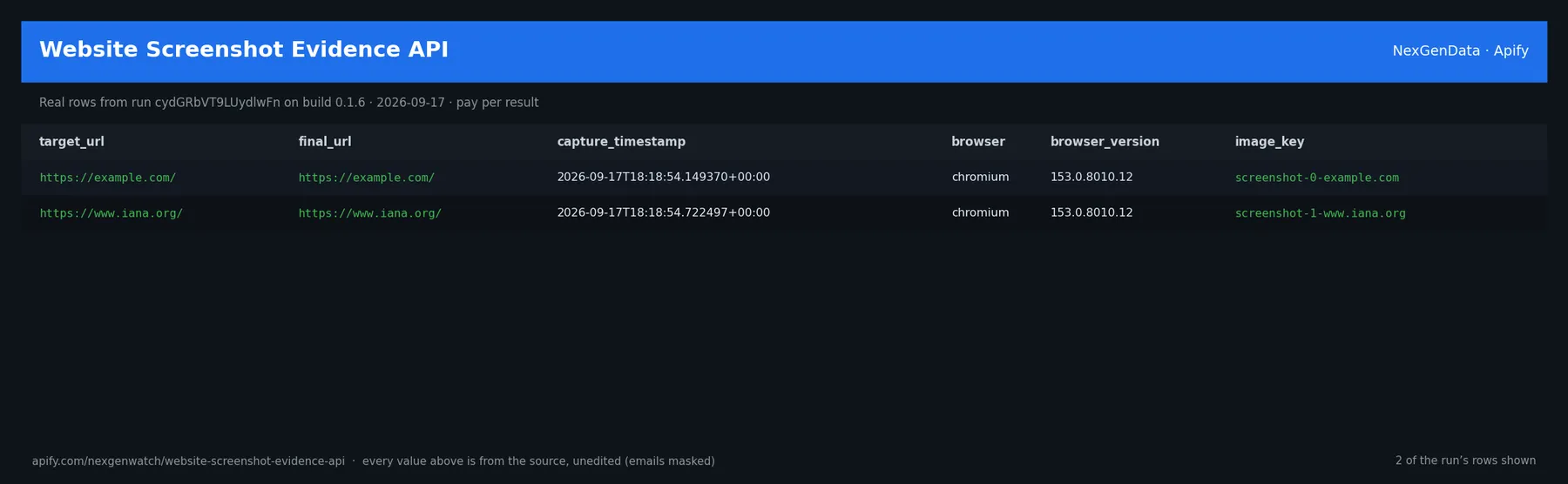
Real rows from run cydGRbVT9LUydlwFn on build 0.1.6 (2026-09-17), the same input as the Quick start below — every value is as the source published it (emails masked, long text shortened):
| target_url | final_url | capture_timestamp | browser | browser_version | image_key |
|---|---|---|---|---|---|
| https://example.com/ | https://example.com/ | 2026-09-17T18:18:54.149370+00:00 | chromium | 153.0.8010.12 | screenshot-0-example.com |
| https://www.iana.org/ | https://www.iana.org/ | 2026-09-17T18:18:54.722497+00:00 | chromium | 153.0.8010.12 | screenshot-1-www.iana.org |
The run finished with the status message: 2 URL(s): 2 evidence bundle(s) captured+charged, 0 unbilled (blocked/unreachable/unparseable) | screenshot_check charged=2
✅ What you get
Each row is flat JSON with these fields (from the dataset schema and the sample run; a field the source does not publish for a given row is null):
target_url(string/null) — e.g.https://example.com/final_url(string/null) — e.g.https://example.com/http_status(integer/string/null) — e.g.200viewport(string/null) — e.g.desktopcapture_timestamp(string/null) — e.g.2026-09-17T18:18:54.149370+00:00browser(string/null) — e.g.chromiumbrowser_version(string/null) — e.g.153.0.8010.12image_key(string/null) — e.g.screenshot-0-example.comimage_bytes(integer/string/null) — e.g.15852image_sha256(string/null) — e.g.673725f9cb364731243d43f2bcab5d8ca3c67c4cfb0bf931ff73bf6a2ceb811awidth(integer/string/null) — e.g.1280height(integer/string/null) — e.g.800render_warnings(string/null) — null in every sample rowfaults(string/null) — null in every sample rowrecord_type(string) — e.g.screenshot_evidencesource(string/null) — e.g.buyer-submitted page URLsoutcome(string/null) — e.g.answerinput(string/null) — e.g.https://example.com/outcome_reason(string/null) — null in every sample rowobserved_at(string/null) — null in every sample rowterminal(string/null) — null in every sample row
Output & billing
One row per target. A complete evidenced verdict carries outcome: answer and is the only billable outcome; blocked / unreachable / unparseable / rejected targets carry that status and are not billed (push-then-charge — failures can only undercharge).
⚙️ Sample inputs
1. Quick start — the Store example (this is what the sample above came from)
The sample run charged exactly: 2 × $0.02 apify-actor-start + 2 × $0.05 screenshot_check = $0.14 on the Free tier — every delivered row was billed.
2. A smaller, narrowed run
A bounded run for checking the field shape before scheduling. viewport narrows what the source is asked for.
3. A full-size run
The same input run on a schedule; each run is billed only for what it delivers.
🧾 JSON sample record
One real record from run cydGRbVT9LUydlwFn, exactly as it lands in the dataset (emails masked, long text shortened):
🔧 How it works
Transport. Plain HTTPS from the Apify platform, no proxy. A headless browser renders the page. robots.txt is read first and a disallowed path is never fetched. Every request carries an identified contact User-Agent.
Terminal states. A run ends NORMAL, CAPPED (your cap was reached), PARTIAL (something was withheld and the message says what), GENUINE_EMPTY (the source was read and truly had nothing in scope) or BLOCKED (the source refused or changed shape — the run FAILS loud and bills nothing). A zero-row run is never reported as a silent success.
Charging. Each screenshot check is charged at the moment it is pushed (screenshot_check); a row that fails to charge is not delivered, so the dataset count always equals the charged count.
What you submit
urls — page urls. Page URLs to capture as evidence. Per URL: a screenshot image artifact (stored in the run key-value store), final URL, HTTP state, capture timestamp, headless browser build, SHA-256 of the image bytes, and render warnings. Only a completed evidence bundle bills; a URL blocked (robots/SSRF/403/429/5xx) or unreachable is delivered as an unbilled status, never a broken-site verdict.
The runtime source gate (per submitted target)
You choose the targets, so the source contract is enforced at run time, per origin, before any page is read:
- robots.txt fetched once per origin and honored; no robots / 404 = permitted, a disallowed path or unavailable robots file = BLOCKED.
- SSRF guard — every host is resolved and must be public; private, loopback, link-local, reserved and cloud-metadata addresses are refused before a socket opens.
- HTTP —
403/429/5xx= BLOCKED; DNS / timeout / connection faults = UNREACHABLE.
A BLOCKED or UNREACHABLE target is delivered as an unbilled status row — never a broken-site verdict, and never charged.
Why this and not the obvious alternative
batch evidence artifact with content hashes — a per-URL screenshot bundle you can archive/verify, NOT fleet-1's interactive Playwright browser MCP (no interactive tools, no live session).
What is not done. No login, no cookie or CAPTCHA bypass, no private or personal-account data.
💰 Pricing example
| Event | Free | Bronze | Silver | Gold |
|---|---|---|---|---|
Actor Start (apify-actor-start) | $0.02 | $0.02 | $0.02 | $0.02 |
Screenshot Check (screenshot_check) | $0.05 | $0.04 | $0.04 | $0.03 |
Worked at the live Free-tier price:
- 2 screenshot checks: $0.02 start + 2 × $0.05 = $0.12
- 25 screenshot checks: $0.02 start + 25 × $0.05 = $1.27
- 100 screenshot checks: $0.02 start + 100 × $0.05 = $5.02
A run that delivers zero rows charges the $0.02 start fee only. A BLOCKED run (source refused) fails loud and charges no value event. The start fee is charged once per GB of run memory; the default run memory is 2048 MB.
Yield on the sample run: 2 URL(s): 2 evidence bundle(s) captured+charged, 0 unbilled (blocked/unreachable/unparseable) | screenshot_check charged=2.
⚖️ Legal & ToS
This actor reads public data only. It collects only what the source publishes to any visitor, keeps to the source's robots rules (checked on every run), identifies itself with a contact User-Agent, and does not access accounts, private data or anything behind authentication. Use the output in line with the source's terms and your local law; the intended use is B2B research and monitoring.
❓ FAQ
Q: Do I need an API key or a login?
A: No. the input schema has no key field and the actor carries no secrets.
Q: Why did my run return 0 rows?
A: Read the run's status message. GENUINE_EMPTY means the source was read and had nothing in scope for your input; BLOCKED means the source refused and the run failed without billing a value event — retry later or narrow the input. A zero-row run bills the start fee only.
Q: How fresh is the data?
A: Every run reads the source live at run time; nothing is cached between runs. Put it on a schedule for a continuous feed.
Q: What formats can I export?
A: The dataset downloads as JSON, CSV, Excel, XML or RSS from the run's Dataset tab or the Apify API, and any run can push to a webhook or integration.
Q: How is this different from the other web QA and enrichment tools actors?
A: Same output shape and billing model; this one covers Website Screenshot Evidence API. The siblings under Related Actors cover the other sources or slices — run several on one schedule for a combined feed.
Q: Are there rate limits?
A: The actor paces itself against the source and honours its robots rules; there is no per-buyer limit beyond your Apify plan's concurrency.
🆘 Troubleshooting
- Run FAILED with BLOCKED → the source refused the request or changed its page shape → nothing was billed beyond the start fee; retry after a while, and if it persists open an Issue with the run id.
- Fewer rows than expected → the source had fewer items in scope → widen the input.
- Input validation error on start → a field is outside the schema's allowed values → start from the Quick start block and change one field at a time.
- Run TIMED-OUT → a very wide request on a slow day → raise the run timeout in Run options or narrow the input; what was delivered before the timeout is still in the dataset.
🔗 Related Actors
- Website Brand Kit API — Extracts a full brand system from a domain — logos, favicons, declared and pixel-derived colors, font declarations, theme color and social share imag…
- Website Contact Finder — Email, Phone & Social Links — Find business emails, phone numbers, and social profile links published on company websites. Submit domains or URLs and pay only when a contact-beari…
- Website Migration Link Auditor — Audits an old→new URL migration manifest. Each source URL gets an acceptance receipt: redirect target/chain/loop, 404/410/5xx, fragment survival, can…
- Website Technology Detector — Fingerprints the technologies a website exposes on the pages its robots.txt permits — web server, CDN, CMS, JavaScript frameworks, analytics and mark…
- 🏢 About NexGenData — NexGen Watch is NexGenData's fleet of 256 public monitoring and lookup actors built on official sources, pay-per-result. Browse the catalog at apify.com/nexgenwatch.
⭐ Found this useful?
If this actor saved you a manual check, a quick review on the Apify Store helps other teams find it. Feature request or a source that changed? Open it from the Issues tab — every one is read.


