

E-commerce Scraper & Price Monitor — WooCommerce, Magento
Pricing
from $0.56 / 1,000 product or variant records
E-commerce Scraper & Price Monitor — WooCommerce, Magento
Scrape public online store catalogs (WooCommerce Store API, Magento GraphQL, Shopify, and schema.org Product JSON-LD for Squarespace, BigCommerce, Wix and custom stores), or monitor price and stock changes. $0.0007 per product/variant, $0.0005 per change, $0.002 per catalog page.
Pricing
from $0.56 / 1,000 product or variant records
Rating
0.0
(0)
Developer

Owlabee
Maintained by CommunityActor stats
0
Bookmarked
2
Total users
1
Monthly active users
2 days ago
Last modified
Categories
Features
Share
E-commerce scraper and price monitor for online stores that are not (only) on Shopify: give it a store's domain and get its catalog, every product or variant with price, compare-at price, currency, availability, SKU and image, from the store's own public catalog API (WooCommerce Store API, Magento GraphQL, Shopify products.json) or, on any other platform, from the schema.org Product JSON-LD its product pages publish for search engines. Run it on a schedule to get price, stock and new or removed product change events by webhook.
What it does
The Actor looks at a store's home page once, detects the platform, and reads the catalog the cheapest public way that platform offers:
| Platform | How it is read | Products per request |
|---|---|---|
| WooCommerce | Store API /wp-json/wc/store/v1/products (the unauthenticated API WooCommerce's block checkout uses), trimmed with _fields; variations by id | 100 |
| Magento 2 / Adobe Commerce | Guest storefront GraphQL /graphql (GET), configurable products with their variants | 50 |
| Shopify | Public products.json | 250 |
| Squarespace, BigCommerce, Wix, Salesforce Commerce Cloud, custom stores | Product URLs from the store's XML sitemap, then the schema.org Product / ProductGroup JSON-LD on each product page | 1 per page |
If a platform's catalog API is disabled, blocked or disallowed by the store's robots.txt, auto mode falls back to the product pages' JSON-LD. You can also skip discovery and give a list of product page URLs on any platform to watch a fixed set of competitor products.
Every record has the same shape whatever the platform, the record of the Shopify Catalog Monitor plus platform, source, currency and categories, so datasets from both Actors line up. Switch to changes mode and the Actor keeps the previous snapshot of each store in a key-value store you name, diffs the new catalog against it and writes only what changed, with before/after values and the percentage price move. Typical users are competitor price trackers, resellers watching supplier stock, brand teams auditing MAP compliance, deal sites and analysts building catalog datasets. No browsers, proxies, logins or API keys; output as JSON, CSV, Excel, through the Apify API, webhooks, or the Apify MCP server for AI agents.
Tested on 2026-11-09 against WooCommerce (mercantile.wordpress.org), Magento (venia.magento.com) and Squarespace (a product page on hester-demo.squarespace.com, via JSON-LD); Shopify reuses the Shopify Catalog Monitor's reader. The JSON-LD reader is generic, so other platforms work when their product pages carry Product JSON-LD with an offer; pages without it are counted and reported, not guessed at.
How to use
- Enter one or more Store URLs (bare domains like
venia.magento.comor any URL on the store), or a list of Product page URLs. - Pick a Mode:
snapshotfor the full catalog,changesto receive only price, stock, title and new/removed product events compared with the previous run. Optionally set Platform, Granularity, Max products per store and a Webhook URL. - Click Start (or schedule it daily). Records appear in the dataset as they are saved; download them or consume them via API, integrations or MCP.
Quick start input
The input the Store runs in its daily automated test (one Magento and one WooCommerce store, 10 products each):
Daily price and stock monitor with a webhook (the first run writes the baseline):
Watch a fixed list of competitor product pages on any platform:
Input
| Field | Type | Required | Description |
|---|---|---|---|
storeUrls | string[] | one of the two | Stores to read; domains or any store URL, reduced to the origin |
productUrls | string[] | one of the two | Product pages to read instead of whole catalogs (JSON-LD, any platform) |
platform | auto | woocommerce | magento | shopify | jsonld | no | auto (default) detects the platform and falls back to JSON-LD |
mode | snapshot | changes | no | Full catalog (default) or only changes since the last run |
granularity | variant | product | no | One record per variant (default) or per product |
maxProductsPerStore | integer | no | Cap per store (default 1000) |
maxSecondsPerStore | integer | no | Time budget per store (default 900 s) |
stateStoreName | string | no | Key-value store holding snapshots for changes mode (default ecommerce-scraper-state) |
webhookUrl | string | no | POST target for the run summary and change sample |
Output example
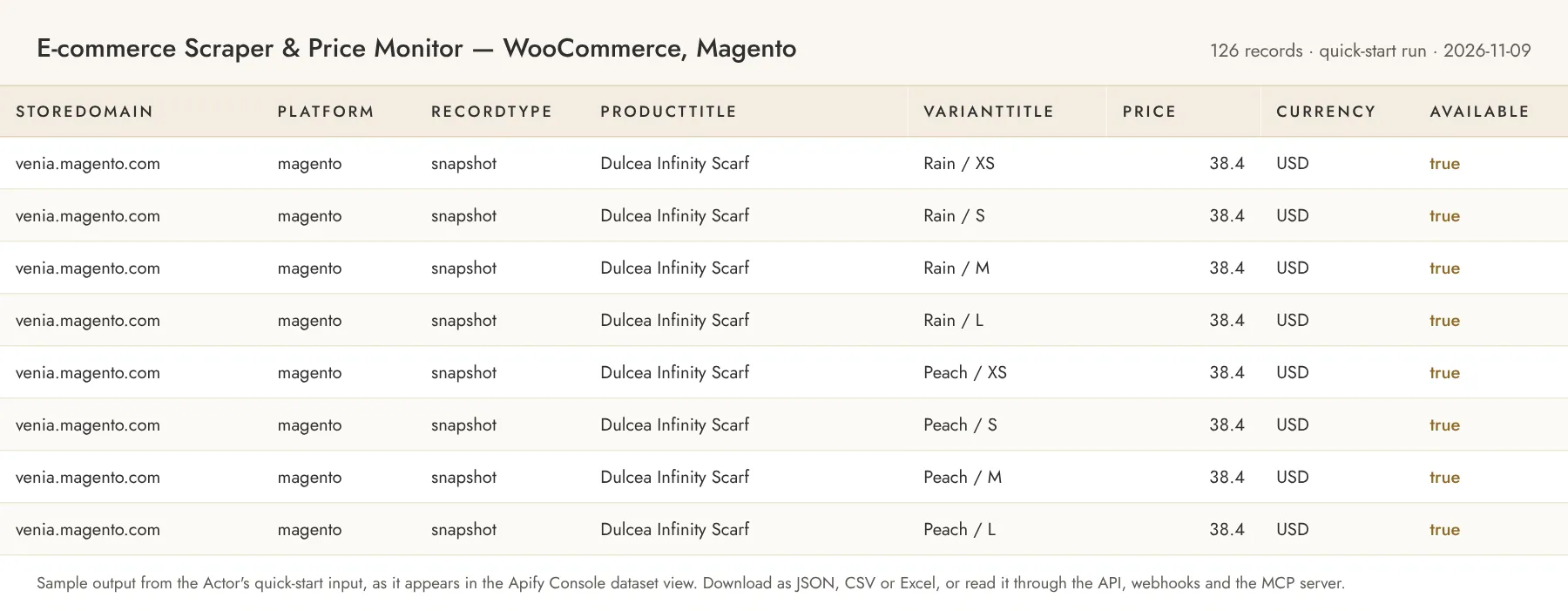
A variant record from the WooCommerce Store API (recordType is snapshot, or baseline on the first changes run):
source is woocommerce-store-api, magento-graphql, shopify-products-json or json-ld. JSON-LD records take barcode from a GTIN, compareAtPrice from a strike-through price, and set available to null when the offer does not say.
Change record (changes mode, from the second run on). changeType is one of new-product, removed-product, new-variant, removed-variant, price-changed, availability-changed, title-changed:
Error items look like { "storeDomain": "example.com", "recordType": "error", "error": "ROBOTS_DISALLOWED", "errorMessage": "..." }, with codes such as BLOCKED, RATE_LIMITED, PASSWORD_PROTECTED, ROBOTS_DISALLOWED, ROBOTS_UNREACHABLE, NO_SITEMAP, NO_PRODUCTS_FOUND, EMPTY_CATALOG, NOT_SUPPORTED, API_ERROR, FETCH_FAILED, TIME_BUDGET, INVALID_STORE_URL or INVALID_PRODUCT_URL. They are charged like one product record, because the work to discover the problem was done.
Pricing
Pay per event. Set a maximum cost per run in the run options to cap spend.
| Event | Price | Notes |
|---|---|---|
| Product or variant record | $0.0007 | Per record in snapshot mode and per baseline record on the first changes run; error items too |
| Detected change | $0.0005 | Per change record in changes mode |
| Catalog page | $0.002 | Per catalog API page (WooCommerce 100 products or variations, Magento 50, Shopify 250) or sitemap file requested, in both modes, including pages that fail or come back empty |
| Store HTML page | $0.0005 | Per HTML page requested: the home page once per store for platform detection, and each product page read for JSON-LD, with or without a Product on it |
| Actor start | $0.00005 | Apify platform event |
Examples: 1,000 variants from a WooCommerce store with 400 products ≈ $0.70 + 4 product pages and ~10 variation pages $0.028 + home page $0.0005 ≈ $0.73. A daily changes check of a 1,000-product Magento store with 20 price changes ≈ 20 pages $0.04 + 20 changes $0.01 ≈ $0.05. A JSON-LD store costs $0.0005 per product page plus $0.0007 per record: 500 products ≈ $0.60.
Store pricing discounts: users on the Scale plan (Silver) pay 10% less per event, Business (Gold) 20% less.
Limits and fair use
- robots.txt is read first and honored for every request: a disallowed catalog API sends
automode to the product pages, and disallowed product pages are skipped without being requested. An unreachable robots.txt (server error or 5 s timeout) means the store is not read. - Requests to one store are spaced at least 500 ms apart with bounded retries on 429/5xx; two stores are processed in parallel. The Actor identifies itself in its User-Agent and uses no proxies, logins, CAPTCHA solving or browsers. Stores that block it return an error item.
- Each store has a time budget (
maxSecondsPerStore, default 900 s) and stops after 60 s without a finished page; HTML pages have a 6 s deadline and catalog pages 20 s, retries included. A stalled first product page, or two failed product pages in a row, end the store. What was read before a stop is kept and charged, and inchangesmode no removals are reported for that store. - Only the first 768 KB of an HTML page is read, and a catalog page or sitemap file over 4 MB is refused; the JSON-LD route reads at most 25 sitemap files per store. Default run memory is 512 MB.
- Product data only: the Actor reads what the store publishes to every visitor and never touches carts, checkout, customer accounts or customer data.
- Ecwid and Shopware 6 are not supported: their storefront APIs need an access token taken from the page, which is the merchant's credential. PrestaShop, OpenCart and Wix's private API are not used either; Wix stores are read through JSON-LD.
Related Actors
- Shopify Catalog Monitor & Price Tracker — Products Scraper: the Shopify-only sibling, same record shape and change events.
- Website Change Monitor — Sitemap Monitor & Page Diff: page and sitemap changes on any site.
Use from AI agents (MCP)
Pin this Actor in the Apify MCP server with https://mcp.apify.com?tools=owlabee/ecommerce-scraper, or let the agent find it with search-actors. It is pay-per-event with limited permissions. Prompts that map directly onto the input:
- "Export every variant of mercantile.wordpress.org with price, stock and SKU as a spreadsheet."
- "Every morning check these three Magento and WooCommerce competitor stores for price drops and new products and post only the changes to my webhook."
- "Track the price and availability of these 20 product pages on different stores and tell me when any of them changes."
FAQ
Does this need proxies or an API key? No. It reads public catalog endpoints and product pages with plain HTTP from Apify's standard infrastructure. Stores that block datacenter traffic return an error item; there is no workaround on purpose.
How is cost controlled? Set maxProductsPerStore, maxSecondsPerStore and the run's maximum total charge. The Actor charges each page and record as it goes and stops cleanly at the limit; in changes mode it keeps the old snapshot so the next run re-detects anything it could not emit.
Which platform will my store be read with? The platform and source fields on every record and in the run's SUMMARY say so. Set platform to force one.
Why does a JSON-LD store cost more per product? Catalog APIs return 50–250 products per request; the JSON-LD route needs one page per product, so each page is a small charge of its own.
Why does the first changes run write so many records? There is nothing to compare against yet, so the full catalog is stored as baseline records at the product rate. From the next run on you only receive change events.
Is there a Shopify-only version? Yes, the Shopify Catalog Monitor, with collection membership; this Actor reads Shopify stores too, without collections.
Support
Questions, bugs or a platform you'd like added? Open an issue on the Actor's Issues tab, or email jacob@owlabee.com.
Changelog
- 2026-11-09 — First release: WooCommerce Store API, Magento GraphQL, Shopify products.json and schema.org Product JSON-LD (Squarespace, BigCommerce, Wix, custom stores) with platform detection and fallback,
snapshotandchangesmodes, product page URL lists, webhook delivery.
Legal
Not affiliated with or endorsed by Automattic, Adobe, BigCommerce, Squarespace, Shopify or Wix; the names identify the platform a store runs on. This Actor accesses only product data the store publishes to every visitor, honors robots.txt and per-host rate limits, and never logs in or collects customer data. Use the data in compliance with each store's terms and applicable law. It is not a consumer reporting agency and its output must not be used for employment, credit, insurance, or tenant screening decisions.


