

Shopify Store Products Export - No Login, Any Store
Pricing
from $0.63 / 1,000 products
Shopify Store Products Export - No Login, Any Store
Export every public product from any Shopify store: prices, sale prices, stock, variants, SKUs, images, tags and dates. Whole catalog or one collection, only-new mode for daily runs. No login, no API key.
Pricing
from $0.63 / 1,000 products
Rating
0.0
(0)
Developer

Cliqto Media
Maintained by CommunityActor stats
0
Bookmarked
2
Total users
1
Monthly active users
a day ago
Last modified
Categories
Share
Export public products from any Shopify store to JSON, CSV or Excel. You get one row per product with prices, sale prices, stock, variants, SKUs, images, tags and dates.
Add one store URL, such as https://www.tentree.com, and click Start. There is no login and no API key. A first run with 20 products from one store takes about 5 seconds and costs about $0.02.
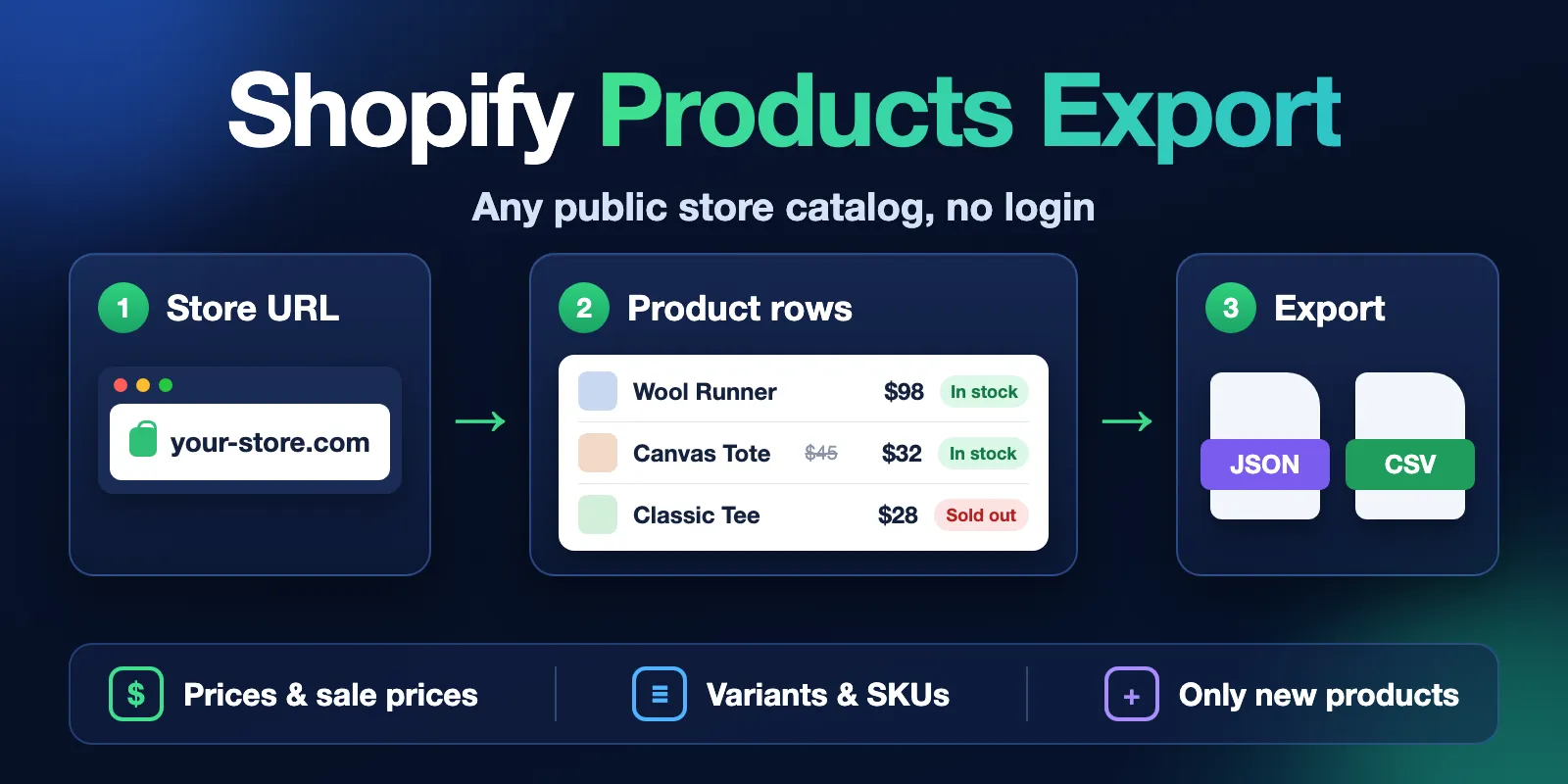
Table of contents
- What it does
- How it works
- Quick start
- Use cases
- Input
- Output
- Pricing
- Limits
- API, export and integrations
- Troubleshooting
- FAQ
- Related Actors
- Support
What it does
Most Shopify stores publish their catalog in a public product feed (/products.json). This Actor reads that feed and saves one Dataset row per product.
You can export the whole catalog or one collection, such as sale or mens. You can add up to 100 stores in one run.
Each product row has the price range, the compare-at (original) price, a sale flag, stock, vendor, product type, tags, options, images and dates. It can also have the full variants list with SKUs.
The Actor only reads public storefront data. It does not log in to the store admin. It does not unlock password-protected stores. This is an independent tool. It is not affiliated with, endorsed by, or sponsored by Shopify Inc.
Good fit
- Watch a competitor's prices, sales and stock.
- Copy a supplier's catalog with SKUs and images into your own system.
- Get a daily list of only the new products in a store.
Not a fit
- Stores that are not on Shopify, or that switched the public feed off. You get a status row, not products.
- Inventory numbers. Shopify's public feed only says if a variant is in stock (
available). It does not give quantities. - Private data: orders, customers, costs, admin-only fields and unpublished products.
What data you get
- Product:
productId,handle,title,vendor,productType,tags,descriptionandurl. - Price:
price,priceMax,compareAtPrice,onSaleandcurrency. - Stock:
available,variantsCountandavailableVariantsCount. - Variants:
variantswithvariantId,sku,price,compareAtPrice,available, options and weight.optionslists sizes, colors and other option values. - Images and dates:
imageUrl,images,createdAt,updatedAtandpublishedAt. - Status rows: one row for each store that gave no products or stopped early, with
statusCodeandstatusMessage.
The data is the same data that the store shows to every visitor.
How it works
- You give one or more store URLs. The Actor checks that each site is a Shopify store and reads its name and currency.
- It reads the store's public product feed page by page, newest products first, until it reaches your maximum. In only-new mode it skips products that earlier runs already returned.
- It saves one row per product in the Dataset, a status row for each store that gave no products or stopped early, and a run summary.
Quick start
-
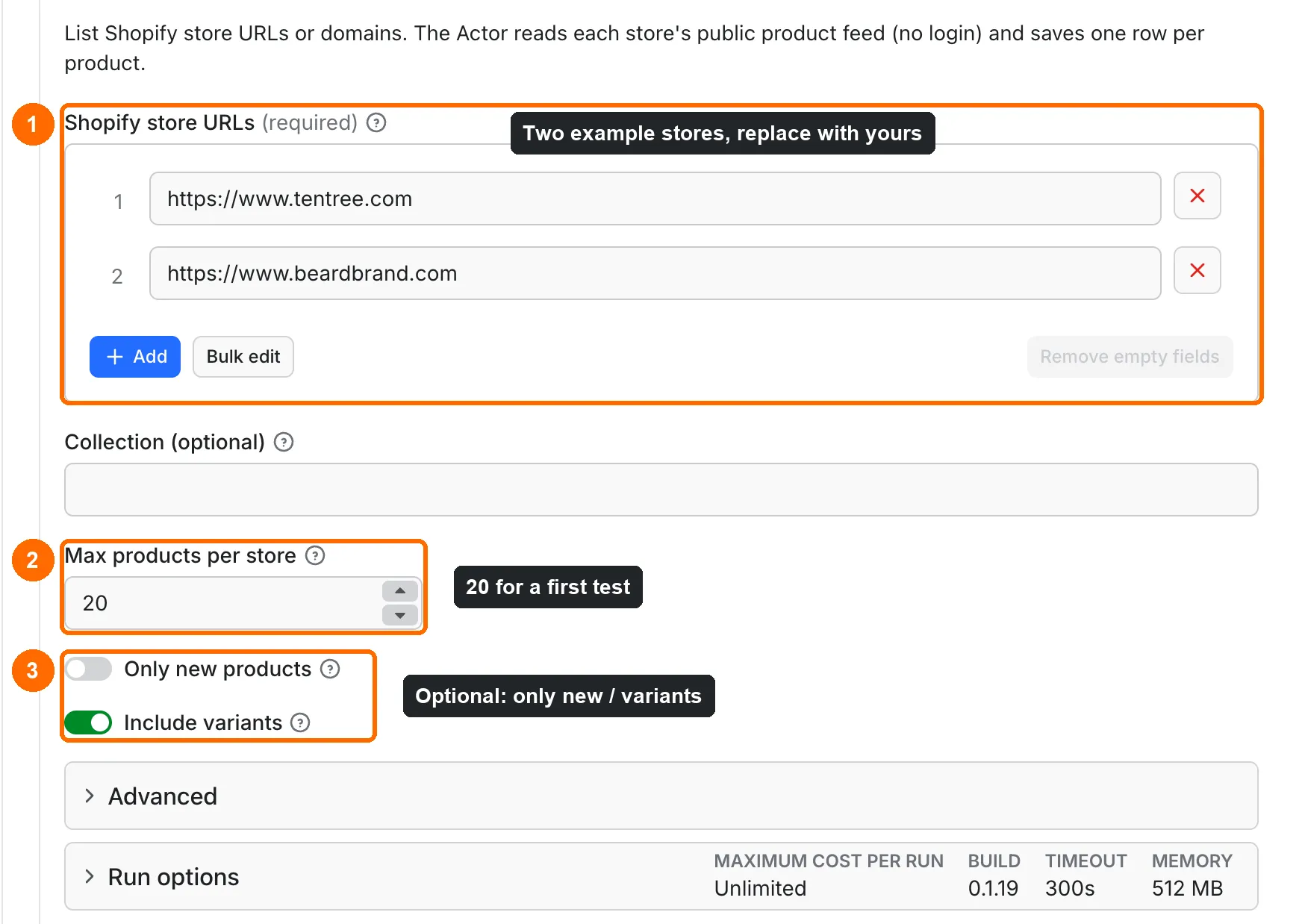
Open the Input tab. Shopify store URLs (
storeUrls) is prefilled with two example stores,https://www.tentree.comandhttps://www.beardbrand.com(box 1 in the picture). Replace them with your stores or keep them for a test. -
Keep Max products per store (
maxProducts) at the prefilled 20 for a first test (box 2). Runs without this field read up to 1,000 products per store. -
Optional: turn on Only new products for a daily schedule, or turn off Include variants for smaller rows (box 3). For a first test, keep them as they are.
-
Click Start.
-
Open the Output tab and the Products view. Check Title, Price, Compare-at price, On sale and In stock.
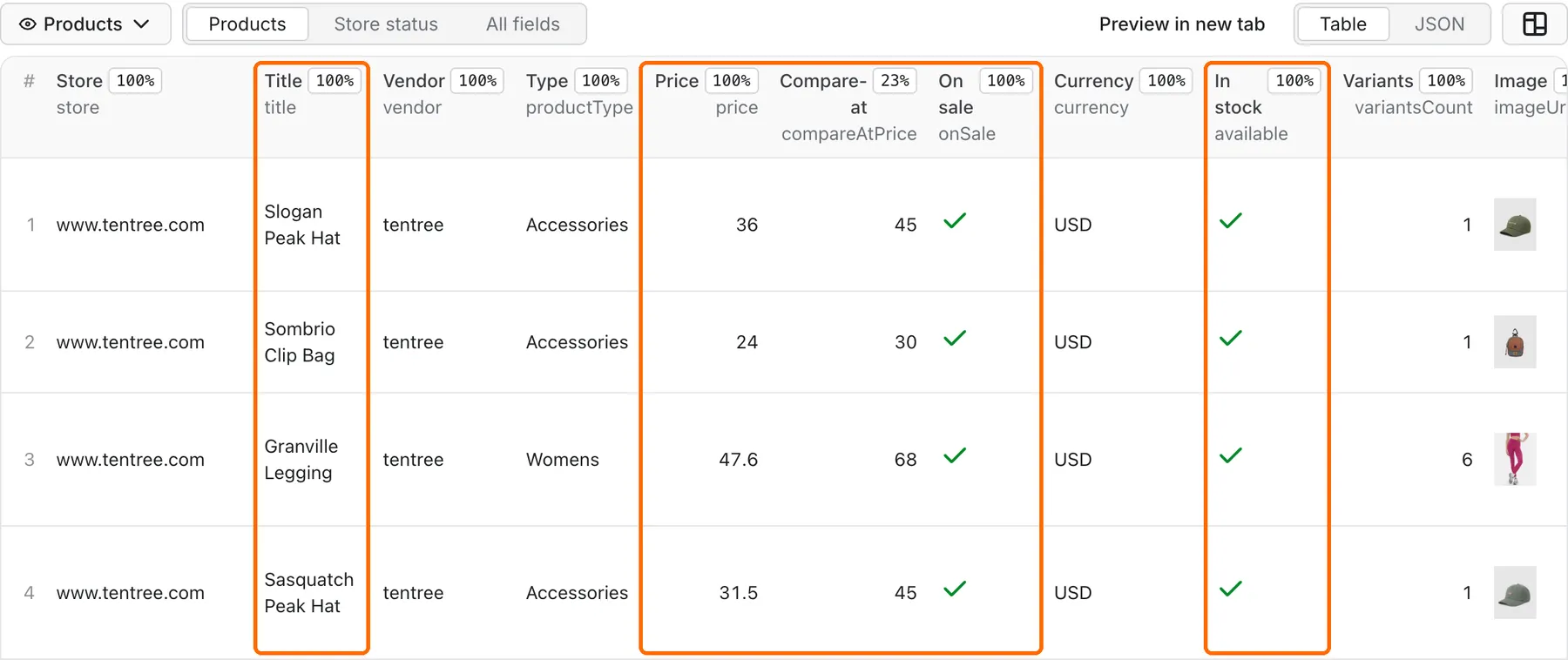
Expected result: 40 product rows (20 from each example store), newest first. The run takes about 5 seconds and costs about $0.04 on the Free plan.
Use cases
| Buyer job | Input path | Output entity | Key fields | Next integration |
|---|---|---|---|---|
| Competitor price and sale watch | storeUrls, schedule | Product row | price, compareAtPrice, onSale, available | Dataset export or API to a sheet |
| Stock watch | storeUrls, includeVariants | Product row | available, availableVariantsCount, variants[].available | Alert on run finish |
| Supplier catalog import | storeUrls, includeVariants: true | Product row with variants | variants[].sku, variants[].price, images, description | JSON/CSV import into your store or PIM |
| New product alerts | storeUrls, onlyNew: true, schedule | New product rows | title, url, publishedAt, isNew | Webhook or integration on run finish |
| Collection research | Collection URL or collection | Product row | productType, vendor, tags, price | Dataset export |
Input
Input fields
| Field | Plain name | Type | Required | Default / prefill | Allowed values | Effect | Example | Recommendation |
|---|---|---|---|---|---|---|---|---|
storeUrls | Shopify store URLs | array of strings | yes | prefill: https://www.tentree.com, https://www.beardbrand.com | 1–100 URLs or domains | Stores to export. A collection URL exports only that collection. | kith.com, https://kith.com/collections/sale | Use the store's public domain. Duplicates are merged. |
collection | Collection | string | no | empty (whole catalog) | collection handle | Applied to every store without a collection in its URL | sale | Use it for big catalogs or one category. |
maxProducts | Max products per store | integer | no | default 1,000; prefill 20 | 1–25,000 | Stops each store after this many product rows | 500 | Each product row is billed, so set the number you need. |
onlyNew | Only new products | boolean | no | false | true / false | Returns only products that earlier runs did not return | true | Use it with a schedule. |
includeVariants | Include variants | boolean | no | true | true / false | Adds the variants list (SKU, price, stock per size/color) | false | Turn it off for smaller rows. Price ranges and stock counts stay. |
stateKey | State key | string (secret, Advanced section) | no | default | letters, digits, -, _; up to 40 | Name of the only-new memory | competitors-daily | Use a different key for each schedule. |
You can write a store as a full URL or as a domain. The Actor adds https://. Invalid URLs get a free status row and do not stop the other stores.
Headless stores (custom front ends) often hide the feed on their own domain. The Actor then tries the store's *.myshopify.com domain.
Interacting settings
| When | Input A | Input B | Effective behavior | Example | Cost/result effect |
|---|---|---|---|---|---|
| A store URL has a collection | storeUrls | collection | The collection in the URL wins for that store | kith.com/collections/sale + collection: mens | Only sale is read for Kith |
| Only new is on | onlyNew | maxProducts | The first run returns the newest products up to the max. It treats all older products as already seen. Later runs return only products published since. | onlyNew: true, maxProducts: 50 | First run: up to 50 rows. Unchanged store: 0 product rows. |
| Only new is on, many new products | onlyNew | maxProducts | A run stops at the max. The next run returns the rest of the new products. | 400 new, max 300 | 300 rows, then 100 rows |
| Different schedules | onlyNew | stateKey | Each key has its own memory | stateKey: daily-sale | Schedules do not hide each other's products |
Input examples
One store, first test
Expected behavior: the Actor reads the newest 20 products of the store.
Expected output: 20 product rows with title, price, compareAtPrice, available and variants.
Limit or cost note: about $0.02 on the Free plan.
Daily new products from several stores
Expected behavior: the first run saves up to 200 newest products per store. Later runs save only new products.
Expected output: product rows with isNew: true after the first run. A store with nothing new gives no product rows.
Limit or cost note: an unchanged run of 2 stores costs $0.0014.
Output
The run saves two kinds of rows in the same default Dataset: product rows (recordType: product) and store status rows (recordType: store-status) for stores that gave no products or stopped early. The views do not filter rows. The Products view shows the product columns, and the Store status view shows the status columns. To get only one row type, filter by recordType. A run summary is saved as RUN_SUMMARY in the key-value store.
Output fields
| Field | Meaning | Type | Can be empty? | Example / enum | Source / notes |
|---|---|---|---|---|---|
recordType | Row type | string | no | product, store-status | Set by the Actor |
status | Row status | string | no | complete, not_found, error | not_found means no data; error means the store failed |
store | Store domain | string | conditional | www.tentree.com | After redirects |
storeName | Store name | string | yes | Tentree | Store's public meta.json |
storeUrl | Store address | string | conditional | https://www.tentree.com | After redirects |
productId | Shopify product ID | integer | product rows: no | 8143518761146 | Feed |
title | Product title | string | no | Slogan Peak Hat | Feed |
vendor | Brand or vendor | string | yes | tentree | Feed |
productType | Product type | string | yes | Accessories | Set by the store |
tags | Product tags | array | yes | ["accessories", "baseball-cap"] | Feed |
description | Description as plain text | string | yes | Show them what's on your mind... | HTML removed, up to 5,000 characters |
price | Lowest variant price | number | yes | 36 | null if the store hides it. A real price of 0 stays 0. |
priceMax | Highest variant price | number | yes | 36 | Feed |
compareAtPrice | Original price of the cheapest variant | number | yes | 45 | null when there is no compare-at price |
onSale | Sale flag | boolean | yes | true | compareAtPrice is above price |
currency | Store currency | string | yes | USD | Store's base currency from meta.json |
available | In stock | boolean | yes | true | At least one variant is in stock |
variantsCount / availableVariantsCount | Variants / variants in stock | integer | yes | 1 / 1 | Feed |
options | Options and values | array | yes | [{"name":"Size","values":["ONE"]}] | Feed |
variants | Variants list | array | yes | see example | null when includeVariants is off |
imageUrl / images | Main image / all images | string / array | yes | Shopify CDN URL | Feed |
createdAt / updatedAt / publishedAt | Dates | string | yes | 2026-10-28T02:51:19.000Z | UTC ISO 8601 |
url | Product page | string | yes | https://www.tentree.com/products/... | Built from store and handle |
isNew | New since the last run | boolean | yes | true | Only-new mode; null on the first run and when the mode is off |
statusCode / statusMessage | Reason for a status row | string | status rows only | NOT_SHOPIFY, PASSWORD_PROTECTED | Plain-English message |
productsFound | Product rows saved before the stop | integer | status rows only | 0 | Set by the Actor |
sourceUrl / fetchedAt | Feed page and fetch time | string | no | https://www.tentree.com/products.json?... | Set by the Actor |
Output entities and surfaces
| Situation | Dataset/API/KVS/live view | Result shape | User action |
|---|---|---|---|
| Normal item | Dataset, recordType: product (Products view) | One product row | Export or read the fields |
| Domain-empty result | Dataset, recordType: store-status (Store status view) | status: not_found, codes NOT_SHOPIFY, COLLECTION_NOT_FOUND, PASSWORD_PROTECTED, NO_PRODUCTS | Check the URL or the collection |
| Only new, nothing new | RUN_SUMMARY | No product rows, message "No new products since the previous run." | Nothing to do |
| Partial result | Dataset, recordType: store-status (Store status view) | status: error with productsFound above 0 | Run again later; the rows already saved are valid |
| Technical failure | Dataset + RUN_SUMMARY | status: error, codes BLOCKED, RATE_LIMITED, SOURCE_UNAVAILABLE | Run again later |
The run status is Succeeded when at least one store gave products or the result is honestly empty. It is Failed only when the input is invalid, or when no store gave products and at least one store failed with an error.
Output example
This example is trimmed. It shows one product from the Quick start run. The tags, description, imageUrl, images and the variant imageUrl fields are left out here. null means the store does not publish the value. It never stands for zero.
Pricing
Pricing unit
You pay per event. Platform usage is included. You do not pay for compute or proxies separately.
| Event | When it is charged | Free plan | Bronze | Silver | Gold and higher |
|---|---|---|---|---|---|
| Actor start | Once per run (per GB of memory, at least one; default 512 MB = one) | $0.001 | $0.001 | $0.001 | $0.001 |
| Store checked | Once for each valid store URL that the Actor tries to read, whatever the result | $0.0002 | $0.0002 | $0.0002 | $0.0002 |
| Product | Each product row | $0.0009 | $0.00081 | $0.00072 | $0.00063 |
Per 1,000 products this is $0.90 on the Free plan, $0.81 on Bronze, $0.72 on Silver and $0.63 on Gold and higher.
Status rows are free. Invalid URLs are not charged as a store. A store that is not Shopify, blocked or empty is still a checked store ($0.0002), which is less than one product.
An only-new run with nothing new pays only the start and the store fees. If you set a maximum cost per run, the Actor stops before it goes over. Stores it did not read get a free CHARGE_LIMIT status row.
Cost examples
| Products from 1 store | Events | Free | Bronze | Silver | Gold+ |
|---|---|---|---|---|---|
| 1 | 1 start, 1 store, 1 product | $0.0021 | $0.00201 | $0.00192 | $0.00183 |
| 10 | 1 start, 1 store, 10 products | $0.0102 | $0.0093 | $0.0084 | $0.0075 |
| 20 (first test) | 1 start, 1 store, 20 products | $0.0192 | $0.0174 | $0.0156 | $0.0138 |
| 100 | 1 start, 1 store, 100 products | $0.0912 | $0.0822 | $0.0732 | $0.0642 |
| 1,000 | 1 start, 1 store, 1,000 products | $0.9012 | $0.8112 | $0.7212 | $0.6312 |
The start and store fees are the same on every plan. For one or a few products they are most of the price.
| Other scenario | Input scope | Events | Free plan charge | Stop/cap behavior |
|---|---|---|---|---|
| Quick start prefill | 2 stores × 20 products | 1 start, 2 stores, 40 products | $0.0374 | Stops each store at 20 |
| Many stores | 10 stores × 100 products | 1 start, 10 stores, 1,000 products | $0.903 | Stops each store at 100 |
| Only new, nothing new | 1 store, onlyNew: true | 1 start, 1 store, 0 products | $0.0012 | No product rows |
| Wrong collection | 1 store, unknown collection | 1 start, 1 store, 0 products | $0.0012 | One COLLECTION_NOT_FOUND status row |
| Wrong URLs | 100 sites that are not Shopify | 1 start, 100 stores, 0 products | $0.021 | Status rows only |
Limits
- 100 stores and 25,000 products per feed. One run reads up to 100 stores. Shopify does not serve more than 25,000 products from one feed. For bigger stores, run collections one by one.
- Time. A big store gives about 120 products per second: 1,000 products took about 5 seconds, 18,847 products took 154 seconds. One store up to the 25,000 limit fits in the default 300-second timeout. For several big stores in one run, raise the timeout in Run options or split the stores.
- Currency. Prices are in the store's base currency (
currency), whatever country the run comes from. If the store answers in another market's prices,currencyisnulland the run summary has a warning. - Slow-down and blocks. The feed is public, so the Actor first reads it directly. When a store answers HTTP 429 (too many requests) or blocks the request, the Actor moves that store only to Apify datacenter proxies at once and retries there with a new IP. If the proxy is refused twice in a row for that store too, the Actor stops on that store and goes on with the others. When a store is briefly down (HTTP 503), the Actor waits and tries again. The proxy is included in the price. The run summary then has a warning with the store names.
- Order. Rows come newest first by publish date, as the store's feed gives them.
- Partial results. If a store fails after some pages, the rows already saved stay in the Dataset. The store also gets a status row with
status: errorandproductsFound. The run summary lists every store with its result. - No private data. No orders, customers, costs, inventory quantities, unpublished products or password-protected stores.
API, export and integrations
- API: start the Actor with the Apify API and read the default Dataset with
?view=products, then keep rows withrecordTypeequal toproduct. - Export: download the Dataset as JSON, CSV, Excel, XML or HTML in the Output tab.
- Webhooks / no-code: use an Apify integration or webhook on run finish to send rows to Make, Zapier, Google Sheets or your own URL.
Scheduling and monitoring
To get new products every day, save your input as a task and add a schedule in Apify Console. Set onlyNew: true.
- The first run saves up to
maxProductsnewest products per store. All older products count as already seen. - Each later run saves only products published since the last run, with
isNew: true. - A run with nothing new saves no product rows and costs only the start and store fees.
- Use a different
stateKeyfor each schedule, so two schedules do not hide products from each other.
For price or stock watching, run the full export on a schedule without onlyNew and compare price and available between runs in your own tool.
Use with AI agents (MCP)
- Apify MCP server URL with only this Actor:
https://mcp.apify.com?tools=cliqtomedia/shopify-products-scraper. - Smallest useful input:
{"storeUrls": ["https://www.tentree.com"], "maxProducts": 20}. - Key output fields:
title(product name),priceandcompareAtPrice(current and original price),available(in stock),url(product page),recordType(productorstore-status). - A run of 20 products takes about 5 seconds and costs about $0.02. One run reads up to 100 stores and up to 25,000 products per store.
Troubleshooting
The store gives a NOT_SHOPIFY row
Symptom: no products and statusCode: NOT_SHOPIFY.
Likely reason: the site is not on Shopify, or it switched off the public feed. Some headless stores also hide it on their *.myshopify.com domain.
Check: open https://<store>/products.json in a browser.
Action: if the browser shows no product list, this Actor cannot read that store.
COLLECTION_NOT_FOUND
Symptom: a status row for the store with this code.
Likely reason: the collection handle is wrong, or the store moved the collection to another page.
Check: open the collection in the store and copy the part after /collections/ from the address bar.
Action: run again with that handle.
BLOCKED, RATE_LIMITED or SOURCE_UNAVAILABLE
Symptom: a status row with status: error. The run may be Failed when no store gave products.
Likely reason: the store's bot protection or a temporary outage. The Actor already retried that store through Apify datacenter proxies and gave up after two refusals in a row there.
Check: statusMessage and productsFound in the row, and the proxy warning in RUN_SUMMARY.
Action: run again later. Rows already saved in the Dataset are valid.
Fewer products than the store shows
Symptom: the Dataset has fewer rows than the store's website.
Likely reason: maxProducts stopped the store, the 25,000 feed limit, or products that the store hides from its public feed.
Check: the warnings and productsFound in RUN_SUMMARY.
Action: raise maxProducts, or run collection by collection.
FAQ
Do I need a Shopify login or API key?
No. The Actor reads the store's public product feed. Password-protected stores are skipped with a PASSWORD_PROTECTED row.
Why are there no products in an only-new run?
Nothing was published in the store since the last run with the same stateKey. The run costs only the start and store fees. The first only-new run returns the newest products and treats all older products as already seen. The memory lives in the key-value store shopify-products-scraper-state in your account. If the Actor may not open that store (for example, another tool made a store with the same name), it uses cliqtomedia-shopify-products-state instead. If neither opens, the run still exports products like a first only-new run and adds a STATE_UNAVAILABLE warning to the run summary.
Is the stock number exact?
Shopify's public feed only tells if a variant can be bought. The available field is this flag. Quantities are not public.
How fresh is the data?
Each row is read live from the store at fetchedAt.
Related Actors
- Google Shopping Scraper - Prices, Stores & Offers, No Login — compare the same products across many shops in Google Shopping.
- Website JSON-LD Structured Data Scraper — read product data from stores that are not on Shopify.
- XML Sitemap URLs Extractor: Indexes & Gzip — list all product and collection pages of a store from its sitemap.
- eBay Sold Listings Scraper - Sold Prices & Dates — check what the same products really sell for on eBay.
Support
For a bug, a question or a feature request, open an issue on this Actor's Issues tab in Apify Store.
Include the run ID, the store URL and the statusCode from the row or RUN_SUMMARY.
Do not send tokens, cookies, private account data or full sensitive payloads.


