
Viral Video Analyzer: TikTok, Instagram & YouTube Transcript
Pricing
from $5.00 / 1,000 video transcribeds
Viral Video Analyzer: TikTok, Instagram & YouTube Transcript
Transcript, hook score, structure and a reusable script template for any TikTok, Instagram Reel or YouTube Short. Paste a link or a whole profile.
Pricing
from $5.00 / 1,000 video transcribeds
Rating
0.0
(0)
Developer

PeakClips
Maintained by CommunityActor stats
1
Bookmarked
2
Total users
1
Monthly active users
21 hours ago
Last modified
Categories
Features
Share
Find out why a short-form video works, then reuse it. Paste any TikTok, Instagram Reel or YouTube Short, or a whole profile, and get the transcript, the on-screen text, a scored hook, the beat-by-beat structure, the CTA and a fill-in-the-blank script template. Profile links also get a profile report that compares the creator's videos and shows what's driving their views.
No login, no cookies, no account connected. Failed or private videos are never charged.
Most transcript tools give you the words. This one gives you the script: what's said, what's shown, how it's built, and why it performs.
What you get
| You get | Why it matters |
|---|---|
| Transcript with timestamps, in the video's own language | The actual script, word for word. Uses the platform's captions when they exist, AI speech-to-text when they don't |
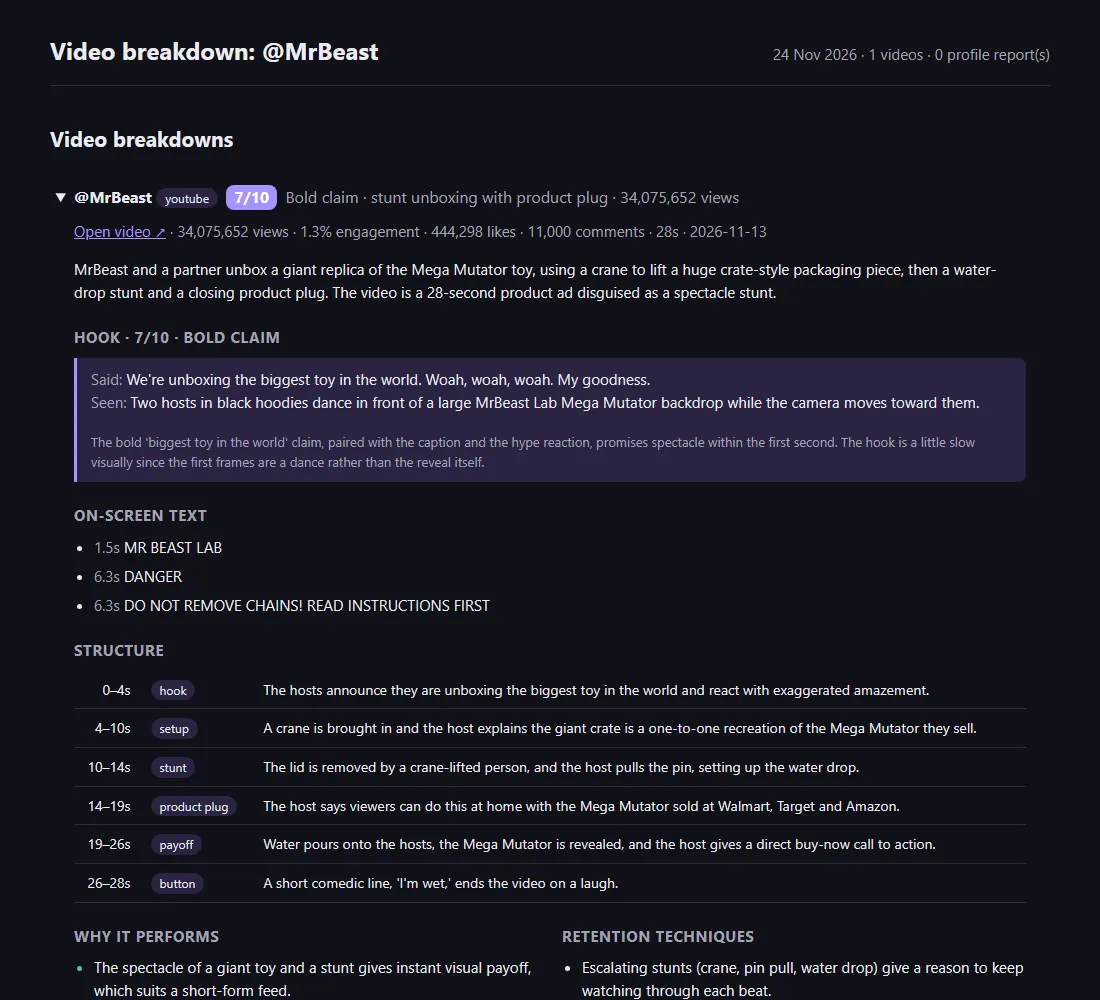
| On-screen text, read from the video itself | Text overlays often carry the hook, the list or the punchline. Audio-only tools miss them completely |
| Works on silent, music-only videos | Recipes, listicles and tutorials with no speech still get a full breakdown from what's on screen |
| Hook breakdown: spoken, on-screen and visual, plus hook type and a 1-10 score with the reason | The first 3 seconds decide whether people keep watching. Hook types are sortable: question, bold claim, curiosity gap, story opener and more |
| Beat-by-beat structure with timestamps | hook → setup → tension → payoff → CTA, so you can see exactly how the video holds attention |
| Call to action, typed | Follow, comment, share, save, link or none |
| Why it performs, tied to this video and its numbers | Concrete reasons, not generic advice |
Reusable script template with [placeholders], plus 3 remix ideas | Turn a competitor's winner into your next video in minutes |
| Stats: views, likes, comments, shares, saves, engagement rate, followers, sound, hashtags, post date | Rank and filter results by what actually performed |
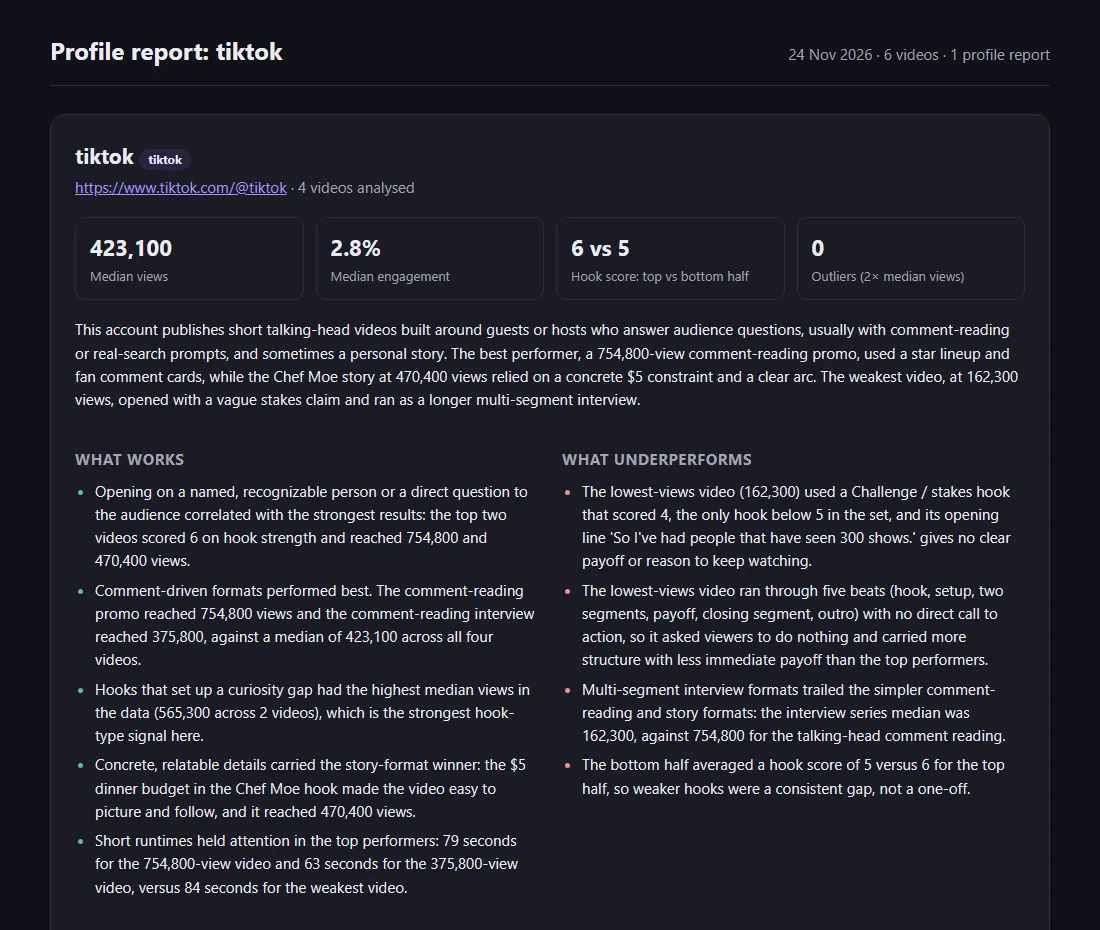
| Profile report (profile links) | Which hooks and formats get the most views for this creator, top vs bottom performers, outliers, their signature structure and 5 new video ideas |
One tool, three platforms, one consistent output. Mix TikTok, Instagram and YouTube links in the same run and compare them side by side.
Profile report: what's working for this creator
Paste a profile link (for example https://www.tiktok.com/@creator) and, after breaking down each video, the tool adds one report row per profile:
- Summary of what the creator makes and what drives their best videos
- What works and what underperforms, each backed by the numbers
- Winning hooks with real quotes from their top videos
- Signature structure: the beat pattern they repeat
- Script template modelled on their top performers
- 5 video ideas that apply the winning patterns
- Stats: median views and engagement, hook type and format leaderboards, top-half vs bottom-half hook scores, and outliers (videos at 2x or more of the creator's median views)
Real excerpt, from a 4-video sample:
"Comment-driven formats led the views: the comment reading video (754,600 views) and the comment Q&A (375,700 views) both use real viewer comments as the content spine… The top two videos had no CTA, while both lower-ranked videos closed with one. With four videos this is only a pattern to test, not a rule."
It needs at least 3 analysed videos, and you can switch it off.
Output sample
One real row (trimmed). Every video produces one row like this:
The Overview tab shows the headline columns (creator, views, engagement, hook score, hook type, hook, format, niche, summary) as a table. Download everything as JSON, CSV, Excel or HTML, or fetch it through the API.
A ready-to-share report with every run
Every Full breakdown run also saves a readable report page (REPORT.html), so you don't have to read raw data. Open it from the run's Output tab ("Report (HTML)"), or from Storage → Key-value store → REPORT.html, where you can also download it. It includes:
- Profile reports: headline numbers, what works vs what underperforms, winning hooks, signature structure, script template, video ideas, hook type and format leaderboards, and every video ranked against the creator's median
- A breakdown card for every video: hook score and why, what's said, shown and seen in the opening, on-screen text, a beat-by-beat structure timeline, CTA, why it performs, retention techniques, script template and remix ideas
It's a single file with nothing to install. Email it to a client, drop it in Slack, or print it to PDF from your browser.
Quick start (no code)
- Paste links into Videos or profiles: single videos, profiles, or both, on any of the three platforms.
- For profiles, set Max videos per profile (newest first).
- Choose Full breakdown or Transcript + stats only.
- Click Start. Results appear in the Output tab as each video finishes.
| Platform | Single video | Profile |
|---|---|---|
| TikTok | https://www.tiktok.com/@user/video/123… | https://www.tiktok.com/@user |
| YouTube Shorts | https://www.youtube.com/shorts/abc… | https://www.youtube.com/@channel |
| Instagram Reels | https://www.instagram.com/reel/abc…/ | https://www.instagram.com/user/ |
What people use it for
- Competitor research: paste 5 competitor profiles and get a report on what's working for each, plus a swipe file of their best hooks.
- Weekly content monitoring: save the run as an Apify Task, set Only videos posted on or after, and add a Schedule. You get a breakdown of every new video your competitors post, and only pay for new ones.
- Script writing: take a top performer's
script_templateand fill in your own topic. - Briefing editors and UGC creators: send the structure and hook breakdown of a reference video instead of "make it like this one".
- Hook libraries: sort hundreds of hooks by type and score, and see which ones your niche rewards.
- Repurposing: turn transcripts into blog posts, threads and captions.
- AI and research pipelines: clean, structured short-form video data for analysis, RAG or model training.
How much does it cost?
You only pay for what succeeds. Failed, private, deleted and skipped videos are free.
| What | Price |
|---|---|
| Full breakdown, per video | $0.03 ($30 per 1,000) |
| Transcript + stats, per video | $0.005 ($5 per 1,000) |
| Profile report, per profile | $0.10 |
| Instagram fetch, extra per Instagram video | $0.003 |
Examples:
- 1 video, full breakdown: $0.03
- A creator's last 20 videos + profile report: $0.70
- 5 competitors × 10 videos + 5 reports: $2.00
- 1,000 transcripts: $5
TikTok and YouTube Shorts have no extra fees. Instagram videos add $0.003 each, which covers fetching them through Apify's official Instagram Reel Scraper; you don't need to run or pay for that scraper separately. Set Max cost per run in the run options to cap any run.
Free plan: Apify's free plan includes $5 of monthly credit, enough for about 150 full breakdowns. Full breakdowns are limited to 10 videos per run on the free plan. Any paid Apify plan removes the limit.
Input
| Field | What it does | Default |
|---|---|---|
| Videos or profiles | TikTok, Instagram Reel and YouTube Shorts links, as videos or profiles | required |
| What to extract | full breakdown or transcript + stats only | full |
| Max videos per profile | Newest videos to analyse per profile link (1-200) | 10 |
| Profile report | Add one "what's working" report per profile (full mode) | on |
| Only videos posted on or after | Skip older videos, for free. Ideal for scheduled monitoring | none |
| Read on-screen text | Read text overlays and visuals from stills | on |
| Analysis language | Language of the written analysis. Transcripts stay in the original language | English |
| Include timestamped transcript segments | Start/end time for every transcript line | on |
| Always transcribe audio | Ignore platform captions and run speech-to-text | off |
Example input:
Use it from AI agents (Claude, ChatGPT, Cursor) and the API
This Actor is available as a tool through the Apify MCP server, so AI agents can call it directly. Give your agent this:
Python:
It also works with Make, Zapier, n8n, Google Sheets, Slack and webhooks through Apify integrations.
How it compares to a transcript scraper
| Transcript scraper | This Actor | |
|---|---|---|
| Transcript | Yes | Yes, with timestamps |
| On-screen text and silent videos | No | Yes |
| Hook score and hook type | No | Yes, 1-10 with the reason |
| Beat-by-beat structure and CTA | No | Yes |
| Reusable script template and remix ideas | No | Yes |
| What's working across a whole profile | No | Yes, profile report |
| TikTok, Instagram and YouTube in one run | Usually one platform | Yes, same output format |
| Failed or private videos | Varies | Never charged |
No login or cookies: nothing is connected to your social accounts. Runs that restart are never double-charged.
FAQ
How do I get a TikTok transcript? Paste the TikTok video link and run in either mode. You get the full transcript with timestamps, from TikTok's own captions when available, otherwise from AI speech-to-text.
How do I transcribe Instagram Reels?
Paste the reel link (/reel/…) or the creator's profile link. Reels are fetched through Apify's official Instagram scraper and transcribed from the audio.
Can I get transcripts of YouTube Shorts?
Yes. Paste a Shorts link or a channel link (youtube.com/@channel) to analyse the channel's latest Shorts.
Does it work on videos with no speech? Yes. In full mode the AI reads the on-screen text and visuals, so music-only and text-on-screen videos still get a hook, structure and script breakdown.
Which languages are supported? Transcripts work in most languages and stay in the original language. Set Analysis language to get the written analysis in Spanish, German, French, Portuguese or any other language.
How accurate is the hook score? It's an expert-style judgement of how strongly the opening stops the scroll, with the reasoning written out. Use it to compare videos and spot patterns, alongside the real view and engagement numbers that come with every row.
Can I monitor competitors automatically? Yes. Save your input as a Task, set Only videos posted on or after, and add an Apify Schedule (for example, weekly). Older videos are skipped for free.
Can I export to Google Sheets or Excel? Yes. Download CSV or Excel from the Output tab, or connect the Google Sheets integration.
Does it work on private accounts? No. Only public videos and profiles.
Is it legal to analyse TikTok, Instagram and YouTube videos? The Actor only reads publicly available videos and metadata, without logging in. You're responsible for how you use the results, including platform terms and copyright. Use it for research and inspiration, and don't republish other creators' content as your own.
What happens if a video fails? You get a row explaining why (private, deleted, or temporarily blocked by the platform) and you're not charged for it.
Support
Found a link that doesn't work, or want a feature? Open an issue on the Issues tab. We read every one and fix problems fast.


