

App Store Reviews & Ratings Scraper – Google Play App Data
Pricing
from $0.50 / 1,000 results
App Store Reviews & Ratings Scraper – Google Play App Data
Search the App Store by keyword or load specific apps from Apple and Google Play (by package name) into one dataset: ratings, rating counts, price, category, version, update date, size, languages and App Store reviews – Google Play has no review feed. One record shape for both stores.
Pricing
from $0.50 / 1,000 results
Rating
0.0
(0)
Developer

Perceptron Data
Maintained by CommunityActor stats
0
Bookmarked
1
Total users
1
Monthly active users
5 days ago
Last modified
Categories
Share
App Store & Google Play Data
Give app IDs or App Store keywords, get one row per app with the same fields for both stores: rating, rating count, price, version, category. App Store keyword ranks and up to 500 recent App Store reviews per app come with it.
Limits: keyword search and reviews are App Store only – Google Play apps load by package name, and Google publishes no review feed. Apple's public feed often holds fewer than 500 reviews; every row says how complete its reviews are. Twelve country store fronts.
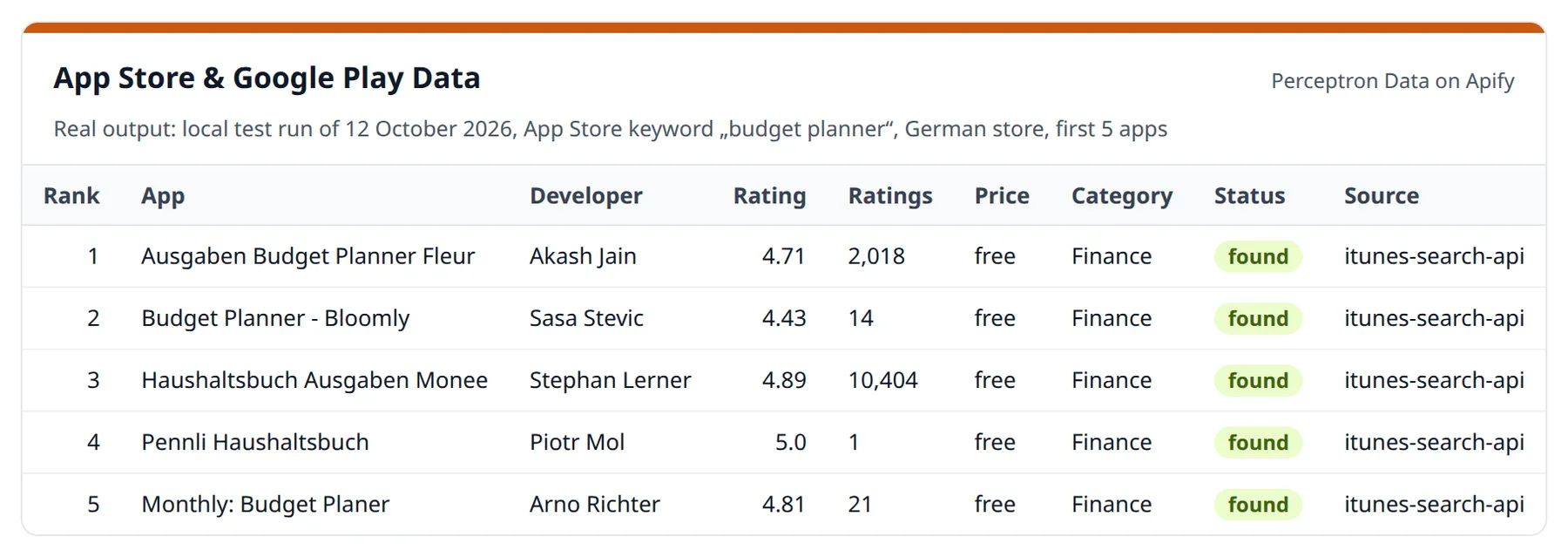
Comparing an app across both stores usually means merging two exports with different fields by hand. Here both stores come back with the same field names – and every row says where a number comes from, for which country and when it was checked.
How to use – step by step
- Click Try for free on this page (a free Apify account is enough) – the form opens with the keyword "budget planner" for the German store.
- Keep What to do: Auto and enter Search keywords for an App Store search – or paste apps into Apple apps: ids, bundle ids or App Store URLs and Google Play apps: package names or Play URLs.
- Pick the Store country; optionally switch on Include reviews (App Store) and set Maximum reviews per app.
- Set Maximum apps (default 50) and click Start. Five apps for one keyword took 1.3 seconds in a local test run on 12 October 2026.
- Open the Output tab: the Apps view shows store, title, developer, rating, rating count and its scope, price, category, last update, country and check time. Export as CSV, Excel or JSON, or read the rows through the API. Inputs that were not found are listed under
NOT_FOUNDin the key-value store – not charged.
Why the comparison needs care
Measured on 12 October 2026 (Spotify):
| Source | Rating | Rating count | Counts… |
|---|---|---|---|
| App Store Germany | 4.70★ | 5,794,390 | Germany only |
| App Store USA | 4.77★ | 42,537,199 | USA only |
| Google Play | 4.18★ | 36,467,948 | worldwide |
Apple counts ratings per country store, Google Play shows one worldwide
count (identical in every country). Put "Apple Germany" next to "Play" and
you compare a country with the world. Each row therefore carries
ratingCountScope (country or worldwide) and country, so the numbers
are never mixed up by accident.
What you get per app
| Field | Example |
|---|---|
store, title, developer, developerId | apple · Instagram · Instagram, Inc. |
rating, ratingCount, ratingCountScope | 4.7 · 5,794,390 · country (Apple) / worldwide (Play) |
price, currency, isFree | 0 · EUR · true (null when the store shows no price, e.g. Apple Arcade) |
category, categoryCode, contentRating | Communication · COMMUNICATION (Play) / 6005 (Apple) · 12+ |
version, lastUpdated, releaseDate, releaseNotes | both stores (Play: version only where it does not "vary with device") |
installs, minInstalls, installCount | Google Play: "1,000,000,000+" and the count embedded in the page |
summary, description, screenshotCount, inAppPurchases, containsAds | listing content (summary, inAppPurchases, containsAds: Play) |
sizeBytes, languages, supportedDevices, ratingCurrentVersion | Apple only — Google no longer shows them |
iconUrl, storeUrl, sellerUrl, developerEmail, privacyPolicyUrl | links (developerEmail, privacyPolicyUrl: Play) |
searchKeyword, searchPosition | in search mode: where the app ranks |
reviews[], reviewsStatus | App Store: date, rating, title, text, app version, author — plus how complete they are |
input, status, country, checkedAt, source | the proof line: what you asked for, what was found, where, when |
Use cases
- Store optimisation (ASO) — which apps rank for your keywords, in which position, and what their listings look like
- Competitor tracking — schedule a weekly run and watch ratings, prices, versions and update cadence move
- Market research — the size and quality of a category before you build in it
- Review mining — hundreds of recent reviews as structured text, ready for sentiment or topic analysis
- Cross-store audits — where your app is rated worse and why
- AI agents — one clean schema for both stores, callable via MCP
Input examples
Keyword research in the German App Store:
Compare one product across both stores — ids or the store links, as you copy them:
Mine reviews of a competitor:
mode defaults to auto: app ids or store URLs given → those apps are
loaded; otherwise the keywords are searched. Each app is loaded once, even if
it appears twice in the input.
What does a run cost?
| Records | Cost |
|---|---|
| 100 apps | $0.11 |
| 1,000 apps | $1.01 |
| 1 app with 500 reviews | $0.01 |
$0.01 per run start plus $0.001 per app record (Free plan; lower on paid plans — see the Pricing tab). Reviews come nested inside the app record, so a review-heavy run costs the same per app.
You pay only for apps that were found. Inputs that do not exist, are not
an app id or URL, or could not be loaded because a store refused or failed are
not stored as rows and cost nothing — they are listed in the run's
key-value store (NOT_FOUND, FAILED, REMAINING) and named in the status
message. Duplicates in the input are loaded once; if Apify restarts a run on
another server, nothing is delivered or charged twice.
Limitations – stated honestly
- Keyword search covers the App Store only. Google Play apps are loaded
by package name or Play URL (
com.whatsapp, not "WhatsApp"). - Reviews are Apple only, and Apple's feed is patchy. The public feed holds
at most 500 recent reviews per app and country (10 pages of 50) — but often
far fewer, with empty pages in between (measured 12 Oct 2026: Spotify
Germany, page 1 empty, pages 2–10 full). The actor reads past empty pages and
every row says how complete its reviews are:
reviewsStatus(ok,partial,feed_empty,page_featured_only,error) plus the number of feed pages read, empty and failed. When the feed is empty, the few featured reviews of the app's store page are used (reviewsSource: app-store-page). Measured 12 Oct 2026 (search "budget planner", Germany, 42 apps, up to 500 each): 7,463 reviews; 35 apps read to the end of the feed, 7 small apps without any review in Apple's feed. Google Play publishes no review feed. - Rankings are per country. A keyword position in
desays nothing aboutus— run each store front you care about. - Apple counts ratings per country, Google Play worldwide (
ratingCountScope). - In apps mode
max_itemscaps the total number of apps; apps beyond it are listed underREMAININGwith a warning instead of being dropped silently. - A run close to its time limit stops on its own and lists what is left under
REMAINING.
Data sources
Apple data comes from the official iTunes Search API and the public
customer-review feed (plus, when that feed is empty, the featured reviews on
the app's store page). Google Play data comes from the structured schema.org
block that each store page publishes for search engines and from the data the
page itself carries (installs, version, update date). Every row names its
source. No login,
no paywall and no access control is involved, and no personal data beyond the
public display names attached to reviews.
Not affiliated with or endorsed by Apple or Google.
Changelog
- 12 October 2026 – Only apps that were found are stored and charged; inputs that do not exist or could not be loaded are listed under
NOT_FOUNDandFAILED, duplicates are loaded once. Every row carries the input,status, country, check time and source;ratingCountScopesays whether a rating count is per country or worldwide. The App Store review feed is read past empty pages, and every row says how complete its reviews are.
Auf Deutsch: App-Store- und Google-Play-Daten exportieren
App-IDs oder App-Store-Suchbegriffe rein, je App eine Zeile raus – mit denselben Feldern für Apple App Store und Google Play: Bewertung, Anzahl Bewertungen, Preis, Version, Kategorie. Dazu Rangplätze und bis zu 500 aktuelle App-Store-Rezensionen je App; Google Play veröffentlicht keine Rezensionen.
Dazu kommen Aktualisierungsdatum, Installationen (Play), Sprachen und bei Apple Nutzerrezensionen mit Datum — Apples öffentlicher Feed liefert je App und Land höchstens 500, oft deutlich weniger; jede Zeile sagt, wie vollständig. Jede Zeile trägt Eingabe, Land, Quelle und Prüfzeitpunkt; bezahlt werden nur gefundene Apps. Zwölf Länder, darunter Deutschland, Österreich und die Schweiz.
Typische Anwendungsfälle: App-Store-Optimierung (ASO), Ranking-Beobachtung per Zeitplan, Wettbewerbsanalyse, Auswertung von Rezensionen.
FAQ
Do I need an Apple or Google developer account or an API key? No. Apple data comes from the public iTunes Search API and review feed, Google Play data from the public store page. No login, no key, no proxy.
Can I search Google Play by keyword?
Not with this actor — keyword search runs on the App Store. Play apps are
loaded by package name (com.whatsapp) or by their Play URL.
Can I get Google Play reviews? No. Google publishes no public review feed, and this actor does not pretend otherwise. App Store reviews are available for every app.
How many reviews per app?
At most 500 per app and country — Apple's own limit for its public feed. In
practice the feed often holds fewer and has empty pages; each row's
reviewsStatus and reviewsFeedPages* fields say exactly what came back.
Do I pay for apps that are not found?
No. Only found apps become rows. Not found, invalid or failed inputs are listed
in the key-value store (NOT_FOUND, FAILED) and in the status message.
Which countries are supported?
Twelve store fronts: de, at, ch, us, gb, fr, it, es, nl,
pl, se, dk. Rankings, prices and reviews differ per country, so run each
one you care about.
Can I track keyword rankings over time?
Yes. Schedule a daily or weekly run with the same keywords; every row carries
searchKeyword and searchPosition, so comparing runs shows who moved up.
How fresh is the data? Live. Every run reads the stores at that moment — there is no cache in between.
More from Perceptron Data
| Actor | What it does |
|---|---|
| Advertiser Check (Google & Bing) | Company list in, one row per company out: Google ads, Bing ads, ad counts, accounts |
| Imprint & VAT Check | Domains in, company rows out: legal name, address, register number and EU VAT ID checked against VIES (Swiss UIDs excluded) |
| Free Imprint & Contact Check | The same company row, free, for up to 10 websites per run |
| PDF to Markdown | PDF, Word, Excel and PowerPoint to Markdown for AI – tables as JSON, OCR for scans |
| Research Agent | A question in, cited passages out – every source graded by evidence level |
| Arbeitsagentur Jobs | German job listings from the Jobbörse of the Bundesagentur für Arbeit |
| kununu Employer Data | Employer score vs. industry, salary ranges, benefits and reviews for DACH companies |
| Messe München Exhibitors | Exhibitor lists of bauma, IFAT, BAU and more |
| Koelnmesse Exhibitors | Exhibitor lists of Anuga, ISM, imm cologne and more |
| TED Tenders | EU public tenders and contract awards from TED |
| MaStR Energy Assets | Solar, wind and storage units in Germany with operator and capacity |
| EUDAMED Medical Devices | EU medical devices, manufacturers and certificates |
| Data Source Finder | Free: tells you which ready-made scraper covers your data source |
Support
Bug reports are welcome in the Issues tab.


