

PDF & DOCX to Markdown Converter – Excel, PowerPoint, OCR
Pricing
from $0.35 / 1,000 pages
PDF & DOCX to Markdown Converter – Excel, PowerPoint, OCR
Converts PDF to Markdown and Word to Markdown – also PowerPoint and Excel – for AI and RAG: tables kept as Markdown tables and JSON rows, scanned PDFs read with OCR in 8 languages, one row per document, page or chunk. Fills in the files Website Content Crawler downloads but leaves empty.
Pricing
from $0.35 / 1,000 pages
Rating
0.0
(0)
Developer

Perceptron Data
Maintained by CommunityActor stats
0
Bookmarked
2
Total users
1
Monthly active users
15 days ago
Last modified
Categories
Share
PDF to Markdown
Give PDF, Word, Excel or PowerPoint files, get clean Markdown back: one row per document, page or RAG chunk, tables also as JSON rows. Scanned pages are read with OCR; no LLM and no third-party API are involved.
Limits: not for handwriting. Tables without ruling lines whose cells are mostly words can come out as text, charts and images are not described, and old .doc and .ppt files are not supported.
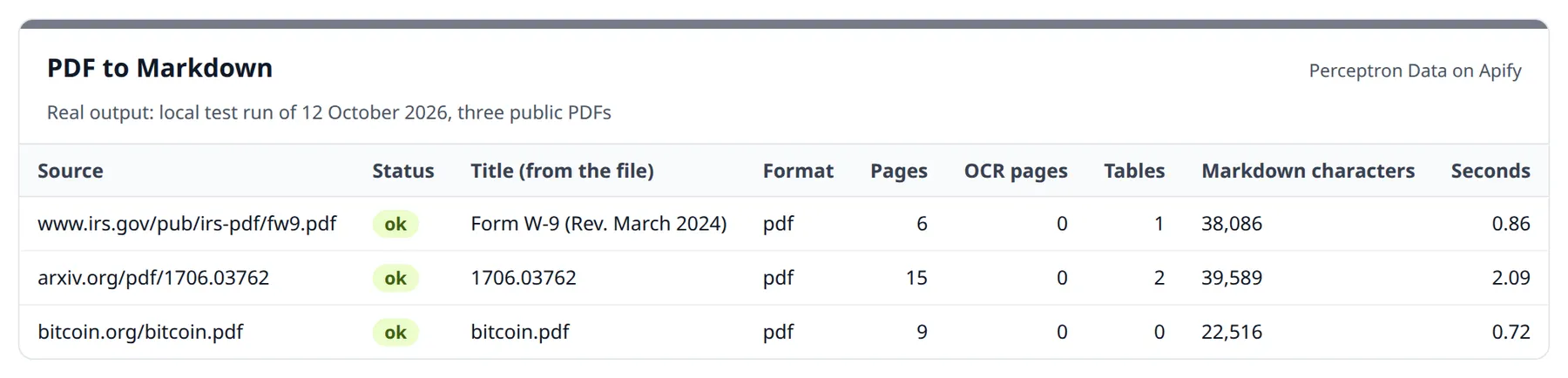
| Document | Status | Pages | Tables found | Markdown characters | Time | Cost on the Apify Free plan |
|---|---|---|---|---|---|---|
| IRS Form W-9 | ok | 6 | 1 | 38,086 | 0.86 s | $0.004 (6 pages + 1 document) |
| "Attention Is All You Need" (arXiv 1706.03762) | ok | 15 | 2 | 39,589 | 2.09 s | $0.0085 (15 pages + 1 document) |
| Bitcoin white paper | ok | 9 | 0 | 22,516 | 0.72 s | $0.0055 (9 pages + 1 document) |
Local test run of 12 October 2026 with version 0.1.6. On Apify every run adds a start fee of $0.005 at the default 1 GB of memory.
What you are not charged for: files that fail (a typo in the address, a password-protected PDF, an old .doc), links that return a web page or an empty answer instead of a document, blank pages, and pages whose text recognition failed or stayed below 60 % confidence. Every row says which pages were charged and which were free. The start fee is $0.005 per GB of run memory ($0.005 at the default 1 GB).
How to use – step by step
- Click Try for free on this page (a free Apify account is enough) – the form opens with the IRS Form W-9 as an example.
- Paste links to your files into Document URLs, one per line – or enter the run or dataset ID of a Website Content Crawler run into Website Content Crawler run or dataset ID.
- Choose Output: one row per document (default), one row per page, or RAG chunks with page numbers. Text recognition for scans is on automatically.
- Click Start. In the local test run of 12 October 2026 the 6-page W-9 took 0.86 seconds, the 15-page paper 2.09 seconds.
- Open the Output tab: the Documents view shows status, pages, OCR pages and the Markdown. Export as JSON or CSV, or read the rows through the API (examples below).
Fills the gap in Website Content Crawler
The Website Content Crawler
can download the PDFs and Office files it finds ("Save files") – but it does not
read them. Measured on a real crawl: every downloaded file comes back as a record
with an empty text and an empty markdown, plus a fileUrl.
Give this actor the crawler's run ID or dataset ID and it fills them in –
with the same url, crawl and metadata fields, so the results merge
straight into your crawl data:
To run it automatically after every crawl, add it in the crawler's Integrations tab ("Run succeeded" → this actor) with the input:
Formats
| Format | How it is read |
|---|---|
| PDF with a text layer | Text in reading order (column by column), headings detected from font size, tables row by row as Markdown + JSON rows |
| PDF scans (pages without text) | OCR with Tesseract – English, German, French, Spanish, Italian, Dutch, Polish, Portuguese; pages scanned sideways or upside down are turned first |
| Word (.docx) | Headings, lists, tables |
| Excel (.xlsx, .xls) | Every sheet as a table, also as JSON rows – empty cells stay empty (no NaN) |
| PowerPoint (.pptx) | Slide titles and text, slide by slide |
| HTML, CSV, JSON, XML, TXT | Converted to Markdown |
Old binary formats (.doc, .ppt) are not supported – the run says so instead of returning garbage. A link that claims to be a PDF but returns a web page (a login wall, an error page) is rejected and not charged, and so is a server that answers without a document (e.g. HTTP 202 with an empty body – a bot wall). Word, Excel and PowerPoint files behind links without a file name are recognised by their content.
Measured quality (12 October 2026)
Measured on a fixed test set, before and after version 0.1.6:
| What | Before | Now |
|---|---|---|
| Column switches in two-column papers (first 6 pages; ideal ≈ 6) – ResNet / DocLayNet / Bundestag protocol 1949 | 46 / 31 / 61 | 8 / 6 / 12 |
| Destatis Statistical Yearbook 2019, 500 pages: paragraphs of bare figures without their row | 4,991 | 399 |
| … table rows returned | 1,094 | 12,725 |
| IRS Pub. 15-T page 20: a row of the wage table | $0 $0 $0 $0 $0 fused in one cell, "At least" column empty | $340 | $350 | $0 | $0 | $0 | $0 | $0 | $1 |
| Scans turned by 90° / 180° (5 pages) | 3 pages of gibberish, charged | 5 of 5 read, OCR confidence 95 % |
| Words of the PDF that reach the output (IRS Pub. 15-T, 71 pages) | 97.1 % | 100 % |
Measured speed
On one CPU core, 5 October 2026:
| Document | Time | Result |
|---|---|---|
| IRS Form W-9, 6 pages | 0.7 s | title, headings, 1 table |
| IRS Publication 15-T, 14 pages of tax tables | 2.8 s | 8 tables as JSON rows |
| 4 PDFs from a crawl, 116 pages | 12.4 s | – |
| Scanned PDF, 2 pages | 5.3 s | read by OCR |
| Word, Excel, PowerPoint file | 0.4–0.5 s each | tables included |
| Destatis Statistical Yearbook, first 500 of 716 pages (12 Oct 2026) | 124 s | 507 tables, 12,725 rows |
| Destatis municipality list, 1.9 MB Excel (12 Oct 2026) | 2.4 s, 190 MB memory (before: 17 s, 750 MB) | 16,000-row table, no NaN |
Runs use 1 GB of memory by default. More memory gives the run more CPU and converts proportionally faster – at the same cost per page.
Output
One row per document (default) – shortened:
Tables from an Excel sheet, as they come out:
Every row is its own proof: the address you gave and where it led (finalUrl), the
file's size and SHA-256, when it was checked, the settings used, and which pages were
charged and which were free. status is ok, partial (stopped at the time budget or
your cost limit – only the pages returned are charged), empty (blank), unreadable
(text recognition failed or stayed unreliable) or failed. A summary of the run –
documents converted, failed, not delivered, pages charged and free – is stored as
COVERAGE in the run's key-value store (not charged).
One row per page ("output": "pages") adds page, ocr, method,
ocrConfidence, chars and charged – useful when your answers must cite a page. RAG chunks ("output": "chunks") split on
paragraph boundaries into pieces of chunk_size characters with chunk_overlap,
and every chunk carries pageStart and pageEnd. Form W-9 with 1,500-character
chunks: 33 chunks.
Files that cannot be converted come back as a row with "status": "failed" and
an error explaining why – and are not charged. One bad address (a typo, a
wrong port) fails only its own row; the other documents are converted. A result
larger than a dataset row allows (about 9 MB) is split into parts (part,
partCount, pageStart, pageEnd) instead of failing.
Input examples
Convert a list of files:
RAG chunks from a crawl, scanned pages in German and English:
A PDF whose text layer is garbage (copy-paste gives nonsense): force OCR.
What does a run cost?
$0.005 per run start, then per result – cheaper on bigger Apify plans:
| Your Apify plan | Document | Page | Page read by OCR |
|---|---|---|---|
| Free | $0.001 | $0.0005 | $0.003 |
| Starter | $0.0009 | $0.00045 | $0.0027 |
| Scale | $0.0008 | $0.0004 | $0.0024 |
| Business & Enterprise | $0.0007 | $0.00035 | $0.0021 |
1,000 ten-page PDFs with a text layer: $6.01 on the Free plan. Word, Excel and PowerPoint files count one page per 3,000 characters of text (table borders and padding are not counted). Only what delivered text is charged: failed files, blank pages, pages whose text recognition failed or stayed unreliable, and servers that answer without a document are free – every row says what was charged.
Honest limits
- Tables are rebuilt row by row from the words on the page – ruled tables and blocks of figures without lines (see the measurements above). Tables without lines whose cells are mostly words (not figures) can still come out as text; headers that span several columns land in the first of them; charts are not tables.
- Multi-column layouts are read column by column (measured above); pages with side boxes, floating figures or columns of unequal height can still switch columns where the layout gives no clear gutter.
- Charts and images are not described – there is no vision model involved.
- OCR quality follows scan quality. Handwriting is not supported. Every OCR page carries Tesseract's confidence; below 60 % it is returned with a warning and not charged.
- Password-protected PDFs fail with "The PDF is password-protected" and are not charged.
- Long documents stop at
max_pages(default 500) and say so inwarnings. A document that needs longer than its time budget (15 minutes) returns the pages it finished (status: partial) and is charged only for those. - Not affiliated with or endorsed by Microsoft or Adobe; Word, Excel and PowerPoint are named only to say which file formats are read.
Use it from code (Python, JavaScript, cURL)
Get your API token under Settings → API & Integrations in Apify Console.
Python (pip install apify-client):
JavaScript (npm install apify-client):
cURL – one call, the converted document in the response (the synchronous endpoint waits at most 5 minutes):
Use it from an AI agent (MCP)
Add the Apify MCP server with this actor as a tool to Claude, Cursor, VS Code or any other MCP client:
The client signs in to Apify on first connection, or you set the header Authorization: Bearer <APIFY_TOKEN>. The agent sends urls and puts markdown – or, with "output": "chunks", the chunks with their page numbers – into its context; status and warnings say when a file could not be read.
What the agent's runs cost (live prices on 12 October 2026, Apify Free plan): $0.0005 per page with a text layer, $0.003 per page read by OCR, $0.001 per document, plus $0.005 per run start at the default 1 GB. Paid plans pay less per page; failed files and blank pages are free.
Data protection
Files are downloaded, converted and written to the dataset of your own run – nothing is sent to an AI provider or any other third party, and nothing is kept outside your Apify storage. Only public http(s) addresses are fetched: every redirect is checked before it is followed, and a connection is only opened to an address that was just checked – addresses inside private networks are refused without being contacted.
FAQ
Why not just use an LLM to read PDFs? Cost and privacy. A page with a text layer costs $0.0005 on the Apify Free plan, plus $0.001 per document and $0.005 per run start – without sending a single page to an outside model. Use an LLM afterwards, on clean Markdown.
Does it work with scanned documents?
Yes. Pages without a text layer are detected automatically and read with OCR;
ocrPages tells you how many. Pages scanned sideways or upside down are turned
first. Blank pages and chapter dividers are not sent to OCR – they are not scans –
and blank pages are never charged.
Can I get only the tables?
Every row has tables with the rows of each table. Read that field and ignore
the rest; Excel sheets always appear there.
How large can files be?
50 MB by default, up to 500 MB with max_file_mb, and 500 pages per document by
default. Results too large for one dataset row are split into parts.
Does it keep the crawler's data?
Yes – with crawler_dataset, every record keeps the crawler's url and crawl
fields, so you can join it with the crawl's web pages.
Changelog
- 12 October 2026 (0.1.8) – Table cells: word spaces are kept ("ByteNet [18]", not "ByteNet[18]"), raised digits such as exponents and footnote marks are written after "^" ("10^20" instead of "1020", in the text too), a value centred over two columns no longer merges them, the header between the top two rules of a table is part of the table, dense ruled tables such as the IRS 1040 tax table come out row by row, and dot leaders no longer fill cells. Measured against the original PDFs: the 20 published sample rows (arXiv, US Census Bureau, IRS) match in 105 of 105 cells (before: 73), 20 further rows from other tables of the same files in 112 of 112 (before: 88). Charges are unchanged.
- 12 October 2026 – Tables are rebuilt row by row (Destatis yearbook: 12,725 table rows instead of 1,094); two-column pages are read column by column; scans turned by 90° or 180° are turned before text recognition. Only pages that delivered text are charged, and every row lists charged and free pages. Large Excel files need a fraction of the memory; addresses inside private networks are refused.
- 5 October 2026 – First release: PDF, Word, Excel and PowerPoint to Markdown, tables as JSON rows, OCR for scans, Website Content Crawler input.
Auf Deutsch: PDF, Word und Excel in Markdown umwandeln
PDF-, Word-, Excel- und PowerPoint-Dateien rein, sauberes Markdown raus – je Dokument, Seite oder RAG-Abschnitt, Tabellen zusätzlich als JSON-Zeilen. Gescannte Seiten liest die Texterkennung (OCR); es ist keine KI beteiligt, und kein Drittanbieter sieht die Dokumente.
Er ergänzt den Website Content Crawler: Dessen heruntergeladene Dateien bleiben dort leer – hier werden sie gefüllt. Berechnet wird nur, was Text geliefert hat: Leerseiten, gescheiterte oder unsichere Texterkennung und Fehlschläge sind kostenlos, und jede Zeile nennt Quelle, Prüfzeitpunkt, Prüfsumme und berechnete Seiten.
More from Perceptron Data
| Actor | What it does |
|---|---|
| Website Content Crawler (by Apify) | Crawls websites and downloads their files – this actor reads them |
| Research Agent | A question in, cited passages out – every source graded by evidence level |
| Advertiser Check (Google & Bing) | Company list in, one row per company out: Google ads, Bing ads, ad counts, accounts |
| Imprint & VAT Check | Domains in, company rows out: legal name, address, register number and EU VAT ID checked against VIES (Swiss UIDs excluded) |
| TED Tenders | EU public tenders – their documents convert here |
| EUDAMED Medical Devices | EU medical devices, manufacturers and certificates |
| Data Source Finder | Free: tells you which ready-made scraper covers your data source |
Support
Bug reports are welcome in the Issues tab.


